How to Use ATL/MFC CString at the Windows API Boundaries

Let’s discuss how CString C++ objects can be used at the boundaries of C-interface Windows APIs, considering both the input and output string cases.

We have two cases to consider: Let’s start with the input read-only string case (which is the easiest one).

The Input String Case

If you have a CString instance and you want to pass it to a Windows API function that expects an input read-only string, you can simply pass the CString instance itself! It’s as simple as this:

//
// *** Input string case ***
// 

// Some string to pass as input parameter
CString myString = TEXT("Connie"); 

// Just pass the CString object to the Windows API function
// that expects an input string, like e.g. SetWindowText
DoSomething(myString);

If you compile your C++ code in Unicode (UTF-16) build mode (which has been the default since Visual Studio 2005): CString is a wchar_t-based string, and the input string parameter of the Windows API function that follows the TCHAR model is typically a PCWSTR, which is basically a null-terminated const wchar_t* C-style string pointer. In this case CString offers an implicit conversion operator to PCWSTR, so you can simply pass the CString object, and the C++ compiler will automatically invoke the PCWSTR conversion operator to pass the given string as read-only string input parameter.

The Output String Case

Now let’s consider the output case, i.e. you are invoking a Windows API function that expects an output string parameter. Usually, in C-interface Windows API functions this is represented by a non-const pointer to a raw C-style character array, in particular a wchar_t* (or PWSTR) in the Unicode UTF-16 form.

You (i.e. the caller) pass a non-const pointer to a writable wchar_t buffer, and the Windows API function will fill this caller-provided buffer with proper characters, including a terminating NUL. This is all C stuff, but at the end of the process what you really want is the result string to be stored in a C++ CString object. So, how can you bridge these two worlds of C-style null-terminated string pointers and C++ CString class instances?

Option 1: Using an Intermediate Buffer

Well, one option would be to allocate an intermediary character buffer, then let the Windows API function fill it with its own result text, and finally create a CString object initialized with the content of that external intermediary buffer. For example:

//
// The Output String Case -- Using a Temporary Buffer
//

// 1. Allocate a temporary buffer to pass to the Windows API function
auto buffer = std::make_unique< wchar_t[] >(bufferLength);

// 2. Call the Windows API function, passing the address of the temporary buffer.
// The Windows API function will write its string into that buffer,
// including a NUL terminator, as per usual C string convention.
GetSomeText(
    buffer.get(), // <-- starting address of the output buffer
    bufferLength, // <-- size of the buffer (e.g. in wchar_t's)
    /* ... other parameters ... */
);

// 3. Create a CString object initialized with the NUL-terminated
// string stored in the temporary buffer previously allocated
CString result(buffer.get());

// NOTE: Since the temporary buffer was created with make_unique,
// it will be *automatically* released.
// Thank you C++ destructors!

Option 2: Working In-place with the CString’s Own Buffer

In addition to that, instead of creating an external temporary buffer, passing its address to the Windows API function to let it write the output string, and then copying the result string into a CString object, CString offers another option.

In fact, you can request CString objects to allocate some internal memory, and get write access to that. In this way, you can directly pass the address of that CString’s own internal memory to the desired Windows API function, and let it write the result string directly inside the CString’s internal buffer, without the need of creating an external intermediary buffer, and making an additional string copy (from the temporary buffer to the CString object).

The method that CString offers to allocate an internal character buffer is GetBuffer. You can specify to it the minimum required buffer length. On success, this method returns a non-const pointer to the beginning of the buffer memory, which you can pass to the Windows API function expecting an output string parameter.

Then, after the called function has written its result string into the provided buffer (including the NUL-terminator), you can invoke the CString::ReleaseBuffer method to let the CString object update its internal state to properly store the NUL-terminated string previously written in its own buffer.

In C++ code, this process looks like that:

//
// The Output String Case -- Using CString's Internal Buffer
//

// This CString object will store the output result string
CString result;

// Allocate a CString buffer of proper size, 
// and return a _non-const_ pointer to it
wchar_t* pBuffer = result.GetBuffer(bufferLength);

// Pass the pointer to the internal CString buffer
// and the buffer length to the Windows API function
// expecting an output string parameter
GetSomeText(
    pBuffer,      // <-- starting address of the buffer
    bufferLength, // <-- size of the buffer (e.g. in wchar_t's)
    /* ... other parameters ... */
);

// We assume that the Windows API function has written
// a properly NUL-terminated string into the provided buffer.
// So we can invoke CString::ReleaseBuffer to update
// the CString object's internal state, 
// and release control of the buffer.
result.ReleaseBuffer();

// It's good practice to clear the buffer pointer to avoid subtle bugs
// caused by referencing it after the ReleaseBuffer call
pBuffer = nullptr;

// Now you can happily use the CString result object in your code!

As you can note, in this second case, working in-place with the CString’s internal buffer, the output string characters are written only once inside the CString object, instead of being first written to an external intermediate buffer, and then being copied inside the result CString object.

Comparing Different Methods for Accessing Raw Character Buffers in Strings vs. String Views

Let’s try to make clarity on some different available options.

In a previous blog post, I discussed the reasons why I passed std::wstring objects by const&, instead of using std::wstring_view. The key point was that those strings were passed as input parameters to C-interface API functions, that expected null-terminated C-style strings.

In particular, the standard string classes like std::string and std::wstring offer the c_str method, which returns a pointer to a read-only string buffer that is guaranteed to be null-terminated. This method is only available in the const version; there is no non-const overload of c_str that returns a character buffer with read/write access. If you need read-write access to the internal string character buffer, you need to invoke the data method, which is available in both const and non-const overloaded forms. The string‘s data method guarantees that the returned buffer is null-terminated.

On the other hand, the string view‘s data method does not offer this null-termination guarantee. In addition, there is no c_str method available for string views (which makes sense if you think that c_str implies a null-terminated C-style string pointer, and [w]string_views are not guaranteed to be null-terminated).

The properties discussed in the above paragraph can be summarized in the following comparison table:

Method[w]string[w]string_view
c_str (const)Returns null-terminated read-only string bufferN/A
c_str (non-const)N/AN/A
data (const)Returns null-terminated read-only string bufferNo guarantee for null-termination
data (non-const)Returns null-terminated read/write string bufferNo guarantee for null-termination
Accessing raw character buffer in C++ standard strings vs. string views

Suggestion for the C++ Standard Library: Null-terminated String Views?

As a side note, it probably wouldn’t be bad if null-terminated string views were added to the C++ standard library. That would make it possible to pass instances of those null-terminated string views instead of const& to string objects as input strings to C-interface APIs.

Why Don’t You Use String Views (as std::wstring_view) Instead of Passing std::wstring by const&?

Thank you for the suggestion. But *in that context* that would cause nasty bugs in my code, and in code that relies on it.

…Because (in the given context) that would be wrong 🙂

This “suggestion” comes up with some frequency…

The context is this: I have some Win32 C++ code that takes input string parameters as const std::wstring&, and someone suggests me to substitute those wstring const reference parameters with string views like std::wstring_view. This is usually because they have learned from someone in some course/video course/YouTube video/whatever that in “modern” C++ code you should use string views instead of passing string objects via const&. [Sarcastic mode on]Are you passing a string via const&? Your code is not modern C++! You are such an ignorant C++98 old-style C++ programmer![Sarcastic mode off] 😉

(There are also other “gurus” who say that in modern C++ you should always use exceptions to communicate error conditions. Yeah… Well, that’s a story for another time…)

So, Thank you for the suggestion, but using std::wstring_view instead of const std::wstring& in that context would introduce nasty bugs in my C++ code (and in other people’s code that relies on my own code)! So, I won’t do that!

In fact, my C++ code in question (like WinReg) talks to some Win32 C-style APIs. These expect PCWSTR as input parameters representing Unicode UTF-16 strings. A PCWSTR is basically a typedef for a _Null_terminated_ const wchar_t*. The key here is the null termination part.

If you have:

// Input string passed via const&.
//
// Someone suggests me to replace 'const wstring &' 
// with wstring_view:
//
//     void DoSomething(std::wstring_view s, ...)
//
void DoSomething(const std::wstring& s, ...)
{
    // This API expects input string as PCWSTR,
    // i.e. _null-terminated_ const wchar_t*.
    SomeWin32Api(s.data(), ...); // <-- See the P.S. later
}

std::wstring guarantees that the pointer returned by the wstring::data() method points to a null-terminated string.

On the other hand, invoking std::wstring_view::data() does not guarantee that the returned pointer points to a null-terminated string. It may, or may not. But there is no guarantee!

So, since [w]string_views are not guaranteed to be null-terminated, using them with Win32 APIs that expect null-terminated strings is totally wrong and a source of nasty bugs.

So, if your target are Win32 API calls that expect null-terminated C-style strings, just keep passing good old std::wstring by const&.

Bonus Reading: The Case of string_view and the Magic String


P.S. Invoking data() vs. c_str() – To make things clearer (and more bug-resistant), when you need a null-terminated C-style string pointer as input parameter, it’s better to invoke the c_str() method on [w]string (instead of the data() method), as there is no corresponding c_str() method available with [w]string_view.

In this way, if someone wants to “modernize” the existing C++ code and tries to change the input string parameter from [w]string const& to [w]string_view, they get a compiler error when the c_str() method is invoked in the modified code (as there is no c_str() method available for string views). It’s much better to get a compile-time error than a subtle run-time bug!

On the other hand, the data() method is available for both strings and string views, but its guarantees about null-termination are different for strings vs. string views.

So, invoking the string’s c_str() method (instead of the data() method) is what I suggest when passing STL strings to Win32 API calls that expect C-style null-terminated string pointers as input (read-only) parameters. I consider this a best practice.

(Of course, if the C-interface API function needs to write to the provided string buffer, the data() method must be invoked, as it’s overloaded for both the const and non-const cases.)

Happy Anniversary: One Year of Blogging

Celebrating the first year anniversary of this blog.

April 22nd is this blog’s birthday!

In fact, WordPress reminded me that I registered this blog on April 22nd, one year ago.

Achievement: Happy Anniversary with WordPress.com

This blog authoring journey has been interesting, fun, and full of satisfaction. Some days this blog reached 600+ visits, and even peaked at 900+/day.

I wrote 55+ articles on C++ programming in general, and on Windows programming in C++.

Thanks to all the blog readers!

And Happy Anniversary!

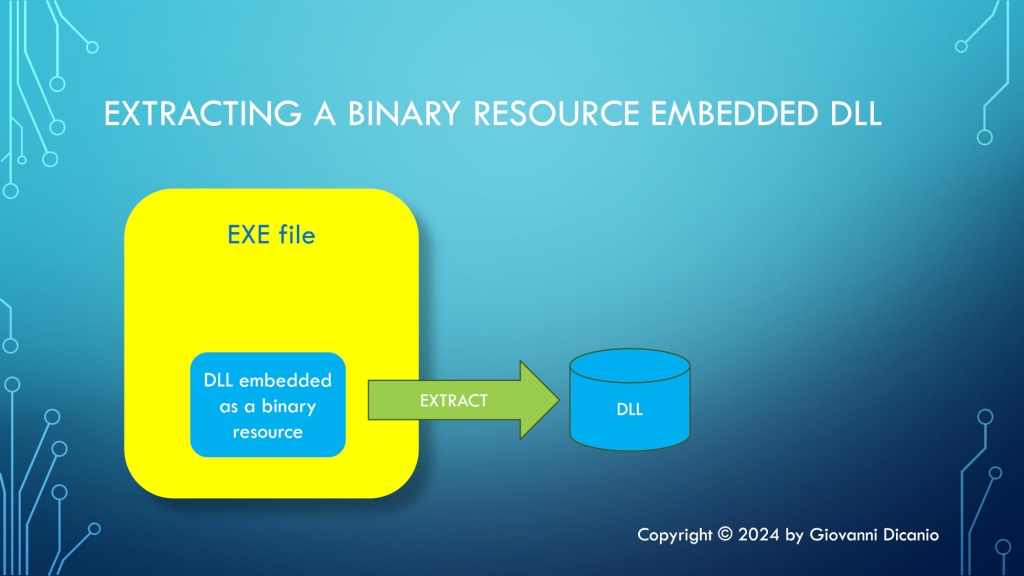
Embedding (and Extracting) Binary Files like DLLs into an EXE as Resources

A Windows .EXE executable file can contain binary resources, which are basically arbitrary binary data embedded in the file.

In particular, it’s possible to embed one or more DLLs as binary resources into an EXE. In this article, I’ll first show you how to embed a DLL as a binary resource into an EXE using the Visual Studio IDE; then, you’ll learn how to access that binary resource data using proper Windows API calls.

A Windows EXE file can contain one or more DLLs embedded as binary resources.

Embedding a Binary Resource Using Visual Studio IDE

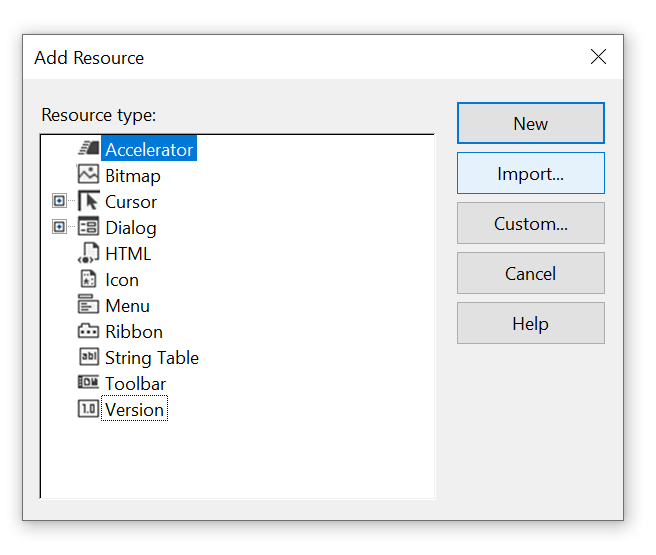
If you are using Visual Studio to develop your Windows C++ applications, from Solution Explorer you can right-click your EXE project node, then choose Add > Resource from the menu.

Menu command to add a resource using Visual Studio.
Adding a resource from the Visual Studio IDE

Then click the Import button, and select the binary resource to embed into the EXE, for example: TestDll.dll.

The Add Resource dialog box in Visual Studio
Click the Import button to add the binary resource (e.g. DLL)

In the Custom Resource Type dialog box that appears next, enter RCDATA as Resource type.

Then click the OK button.

A hex representation of the resource bytes is shown in the IDE. Type Ctrl+S or click the diskette icon in the toolbar to save the new resource data.

You can close the binary hex representation of the resource.

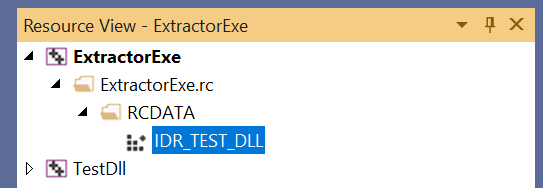
The resource was automatically labeled by the Visual Studio IDE as IDR_RCDATA1. To change that resource ID, you can open Resource View. Then, expand the project node, until you see the RCDATA virtual folder, and then IDR_RCDATA1 inside it. Click the IDR_RCDATA1 item to select it.

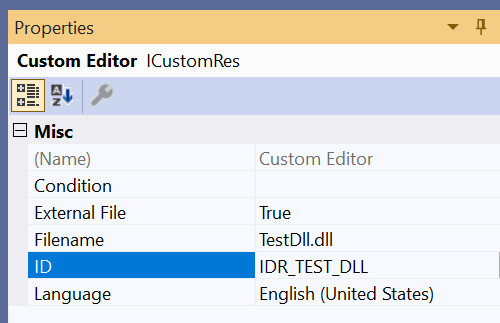
In the Properties grid below, you can change the ID field, for example: you can rename the resource ID as IDR_TEST_DLL.

Type Ctrl+S to save the modifications.

The binary resource ID under the RCDATA virtual folder in Resource View
The binary resource ID (IDR_TEST_DLL) under the RCDATA virtual folder in Resource View
The resource properties grid
The Properties grid to edit the resource properties

Don’t forget to #include the resource header (for example: “resource.h”) in your C++ code when you need to refer to the embedded resource by its ID.

In particular, if you open the resource.h file that was created and modified by Visual Studio, you’ll see a #define line that associates the “symbolic” name of the resource (e.g. IDR_TEST_DLL) with an integer number that represents the integer ID of the resource, for example:

#define IDR_TEST_DLL            101

Accessing an Embedded Binary Resource from C/C++ Code

Once you have embedded a binary resource, like a DLL, into your EXE, you can access the resource’s binary data using some specific Windows APIs. In particular:

  1. Invoke FindResource to get the specified resource’s information block (represented by an HRSRC handle).
  2. Invoke LoadResource, passing the above handle to the resource information block. On success, LoadResource will return another handle (declared as HGLOBAL for backward compatibility), that can be used to access the first byte of the resource.
  3. Invoke LockResource passing the resource handle returned by LoadResource, to get access to the first byte of the resource.

To get the size of the resource, you can call the SizeofResource API.

The above “API dance” can be translated into the following C++ code:

#include "resource.h"  // for the resource ID (e.g. IDR_TEST_DLL)


// Locate the embedded resource having ID = IDR_TEST_DLL
HRSRC hResourceInfo = ::FindResource(hModule,
                                     MAKEINTRESOURCE(IDR_TEST_DLL),
                                     RT_RCDATA);
if (hResourceInfo == nullptr)
{
    // Handle error...
}

// Get the handle that will be used to access 
// the first byte of the resource
HGLOBAL hResourceData = ::LoadResource(hModule, hResourceInfo);
if (hResourceData == nullptr)
{
    // Handle error...
}

// Get the address of the first byte of the resource
const void * pvResourceData = ::LockResource(hResourceData);
if (pvResourceData == nullptr)
{
    // Handle error...
}

// Get the size, in bytes, of the resource
DWORD dwResourceSize = ::SizeofResource(hModule, hResourceInfo);
if (dwResourceSize == 0)
{
    // Handle error...
}

I uploaded on GitHub a C++ demo code that extracts a DLL embedded as a resource in the EXE, and, for testing purposes, invokes a function exported from the extracted DLL. In particular, you can take a look at the ResourceBinaryView.h file for a reusable C++ class to get a read-only binary view of a resource.

P.S. An EXE is not the only type of Windows Portable Executable (PE) file that can have embedded resources. For example: DLLs can contain resources, as well.

Unicode Conversions with String Views as Input Parameters

Replacing input STL string parameters with string views: Is it always possible?

In a previous blog post, I showed how to convert between Unicode UTF-8 and UTF-16 using STL string classes like std::string and std::wstring. The std::string class can be used to store UTF-8-encoded text, and the std::wstring class can be used for UTF-16. The C++ Unicode conversion code is available on GitHub as open source project.

The above code passes input string parameters using const references (const &) to STL string objects:

// Convert from UTF-16 to UTF-8
std::string ToUtf8(std::wstring const& utf16)
    
// Convert from UTF-8 to UTF-16
std::wstring ToUtf16(std::string const& utf8)

Since C++17, it’s also possible to use string views for input string parameters. Since string views are cheap to copy, they can just be passed by value (instead of const&). For example:

// Convert from UTF-16 to UTF-8
std::string ToUtf8(std::wstring_view utf16)
    
// Convert from UTF-8 to UTF-16
std::wstring ToUtf16(std::string_view utf8)

As you can see, I replaced the input std::wstring const& parameter above with a simpler std::wstring_view passed by value. Similarly, std::string const& was replaced with std::string_view.

Important Gotcha on String Views and Null Termination

There is an important note to make here. The WideCharToMultiByte and MultiByteToWideChar Windows C-interface APIs that are used in the conversion code can accept input strings in two forms:

  1. A null-terminated C-style string pointer
  2. A counted (in bytes or wchar_ts) string pointer

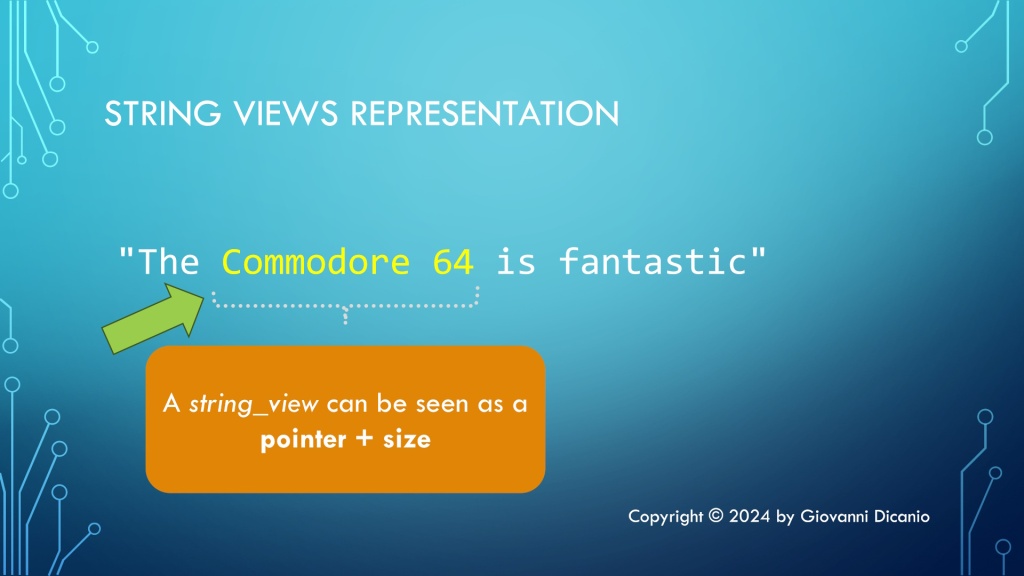
In my code, I used the second option, i.e. the counted behavior of those APIs. So, using string views instead of STL string classes works just fine in this case, as string views can be seen as a pointer and a “size”, or count of characters.

A representation of string views: they can be seen as a pointer and a size.
A representation of string views: pointer + size

But string views are not necessarily null-terminated, which implies that you cannot safely use string view parameters when passing strings to APIs that expect null-terminated C-style strings. In fact, if the API is expecting a terminating null, it may well run over the valid string view characters. This is a very important point to keep in mind, to avoid subtle and dangerous bugs when using input string view parameters.

The modified code that uses input string view parameters instead of STL string classes passed by const& can be found in this branch of the main Unicode string conversion project on GitHub.

Simplifying Windows Registry Programming with the C++ WinReg Library

A convenient easy-to-use and hard-to-misuse high-level C++ library that wraps the complexity of the Windows Registry C-interface API.

The native Windows Registry API is a C-interface API, that is low-level and kind of hard and cumbersome to use.

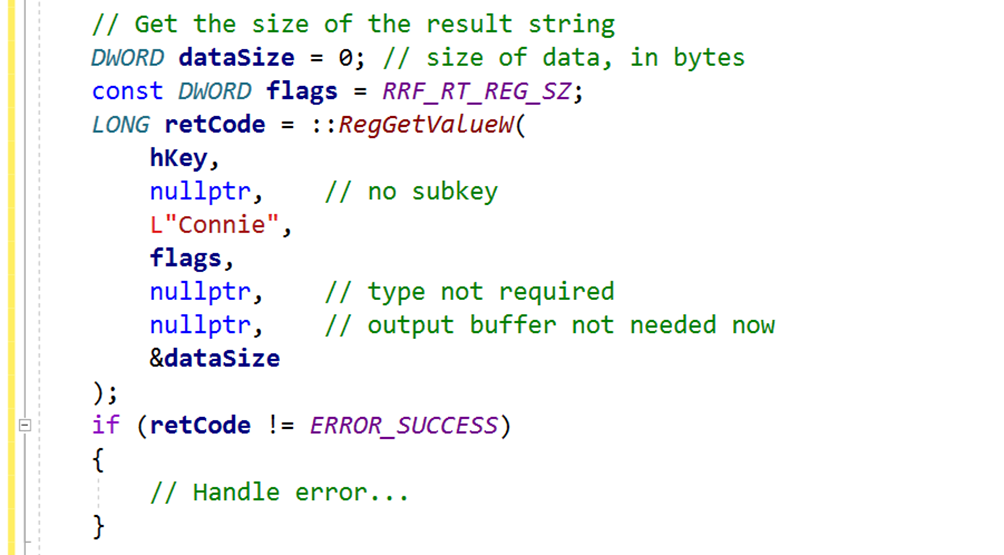
For example, suppose that you simply want to read a string value under a given key. You would end up writing code like this:

Complex code to get a string value from the registry, using the Windows native Registry API.
Sample code excerpt to read a string value from the Windows Registry using the native Windows C-interface API.

Note how complex and bug-prone that kind of code that directly calls the Windows RegGetValueW API is. And this is just the part to query the destination string length. Then, you need to allocate a string object with proper size (and pay attention to proper size-in-bytes-to-size-in-wchar_ts conversion!), and after that you can finally read the actual string value into the local string object.

That’s definitely a lot of bug-prone C++ code, and this is just to query a string value!

Moreover, in modern C++ code you should prefer using nice higher-level resource manager classes with automatic resource cleanup, instead of raw HKEY handles that are used in the native C-interface Windows Registry API.

Fortunately, it’s possible to hide that kind of complex and bug-prone code in a nice C++ library, that offers a much more programmer-friendly interface. This is basically what my C++ WinReg library does.

For example, with WinReg querying a string value from the Windows Registry is just a simple one-line of C++ code! Look at that:

Simple one-liner C++ code to get a string value from the Registry using WinReg.
You can query a string value with just one simple line of C++ code using WinReg.

With WinReg you can also enumerate all the values under a given key with simple intuitive C++ code like this:

auto values = key.EnumValues();

for (const auto & [valueName, valueType] : values)
{
    //
    // Use valueName and valueType
    //
    ...
}

WinReg is an open-source C++ library, available on GitHub. For the sake of convenience, I packaged and distribute it as a header-only library, which is also available via the vcpkg package manager.

If you need to access the Windows Registry from your C++ code, you may want to give C++ WinReg a try.

Decoding Windows SDK Types: PSTR and PCSTR

The char-based equivalents of the already decoded wchar_t-based C-style string typedefs

In previous blog posts, we decoded some Windows SDK string typedefs like PWSTR and PCWSTR. As we already saw, they are basically typedefs for C-style null-terminated wchar_t Unicode UTF-16 string pointers. In particular, the “C” in PCWSTR means that the string is read-only (const).

To recap these typedefs in table form, we have:

Windows SDK TypedefC/C++ Underlying Type
PWSTRwchar_t*
PCWSTRconst wchar_t*

Now, as you can imagine, there are also char-based variants of these wchar_t string typedefs. You can easily recognize their names as the char versions do not have the “W” (which stands for WCHAR or equivalently wchar_t): They are PSTR and PCSTR.

As you can see, there is the “STR” part in their names, specifying that these are C-style null-terminated strings. The “P” stands for pointer. So, in table form, they correspond to the following C/C++ underlying types:

Windows SDK TypedefC/C++ Underlying Type
PSTRchar*
PCSTRconst char*

As expected, the const version, which represents read-only strings, has the letter “C” before “STR”.

These char-based string pointers can be used to represent ASCII strings, strings in some kind of multi-byte encoding, and even UTF-8-encoded strings.

Moreover, as we already saw for the wchar_t versions, another common prefix you can find for them is “LP” instead of just “P” for “pointer”, as in LPSTR and LPCSTR. LPSTR is the same as PSTR; similarly, LPCSTR is the same as PCSTR.

In table form:

Windows SDK TypedefC/C++ Underlying Type
PSTRchar*
LPSTRchar*
PCSTRconst char*
LPCSTRconst char*
Windows SDK char-based C-style string typedefs

How Can You Pass STL Strings as PWSTR Parameters at the Windows API Boundaries?

Getting text from Windows C-interface APIs and storing it into STL string objects.

In a previous blog post, we saw that a PWSTR is basically a pointer to a wchar_t array that is typically filled with some Unicode UTF-16 null-terminated text by Windows API calls. In other words, a PWSTR is an output C-style string pointer. You pass it to some Windows API, and, on success, the API will have written some null-terminated text into the caller provided buffer.

Typically, a PWSTR pointer parameter is accompanied by another parameter that represents the size of the output buffer pointed to. In this way, the Windows API knows where to stop when writing the output string, preventing dangerous buffer overflow bugs and security problems.

For example, if you consider the MultiByteToWideChar API prototype1:

int MultiByteToWideChar(
    UINT   CodePage,
    DWORD  dwFlags,
    LPCCH  lpMultiByteStr,
    int    cbMultiByte,
    LPWSTR lpWideCharStr,
    int    cchWideChar
);

The second to last parameter (lpWideCharStr) is a caller-provided pointer to an output buffer, and the last parameter (cchWideChar) is the size, in wchar_ts, of that output buffer.

Now, suppose that you have an STL string and want to pass it as an output PWSTR parameter. How can you do that?

If you have a std::wstring object, it’s ready to store Unicode UTF-16 text on Windows.

Allocating an External Buffer

To store some UTF-16 text returned by a Windows API via PWSTR parameter in a wstring object, you can allocate a wchar_t buffer of proper size, for example using std::unique_ptr and std::make_unique:

// Allocate an output buffer of proper size
auto buffer = std::make_unique< wchar_t[] >(bufferLength);

Then, you can invoke the desired Windows API, passing the buffer pointer and size:

// Call the Windows API to get some text in the allocated buffer 
result = GetSomeTextApi(
    buffer.get(), // output buffer pointer (PWSTR)
    bufferLength, // size of the output buffer, in wchar_ts

    // ...other parameters...
);

// Check 'result' for errors...

Then, since the output buffer is null-terminated, you can use a std::wstring constructor overload to create a std::wstring object from the null-terminated text stored in that buffer:

// Create a wstring that stores the null-terminated text
// returned by the API in the output buffer
std::wstring text(buffer.get());

However, you can do even better than that.

Working Directly with the String’s Internal Buffer

In fact, instead of allocating an external buffer owned by a unique_ptr, and then doing a second string allocation with the std::wstring constructor, you could simply create a wstring of proper size, and then pass to the API the address of the internal string character array. In this way, you work in-place in the wstring character array, without allocating an external buffer. For example:

// Allocate a string of proper size (bufferLength is in wchar_ts)
std::wstring text;
text.resize(bufferLength);

// Get the text from the Windows API
result = GetSomeTextApi(
    &text[0],     // output buffer pointer (PWSTR)
    bufferLength, // size of the output buffer, in wchar_ts

    // ...other parameters...
);

Note that the address of the internal string buffer can be obtained with the &text[0] syntax. In addition, since C++17, the std::wstring class offers a convenient wstring::data method, that you can invoke to get the address of the internal string buffer, as well.

Note also that, sine C++17, it’s became legal to overwrite the terminating NUL character in the internal string buffer with another NUL.

On the other hand, with C++11 and C++14, to fully adhere to the C++ standard, you had to allocate a buffer of larger size to make room for the NUL terminator written by the Windows API, and then you had resize down the string to chop off this additional NUL:

text.resize(bufferLength - 1);

I wrote an article for MSDN Magazine on “Using STL Strings at Win32 API Boundaries”. Note that this article predates C++17. So, if your C++ toolkit is compatible with C++17:

  • You can invoke the wstring::data method (in addition to the C++11/14 compatible &text[0] syntax)
  • You can let Windows APIs overwrite the terminating NUL in the wstring internal buffer with another NUL, instead of making extra room for the additional NUL written by Windows APIs, and then resizing the wstring down to chop it off.2
  1. The MultiByteToWideChar API prototype uses LPWSTR, which is perfectly equivalent to PWSTR, as we already saw in the blog post discussing the PWSTR type. ↩︎
  2. Overwriting the STL string’s terminating NUL with another NUL has worked fine for me even with C++11 and C++14 Visual Studio compilers and library implementations. ↩︎