Unicode Conversions with String Views as Input Parameters

Replacing input STL string parameters with string views: Is it always possible?

In a previous blog post, I showed how to convert between Unicode UTF-8 and UTF-16 using STL string classes like std::string and std::wstring. The std::string class can be used to store UTF-8-encoded text, and the std::wstring class can be used for UTF-16. The C++ Unicode conversion code is available on GitHub as open source project.

The above code passes input string parameters using const references (const &) to STL string objects:

// Convert from UTF-16 to UTF-8
std::string ToUtf8(std::wstring const& utf16)
    
// Convert from UTF-8 to UTF-16
std::wstring ToUtf16(std::string const& utf8)

Since C++17, it’s also possible to use string views for input string parameters. Since string views are cheap to copy, they can just be passed by value (instead of const&). For example:

// Convert from UTF-16 to UTF-8
std::string ToUtf8(std::wstring_view utf16)
    
// Convert from UTF-8 to UTF-16
std::wstring ToUtf16(std::string_view utf8)

As you can see, I replaced the input std::wstring const& parameter above with a simpler std::wstring_view passed by value. Similarly, std::string const& was replaced with std::string_view.

Important Gotcha on String Views and Null Termination

There is an important note to make here. The WideCharToMultiByte and MultiByteToWideChar Windows C-interface APIs that are used in the conversion code can accept input strings in two forms:

  1. A null-terminated C-style string pointer
  2. A counted (in bytes or wchar_ts) string pointer

In my code, I used the second option, i.e. the counted behavior of those APIs. So, using string views instead of STL string classes works just fine in this case, as string views can be seen as a pointer and a “size”, or count of characters.
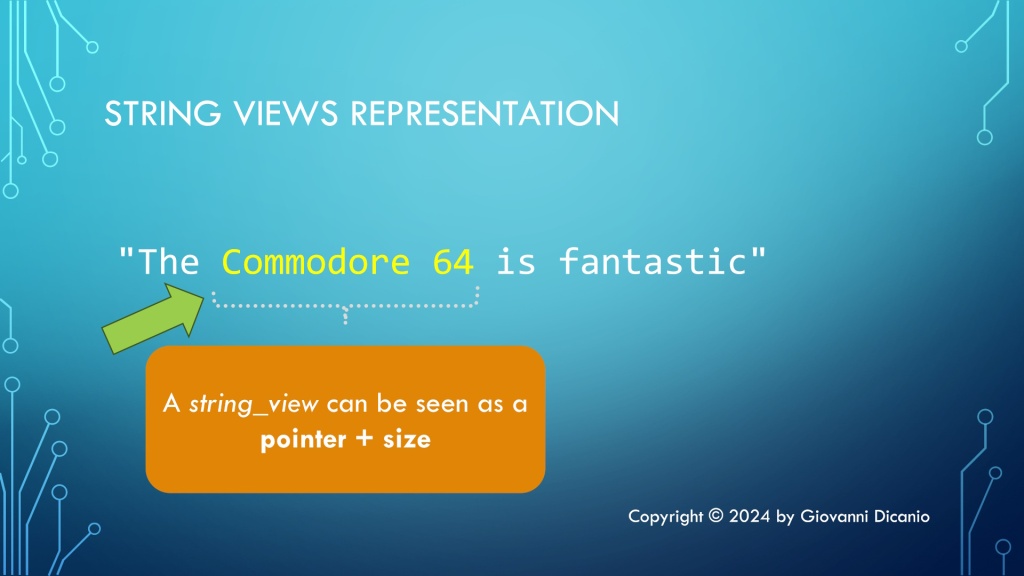
A representation of string views: they can be seen as a pointer and a size.
A representation of string views: pointer + size

But string views are not necessarily null-terminated, which implies that you cannot safely use string view parameters when passing strings to APIs that expect null-terminated C-style strings. In fact, if the API is expecting a terminating null, it may well run over the valid string view characters. This is a very important point to keep in mind, to avoid subtle and dangerous bugs when using input string view parameters.

The modified code that uses input string view parameters instead of STL string classes passed by const& can be found in this branch of the main Unicode string conversion project on GitHub.

Simplifying Windows Registry Programming with the C++ WinReg Library

A convenient easy-to-use and hard-to-misuse high-level C++ library that wraps the complexity of the Windows Registry C-interface API.

The native Windows Registry API is a C-interface API, that is low-level and kind of hard and cumbersome to use.

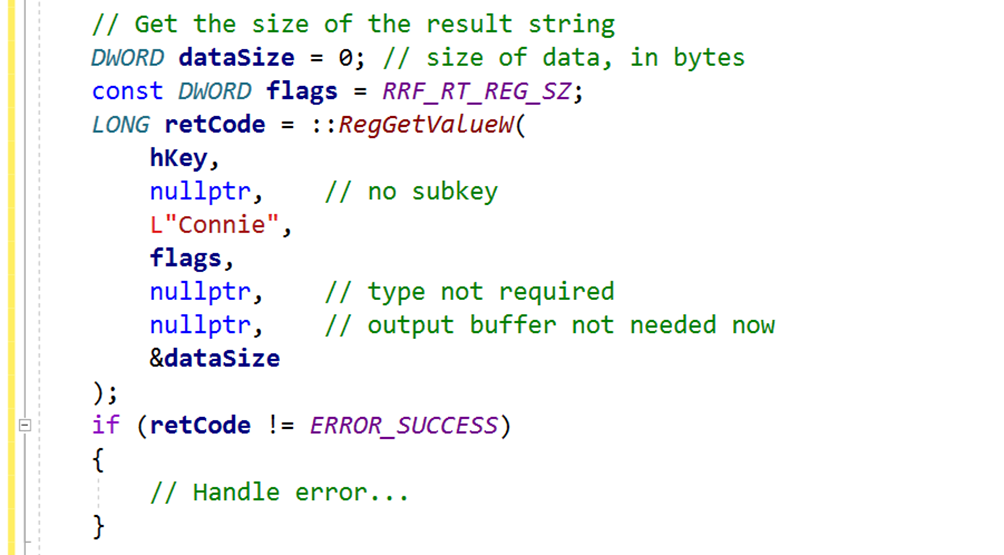
For example, suppose that you simply want to read a string value under a given key. You would end up writing code like this:

Complex code to get a string value from the registry, using the Windows native Registry API.
Sample code excerpt to read a string value from the Windows Registry using the native Windows C-interface API.

Note how complex and bug-prone that kind of code that directly calls the Windows RegGetValueW API is. And this is just the part to query the destination string length. Then, you need to allocate a string object with proper size (and pay attention to proper size-in-bytes-to-size-in-wchar_ts conversion!), and after that you can finally read the actual string value into the local string object.

That’s definitely a lot of bug-prone C++ code, and this is just to query a string value!

Moreover, in modern C++ code you should prefer using nice higher-level resource manager classes with automatic resource cleanup, instead of raw HKEY handles that are used in the native C-interface Windows Registry API.

Fortunately, it’s possible to hide that kind of complex and bug-prone code in a nice C++ library, that offers a much more programmer-friendly interface. This is basically what my C++ WinReg library does.

For example, with WinReg querying a string value from the Windows Registry is just a simple one-line of C++ code! Look at that:

Simple one-liner C++ code to get a string value from the Registry using WinReg.
You can query a string value with just one simple line of C++ code using WinReg.

With WinReg you can also enumerate all the values under a given key with simple intuitive C++ code like this:

auto values = key.EnumValues();

for (const auto & [valueName, valueType] : values)
{
    //
    // Use valueName and valueType
    //
    ...
}

WinReg is an open-source C++ library, available on GitHub. For the sake of convenience, I packaged and distribute it as a header-only library, which is also available via the vcpkg package manager.

If you need to access the Windows Registry from your C++ code, you may want to give C++ WinReg a try.

Decoding Windows SDK Types: PSTR and PCSTR

The char-based equivalents of the already decoded wchar_t-based C-style string typedefs

In previous blog posts, we decoded some Windows SDK string typedefs like PWSTR and PCWSTR. As we already saw, they are basically typedefs for C-style null-terminated wchar_t Unicode UTF-16 string pointers. In particular, the “C” in PCWSTR means that the string is read-only (const).

To recap these typedefs in table form, we have:

Windows SDK TypedefC/C++ Underlying Type
PWSTRwchar_t*
PCWSTRconst wchar_t*

Now, as you can imagine, there are also char-based variants of these wchar_t string typedefs. You can easily recognize their names as the char versions do not have the “W” (which stands for WCHAR or equivalently wchar_t): They are PSTR and PCSTR.

As you can see, there is the “STR” part in their names, specifying that these are C-style null-terminated strings. The “P” stands for pointer. So, in table form, they correspond to the following C/C++ underlying types:

Windows SDK TypedefC/C++ Underlying Type
PSTRchar*
PCSTRconst char*

As expected, the const version, which represents read-only strings, has the letter “C” before “STR”.

These char-based string pointers can be used to represent ASCII strings, strings in some kind of multi-byte encoding, and even UTF-8-encoded strings.

Moreover, as we already saw for the wchar_t versions, another common prefix you can find for them is “LP” instead of just “P” for “pointer”, as in LPSTR and LPCSTR. LPSTR is the same as PSTR; similarly, LPCSTR is the same as PCSTR.

In table form:

Windows SDK TypedefC/C++ Underlying Type
PSTRchar*
LPSTRchar*
PCSTRconst char*
LPCSTRconst char*
Windows SDK char-based C-style string typedefs

How Can You Pass STL Strings as PWSTR Parameters at the Windows API Boundaries?

Getting text from Windows C-interface APIs and storing it into STL string objects.

In a previous blog post, we saw that a PWSTR is basically a pointer to a wchar_t array that is typically filled with some Unicode UTF-16 null-terminated text by Windows API calls. In other words, a PWSTR is an output C-style string pointer. You pass it to some Windows API, and, on success, the API will have written some null-terminated text into the caller provided buffer.

Typically, a PWSTR pointer parameter is accompanied by another parameter that represents the size of the output buffer pointed to. In this way, the Windows API knows where to stop when writing the output string, preventing dangerous buffer overflow bugs and security problems.

For example, if you consider the MultiByteToWideChar API prototype1:

int MultiByteToWideChar(
    UINT   CodePage,
    DWORD  dwFlags,
    LPCCH  lpMultiByteStr,
    int    cbMultiByte,
    LPWSTR lpWideCharStr,
    int    cchWideChar
);

The second to last parameter (lpWideCharStr) is a caller-provided pointer to an output buffer, and the last parameter (cchWideChar) is the size, in wchar_ts, of that output buffer.

Now, suppose that you have an STL string and want to pass it as an output PWSTR parameter. How can you do that?

If you have a std::wstring object, it’s ready to store Unicode UTF-16 text on Windows.

Allocating an External Buffer

To store some UTF-16 text returned by a Windows API via PWSTR parameter in a wstring object, you can allocate a wchar_t buffer of proper size, for example using std::unique_ptr and std::make_unique:

// Allocate an output buffer of proper size
auto buffer = std::make_unique< wchar_t[] >(bufferLength);

Then, you can invoke the desired Windows API, passing the buffer pointer and size:

// Call the Windows API to get some text in the allocated buffer 
result = GetSomeTextApi(
    buffer.get(), // output buffer pointer (PWSTR)
    bufferLength, // size of the output buffer, in wchar_ts

    // ...other parameters...
);

// Check 'result' for errors...

Then, since the output buffer is null-terminated, you can use a std::wstring constructor overload to create a std::wstring object from the null-terminated text stored in that buffer:

// Create a wstring that stores the null-terminated text
// returned by the API in the output buffer
std::wstring text(buffer.get());

However, you can do even better than that.

Working Directly with the String’s Internal Buffer

In fact, instead of allocating an external buffer owned by a unique_ptr, and then doing a second string allocation with the std::wstring constructor, you could simply create a wstring of proper size, and then pass to the API the address of the internal string character array. In this way, you work in-place in the wstring character array, without allocating an external buffer. For example:

// Allocate a string of proper size (bufferLength is in wchar_ts)
std::wstring text;
text.resize(bufferLength);

// Get the text from the Windows API
result = GetSomeTextApi(
    &text[0],     // output buffer pointer (PWSTR)
    bufferLength, // size of the output buffer, in wchar_ts

    // ...other parameters...
);

Note that the address of the internal string buffer can be obtained with the &text[0] syntax. In addition, since C++17, the std::wstring class offers a convenient wstring::data method, that you can invoke to get the address of the internal string buffer, as well.

Note also that, sine C++17, it’s became legal to overwrite the terminating NUL character in the internal string buffer with another NUL.

On the other hand, with C++11 and C++14, to fully adhere to the C++ standard, you had to allocate a buffer of larger size to make room for the NUL terminator written by the Windows API, and then you had resize down the string to chop off this additional NUL:

text.resize(bufferLength - 1);

I wrote an article for MSDN Magazine on “Using STL Strings at Win32 API Boundaries”. Note that this article predates C++17. So, if your C++ toolkit is compatible with C++17:

  • You can invoke the wstring::data method (in addition to the C++11/14 compatible &text[0] syntax)
  • You can let Windows APIs overwrite the terminating NUL in the wstring internal buffer with another NUL, instead of making extra room for the additional NUL written by Windows APIs, and then resizing the wstring down to chop it off.2
  1. The MultiByteToWideChar API prototype uses LPWSTR, which is perfectly equivalent to PWSTR, as we already saw in the blog post discussing the PWSTR type. ↩︎
  2. Overwriting the STL string’s terminating NUL with another NUL has worked fine for me even with C++11 and C++14 Visual Studio compilers and library implementations. ↩︎

How Can You Pass STL Strings as PCWSTR Parameters at the Windows API Boundaries?

The STL wstring’s c_str method comes to the rescue.

We saw that a PCWSTR parameter is basically an input C-style null-terminated string pointer. If you have an STL string, how can you pass it when a PCWSTR is expected?

Well, it depends from the type of the STL string. If it’s a std::wstring, you can simply invoke its c_str method:

// DoSomethingApi(PCWSTR pszText, ... other stuff ...)

std::wstring someText = L"Connie";

// Invoke the wstring::c_str() method to pass the wstring
// as PCWSTR parameter to a Windows API:
DoSomethingApi(someText.c_str(), /* other parameters */);

The wstring::c_str method returns a pointer to a read-only C-style null-terminated “wide” (i.e. UTF-16 on Windows) string, which is exactly what a PCWSTR parameter expects.

If it’s a std::string, then you have to consider the encoding used by it. For example, if it’s a UTF-8-encoded string, you can first convert from UTF-8 to UTF-16, and then pass the UTF-16 equivalent std::wstring object to the Windows API invoking the c_str method as shown above.

If the std::string stores text encoded in a different way, you could still use the MultiByteToWideChar API to convert from that encoding to UTF-16, and pass the result std::wstring to the PCWSTR parameter invoking the wstring::c_str method, as well.

Decoding Windows SDK Types: PWSTR

Meet the non-const sibling of the previously discussed PCWSTR.

Last time we discussed a common Windows SDK type: PCWSTR. You can follow the same approach of the previous post to decode another common Win32 type: PWSTR.

PWSTR is very similar to PCWSTR: the only difference is the missing “C” after the initial “P”.

So, splitting PWSTR up into pieces like we did last time, you get:

  1. The initial P, which stands for pointer. So, this is a pointer to something.
  2. [There is no C in this case, so the “thing” pointed to is not const]
  3. The remaining WSTR part, which stands for WCHAR STRing, and represents the target of the pointer.

So, a PWSTR is a pointer (P) to a (non-const) Unicode UTF-16 NUL-terminated C-style string (WSTR). In other words, PWSTR is the non-const version of the previous PCWSTR.

Considering its const type qualifier, PCWSTR is used to represent read-only input string parameters; on the other hand, the non-const version PWSTR can be used for output or input-output string parameters.

As already seen for PCWSTR, there is the perfectly equivalent variant with the initial “LP” prefix instead of “P”: LPWSTR.

The PWSTR and LPWSTR definitions from <WinNT.h> are like that:

typedef _Null_terminated_ WCHAR *LPWSTR, *PWSTR;

Note the _Null_terminated_ annotation, used to specify that the WCHAR array must be null-terminated.

Decoding Windows SDK Types: PCWSTR

Exploring what’s under the hood of a common Windows SDK C/C++ typedef, including an interesting code annotation.

If you have done some Windows native programming in C or C++, you would have almost certainly found some apparently weird types, like PCWSTR.

So, what does PCWSTR mean?

Well, to understand its meaning, let’s split it up into smaller pieces:

  1. The initial P stands for pointer. So, this is a pointer to something.
  2. The following C stands for const. So, this is a pointer to something that cannot be modified.
  3. The remaining WSTR part stands for WCHAR STRing, and represents the target of the pointer.

So, a PCWSTR is a pointer to a constant (i.e. read-only) WCHAR string.

The WSTR or “WCHAR string” part needs some elaboration. Basically, WCHAR is a typedef for wchar_t. So, a WSTR or WCHAR string basically means a C-style NUL-terminated string made by an array of wchar_ts. In other words, this is a Unicode UTF-16 C-style NUL-terminated string.

Putting all these pieces of information together, a PCWSTR is basically a pointer (P) to a constant (C) NUL-terminated C-style wchar_t Unicode UTF-16 string (WSTR).

Shows the various pieces of the PCWSTR acronym.
Decoding the PCWSTR typedef

This PCWSTR definition can be translated in the following C/C++ typedef:

typedef const WCHAR* PCWSTR;

// NOTE:
// WCHAR is a typedef for wchar_t

Some C++ coding guidelines, like Google’s, suggest avoiding those Windows SDK typedefs like PCWSTR in your own C++ code, and instead “keeping as close as you can to the underlying C++ types”:

Windows defines many of its own synonyms for primitive types, such as DWORDHANDLE, etc. It is perfectly acceptable, and encouraged, that you use these types when calling Windows API functions. Even so, keep as close as you can to the underlying C++ types. For example, use const TCHAR * instead of LPCTSTR.

Google C++ Style Guide – Windows Code Section

In other words, following those guidelines, you should use the explicit and more verbose “const WCHAR*” or “const wchar_t*”, instead of the PCWSTR typedef.

Don’t Miss the Code Annotation

However, if you take a look at the actual typedef in the Windows SDK headers, you’ll see that the definition of PCWSTR is something like this:

// PCWSTR definition in the <winnt.h> Windows SDK header

typedef _Null_terminated_ CONST WCHAR *LPCWSTR, *PCWSTR;

The important thing to note here is the _Null_terminated_ part, which is a C/C++ code annotation that specifies that the WCHAR array pointed to must be null-terminated. This is something useful when you run Code Analysis on your C/C++ Windows native code, as it can help spotting subtle bugs, like pointing to non-null-terminated character arrays by mistake.

So, in this case, if you follow C++ coding styles like Google’s, and keep as close as possible to the underlying C++ types, you miss the important code annotation part.

An Equivalent Type with Historical Roots: LPCWSTR

As a side note, as you can see from the above typedef from the <winnt.h> Windows SDK header, there is a totally equivalent type to PCWSTR: it’s LPCWSTR, the difference being in the additional initial “L“. This “L” probably means “long“, and should be thought of as attached to the “P”as in “LP”. So, basically, this should probably mean something like “long pointer”. I’m not entirely sure, but I think this is something from the 16-bit Windows era, when the memory was somehow segmented and there were “near” pointers and “far” or “long” pointers. But, as I said, I’m not entirely sure, as I started programming in C++ for Windows 95, enjoying the 32-bit era.

Visual Studio 2019 and [[nodiscard]] in its Default C++14 Mode

“Back-porting” and enabling [[nodiscard]] in C++14 code bases is a feature that can come in handy.

[[nodiscard]] is a feature that was added in C++17. However, it’s interesting to note that the Visual C++ compiler that comes with Visual Studio 2019 accepts [[nodiscard]] also when you compile C++ code in the default C++14 mode.

C++ project property page in VS 2019, showing the default C++14 mode selected.
Visual Studio 2019 C++ Project Properties

If, for some reason, you can’t compile your C++ code base with C++17 mode enabled, I would still suggest to use [[nodiscard]] in your C++ code, at least in places where it can help spotting subtle bugs (like in the cases suggested here).

C4834 warning message emitted by VC++ 2019 in its default C++14 mode, when the return value of a [[nodiscard]] function is discarded.
C4834 [[nodiscard]]-related warning message emitted by VC++ in default C++14 mode

You could even use some conditional compilation with preprocessor macros to enable [[nodiscard]] when compiling your C++ code with compilers like VC++ 2019 that support this feature, and expand that preprocessor macro to nothing in C++ compilers that don’t support it.