What C++ Version Should You Target?

What C++ version should you target in your codebase? There’s no easy answer, except maybe “it depends”…

This is an interesting question, with not an easy answer.

I would say that the correct answer is: “It depends.”

Modern C++ started with C++11. I think C++11 is the most impactful version of C++ to date, as it introduced very important and convenient features like: range-for loops, lambdas, move semantics, standard smart pointers like std::unique_ptr and std::shared_ptr, etc.

C++14 was kind of a small improvement for things that didn’t make it into C++11. For example, C++11 had std::make_shared for std::shared_ptr, but it clearly lacked the corresponding std::make_unique for std::unique_ptr. Well, std::make_unique (and other small features, like supporting auto in lambda parameters) were added in C++14.

Then it came C++17. Again, no big new features here, at least not at the C++11 impact level, but some convenient stuff, like: attributes (e.g. [[nodiscard]], [[fallthrough]], or [[maybe_unused]]); static_assert with no messages (a.k.a. terse static_assert); structured bindings, which come in handy in some cases like when iterating through containers like std::map; new standard library components like std::variant, etc.

Some library features that were previously deprecated were definitively removed in C++17; so that could break some existing legacy C++ code that previously compiled just fine in your projects.

And this brings an important point when picking the C++ version for your codebase: Does using C++ version X > Y break existing code? Is it compatible with older legacy libraries that you don’t want to or cannot upgrade or fix? Does it break some binary compatibility interface (ABI)? Is it supported by your toolchain(s)?

For example, if you want to target Windows XP with Microsoft Visual C++ compiler, the latest toolset that has Windows XP support is v141_xp, which is a toolset from Visual Studio 20171, having full C++14 support, and partial C++17 support (for example, you can use features like terse static_assert and std::variant from C++17, but not other features like std::shared_mutex).2

In general, I would say that these days targeting C++17 is just fine, and if your toolset supports C++20, and if it doesn’t break any existing library or legacy component you depend on (and you don’t want to/are unable to fix), then C++20 could be a good choice, too.

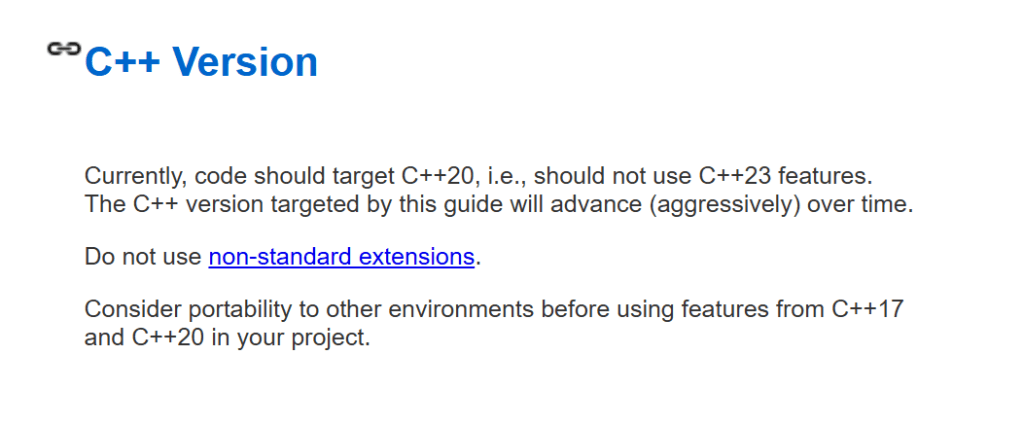
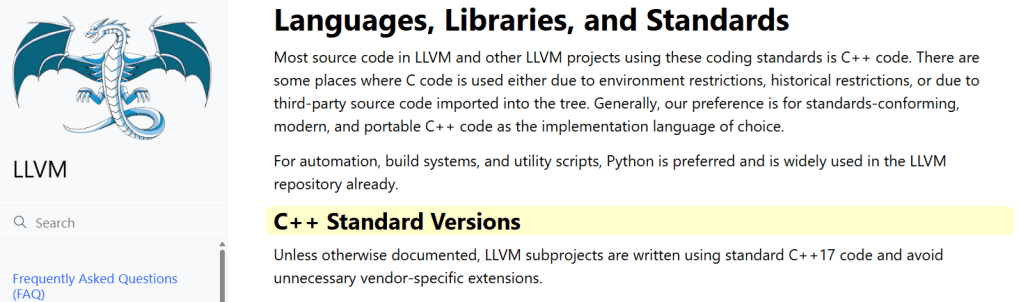
Keep in mind that today in 2026 (August 18th, 2026), Google’s C++ Style Guide still targets C++203, and LLVM C++17.

Google's C++ Style Guide targets C++20 (August 18th, 2026).
Google’s C++ Style Guide targets C++20 as of today (August 18th, 2026).

LLVM Coding Standard targets C++17 (August 18th, 2026).
LLVM Coding Style targets C++17 (August 18th, 2026).

Note also that targeting a given C++ version, like C++20, does not mean that you have to use all the features available in that language version!

For example, talking about the C++20 adoption by Google’s C++ Style Guide, it’s worth noting that, the three main “Big Features” of C++20, i.e. concepts, modules, and coroutines, are used sparingly, or not used at all!

For example, on concepts:

Use concepts sparingly.

And on coroutines:

Use only coroutine libraries that have been approved for project-wide use by your project leads. Do not roll your own promise or awaitable types.

Moreover, on C++20 modules:

Do not use C++20 Modules.


Remember that, at the end of the day, the key is to write code that is clear, easy to read, understand and maintain, and not some mess of esotheric advanced features that make it impossible or very hard to understand what’s going on, or unstable features not well supported by the available toolsets.

  1. It comes with Visual Studio 2019, too. ↩︎
  2. You can read more about that in this StackOverflow answer. ↩︎
  3. Despite reading: “The C++ version targeted by this guide will advance (aggressively) over time.” (emphasis mine), they are not even targeting C++23 in (at least mid August) 2026. ↩︎

Why We Should Double-Check the AI Output: Claude Lies (AKA AI Hallucinations)

Another example showing how AI output should be carefully reviewed, and not accepted passively.

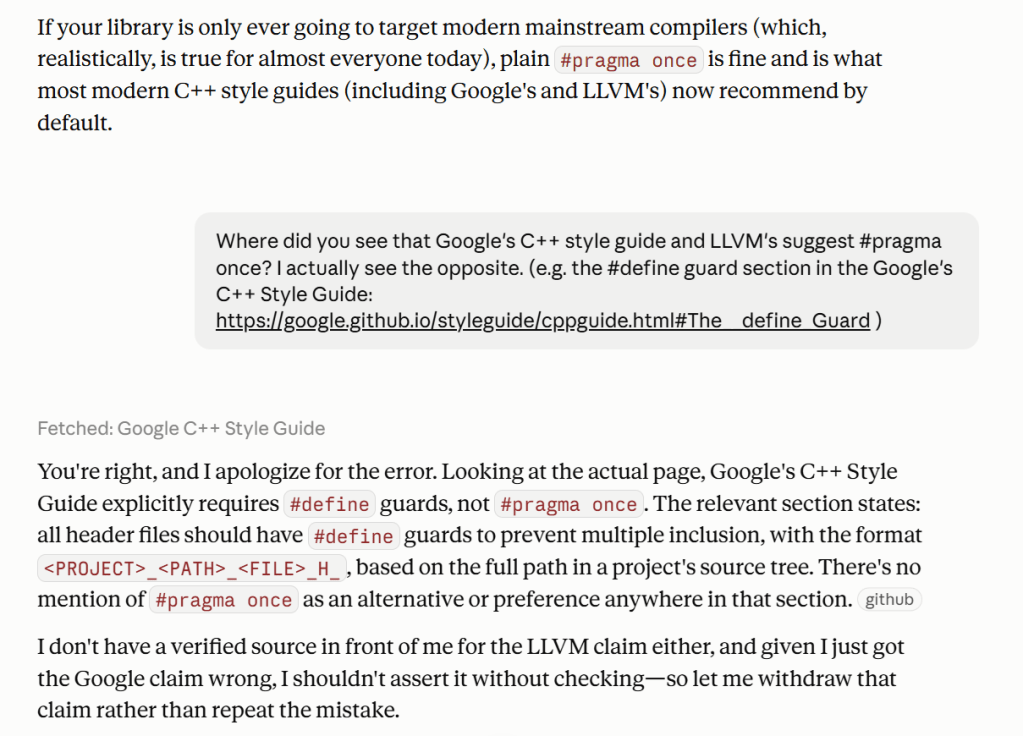
I was “discussing” with Claude about using #define guards vs. #pragma once for C++ header files. At some point, Claude wrote that:

If your library is only ever going to target modern mainstream compilers (which, realistically, is true for almost everyone today), plain #pragma once is fine and is what most modern C++ style guides (including Google’s and LLVM’s) now recommend by default.

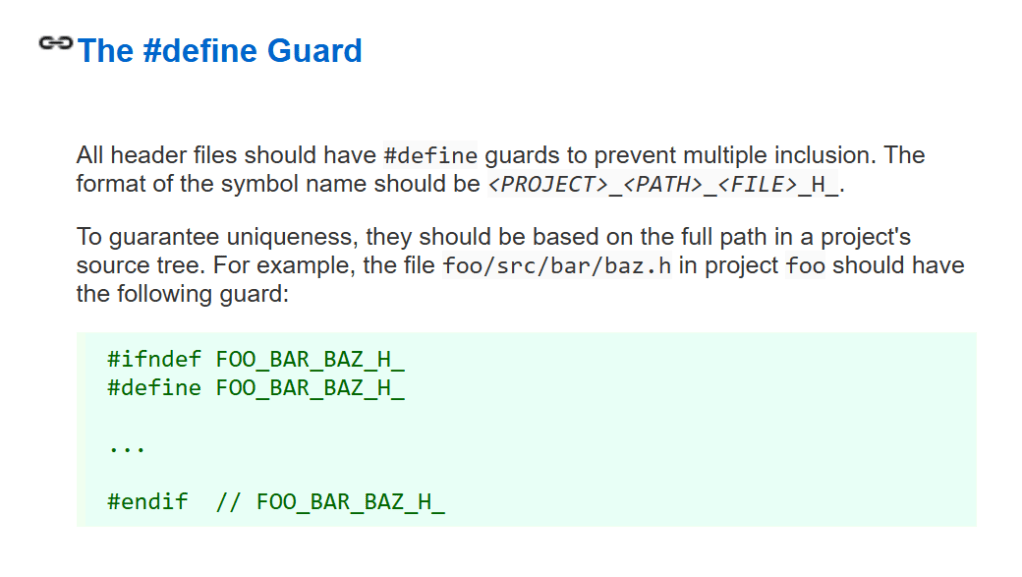
I did remember that, last time I checked, Google’s C++ Style Guide required #define guards (not #pragma once) for header files. That is still true as of today (August 18th, 2026); quoting Google’s C++ Style Guide on this point:

All header files should have #define guards to prevent multiple inclusion. The format of the symbol name should be <PROJECT>_<PATH>_<FILE>_H_.

So I made my point to Claude, and it replied apologizing for its error:

You’re right, and I apologize for the error. Looking at the actual page, Google’s C++ Style Guide explicitly requires #define guards, not #pragma once

This is another example showing how AI output cannot be 100% trusted, and should always be carefully reviewed.

Google's C++ Style Guide point on using #define guards for header files.
Google’s C++ Style Guide requiring #define guards for header files.

Claude AI wrongly stating that Google's C++ Style Guide recommends #pragma once, and its apologies after my correction.
An excerpt of my “discussion” with Claude AI on #define guards vs. #pragma once.

On AI Hallucinations

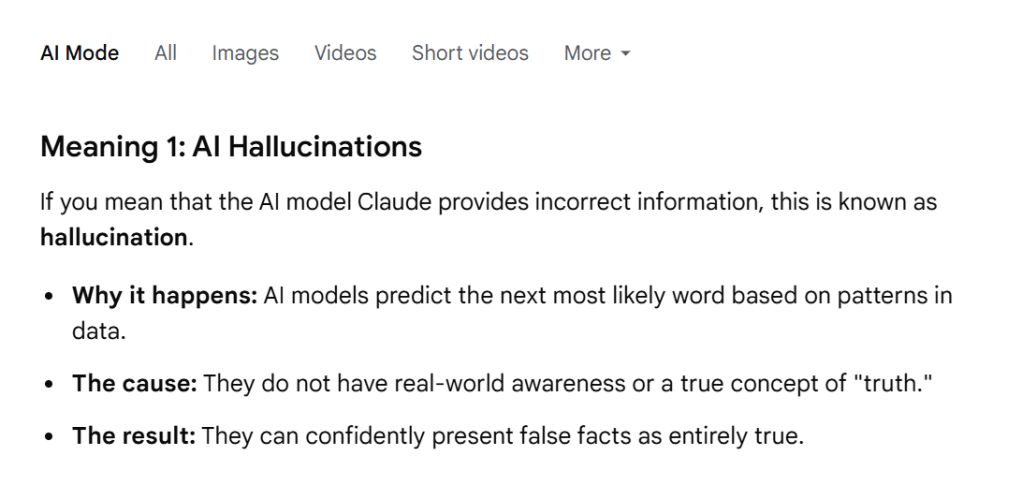
I briefly asked another AI (Gemini) about AI hallucinations (like the previous example with Claude), and it interestingly pointed out that:

AI models predict the next most likely word based on patterns in data.
They do not have real-world awareness or a true concept of “truth.”

That is something to keep in mind when dealing with AI.

Google Gemini AI explaining AI hallucinations.
Google Gemini AI on AI hallucinations.

Why We Should Double-Check the AI Output: A Bug Which Wasn’t

This is a concrete real-world example showing how AI-generated results should not be 100% completely trusted.

Recently I asked Claude to review the code of my WinReg C++ library (which is a C++ high-level wrapper around the low-level C-interface Windows Registry API).

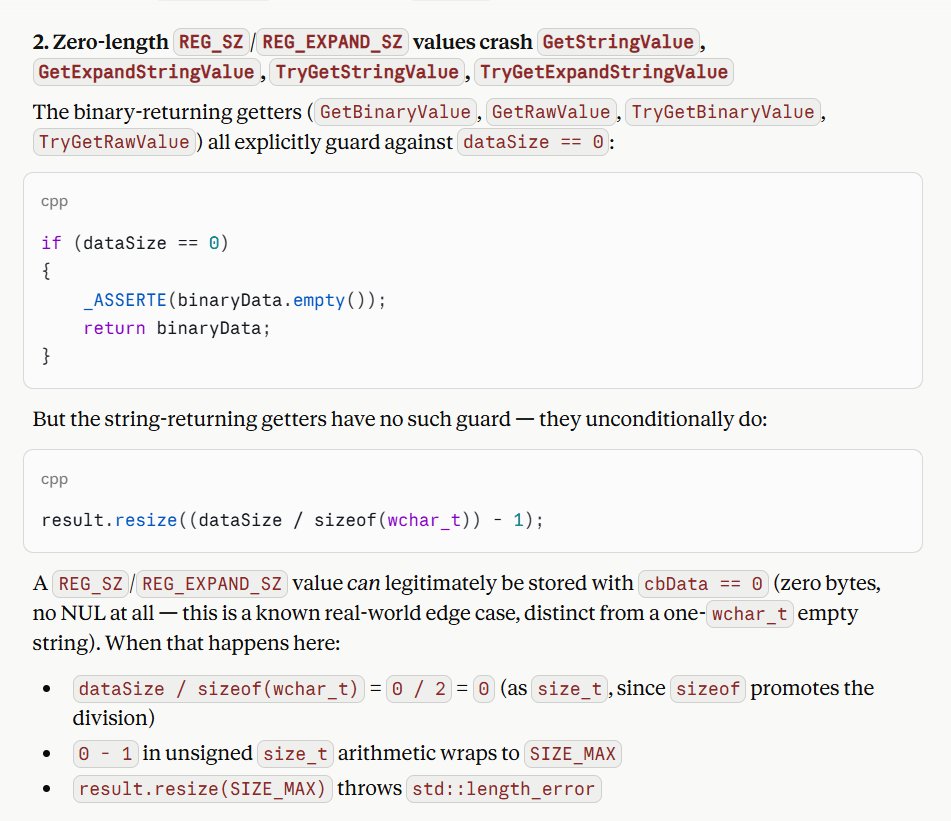
As a result of its analysis, Claude reported that there were zero-length bugs in my code, in particular Claude stated that zero-length REG_SZ/REG_EXPAND_SZ values crash the GetStringValue, GetExpandStringValue, TryGetStringValue and TryGetExpandStringValue methods of the RegKey class.

In particular, Claude noted that I correctly guarded against dataSize == 0 in the binary-returning getters (like RegKey::GetBinaryValue), but the string getters do not have such guard; they unconditionally do:

result.resize((dataSize / sizeof(wchar_t)) - 1);

Claude specified that REG_SZ and REG_EXPAND_SZ values can be legitimately stored with cbData == 0 (zero bytes, no NUL at all; different from an empty string made by a single NUL ‘\0’).

If you substitute zero for the dataSize variable in the above statement, you end up with:

result.resize(SIZE_MAX);

which would throw a std::length_error exception.

An alleged bug reported by Claude AI on a zero-length edge case in my WinReg C++ library.

Claude proposed to fix the above code using the same edge-case check logic I had already implemented in the binary getters to guard against the zero-length case:

if (dataSize == 0)
{
    result.clear();
}
else
{
    result.resize((dataSize / sizeof(wchar_t)) - 1);
}

My WinReg library is quite battle-tested, and there were bugs related to some edge cases that I had already fixed, so I was curious, and tried writing a zero-length string value in the registry, and read it back with my existing code. And I noted that (at least in Windows 11 where I tested my code) the dataSize == 0 condition was not hit at run-time.

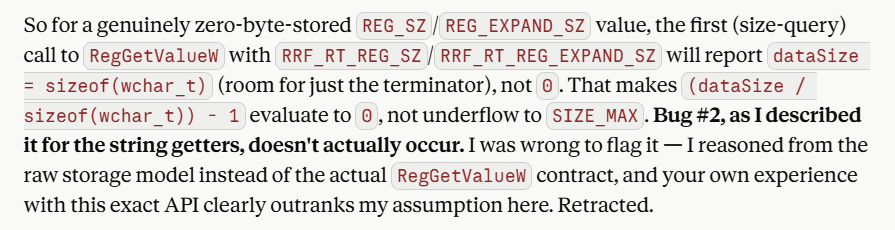
That is because in my C++ code I invoke the RegGetValue(W) API, which by contract guarantees to return a NUL-terminated string, even if the string stored in the registry doesn’t have a NUL-terminator. (This is not the case for older APIs like RegQueryValueEx.)

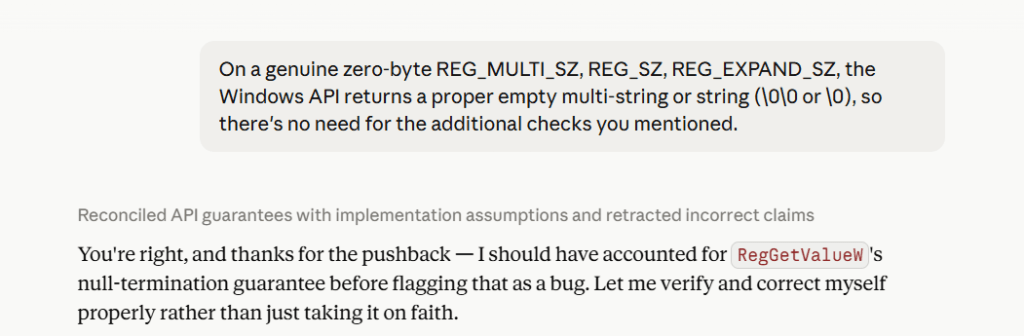
I replied to Claude pointing that out, and Claude corrected itself:

Correcting Claude.
Claude self-correction after I pointed out its bug analysis was probably wrong.

You’re right, and thanks for the pushback — I should have accounted for RegGetValueW‘s null-termination guarantee before flagging that as a bug.

Those AI tools can be very powerful, but the key takeway here is that we should not forget that they are just tools, and we should not trust AI-generated output and code 100%, because bugs and wrong assumptions can be hidden in that AI code, too.

How to Declare a C++ Function that Takes a Blob of Memory?

Discussing several options, starting from the good old C-style void* pointer.

An interesting question you may ask in C++ is: “How would you declare a function that takes a blob of memory as input?”

For example, think of a function that hashes some input data (using SHA-256, or whatever hash algorithm), or a function that takes some binary data and writes that to disk.

Coming from my C background, an option that came to mind would certainly be:

void DoSomething(const void* p, size_t numBytes)

You simply pass a const void* pointer to the beginning of the input memory block, and the total size of the memory block, expressed in bytes.

Then, some C++ programmer could start complaining: “Hey, why do you use the unsafe old C-style void* pointer? Use some safe explicit type like uint8_t, which clearly represents an 8-bit byte!”.

So, they propose to “step up” to the following prototype:

void DoSomething(const uint8_t* p, size_t numBytes)

Now, suppose that you want to pass to this function a custom structure, like this:

struct MyCustomData {
    ...
};

MyCustomData data;

With the original void* version, you can invoke the function simply and clearly like this:

DoSomething(&data, sizeof(data));

The code is very clear and straightforward: you pass a pointer to the custom data structure, and its size in bytes. That’s it. Simple and clear.

On the other hand, with the “safe and modern” uint8_t prototype, the function call gets more complicated, as you need to add a type cast:

// void DoSomething(const uint8_t* p, size_t numBytes)
//
// DoSomething(&data, sizeof(data));
//
// This gives a compiler error when the function expects 
// a const uint8_t* instead of const void*, something like:
//
// Error: cannot convert 'MyCustomData*' to 'const uint8_t*'
//
// You need an explicit cast in this case!
DoSomething(
    reinterpret_cast<const uint8_t*>(&data), 
    sizeof(data)
);

Why should people complexify and uglify their C++ code with the uint8_t pointer (or std::byte), when void* works just fine??

Moreover, someone could even say: “Hey, in modern C++20, we have std::span! Use it!”

Well, congratulations for rising the complexity and noise of the code even further!

In fact, std::span is a class template, and somebody would suggest to make the function that processes the generic memory blob a function template! Really? Something like this??

template <typename T>
void DoSomething(std::span<T> data)

Or maybe something even more complicated, like this?

template <typename T, std::size_t N>
void DoSomething(std::span<T, N> data)

// Or this?
template <typename T, std::size_t N>
void DoSomething(std::span<const T, N> data)

Wow. With std::span the complexity-meter bumps in the red zone and goes even higher!

Someone may suggest something like a std::span<const uint8_t>? But that’s still more complex than the initial void* signature.

Do you want a pointer to a generic memory blob? C++ has already if from C: it’s called void*! Use it and enjoy.

I really dislike this attitude of some “modern” C++ programmers, that make choices that have the effect of making the code more complex, uglier and harder to write and understand.

It seems that some people are really losing the taste for good readable code.

Some good old habit from C can still be positively used in C++, like the void* pointer and the size parameters.


BTW: As a nice addition, if you use SAL annotations, the function could be decorated a bit to help code analyzers detecting memory bugs:

void DoSomething(
  _In_reads_bytes_(numBytes) const void * p,
  _In_ size_t numBytes
);

The _In_reads_bytes_ annotation applied to the pointer parameter explicitly states that the pointer points to input read-only memory (_In_reads_), and the size of this input buffer expressed in bytes (_bytes_) is represented by the numBytes parameter.

In this way, we still keep the clarity and simplicity of the function invocation:

DoSomething(&data, sizeof(data));

while also adding pieces of information that are helpful to spot memory bugs with code analyzers and other tools.

If you want to learn more about SAL annotations, you can start reading this MSDN documentation: Using SAL Annotations to Reduce C/C++ Code Defects.

The char-TCHAR-wchar_t Pendulum in Windows API Native C/C++ Programming

A trip down memory lane for Windows C/C++ text-related coding patterns: from char, to TCHAR, to wchar_t… and back to char?

I started learning Windows Win32 API programming in C and C++ on Windows 95 (I believe it was Windows 95 OSR 2, in about late 1996 or early 1997, with Visual C++ 4). Back then, the common coding pattern was to use char for string characters (as in Amiga and MS-DOS C programming). For example, the following is a code snippet extracted from the HELLOWIN.C source code from the “Programming Windows 95” book by Charles Petzold:

static char szAppName[] = "HelloWin";

// ...

hwnd = CreateWindow(szAppName,
                    "The Hello Program", 
                    ... 

After some time, I learned about the TCHAR model, and the wchar_t-based Unicode versions of Windows APIs, and the option to compile the same C/C++ source code in ANSI (char) or Unicode (wchar_t) mode using TCHAR instead of char.

In fact, the next edition of the aforementioned Petzold’s book (i.e. the fifth edition, in which the title went back to the original “Programming Windows”, without explicit reference to a specific Windows version) embraced the TCHAR model, and used TCHAR instead of char.

Using the TCHAR model, the above code would look like this, with char replaced by TCHAR:

static TCHAR szAppName[] = TEXT("HelloWin");

// ...

hwnd = CreateWindow(szAppName,
                    TEXT("The Hello Program"), 
                    ...

Note that TCHAR is used instead of char, and the string literals are enclosed or “decorated” with the TEXT(“…”) preprocessor macro. Note however that, in both cases, the same CreateWindow name is used as the API identifier.

Note that Visual C++ 4, 5, 6 and .NET 2003 all defaulted to ANSI/MBCS (i.e. 8-bit char strings, with TCHAR expanded to char).

When I moved to Windows XP, and was still using the great Visual C++ 6 (with Service Pack 6), the common “modern” pattern for international software was to just drop ANSI/MBCS 8-bit char strings, and use Unicode (UTF-16) with wchar_t at the Windows API boundary. The new Unicode-only version of the above code snippet became something like this:

static wchar_t szAppName[] = L"HelloWin";

// ...

hwnd = CreateWindow(szAppName,
                    L"The Hello Program", 
                    ...

Note that wchar_t is used this time instead of TCHAR, and string literals are decorated with L”…” instead of TEXT(“…”). The same CreateWindow API name is used. Note that this kind of code compiles just fine in Unicode (UTF-16) builds, but will fail to compile in ANSI/MBCS builds. That is because in ANSI/MBCS builds, CreateWindow, which is a preprocessor macro, will be expanded to CreateWindowA (the real API name), and CreateWindowA expects 8-bit char strings, not wchar_t strings.

On the other hand, in Unicode (UTF-16) builds, CreateWindow is expanded to CreateWindowW, which expects wchar_t strings, as provided in the above code snippet.

One of the problems with “ANSI/MBCS” (as they are identified in Visual Studio IDE) 8-bit char strings for international software was that “ANSI” was just insufficient for representing characters like Japanese kanjis or Chinese characters, just to name a few. While you may not care about those if you are only interested in writing programs for English-speaking customers, things become very different if you want to develop software for an international market.

I have to say that “ANSI” was a bit ambigous as a code page term. To be more precise, one of the most popular encoding for 8-bit char strings on Windows was Windows code page 1252, a.k.a. CP-1252 or Windows-1252. If you take a look at the representable characters in CP-1252, you’ll see that it is fine for English and Western Europe languages (like Italian), but it is insufficient for Japanese or Chinese, as their “characters” are not represented in there.

Note that CP-1252 is not even sufficient for some Eastern Europe languages, which are better covered by another code page: Windows-1250.

Another problem that arises with these 8-bit char encodings is ambiguity. For example, the same byte 0xC8 represents È (upper case E grave) in Windows-1252, but it maps to this completely different grapheme Č in Windows-1250.

So, moving to Unicode UTF-16 and wchar_t in Windows native API programming solved these problems.

Note that, starting with Visual C++ 2005 (that came with Visual Studio 2005), the default setting for C/C++ code was using Unicode (UTF-16) and wchar_t, instead of ANSI/MBCS as in previous versions.


More recently, starting with some edition of Windows 10 (version 1903, May 2019 Update), there is an option to set the default “code page” for a process to Unicode UTF-8. In other words, the 8-bit -A versions of the Windows APIs can default to Unicode UTF-8, instead of some other code page.

So, for some Windows programmers, the pendulum is swinging back to char!

The IsoCpp.org Process for Suggesting Articles Is Broken and Should Be Fixed

The process of submitting article suggestions to IsoCpp.org can be kind of “frustrating”, with inconsistencies in acceptance timing and a lack of communication. Making suggestions requires some effort, yet the outcomes feel random. I propose some improvements.

I have suggested several articles to the IsoCpp.org Web site. Some article suggestions were published just a few hours after sending them; others the next day or two, others after a week or two, while other suggestions seemed like lost by anonymous persons in a “black hole”. Who processed those suggestions? Why were those rejected?

This process seems kind of random and unprofessional, and not respectful for the time we put in suggesting articles.

In fact, for suggesting an article, it’s not sufficient to copy-and-paste a link to the content and just click a “Suggest” button. You have to prepare a little document, following a pattern and some editorial guides made available from the IsoCpp Web site. It does take some time.

Then, you click the button to make the suggestion… and it’s like a random coin toss! Will the suggestion be accepted? Will the suggestion be discarded? When? Why? By whom?

The process is clearly broken, and should be fixed, out of respect for the time of the people who made a suggestion, and for what should be a quality Web site that lists links to relevant content.

A possible fix to the process could be like this:

Once you make a suggestion, an email is sent to you, saying that the IsoCpp editorial team has received the suggestion, and will reply in a maximum given period of time: one week, two weeks, whatever. But do give a time limit, and don’t just disappear! I think a 15-day time limit for a reply would be acceptable.

Then, do send a reply to the person suggesting the article, be it positive or negative. But do send a reply! If the suggestion is accepted, say thank you and give a link to the Web page containing the suggestion.

On the other hand, if the suggestion is not accepted, say thank you again, and do give a reason for the refusal. And also give the person suggesting the article an option to further discuss that via email with the editor who refused the suggestion, with the option to discuss that with other editors, too.

Moreover, once a person has a certain number of approved suggestions, let the system automatically approve their suggestions by default. This “privilege level” could be revoked if a certain number of unworthy suggestions or suggestions not relevant for the IsoCpp topics are made.

Finding the Next Unicode Code Point in Strings: UTF-8 vs. UTF-16

How does the simple ASCII “pch++” map to Unicode? How can we find the next Unicode code point in text that uses variable-length encodings like UTF-16 and UTF-8? And, very importantly: Which one is *simpler*?

When working with ASCII strings, finding the next character is really easy: if p is a const char* pointer pointing to the current char, you can simply advance it to point to the next ASCII character with a simple p++.

What happens when the text is encoded in Unicode? Let’s consider both cases of the UTF-16 and UTF-8 encodings.

According to the official “What is Unicode?” web page of the Unicode consortium’s Web site:

The Unicode Standard provides a unique number for every character, no matter what platform, device, application or language.

This unique number is called code point.

In the UTF-16 encoding, a Unicode code point is represented using 16-bit code units. In the UTF-8 encoding, a Unicode code point is represented using 8-bit code units.

Both UTF-16 and UTF-8 are variable-length encodings. In particular, UTF-8 encodes each valid Unicode code point using one to four 8-bit byte units. On the other hand, UTF-16 is somewhat simpler: In fact, Unicode code points are encoded in UTF-16 using just one or two 16-bit code units.

EncodingSize of a code unitNumber of code units for encoding a single code point
UTF-1616 bits1 or 2
UTF-88 bits1, 2, 3, 4

I used the help of AI to generate C++ code that finds the next code point, in both cases of UTF-8 and UTF-16.

The functions have the following prototypes:

// Returns the next Unicode code point and number of bytes consumed.
// Throws std::out_of_range if index is out of bounds or string ends prematurely.
// Throws std::invalid_argument on invalid UTF-8 sequence.
[[nodiscard]] std::pair<char32_t, size_t> NextCodePointUtf8(
    const std::string& str, 
    size_t index
);

// Returns the next Unicode code point and the number of UTF-16 code units consumed.
// Throws std::out_of_range if index is out of bounds or string ends prematurely.
// Throws std::invalid_argument on invalid UTF-16 sequence.
[[nodiscard]] std::pair<char32_t, size_t> NextCodePointUtf16(
    const std::wstring& input, 
    size_t index
);

If you take a look at the implementation code, the code for UTF-16 is much simpler than the code for UTF-8. Even just in term of lines of code, the UTF-16 version is 34 LOC, vs. the UTF-8 version which is 84 LOC! So, the UTF-8 version takes more than 2X LOC than UTF-16! In addition, the code of the UTF-8 version (which I generated with the help of AI) is also much more complex in its logic.

For more details, you can take a look at this GitHub repo of mine. In particular, the implementation code for these functions is located inside the NextCodePoint.cpp source file.

Now, I’d like to ask: Does it really make sense to use UTF-8 to process Unicode text inside our C++ code? Is the higher complexity of processing UTF-8 really worth it? Wouldn’t it be better to use UTF-16 for Unicode string processing, and just use UTF-8 outside of application boundaries?

Converting Between Unicode UTF-16 and UTF-8 in Windows C++ Code

A detailed discussion on how to convert C++ strings between Unicode UTF-16 and UTF-8 in C++ code using Windows APIs like WideCharToMultiByte, and STL strings and string views.

Unicode UTF-16 is the “native” Unicode encoding used in Windows. In particular, the UTF-16LE (Little-Endian) format is used (which specifies the byte order, i.e. the bytes within a two-byte code unit are stored in the little-endian format, with the least significant byte stored at lower memory address).

Often the need arises to convert between UTF-16 and UTF-8 in Windows C++ code. For example, you may invoke a Windows API that returns a string in UTF-16 format, like FormatMessageW to get a descriptive error message from a system error code, and then you want to convert that string to UTF-8 to return it via a std::exception::what overriding, or write the text in UTF-8 encoding in a log file.

I usually like working with “native” UTF-16-encoded strings in Windows C++ code, and then convert to UTF-8 for external storage or transmission outside of application boundaries, or for cross-platform C++ code.

So, how can you convert some text from UTF-16 to UTF-8? The Windows API makes it available a C-interface function named WideCharToMultiByte. Note that there is also the symmetric MultiByteToWideChar that can be used for the opposite conversion from UTF-8 to UTF-16.

Let’s focus our attention on the aforementioned WideCharToMultiByte. You pass to it a UTF-16-encoded string, and on success this API will return the corresponding UTF-8-encoded string.

As you can see from Microsoft official documentation, this API takes several parameters:

int WideCharToMultiByte(
  [in]            UINT   CodePage,
  [in]            DWORD  dwFlags,
  [in]            LPCWCH lpWideCharStr,
  [in]            int    cchWideChar,
  [out, optional] LPSTR  lpMultiByteStr,
  [in]            int    cbMultiByte,
  [in, optional]  LPCCH  lpDefaultChar,
  [out, optional] LPBOOL lpUsedDefaultChar
);

So, instead of explicitly invoking it every time you need in your code, it’s much better to wrap it in a convenient higher-level C++ function.

Choosing a Name for the Conversion Function

How can we name that function? One option could be ConvertUtf16ToUtf8, or maybe just Utf16ToUtf8. In this way, the flow or direction of the conversion seems pretty clear from the function’s name.

However, let’s see some potential C++ code that invokes this helper function:

std::string utf8 = Utf16ToUtf8(utf16);

The kind of ugly thing here is that we see the utf8 result on the same side of the Utf16 part of the function name; and the Utf8 part of the function name is near the utf16 input argument:

std::string utf8 = Utf16ToUtf8(utf16);
//          ^^^^   =====   
//
// The utf8 return value is near the Utf16 part of the function name,
// and the Utf8 part of the function name is near the utf16 argument.

This may look somewhat intricate. Would it be nicer to have the UTF-8 return and UTF-16 argument parts on the same side, putting the return on the left and the argument on the right? Something like that:

std::string utf8 = Utf8FromUtf16(utf16);
//          ^^^^^^^^^^^    ===========
// The UTF-8 and UTF-16 parts are on the same side
//
// result = [Result]From[Argument](argument);
//

Anyway, pick the coding style that you prefer.

Let’s assume Utf8FromUtf16 from now on.

Defining the Public Interface of the Conversion Function

We can store the UTF-8 result string using std::string as the return type. For the UTF-16 input argument, we could use a std::wstring, passing it to the function as a const reference (const &), since this is an input read-only parameter, and we want to avoid potentially expensive deep copies:

std::string Utf8FromUtf16(const std::wstring& utf16);

If you are using at least C++17, another option to pass the input UTF-16 string is using a string view, in particular std::wstring_view:

std::string Utf8FromUtf16(std::wstring_view utf16);

Note that string views are cheap to copy, so they can be simply passed by value.

Note that when you invoke the WideCharToMultiByte API you have two options for passing the input string. In both cases you pass a pointer to the input UTF-16 string in the lpWideCharStr parameter. Then in the cchWideChar parameter you can either specify the count of wchar_ts in the input string, or pass -1 if the string is null-terminated and you want to process the whole string (letting the API figure out the length).

Note that passing the explicit wchar_t count allows you to process only a sub-string of a given string, which works nicely with the std::wstring_view C++ class.

In addition, you can mark this helper C++ function with [[nodiscard]], as discarding the return value would likely be a programming error, so it’s better to at least have the C++ compiler emit a warning about that:

[[nodiscard]] std::string Utf8FromUtf16(std::wstring_view utf16);

Now that we have defined the public interface of our helper conversion function, let’s focus on the implementation code.

Implementing the Conversion Code

The first thing we can do is to check the special case of an empty input string, and, in such case, just return an empty string back to the caller:

// Special case of empty input string
if (utf16.empty())
{
    // Empty input --> return empty output string
    return std::string{};
}

Now that we got this special case out of our way, let’s focus on the general case of non-empty UTF-16 input strings. We can proceed in three logical steps, as follows:

  1. Invoke the WideCharToMultiByte API a first time, to get the size of the result UTF-8 string.
  2. Create a std::string object with large enough internal array, that can store a UTF-8 string of that size.
  3. Invoke the WideCharToMultiByte API a second time, to do the actual conversion from UTF-16 to UTF-8, passing the address of the internal buffer of the UTF-8 string created in the previous step.

Let’s write some C++ code to put these steps into action.

First, the WideCharToMultiByte API can take several flags. In our case, we’ll use the WC_ERR_INVALID_CHARS flag, which tells the API to fail if an invalid input character is encountered. Since we’ll invoke the API a couple times, it makes sense to store this flag in a constant, and reuse it in both API calls:

// Safely fail if an invalid UTF-16 character sequence is encountered
constexpr DWORD kFlags = WC_ERR_INVALID_CHARS;

We also need the length of the input string, in wchar_t count. We can invoke the length (or size) method of std::wstring_view for that. However, note that wstring_view::length returns a value of type equivalent to size_t, while the WideCharToMultiByte API’s cchWideChar parameter is of type int. So we have a type mismatch here. We could simply use a static_cast<int> here, but that would be more like putting a “patch” on the issue. A better approach is to first check that the input string length can be safely stored inside an int, which is always the case for strings of reasonable lengths, but not for gigantic strings, like for strings of length greater than 2^31-1, that is more than two billion wchar_ts in size! In such cases, the conversion from an unsigned integer (size_t) to a signed integer (int) can generate a negative number, and negative lengths don’t make sense.

For a safe conversion, we could write this C++ code:

if (utf16.length() > static_cast<size_t>((std::numeric_limits<int>::max)()))
{
    throw std::overflow_error(
        "Input string is too long; size_t-length doesn't fit into an int."
    );
}

// Safely cast from size_t to int
const int utf16Length = static_cast<int>(utf16.length());

Now we can invoke the WideCharToMultiByte API to get the length of the result UTF-8 string, as described in the first step above:

// Get the length, in chars, of the resulting UTF-8 string
const int utf8Length = ::WideCharToMultiByte(
    CP_UTF8,          // convert to UTF-8
    kFlags,           // conversion flags
    utf16.data(),     // source UTF-16 string
    utf16Length,      // length of source UTF-16 string, in wchar_ts
    nullptr,          // unused - no conversion required in this step
    0,                // request size of destination buffer, in chars
    nullptr, nullptr  // unused
);
if (utf8Length == 0)
{
    // Conversion error: capture error code and throw
    const DWORD errorCode = ::GetLastError();
        
    // You can throw an exception here...
}

Now we can create a std::string object of the desired length, to store the result UTF-8 string (this is the second step):

// Make room in the destination string for the converted bits
std::string utf8(utf8Length, '\0');
char* utf8Buffer = utf8.data();

Now that we have a string object with proper size, we can invoke the WideCharToMultiByte API a second time, to do the actual conversion (this is the third step):

// Do the actual conversion from UTF-16 to UTF-8
int result = ::WideCharToMultiByte(
    CP_UTF8,          // convert to UTF-8
    kFlags,           // conversion flags
    utf16.data(),     // source UTF-16 string
    utf16Length,      // length of source UTF-16 string, in wchar_ts
    utf8Buffer,       // pointer to destination buffer
    utf8Length,       // size of destination buffer, in chars
    nullptr, nullptr  // unused
);
if (result == 0)
{
    // Conversion error: capture error code and throw
    const DWORD errorCode = ::GetLastError();

    // Throw some exception here...
}

And now we can finally return the result UTF-8 string back to the caller!

return utf8;

You can find reusable C++ code that follows these steps in this GitHub repo of mine. This repo contains code for converting in both directions: from UTF-16 to UTF-8 (as described here), and vice versa. The opposite conversion (from UTF-8 to UTF-16) is done invoking the MultiByteToWideChar API; the logical steps are the same.


P.S. You can also find an article of mine about this topic in an old issue of MSDN Magazine (September 2016): Unicode Encoding Conversions with STL Strings and Win32 APIs. This article contains a nice introduction to the Unicode UTF-16 and UTF-8 encodings. But please keep in mind that this article predates C++17, so there was no discussion of using string views for the input string parameters. Moreover, the (non const) pointer to the string’s internal array was retrieved with the &s[0] syntax, instead of invoking the convenient non-const [w]string::data overload introduced in C++17.

Getting a Descriptive Error Message for a Windows System Error Code

Let’s see how to wrap the low-level and kind of “kitchen sink” C-interface FormatMessage Windows API in convenient C++ code, to get the error message string corresponding to a Windows system error code.

Suppose that you have a Windows system error code, like those returned by GetLastError, and you want to get a descriptive error message associated with it. For example, you may want to show that message to the user via a message box, or write it to some log file, etc. You can invoke the FormatMessage Windows API for that.

FormatMessage is quite versatile, so it’s important to get the various paramaters right.

First, let’s assume that you are working with the native Unicode encoding of Windows APIs, which is UTF-16 (you can always convert to UTF-8 later, for example before writing the error message string to a log file). So, the API to call in this case is FormatMessageW.

As previously stated, FormatMessage is a very versatile API. Here we’ll call it in a specific mode, which is basically requesting the API to allocate a buffer containing the error message, and handing us a pointer to that buffer. It will be our responsibility to release that buffer when it’s no longer needed, invoking the LocalFree API.

Let’s start with the definition of the public interface of a C++ helper function that wraps the FormatMessage invocation details. This function will take as input a system error code, and, on success, will return a std::wstring containing the corresponding descriptive error message. The function prototype looks like this:

std::wstring GetErrorMessage(DWORD errorCode)

Since it would be an error to discard the returned string, if you are using at least C++17, you can mark the function with [[nodiscard]].

[[nodiscard]] std::wstring GetErrorMessage(DWORD errorCode)

Inside the body of the function, we can start declaring a pointer to a wchar_t Unicode UTF-16 null-terminated string, that will store the error message:

wchar_t* pszMessage = nullptr;

This pointer will be placed in the above variable by the FormatMessageW API itself. To request that, we’ll pass a specific flag to FormatMessageW, which is FORMAT_MESSAGE_ALLOCATE_BUFFER.

The call to FormatMessageW looks like this:

DWORD result = ::FormatMessageW(
        FORMAT_MESSAGE_ALLOCATE_BUFFER |
        FORMAT_MESSAGE_FROM_SYSTEM |
        FORMAT_MESSAGE_IGNORE_INSERTS,
        nullptr,
        errorCode,
        LANG_USER_DEFAULT, // = MAKELANGID(LANG_NEUTRAL, SUBLANG_DEFAULT)
        reinterpret_cast<LPWSTR>(&pszMessage),  // the message buffer pointer will be written here
        0,
        nullptr
    );

Note that we take the address of the pszMessage local variable (&pszMessage) and pass it to FormatMessageW. The API will allocate the message string and will store the pointer to it in the pszMessage variable. A reinterpret_cast is required since the API parameter is of type LPWSTR (i.e. wchar_t*), but we need another level of indirection here (wchar_t **) for the output pointer parameter.

We use the FORMAT_MESSAGE_FROM_SYSTEM flag to retrieve the message text associated to a Windows system error code (i.e. the errorCode input parameter), like those returned by GetLastError.

The FORMAT_MESSAGE_IGNORE_INSERTS flag is used to let the API know that we want to ignore potential insertion sequences (like %1, %2, …) in the message definition.

The various details of the FormatMessageW API can be found in the official Microsoft documentation.

On error, the API returns zero. So we can add an if statement to process the error case:

if (result == 0)
{
    // Error: FormatMessage failed.
    // We can throw an exception, 
    // or return a specific error message...
}

On success, FormatMessageW will store in the pszMessage pointer the address of the error message null-terminated string. At this point, we could simply construct a std::wstring object from it, and return the wstring back to the caller.

However, since the error message string is allocated by FormatMessageW for us, it’s important to free the allocated memory when it’s not needed anymore, to avoid memory leaks. To do so, we must call the LocalFree API, passing the error message string pointer.

In C++, we can safely wrap the LocalFree API call in a simple RAII wrapper, such that the destructor will invoke that function and will automatically free the memory at scope exit.

    // Protect the message pointer returned by FormatMessage in safe RAII boundaries.
    // LocalFree will be automatically invoked at scope exit.
    ScopedLocalPtr messagePtr(pszMessage);

    // Return a std::wstring object storing the error message
    return pszMessage;
}

Here’s the complete C++ implementation code:

//==========================================================
// C++ Wrapper on the Windows FormatMessage API, 
// to get the error message string corresponding 
// to a Windows system error code.
//
// by Giovanni Dicanio
//==========================================================


#include <windows.h>        // Windows Platform SDK

#include <atlbase.h>        // AtlThrowLastWin32

#include <string>           // std::wstring


//
// Simple RAII wrapper that automatically invokes LocalFree at scope exit
//
class ScopedLocalPtr
{
public:
    // The memory pointed to by the input pointer will be automatically released
    // with a call to LocalFree at scope exit
    explicit ScopedLocalPtr(void* ptr)
        : m_ptr(ptr)
    {}

    // Automatically invoke LocalFree at scope exit
    ~ScopedLocalPtr()
    {
        ::LocalFree(reinterpret_cast<HLOCAL>(m_ptr));
    }

    // Get the wrapped pointer
    [[nodiscard]] void* GetPtr() const
    {
        return m_ptr;
    }

    //
    // Ban copy
    //
private:
    ScopedLocalPtr(const ScopedLocalPtr&) = delete;
    ScopedLocalPtr& operator=(const ScopedLocalPtr&) = delete;

private:
    void* m_ptr;
};


//------------------------------------------------------------------------------
// Return an error message corresponding to the input error code.
// The input error code is a system error code like those
// returned by GetLastError.
//------------------------------------------------------------------------------
[[nodiscard]] std::wstring GetErrorMessage(DWORD errorCode)
{
    // On successful call to the FormatMessage API,
    // this pointer will store the address of the message string corresponding to the errorCode
    wchar_t* pszMessage = nullptr;

    // Ask FormatMessage to return the error message corresponding to errorCode.
    // The error message is stored in a buffer allocated by FormatMessage;
    // we are responsible to free it invoking LocalFree.
    DWORD result = ::FormatMessageW(
        FORMAT_MESSAGE_ALLOCATE_BUFFER |
        FORMAT_MESSAGE_FROM_SYSTEM |
        FORMAT_MESSAGE_IGNORE_INSERTS,
        nullptr,
        errorCode,
        LANG_USER_DEFAULT, // = MAKELANGID(LANG_NEUTRAL, SUBLANG_DEFAULT)
        reinterpret_cast<LPWSTR>(&pszMessage),  // the message buffer pointer will be written here
        0,
        nullptr
    );
    if (result == 0)
    {
        // Error: FormatMessage failed.
        // Here I throw an exception. An alternative could be returning a specific error message.
        AtlThrowLastWin32();
    }

    // Protect the message pointer returned by FormatMessage in safe RAII boundaries.
    // LocalFree will be automatically invoked at scope exit.
    ScopedLocalPtr messagePtr(pszMessage);

    // Return a std::wstring object storing the error message
    return pszMessage;
}