Protecting Your C++ Code Against Unsigned Integer “Overflow”

Let’s explore what happens in C++ when you try to add *unsigned* integer numbers and the sum exceeds the maximum value. You’ll also see how to protect your unsigned integer sums against subtle bugs!

Last time, we discussed signed integer overflow in C++, and some associated subtle bugs, like summing a sequence of positive integer numbers, and getting a negative number as a result.

Now, let’s focus our attention on unsigned integer numbers.

As we did in the previous blog post, let’s start with an apparently simple and bug-free function, that takes a vector storing a sequence of numbers, and computes their sum. This time the numbers stored in the vector are unsigned integers of type uint16_t (i.e. 16-bit unsigned int):

#include <cstdint>  // for uint16_t
#include <vector>   // for std::vector

// Sum the 16-bit unsigned integers stored in the values vector
uint16_t Sum(const std::vector<uint16_t>& values)
{
    uint16_t sum = 0;

    for (auto num : values)
    {
        sum += num;
    }

    return sum;
}

Now, try calling the above function on the following test vector, and print out the result:

std::vector<uint16_t> v{ 10, 1000, 2000, 32000, 40000 };
std::cout << Sum(v) << '\n';

On my beloved Visual Studio 2019 C++ compiler targeting Windows 64-bit, I get the following result: 9474. Well, this time at least we got a positive number 😉 Seriously, what’s wrong with that result?

Well, if you see the sequence of the input values stored in the vector, you’ll note that the result sum is too small! For example, the vector contains the values 32000 and 40000, which are only by themselves greater than the resulting sum of 9474! I mean: this is (apparently…) nonsense. This is indeed a (subtle) bug!

Now, if you compute the sum of the above input numbers, the correct result is 75010. Unfortunately, this value is larger than the maximum (positive) integer number that can be represented with 16 bits, which is 65535.

Side Note: How can you get the maximum integer number that can be represented with the uint16_t type in C++? Simple: You can just invoke std::numeric_limits<uint16_t>::max():

cout << "Maximum value representable with uint16_t: \n";
cout << std::numeric_limits<uint16_t>::max() << '\n';

End of Side Note

So, here you basically have an integer “overflow” problem. In fact, the sum of the input uint16_t values is too big to be represented with an uint16_t.

Before moving forward, I’d like to point out that, while in C++ signed integer overflow is undefined behavior (so, basically the result you get depends on the particular C++ compiler/toolchain/architecture/even compiler switches, like GCC’s -fwrapv), unsigned integer “overflow” is well defined. Basically, what happens in the case of two unsigned integers being added together and exceeding the maximum value is the so called “wrap around“, according to the modulo operation.

To understand that with a concrete example, think of a clock. For example, if you think of the hour hand of a clock, when the hour hand points to 12, and you add 1 hour, the clock’s hour hand will point to 1; there is no “13”. Similarly, if the hour hand points to 12, and you add 3 hours, you don’t get 15, but 3. And so on. So, what happens for the clock is a wrap around after the maximum value of 12:

12 “+” 1 = 1

12 “+” 2 = 2

12 “+” 3 = 3

I enclosed the plus signs above in double quotes, because this is not a sum operation as we normally intend. It’s a “special” sum that wraps the result around the maximum hour value of 12.

You would get a similar “wrap around” behavior with a mechanical-style car odometer: When you reach the maximum value of 999’999 (kilometers or miles), the next kilometer or mile brings the counter back to zero.

Adding unsigned integer values follows the same logic, except that the maximum value is not 12 or 999’999, but 65535 for uint16_t. So, in this case you have:

65535 + 1 = 0

65535 + 2 = 1

65535 + 3 = 2

and so on.

You can try this simple C++ loop code to see the above concept in action:

constexpr uint16_t kU16Max = std::numeric_limits<uint16_t>::max(); // 65535
for (uint16_t i = 1; i <= 10; i++)
{
    uint16_t sum = kU16Max + i;
    std::cout << " " << kU16Max << " + " << i << " = " << sum << '\n';
}

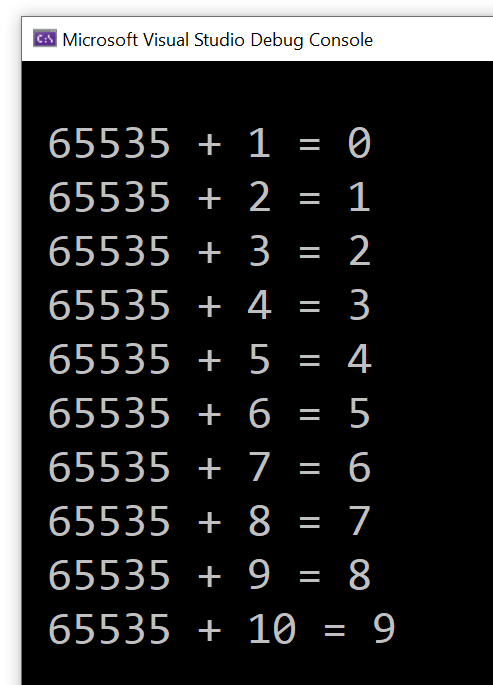
I got the following output:

Output of the above C++ loop code, showing unsigned integer wrap around in action.
Sample C++ loop showing unsigned integer wrap around

So, unsigned integer overflow in C++ results in wrap around according to modulo operation. Considering the initial example of summing vector elements: 10, 1000, 2000, 32000, 40000, the sum of the first four elements is 35010 and fits well in the uint16_t type. But when you add to that partial sum the last element 40000, you exceed the limit of 65535. At this point, wrap around happens, and you get the final result of 9474.

How of curiosity, you may ask: Where does that “magic number” of 9474 come from?

The modulo operation comes here to the rescue! Modulo basically means dividing two integer numbers and taking the remainder as the result of the operation.

So, if you take the correct sum value of 75010 and divide it by the number of integer values that can be represented with 16 bits, which is 2^16 = 65536, and you get the remainder of that integer division, the result is 9474, which is the result returned by the above Sum function!

Now, some people like to say that in C++ there is no overflow with unsigned integers, as before the overflow happens, the modulo operation is applied with the wrap around. I think this is more like a “word war”, but the concept should be clear at this point. In any case, when the sum of two unsigned integers doesn’t fit in the given unsigned integer type, the modulo operation is applied, with a consequent wrap around of the result. The key point is that, for unsigned integers, this is well defined behavior. Anyway, this is the reason why I enclosed the word “overflow” in double quotes in the blog title, and somewhere in the blog post text as well.

Coming back to the original sum problem, independently from the mechanics of the modulo operation and wrap around of unsigned integers, the key point is that the Sum function above returned a value that is not what a user would normally expect.

So, how can you prevent that from happening?

Well, just as we saw in the previous blog post on signed integer overflow, before doing the actual partial cumulative sum, we can check that the result does not overflow. And, if it does, we can throw an exception to signal the error.

Note that, while in the case of signed integers we have to check both the positive number and negative number cases, the latter check doesn’t apply here to unsigned integers (as there are no negative unsigned integers):

#include <cstdint>    // for uint16_t
#include <limits>     // for std::numeric_limits
#include <stdexcept>  // for std::overflow_error
#include <vector>     // for std::vector

// Sum the 16-bit unsigned integers stored in the values vector.
// Throws a std::overflow_error exception on integer overflow.
uint16_t Sum(const std::vector<uint16_t>& values)
{
    uint16_t sum = 0;

    for (auto num : values)
    {
        //
        // Check for integer overflow *before* doing the sum.
        // This will prevent bogus results due to "wrap around"
        // of unsigned integers.
        //
        if (num > 0 && sum > std::numeric_limits<uint16_t>::max() - num)
        {
            throw std::overflow_error("Overflow in Sum function.");
        }

        // The sum is safe
        sum += num;
    }

    return sum;
}

If you try to invoke the above function with the initial input vector, you will see that you get an exception thrown, instead of a wrong sum returned:

std::vector<uint16_t> v{ 10, 1000, 2000, 32000, 40000 };

try
{
    std::cout << Sum(v) << '\n';
}
catch (const std::overflow_error& ex)
{
    std::cout << "Overflow exception correctly caught!\n";
    std::cout << ex.what() << '\n';
}

Next time, I’d like to introduce a library that can help writing safer integer code in C++.

Beware of Integer Overflows in Your C++ Code

Summing signed integer values on computers, with a *finite* number of bits available for representing integer numbers (16 bits, 32 bits, whatever) is not always possible, and can lead to subtle bugs. Let’s discuss that in the context of C++, and let’s see how to protect our code against those bugs.

Suppose that you are operating on signed integer values, for example: 16-bit signed integers. These may be digital audio samples representing the amplitude of a signal; but, anyway, their nature and origin is not of key importance here.

You want to operate on those 16-bit signed integers, for example: you need to sum them. So, you write a C++ function like this:

#include <cstdint>  // for int16_t
#include <vector>   // for std::vector

// Sum the 16-bit signed integers stored in the values vector
int16_t Sum(const std::vector<int16_t>& values)
{
    int16_t sum = 0;

    for (auto num : values)
    {
        sum += num;
    }

    return sum;
}

The input vector contains the 16-bit signed integer values to sum. This vector is passed using const reference (const &), as we are observing it inside the function, without modifying it.

Then we use the safe and convenient range-for loop to iterate through each number in the vector, and update the cumulative sum.

Finally, when the range-for loop is completed, the sum is returned back to the caller.

Pretty straightforward, right?

Now, try and create a test vector containing some 16-bit signed integer values, and invoke the above Sum() function on that, like this:

std::vector<int16_t> v{ 10, 1000, 2000, 32000 };
std::cout << Sum(v) << '\n';

I compiled and executed the test code using Microsoft Visual Studio 2019 C++ compiler in 64-bit mode, and the result I got was -30526: a negative number?!

Well, if you try to debug the Sum function, and execute the function’s code step by step, you’ll see that the initial partial sums are correct:

10 + 1000 = 1010

1010 + 2000 = 3010

Then, when you add the partial sum of 3010 with the last value of 32000 stored in the vector, the sum becomes a negative number.

Why is that?

Well, if you think of the 16-bit signed integer type, the maximum (positive) value that can be represented is 32767. You can get this value, for example, invoking std::numeric_limits<int16_t>::max():

cout << "Maximum value representable with int16_t: \n";
cout << std::numeric_limits<int16_t>::max() << '\n';

So, in the above sum example, when 3010 is summed with 32000, the sum exceeds the maximum value of 32767, and you hit an integer overflow.

In C++, signed integer overflow is undefined behavior. In this case of Microsoft Visual C++ 2019 compiler on Windows, we got a negative number as a sum of positive numbers, which, from a “high level” perspective is mathematically meaningless. (Actually, if you consider the binary representation of these numbers, the result kind of makes sense. But, going down to this low binary level is out of the scope of this post; moreover, in any case, from a “high-level” common mathematical perspective, summing positive integer numbers cannot lead to a negative result.)

So, how can we prevent such integer overflows to happen and cause buggy meaningless results?

Well, we could modify the above Sum function code, performing some safety checks before actually calculating the sum.

// Sum the 16-bit signed integers stored in the values vector
int16_t Sum(const std::vector<int16_t>& values)
{
    int16_t sum = 0;

    for (auto num : values)
    {
        //
        // TODO: Add safety checks here to prevent integer overflows 
        //
        sum += num;
    }

    return sum;
}

If you think about it, if you are adding two positive integer numbers, what is the condition such that their sum is representable with the same signed integer type (int16_t in this case)?

Well, the following condition must be satisfied:

a + b <= MAX

where MAX is the maximum value that can be represented in the given type: std::numeric_limits<int16_t>::max() or 32767 in our case.

In other words, the above condition expresses in mathematical terms that the sum of the two positive integer numbers a and b cannot exceed the maximum value MAX representable with the given signed integer type.

So, the overflow condition is the negation of the above condition, that is:

a + b > MAX

Of course, as we just saw above, you cannot perform the sum (a+b) on a computer if the sum value overflows! So, it seems like a snake biting its own tail, right? Well, we can fix that problem simply massaging the above condition, moving the ‘a’ quantity on the right-hand side, and changing its sign accordingly, like this:

b > MAX – a

So, the above is the overflow condition when a and b are positive integer numbers. Note that both sides of this condition can be safely evaluated, as (MAX – a) is always representable in the given type (int16_t in this example).

Now, you can do a similar reasoning for the case that both numbers are negative, and you want to protect the sum from becoming less than numeric_limits::min, which is -32768 for int16_t.

The overflow condition for summing two negative numbers is:

a + b < MIN

Which is equivalent to:

b < MIN – a

Now, let’s apply this knowledge to modify our Sum function to prevent integer overflow. We’ll basically check the overflow conditions above before doing the actual sum, and we’ll throw an exception in case of overflow, instead of producing a buggy sum value.

#include <cstdint>    // for int16_t
#include <limits>     // for std::numeric_limits
#include <stdexcept>  // for std::overflow_error
#include <vector>     // for std::vector

// Sum the 16-bit signed integers stored in the values vector.
// Throws a std::overflow_error exception on integer overflow.
int16_t Sum2(const std::vector<int16_t>& values)
{
    int16_t sum = 0;

    for (auto num : values)
    {
        //
        // Check for integer overflow *before* doing the sum
        //
        if (num > 0 && sum > std::numeric_limits<int16_t>::max() - num)
        {
            throw std::overflow_error("Overflow in Sum function when adding a positive number.");
        }
        else if (num < 0 && sum < std::numeric_limits<int16_t>::min() - num)
        {
            throw std::overflow_error("Overflow in Sum function when adding a negative number.");
        }

        // The sum is safe
        sum += num;
    }

    return sum;
}

Note that if you add two signed integer values that have different signs (so, you are basically making a subtraction of their absolute values), you can never overflow. So you might think of doing an additional check on the signs of the variables num and sum above, but I think that would be a useless complication of the above code, without any real performance benefits, so I would leave the code as is.

So, in this blog post we have discussed signed integer overflow. Next time, we’ll see the case of unsigned integers.

Safe Narrowing Conversion Support in the GSL

Let’s briefly introduce a generic helper function from the Guidelines Support Library (GSL), that checks narrowing conversions and throws an exception on errors.

In the previous blog post on conversions from size_t to int and related bugs, we saw some custom code that checked that the conversion from the input size_t value to int was safe, and in case it wasn’t, an exception was thrown. Of course, you can customize that code to throw your own custom exception class, or maybe assert in debug builds and throw an exception in release builds, log the error, etc.

In addition to that, the Microsoft’s implementation of the GSL library offers a utility function called gsl::narrow<T>, that checks if the input argument can be represented in the target type T, and if it cannot, the function throws an exception of type gsl::narrowing_error. The implementation code of that function is more generic than the specific case discussed in the previous blog post, but requires that you use the GSL library (in general not a problem, if your C++ compiler supports it), and that the specific gsl::narrowing_error is thrown. Of course you can pick whatever fits your needs best (maybe using that GSL function fits your needs, or maybe you want a different behavior when an unsafe conversion is encountered, so you need to write your own custom code).

Google C++ Style Guide on Unsigned Integers

An interesting note from Google C++ Style Guide on unsigned integers resonates with the recent blog post on subtle bugs when mixing size_t and int.

I was going through Google C++ Style Guide, and found an interesting note on unsigned integers (from the Integer Types section). This resonated in particular with my recent writing on subtle bugs when mixing unsigned integer types like size_t (coming from the C++ Standard Library way of expressing a string length with an unsigned integer type) and signed integer types like int (required at the Win32 API interface of some functions like MultiByteToWideChar and WideCharToMultiByte).

That note from Google C++ style guide is quoted below, with emphasis mine:

Unsigned integers are good for representing bitfields and modular arithmetic. Because of historical accident, the C++ standard also uses unsigned integers to represent the size of containers – many members of the standards body believe this to be a mistake, but it is effectively impossible to fix at this point. The fact that unsigned arithmetic doesn’t model the behavior of a simple integer, but is instead defined by the standard to model modular arithmetic (wrapping around on overflow/underflow), means that a significant class of bugs cannot be diagnosed by the compiler. In other cases, the defined behavior impedes optimization.

That said, mixing signedness of integer types is responsible for an equally large class of problems. The best advice we can provide: try to use iterators and containers rather than pointers and sizes, try not to mix signedness, and try to avoid unsigned types (except for representing bitfields or modular arithmetic). Do not use an unsigned type merely to assert that a variable is non-negative.

Pluralsight 60% Off – Limited Time Offer (Until Sep 30th)

Just a heads up to let you know that Pluralsight is offering 60% OFF all Individual Skills subscriptions, for a limited time!

This offers is valid until 11:59 p.m. MT on September 30, 2023.

This a great opportunity to access high-quality content and save money!

Click the banner below ans save now!

Are wchar_t and std::wstring Really Portable in C++?

Some considerations on writing portable C++ code involving Unicode text across Windows and Linux.

Someone was developing some C++ code that was meant to be portable across Windows and Linux. They were using std::wstring to represent Unicode UTF-16-encoded strings in their Windows C++ code, and they thought that they could use the same std::wstring class to represent UTF-16-encoded text on Linux as well.

In other words, they were convinced that wchar_t and std::wstring were portable across Windows and Linux.

First, I asked them: “What do you mean by portable?”

If by “portable” you mean that the symbols are defined on both Windows and Linux platforms, then wchar_t and std::wstring (which is an instantiation of the std::basic_string class template with the wchar_t character type) are “portable”.

But, if by “portable” you mean that those symbols are defined on both platforms and they have the same meaning, then, I’m sorry, but wchar_t and std::wstring are not portable across Windows and Linux.

In fact, if you try to print out the sizeof(wchar_t), you’ll get 2 on C++ code compiled on Windows with the MSVC compiler, and 4 on GCC on Linux. In other words, wchar_t is 2-byte long on Windows, and 4-byte long on Linux!

In fact, you can use wchar_t and std::wstring to represent Unicode UTF-16-encoded text on Windows. And you can use wchar_t and std::wstring to represent Unicode UTF-32-encoded text on Linux.

If you want to write portable C++ code to represent Unicode UTF-16 text, you can use the char16_t character type for code units, and the corresponding std::u16string class for strings. Both char16_t and std::u16string have been introduced in C++11.

Or, you can switch gears and represent your Unicode text in a portable way using the UTF-8 encoding and the std::string class. If your C++ toolchain has some support for C++20 features, you can use the std::u8string class, and the corresponding char8_t character type for code units.

Code Reviewing ChatGPT’s std::map C++ code

ChatGPT does C++ std::map. OK, let’s review the code produced by this AI. Are there any errors? Can it be improved?

Recently someone sent me an interesting email about the answer they got from ChatGPT to the question they asked: “Teach me about C++ std::map“.

ChatGPT provided the following code, with some additional notes.

ChatGPT's demo code showing how to use std::map.
ChatGPT trying to explain how to use std::map

Well, I read that code and noted a few things:

Since the map instance uses std::string as the key type, the associated <string> header should have been #included (although the above code could compile thanks to “indirect” inclusion of <string>; but that’s not a good practice).

Moreover, since C++20, std::map has been given a (long-awaited…) method to check if there is an element with a key equivalent to the input key in the container. So, I would use map::contains instead of invoking the map::count method to check if a key exists.

// ChatGPT suggested:
//   
//   // Checking if a key exists
//   if (ages.count("Bob") > 0) {
//       ...
//
// Starting with C++20 you can use the much clearer
// and simpler map::contains:
//
if (ages.contains("Bob")) {
    ...

In addition, I would also improve the map iteration code provided by ChatGPT.

In fact, starting with C++17, a new feature called structured binding allows writing clearer code for iterating over std::map’s content. For example:

// ChatGPT suggested:
//
//  Iterating over the map
//  for (const auto& pair : ages) {
//      std::cout << pair.first << ": " << pair.second << std::endl;
//  }
//
// Using C++17's structure bindings you can write:
//
for (const auto& [name, age]: ages) {
    std::cout << name << ": " << age << std::endl;
}

Note how using identifiers like name and age produces code that is much more readable than pair.first and pair.second (which are in the code suggested by ChatGPT).

(As a side note of kind of lesser importance, you may want to replace std::endl with ‘\n’ in the above code; although if “output performance” is not particularly important, std::endl would be acceptable.)

What conclusions can we draw from that interesting experience?

Well, I think ChatGPT did a decent job in showing a basic usage of C++ std::map. But, still, its code is not optimal. As discussed in this simple code review, with a better knowledge of the C++ language and standard library features you can produce higher-quality code (e.g. more readable, clearer) than ChatGPT did in this instance.

…But maybe ChatGPT will read this code review, learn a new thing or two, and improve? 😉

Optimizing C++ Code with O(1) Operations

How to get an 80% performance boost by simply replacing a O(N) operation with a fast O(1) operation in C++ code.

Last time we saw that you can invoke the CString::GetString method to get a C-style null-terminated const string pointer, then pass it to functions that take wstring_view input parameters:

// 's' is a CString instance;
// DoSomething takes a std::wstring_view input parameter
DoSomething( s.GetString() );

While this code works fine, it’s possible to optimize it.

As the saying goes: first make things work, then make things fast.

The Big Picture

A typical implementation of wstring_view holds two data members: a pointer to the string characters, and a size (or length). Basically, the pointer indicates where the observed string (view) starts, and the size/length specifies how many consecutive characters belong to the string view (note that string views are not necessarily null-terminated).

The above code invokes a wstring_view constructor overload that takes a null-terminated C-style string pointer. To get the size (or length) of the string view, the implementation code needs to traverse the input string’s characters one by one, until it finds the null terminator. This is a linear time operation, or O(N) operation.

Fortunately, there’s another wstring_view constructor overload, that takes two parameters: a pointer and a length. Since CString objects know their own length, you can invoke the CString::GetLength method to get the value of the length parameter.

// Create a std::wstring_view from a CString,
// using a wstring_view constructor overload that takes
// a pointer (s.GetString()) and a length (s.GetLength())
DoSomething({ s.GetString(), s.GetLength() });  // (*) see below

The great news is that CString objects bookkeep their own string length, so that CString::GetLength doesn’t have to traverse all the string characters until it finds the terminating null. The value of the string length is already available when you invoke the CString::GetLength method.

In other words, creating a string view invoking CString::GetString and CString::GetLength replaces a linear time O(N) operation with a constant time O(1) operation, which is great.

Fixing and Refining the Code

When you try to compile the above code snippet marked with (*), the C++ compiler actually complains with the following message:

Error C2398 Element ‘2’: conversion from ‘int’ to ‘const std::basic_string_view<wchar_t,std::char_traits<wchar_t>>::size_type’ requires a narrowing conversion

The problem here is that CString::GetLength returns an int, which doesn’t match with the size type expected by wstring_view. Well, not a big deal: We can safely cast the int value returned by CString::GetLength to wstring_view::size_type, or just size_t:

// Make the C++ compiler happy with the static_cast:
DoSomething({ s.GetString(), 
              static_cast<size_t>(s.GetLength()) });

As a further refinement, we can wrap the above wstring_view-from-CString creation code in a nice helper function:

// Helper function that *efficiently* creates a wstring_view 
// to a CString
inline [[nodiscard]] std::wstring_view AsView(const CString& s)
{
    return { s.GetString(), static_cast<size_t>(s.GetLength()) };
}

Measuring the Performance Gain

Using the above helper function, you can safely and efficiently create a string view to a CString object.

Now, you may ask, how much speed gain are we talking here?

Good question!

I have developed a simple C++ benchmark, which shows that replacing a O(N) operation with a O(1) operation in this case gives a performance boost of 93 ms vs. 451 ms, which is an 80% performance gain! Wow.

Results of the C++ benchmark comparing O(N) vs. O(1) operations. O(N) takes 451 ms, O(1) takes 93 ms, which is an 80% performance gain.
Results of the string view benchmark comparing O(N) vs. O(1) operations. O(1) offers an 80% performance gain!

If you want to learn more about Big-O notation and other related topics, you can watch my Pluralsight course on Introduction to Data Structures and Algorithms in C++.

Big-O doesn't have to be boring. A slide from my PS course on introduction to data structures and algorithms in C++. This slide shows a graph comparing the big-O of linear vs. binary search.
Big-O doesn’t have to be boring! (A slide from my Pluralsight course on the topic.)

Introduction to Data Structures and Algorithms in C++

A (hopefully) fun and easy-to-understand introduction to data structures and algorithms in C++.

I authored a course that was published by Pluralsight on Introduction to Data Structures and Algorithms in C++.

In this course, you’ll learn how to implement some fundamental data structures and algorithms in C++ from scratch, with a combination of theoretical introduction using slides, and practical C++ implementation code.

A metaphor used to understand the stack data structure.
Introducing the stack data structure with an interesting metaphor

No prior data structure or algorithm theory knowledge is required. You only need a basic knowledge of C++ language features (please watch the “Prerequisites” clip in the first module for more details about that).

A slide used to explain the linear search algorithm.
Explaining linear search using slides

During this course journey, you’ll also learn some practical C++ coding techniques (ranging from move semantic optimization, to proper safe array copying techniques, insertion operator overloading, etc.) that you’ll be able to use in your own C++ projects, as well.

So, this course is both theory and practice!

A screenshot of a demo showing a subtle bug involving memory leaks.
Spotting a subtle bug!

Here’s just a couple of feedback notes from my reviewers:

The callouts are helpful and keep the demo engaging as you explain the code.

Peer Review

To say that this is an excellent explanation of Big-O notation would be an understatement. The way you illustrate and explain it is far better than the way it was taught to me in college!

Peer Review
A slide illustrating Big-O notation and asymptotic analysis.
Big-O doesn’t have to be boring!

Starting from this course page, you can freely play the course overview, and read a more detailed course description and table of content.

I hope you’ll enjoy watching this course!

The Case of string_view and the Magic String

An interesting bug involving the use of string_view instead of std::string const&.

Suppose that in your C++ code base you have a legacy C-interface function:

// Takes a C-style NUL-terminated string pointer as input
void DoSomethingLegacy(const char* s)
{
    // Do something ...

    printf("DoSomethingLegacy: %s\n", s);
}

The above function is called from a C++ function/method, for example:

void DoSomethingCpp(std::string const& s)
{
    // Invoke the legacy C function
    DoSomethingLegacy(s.data());
}

The calling code looks like this:

std::string s = "Connie is learning C++";

// Extract the "Connie" substring
std::string s1{ s.c_str(), 6 };

DoSomethingCpp(s1);

The string that is printed out is “Connie”, as expected.

Then, someone who knew about the new std::string_view feature introduced in C++17, modifies the above code to “modernize” it, replacing the use of std::string with std::string_view:

// Pass std::string_view instead of std::string const&
void DoSomethingCpp(std::string_view sv)
{
    DoSomethingLegacy(sv.data());
}

The calling code is modified as well:

std::string s = "Connie is learning C++";


// Use string_view instead of string:
//
//     std::string s1{ s.c_str(), 6 };
//
std::string_view sv{ s.c_str(), 6 };

DoSomethingCpp(sv);

The code is recompiled and executed. But, unfortunately, now the output has changed! Instead of the expected “Connie” substring, now the entire string is printed out:

Connie is learning C++

What’s going on here? Where does that “magic string” come from?

Analysis of the Bug

Well, the key to figure out this bug is understanding that std::string_view’s are not necessarily NUL-terminated. On the other hand, the legacy C-interface function does expect as input a C-style NUL-terminated string (passed via const char*).

In the initial code, a std::string object was created to store the “Connie” substring:

// Extract the "Connie" substring
std::string s1{ s.c_str(), 6 };

This string object was then passed via const& to the DoSomethingCpp function, which in turn invoked the string::data method, and passed the returned C-style string pointer to the DoSomethingLegacy C-interface function.

Since strings managed via std::string objects are guaranteed to be NUL-terminated, the string::data method pointed to a NUL-terminated contiguous sequence of characters, which was what the DoSomethingLegacy function expected. Everyone’s happy.

On the other hand, when std::string is replaced with std::string_view in the calling code:

// Use string_view instead of string:
//
//     std::string s1{ s.c_str(), 6 };
//
std::string_view sv{ s.c_str(), 6 };

DoSomethingCpp(sv);

you lose the guarantee that the sub-string is NUL-terminated!

In fact, this time when sv.data is invoked inside DoSomethingCpp, the returned pointer points to a sequence of contiguous characters that is the original string s, which is the whole string “Connie is learning C++”. There is no NUL-terminator after “Connie” in that string, so the legacy C function that takes the string pointer just goes on and prints the whole string, not just the “Connie” substring, until it finds a NUL-terminator, which follows the last character of “Connie is learning C++”.

Figuring out the std::string_view related bug: The string_view points to a sub-string that does *not* include a NUL-terminator.
Figuring out the bug involving the (mis)use of string_view

So, be careful when replacing std::string const& parameters with string_views! Don’t forget that string_views are not guaranteed to be NUL-terminated! That is very important when writing or maintaining C++ code that interoperates with legacy C or C-style code.