Use STL string objects like std::string/std::wstring as a safe bridge.
Last time, we saw that passing a C++ std::[w]string_view to a C-interface API (like Win32 APIs) expecting a C-stylenull-terminatedstring pointer can cause subtle bugs, as there is a requirement impedance mismatch. In fact:
The C-interface API (e.g. Win32 SetWindowText) expects a null-terminated string pointer
The STL string views do not guarantee null-termination
So, supposing that you have a C++17 (or newer) code base that heavily uses string views, when you need to interface those with Win32 API function calls, or whatever C-interface API, expecting C-style null-terminated strings, how can you safely pass instances of string views as input parameter?
Invoking the string_view/wstring_view’s data method would be dangerous and source of subtle bugs, as the data returned pointer is not guaranteed to point to a null-terminated string.
Instead, you can use a std::string/wstring object as a bridge between the string views and the C-interface API. In fact, the std::string/wstring’s c_str method does guarantee that the returned pointer points to a null-terminated string. So it’s safe to pass the pointer returned by std::[w]string::c_str to a C-interface API function that expects a null-terminated C-style string pointer (like PCWSTR/LPCWSTR parameters in the Win32 realm).
For example:
// sv is a std::wstring_view

// C++ STL strings can be easily initialized from string views
std::wstring str{ sv };

// Pass the intermediate wstring object to a Win32 API,
// or whatever C-interface API expecting
// a C-style *null-terminated* string pointer.
DoSomething(
    // PCWSTR/LPCWSTR/const wchar_t* parameter
    str.c_str(), // wstring::c_str

    // Other parameters ...
);

// Or use a temporary string object to wrap the string view
// at the call site:
DoSomething(
    // PCWSTR/LPCWSTR/const wchar_t* parameter
    std::wstring{ sv }.c_str(),

    // Other parameters ...
);
Let’s try to make clarity on some different available options.
In a previous blog post, I discussed the reasons why I passed std::wstring objects by const&, instead of using std::wstring_view. The key point was that those strings were passed as input parameters to C-interface API functions, that expectednull-terminated C-style strings.
In particular, the standard string classes like std::string and std::wstring offer the c_str method, which returns a pointer to a read-only string buffer that is guaranteed to be null-terminated. This method is only available in the const version; there is no non-const overload of c_str that returns a character buffer with read/write access. If you need read-write access to the internal string character buffer, you need to invoke the data method, which is available in both const and non-const overloaded forms. The string‘s data method guarantees that the returned buffer is null-terminated.
On the other hand, the string view‘s data method does not offer this null-termination guarantee. In addition, there is no c_str method available for string views (which makes sense if you think that c_str implies a null-terminated C-style string pointer, and [w]string_views are not guaranteed to be null-terminated).
The properties discussed in the above paragraph can be summarized in the following comparison table:
Method
[w]string
[w]string_view
c_str (const)
Returns null-terminated read-only string buffer
N/A
c_str (non-const)
N/A
N/A
data (const)
Returns null-terminated read-only string buffer
No guarantee for null-termination
data (non-const)
Returns null-terminated read/write string buffer
No guarantee for null-termination
Accessing raw character buffer in C++ standard strings vs. string views
Suggestion for the C++ Standard Library: Null-terminated String Views?
As a side note, it probably wouldn’t be bad if null-terminated string views were added to the C++ standard library. That would make it possible to pass instances of those null-terminated string views instead of const& to string objects as input strings to C-interface APIs.
“Back-porting” and enabling [[nodiscard]] in C++14 code bases is a feature that can come in handy.
[[nodiscard]] is a feature that was added in C++17. However, it’s interesting to note that the Visual C++ compiler that comes with Visual Studio 2019 accepts [[nodiscard]] also when you compile C++ code in the default C++14 mode.
Visual Studio 2019 C++ Project Properties
If, for some reason, you can’t compile your C++ code base with C++17 mode enabled, I would still suggest to use [[nodiscard]] in your C++ code, at least in places where it can help spotting subtle bugs (like in the cases suggested here).
C4834 [[nodiscard]]-related warning message emitted by VC++ in default C++14 mode
You could even use some conditional compilation with preprocessor macros to enable [[nodiscard]] when compiling your C++ code with compilers like VC++ 2019 that support this feature, and expand that preprocessor macro to nothing in C++ compilers that don’t support it.
A couple of suggestions for applying the [[nodiscard]] attribute in C++ code.
In the previous blog post, I shared some thoughts on [[nodiscard]]. As I wrote there, it would be better to have a good default of always assuming [[nodiscard]], and opt out from that good default only in some specific cases. But, unfortunately, the current state of the C++ language standard is different, and actually the opposite of the above.
So, where would I strongly recommend to apply [[nodiscard]]?
The Case of Bad Confusing Naming Choices
A common case that comes to my mind is the example of std::vector::empty. I have always found that vector’s method name confusing. I mean: Is “empty” a method to empty the vector, that is to remove its content? No. std::vector::empty is a bool-returning method to check if the vector has no element.
So, in this case, applying [[nodiscard]] to the vector::empty method will make the C++ compiler generate a warning when you write this kind of C++ code:
// myVector is a std::vector

// Empty the vector content [NOTE: Wrong code]
myVector.empty();
As can be read from the comment above, the intention of the programmer was to empty the vector. But the vector::empty method simply returned a bool to check if the vector had no elements. And, in the above case, that returned value was discarded.
So, the use of the [[nodiscard]] attribute with the vector::empty method will generate a warning in the above bogus case. It’s like the C++ compiler telling the programmer: “Hey, programmer! You discarded the return value of vector::empty!” So the programmer thinks: “Hey, what return value? Wait a minute… I just wanted to empty the vector! Ahhh…Ok. I got it: This vector::empty method returns a bool and is used to check if the vector is empty. So, the method I should call is another one!” And then, after some search, the vector::clear method is invoked and the above code fixed.
// Correct code to empty the vector:
myVector.clear();
Note: The so maltreated MFC, with its CArray class, did choose a much better naming for its “empty” method, calling it IsEmpty. With such a good name, you won’t certainly make the mistake of invoking IsEmpty when you actually meant to make the vector empty. The designers of the STL made a confusing choice for the vector::empty method: calling it is_empty would have been much better and clear.
So, this is actually a case in which [[nodiscard]] comes to the rescue for a bad confusing choice for naming methods.
The Case of Returning Raw Owning Resource Handles
Another important case where I strongly suggest to apply the [[nodiscard]] attribute is when you return to the caller some rawowning handle or pointer (which you can think of as an “handle” to memory resources).
For example, in my WinReg C++ library, I wrap a raw Windows Registry HKEY handle in the safe boundaries of the RegKey C++ class.
However, for flexibility of design, I chose to have a RegKey::Detach method that transfers the ownership of that HKEY raw handle to the caller:
// Transfer ownership of current HKEY to the caller.
// Note that the caller is responsible for closing the key handle!
[[nodiscard]] HKEY Detach() noexcept;
After invoking that method, the caller becomes the new owner of the returned HKEY. As such, the caller will be responsible for properly tracking and releasing the raw handle when not needed anymore.
In such cases, discarding (by mistake) the returned value of the RegKey::Detach method would cause a resource leak. So, having the C++ compiler speak up in such cases would definitely help in preventing such leaks. So, if you have to be selective of where you apply the [[nodiscard]] attribute, this is certainly a great place for it!
Some reflections on the use (or abuse?) of the [[nodiscard]] attribute introduced in C++17.
An interesting addition made in C++17 has been the [[nodiscard]] attribute. The basic idea is to apply it such that the C++ compiler will emit a warning when the return values of functions or methods are discarded.
Someone said that, even in previous versions of the C++ standard, if your C++ compiler didn’t emit a warning when you discard the return value of functions or methods, you should discard that C++ compiler.
Really?
Well, consider this simple piece of C++ code:
int GetSomething()
{
    return 10;
}

int main()
{
    GetSomething();
}
I tried compiling that code with VS 2019 at warning level 4 (which is a good warning level for VC++), and the code compiles successfully, with no warnings emitted by the VC++ compiler.
Of course, I won’t discard VC++, as I consider it the best C++ compiler for Windows (and Visual Studio is my favorite IDE for Windows).
On the other hand, if I add the [[nodiscard]] attribute to the GetSomething function:
[[nodiscard]] int GetSomething()
{
    ...
then the VC++ compiler does emit a warning message:
warning C4834: discarding return value of function with ‘nodiscard’ attribute
So, should C++ compilers emit warnings on discarded return values by default?
Well, if you think about it, printf returns an int, which I think a lot of programmers discard 🙂
So, if C++ compilers would emit such warnings by default, compiling lots of code that uses printf to print some text to the standard output would result in very noisy compilations.
Well, you may argue that printf comes from C. But I could reply that it’s used a lot in C++ (at least until the recent std::print and related formatting functions added in C++20/23).
Moreover, even focusing on more C++-specific features, even something like operator= overloads return a reference that is many times discarded:
So, assuming a default [[nodiscard]] policy, that would indeed generate lots of noisy compilation sessions!
On the other hand, adding [[nodiscard]] to many functions and methods can result in very noisy and kind of cluttered code, too.
So, we need to find a balance here.
A good alternative could be adding [[nodiscard]] to structs or classes or enumerations that represent an error information or something that shouldn’t be discarded, so the C++ compiler will automatically apply the [[nodiscard]] behavior to functions and methods that return those [[nodiscard]] classes or enumerations. Note that this behavior is already implemented in C++17, and available in C++ compilers like Visual C++ 2019.
Another option I was thinking about is this: Assume [[nodiscard]] behavior as the default, and opt out using another attribute, like [[maybe_discarded]], in cases like the operator= overloads, in which discarding the returned value or reference is perfectly sensible. This would adhere to the philosophy of good defaults. In other words, if you don’t specify anything, you’ll get [[nodiscard]] behavior by default, and warning messages. And in those specific cases when discarding the returned value can make sense, only there you specify an explicit attribute like [[maybe_discarded]].
Pay attention to the target of the address-of (&) operator!
Suppose that you have some data stored in a std::vector, and you need to pass it to a function that takes a pointer to the beginning of the data, and in addition the data size or element count.
Something like this:
// Input data to process
std::vector<int> myData = { 11, 22, 33 };

//
// Do some processing on the above data
//
DoSomething(
    ??? ,         // beginning of data
    myData.size() // element count
);
You may think of using the address-of operator (&) to get a pointer to the beginning of the data, like this:
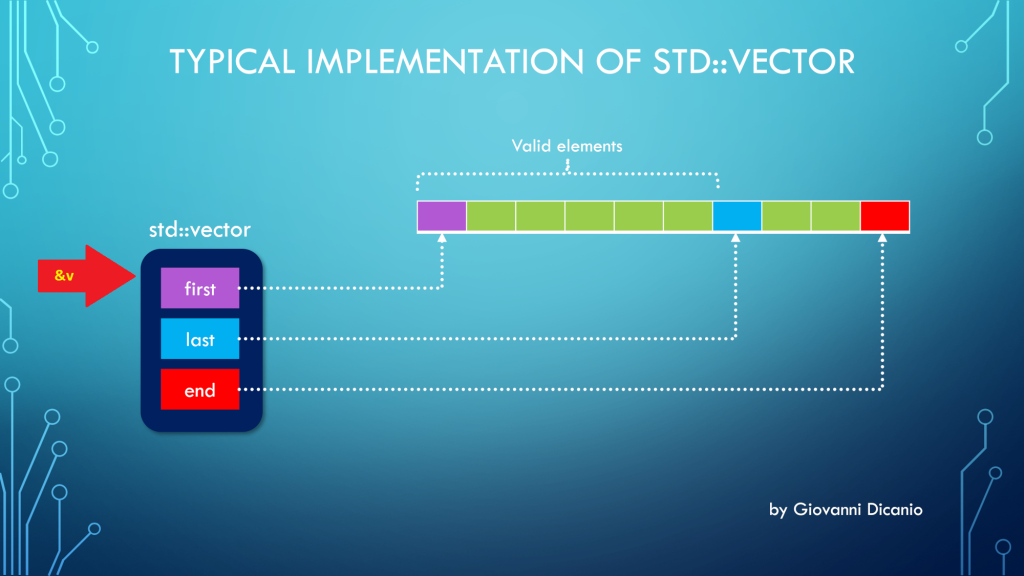
But the above code is wrong. In fact, if you use the address-of operator (&) with a std::vector instance, you get the address of the “control block” of std::vector, that is the block that contains the three pointers first, last, end, according to the model discussed in a previous blog post:
Taking the address of a std::vector (&v) points to its control block
Luckily, if you try the above code, it will fail to compile, with a compiler error message like this one produced by the Visual C++ compiler in VS 2019:
Error C2664: 'void DoSomething(const int *,size_t)':
cannot convert argument 1
from 'std::vector<int,std::allocator<int>> *' to 'const int *'
Types pointed to are unrelated; conversion requires reinterpret_cast, C-style cast or function-style cast
What you really want here is the address of the vector’s elements stored in contiguous memory locations, and pointed to by the vector’s control block.
To get that address, you can invoke the address-of operator on the first element of the vector (which is the element at index 0): &v[0].
// This code works
DoSomething(&myData[0], myData.size());
As an alternative, you can invoke the std::vector::data method:
DoSomething(myData.data(), myData.size());
Now, there’s a note I’d like to point out for the case of empty vectors:
If size() is 0, data() may or may not return a null pointer.
CppReference.com
I would have preferred a well-defined behavior such that, when size is 0 (i.e. the vector is empty), data() must return a null pointer (nullptr). This is the good behavior that is implemented in the C++ Standard Library that comes with VS 2019. I believe the C++ Standard should be fixed to adhere to this intelligent behavior.
An example of writing clear code with good intention, but getting an unexpected C++ compiler error.
Someone asked me for help with their C++ code. The code was something like this:
std::wstring something;
std::optional<bool> result = something.empty() ?
        ReadBoolValueFromRegistry() : {};
The programmer who wrote this code wanted to check whether the ‘something’ string was empty, and if it was, a boolean value had to be read from the Windows registry, and then stored into the std::optionalresult variable.
On the other hand, if the ‘something’ string was not empty, the std::optional result should be default-initialized to an empty optional (i.e. an optional that doesn’t contain any value).
That was the programmer’s intention. Unfortunately, their code failed to compile with Visual Studio 2019 (C++17 mode was enabled).
The offending C++ code with squiggles under the {
There were squiggles under the opening brace {, and the Visual C++ compiler emitted the following error messages:
Error Code
Description
C2059
syntax error: ‘{‘
C2143
syntax error: missing ‘;’ before ‘{‘
I was asked: “What’s the problem here? Are there limitations of using the {} syntax to specify nothing?”
This is a good question. So, clearly, the C++ compiler didn’t interpret the {} syntax as a way to default-initialize the std::optional in case the string was not empty (i.e. the second “branch” in the conditional ternary operator).
A first step to help the C++ compiler figuring out the programmer’s intention could be to be more explicit. So, instead of using {}, you can try and use the std::nullopt constant, which represents an optional that doesn’t store any value.
// Attempt to fix the code: replace {} with std::nullopt
std::optional<bool> result = something.empty() ?
        ReadBoolValueFromRegistry() : std::nullopt;
Unfortunately, this code doesn’t compile either.
Why is that?
Well, to figure that out, let’s take a look at the C++ conditional operator (?:). Consider the conditional operator in its generic form:
// C++ conditional operator ?:
exp1 ? exp2 : exp3
In the above code snippet, “exp2” is represented by the ReadBoolValueFromRegistry call. This function returns a bool. So, in this case the return type of the conditional operator is bool.
// Attempt to fix the code: replace {} with std::nullopt
std::optional<bool> result = something.empty() ?
        ReadBoolValueFromRegistry() : std::nullopt;
//             ^^^--- exp2             ^^^--- exp3
//             Type: bool
On the other hand, if you look at “exp3”, you see std::nullopt, which is a constant of type std::nullopt_t, not a simple bool value!
So, you have this kind of type mismatch, and the C++ compiler complains. This time, the error message is:
Error C2446 ‘:’: no conversion from ‘const std::nullopt_t’ to ‘bool’
So, to fix that code, I suggested to “massage” it a little bit, like this:
// Rewrite the following code:
//
// std::optional<bool> result = something.empty() ?
//        ReadBoolValueFromRegistry() : {};
//
// in a slightly different manner, like this:
//
std::optional<bool> result{};
if (something.empty()) {
    result = ReadBoolValueFromRegistry();
}
Basically, you start with a default-initialized std::optional, which doesn’t contain any value. And then you assign the bool value read from the registry only if the particular condition is met.
The above C++ code compiles successfully, and does what was initially in the mind of the programmer.
P.S. I’m not a C++ “language lawyer”, but it would be great if the C++ language could be extended to allow the original simple code to just work:
std::optional<bool> result = something.empty() ?
        ReadBoolValueFromRegistry() : {};
First, let’s reveal the mystery of the “fixed 24-byte sizeof”; then, let’s see how to properly get the total size, in bytes, of all the elements stored in a std::vector.
Someone was modernizing some legacy C++ code. They had an array defined like this:
int v[100];
and they needed the size, in bytes, of that array, to pass that value to some function. They used sizeof(v) to get the previous array size.
When modernizing their code, they chose to use std::vector instead of the above raw C-style array. And they still used sizeof(v) to retrieve the size of the vector. For example:
The output they got when building their code in release mode with Visual Studio 2019 was 24. They also noted that they always got the same 24 output, independently from the number of elements in the std::vector!
This is clearly a bug. Let’s try to shed some light on it and show the proper way of getting the size of the total number of elements stored in a std::vector.
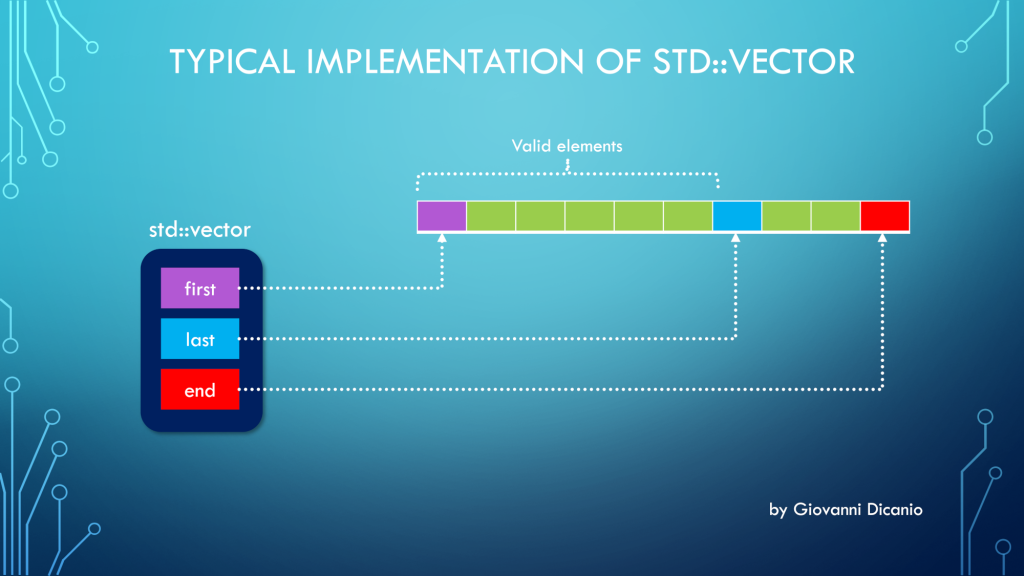
First, to understand this bug, you need to know how a std::vector is implemented. Basically, at least in Microsoft STL implementation (in release builds, and when using the default allocator1), a std::vector is made by three pointers, kind of like this:
Typical implementation of std::vector with three pointers: first, last, end
first: points to the beginning of the contiguous memory block that stores the vector’s elements
last: points one past the last valid element stored in the vector
end: points one past the end of the allocated memory for the vector’s elements
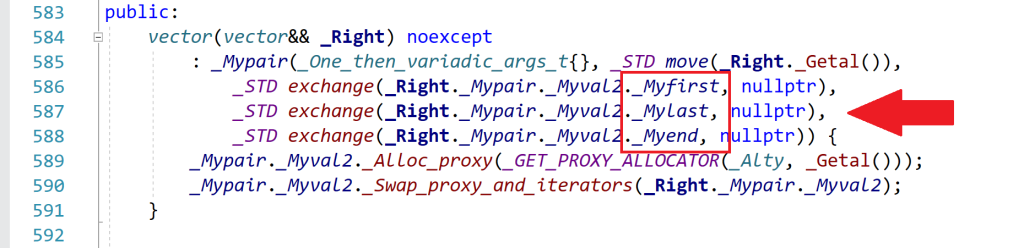
Spelunking inside the Microsoft STL implementation, you’ll see that the “real” names for these pointers are _Myfirst, _Mylast, _Myend, as shown for example in this part of the <vector> header:
An excerpt of the <vector> header that comes with Microsoft Visual Studio 2019
So, when you use sizeof with a std::vector instance, you are actually getting the size of the internal representation of the vector. In this case, you have three pointers. In 64-bit builds, each pointer occupies 8 bytes, so you have a total of 3*8 = 24 bytes, which is the number that sizeof returned in the above example.
As you can see, this number is independent from the actual number of elements stored in the vector. Whether the vector has one, three, ten or 10,000 elements, the size of the vector’s internal representation made by those three pointers is always fixed and given by the above number (at least in the Microsoft’s STL implementation that comes with Visual Studio2).
Now that the bug has been analyzed and the mystery explained, let’s see how to fix it.
Well, to get the “size of a vector”, considered as the number of bytes occupied by the elements stored in the vector, you can get the number of elements stored in the vector (returned by the vector::size method), and multiply that by the (fixed) size of each element, e.g.:
//
// v is a std::vector<int>
//
// v.size()    : number of elements in the vector
// sizeof(int) : size, in bytes, of each element
//
size_t sizeOfAllVectorElementsInBytes = v.size() * sizeof(int);
To write more generic code, assuming the vector is not empty, you can replace sizeof(int) with sizeof(v[0]), which is the sizeof the first element stored in the vector. (If the vector is empty, there is no valid element stored in it, so the index zero in v[0] is out of bounds, and the above code won’t work; it will probably trigger an assertion failure in debug builds.)
In addition, you could use the vector::value_type type name member to get the size of a single element (which would work also in the case of empty vectors). For example:
using IntVector = std::vector<int>;

IntVector v(100);

// Print the number of bytes occupied
// by the (valid) elements stored in the vector:
cout << v.size() * sizeof(IntVector::value_type);
To be even more generic, a helper template function like this could be used:
//
// Return the size, in bytes, of all the valid elements
// stored in the input vector
//
template <typename T, typename Alloc>
inline size_t SizeOfVector(const std::vector<T, Alloc> & v)
{
    return v.size() * sizeof(std::vector<T, Alloc>::value_type);
}


//
// Sample usage:
//
std::vector<int> v(100);
std::cout << SizeOfVector(v) << '\n';
// Prints 400, i.e. 100 * sizeof(int)
Bonus Reading
If you want to learn more about the internal implementation of std::vector (including how they represent the default allocator with an “empty class” using the compressed pair trick), you can read these two interesting blog posts on The Old New Thing blog:
// Sum the 16-bit signed integers stored in the values vector
int16_t Sum(const std::vector<int16_t>& values)
{
    int16_t sum = 0;

    for (auto num : values)
    {
        sum += num;
    }

    return sum;
}
How can you fix the integer overflow problem and associated weird negative results discussed in the above blog post?
Well, one option would be to simply “step up” the integer type. In other words, instead of storing the sum into an int16_t variable, you could use a larger integer type, like int32_t or even int64_t. I mean, the maximum positive integer value that can be represented with a 64-bit (signed) integer is (2^63)-1 = 9,223,372,036,854,775,807: sounds pretty reasonable to represent the sum of some 16-bit samples, doesn’t it?
The updated code using int64_t for the cumulative sum can look like this:
// Sum the 16-bit signed integers stored in the values vector.
// The cumulative sum is stored in a 64-bit integer
// to prevent integer overflow.
int64_t Sum(const std::vector<int16_t>& values)
{
    int64_t sum = 0;

    for (auto num : values)
    {
        sum += num;
    }

    return sum;
}
this time with the int64_t fix you get the correct result of 35,010. Of course, also a simple shorter int32_t would have worked fine in this example. And, if you want to be super-safe, you can still wrap it in a convenient SafeInt<>.
Explaining some of the “magic” behind signed integer overflow weird results.
In this blog post, I showed you some “interesting” (apparently weird) results that you can get when adding signed integer numbers. In that example, you saw that, if you add two positive signed integer numbers and their sum overflows (signed integer overflow is undefined behavior in C++), you can get a negative number.
As another example, I compiled this simple C++ code with Visual Studio C++ compiler:
#include <cstdint>  // for int16_t
#include <iostream> // for std::cout

int main()
{
    using std::cout;

    int16_t a = 3000;
    int16_t b = 32000;
    int16_t c = a + b;  // -30536

    cout << " a = " << a << '\n';
    cout << " b = " << b << '\n';
    cout << " a + b = " << c << '\n';
}
and got this output, with a negative sum of -30536.
Signed integer overflow causing a negative sum when adding positive integers
Now, you may ask: Why is that?
Well, to try to answer this question, consider the binary representations of the integer numbers from the above code:
int16_t a = 3000;  // 0000 1011 1011 1000
int16_t b = 32000; // 0111 1101 0000 0000
int16_t c = a + b; // 1000 1000 1011 1000
If you add a and b bitwise, you’ll get the binary sequence shown above for c.
Now, if you interpret the c sum’s binary sequence as a signed integer number in the Two’s complement representation, you’ll immediately see that you have a negative number! In fact, the most significant bit is set to 1, which in Two’s complement representation means that the number is negative.
int16_t c = a + b;
    //  c: 1000 1000 1011 1000
    //     1xxx xxxx xxxx xxxx
    //     *
    //     ^--- Negative number
    //          Most significant bit = 1
In particular, if you interpret the sum’s binary sequence 1000 1000 1011 1000 in Two’s complement, you’ll get exactly the negative value of -30536 shown in the above screenshot.

![C4834 warning message emitted by VC++ 2019 in its default C++14 mode, when the return value of a [[nodiscard]] function is discarded.](https://giodicanio.com/wp-content/uploads/2024/01/cpp_vs2019_default_cpp14_nodiscard_warning.png?w=974)