I added a few convenient methods to my C++ WinReg library to test if a key contains specific values and sub-keys.
I just wanted to let you know that I updated my C++ WinReg library adding a few methods to test if a registry key contains a given value or a sub-key.
For example, now you can easily check if a key contains a value with some simple C++ code like this:
// 'key' is an instance of the winreg::RegKey class.
// Check if the given key contains a value named "Connie":
if (key.ContainsValue(L"Connie"))
{
    // The value is in the key...
}
From an implementation point of view, the RegKey::ContainsValue method invokes the RegGetValueW Win32 API, and checks its return code.
If the return code is ERROR_SUCCESS (0), the value was found in the key, and the method returns true.
If the return code is ERROR_FILE_NOT_FOUND (2), it means that there is no value with that given name in the key, so the method returns false.
In all other cases, an exception is thrown.
There is a similar method to check for sub-keys, named ContainsSubKey. And there are also the non-exception forms TryContainsValue and TryContainsSubKey.
A convenient easy-to-use and hard-to-misuse high-level C++ library that wraps the complexity of the Windows Registry C-interface API.
The native Windows Registry API is a C-interface API, that is low-level and kind of hard and cumbersome to use.
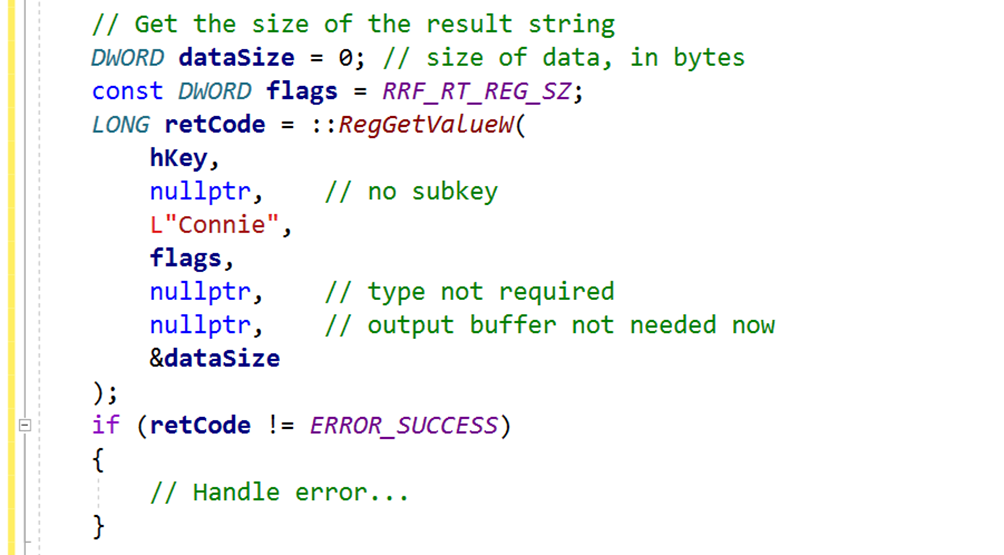
For example, suppose that you simply want to read a string value under a given key. You would end up writing code like this:
Sample code excerpt to read a string value from the Windows Registry using the native Windows C-interface API.
Note how complex and bug-prone that kind of code that directly calls the Windows RegGetValueW API is. And this is just the part to query the destination string length. Then, you need to allocate a string object with proper size (and pay attention to proper size-in-bytes-to-size-in-wchar_ts conversion!), and after that you can finally read the actual string value into the local string object.
That’s definitely a lot of bug-prone C++ code, and this is just to query a string value!
Moreover, in modern C++ code you should prefer using nice higher-level resource manager classes with automatic resource cleanup, instead of raw HKEY handles that are used in the native C-interface Windows Registry API.
Fortunately, it’s possible to hide that kind of complex and bug-prone code in a nice C++ library, that offers a much more programmer-friendly interface. This is basically what my C++ WinReg library does.
For example, with WinReg querying a string value from the Windows Registry is just a simple one-line of C++ code! Look at that:
You can query a string value with just one simple line of C++ code using WinReg.
With WinReg you can also enumerate all the values under a given key with simple intuitive C++ code like this:
auto values = key.EnumValues();

for (const auto & [valueName, valueType] : values)
{
    //
    // Use valueName and valueType
    //
    ...
}

 Giovanni Dicanio's Blog