The char-TCHAR-wchar_t Pendulum in Windows API Native C/C++ Programming

A trip down memory lane for Windows C/C++ text-related coding patterns: from char, to TCHAR, to wchar_t… and back to char?

I started learning Windows Win32 API programming in C and C++ on Windows 95 (I believe it was Windows 95 OSR 2, in about late 1996 or early 1997, with Visual C++ 4). Back then, the common coding pattern was to use char for string characters (as in Amiga and MS-DOS C programming). For example, the following is a code snippet extracted from the HELLOWIN.C source code from the “Programming Windows 95” book by Charles Petzold:

static char szAppName[] = "HelloWin";

// ...

hwnd = CreateWindow(szAppName,
                    "The Hello Program", 
                    ... 

After some time, I learned about the TCHAR model, and the wchar_t-based Unicode versions of Windows APIs, and the option to compile the same C/C++ source code in ANSI (char) or Unicode (wchar_t) mode using TCHAR instead of char.

In fact, the next edition of the aforementioned Petzold’s book (i.e. the fifth edition, in which the title went back to the original “Programming Windows”, without explicit reference to a specific Windows version) embraced the TCHAR model, and used TCHAR instead of char.

Using the TCHAR model, the above code would look like this, with char replaced by TCHAR:

static TCHAR szAppName[] = TEXT("HelloWin");

// ...

hwnd = CreateWindow(szAppName,
                    TEXT("The Hello Program"), 
                    ...

Note that TCHAR is used instead of char, and the string literals are enclosed or “decorated” with the TEXT(“…”) preprocessor macro. Note however that, in both cases, the same CreateWindow name is used as the API identifier.

Note that Visual C++ 4, 5, 6 and .NET 2003 all defaulted to ANSI/MBCS (i.e. 8-bit char strings, with TCHAR expanded to char).

When I moved to Windows XP, and was still using the great Visual C++ 6 (with Service Pack 6), the common “modern” pattern for international software was to just drop ANSI/MBCS 8-bit char strings, and use Unicode (UTF-16) with wchar_t at the Windows API boundary. The new Unicode-only version of the above code snippet became something like this:

static wchar_t szAppName[] = L"HelloWin";

// ...

hwnd = CreateWindow(szAppName,
                    L"The Hello Program", 
                    ...

Note that wchar_t is used this time instead of TCHAR, and string literals are decorated with L”…” instead of TEXT(“…”). The same CreateWindow API name is used. Note that this kind of code compiles just fine in Unicode (UTF-16) builds, but will fail to compile in ANSI/MBCS builds. That is because in ANSI/MBCS builds, CreateWindow, which is a preprocessor macro, will be expanded to CreateWindowA (the real API name), and CreateWindowA expects 8-bit char strings, not wchar_t strings.

On the other hand, in Unicode (UTF-16) builds, CreateWindow is expanded to CreateWindowW, which expects wchar_t strings, as provided in the above code snippet.

One of the problems with “ANSI/MBCS” (as they are identified in Visual Studio IDE) 8-bit char strings for international software was that “ANSI” was just insufficient for representing characters like Japanese kanjis or Chinese characters, just to name a few. While you may not care about those if you are only interested in writing programs for English-speaking customers, things become very different if you want to develop software for an international market.

I have to say that “ANSI” was a bit ambigous as a code page term. To be more precise, one of the most popular encoding for 8-bit char strings on Windows was Windows code page 1252, a.k.a. CP-1252 or Windows-1252. If you take a look at the representable characters in CP-1252, you’ll see that it is fine for English and Western Europe languages (like Italian), but it is insufficient for Japanese or Chinese, as their “characters” are not represented in there.

Note that CP-1252 is not even sufficient for some Eastern Europe languages, which are better covered by another code page: Windows-1250.

Another problem that arises with these 8-bit char encodings is ambiguity. For example, the same byte 0xC8 represents È (upper case E grave) in Windows-1252, but it maps to this completely different grapheme Č in Windows-1250.

So, moving to Unicode UTF-16 and wchar_t in Windows native API programming solved these problems.

Note that, starting with Visual C++ 2005 (that came with Visual Studio 2005), the default setting for C/C++ code was using Unicode (UTF-16) and wchar_t, instead of ANSI/MBCS as in previous versions.


More recently, starting with some edition of Windows 10 (version 1903, May 2019 Update), there is an option to set the default “code page” for a process to Unicode UTF-8. In other words, the 8-bit -A versions of the Windows APIs can default to Unicode UTF-8, instead of some other code page.

So, for some Windows programmers, the pendulum is swinging back to char!

Finding the Next Unicode Code Point in Strings: UTF-8 vs. UTF-16

How does the simple ASCII “pch++” map to Unicode? How can we find the next Unicode code point in text that uses variable-length encodings like UTF-16 and UTF-8? And, very importantly: Which one is *simpler*?

When working with ASCII strings, finding the next character is really easy: if p is a const char* pointer pointing to the current char, you can simply advance it to point to the next ASCII character with a simple p++.

What happens when the text is encoded in Unicode? Let’s consider both cases of the UTF-16 and UTF-8 encodings.

According to the official “What is Unicode?” web page of the Unicode consortium’s Web site:

The Unicode Standard provides a unique number for every character, no matter what platform, device, application or language.

This unique number is called code point.

In the UTF-16 encoding, a Unicode code point is represented using 16-bit code units. In the UTF-8 encoding, a Unicode code point is represented using 8-bit code units.

Both UTF-16 and UTF-8 are variable-length encodings. In particular, UTF-8 encodes each valid Unicode code point using one to four 8-bit byte units. On the other hand, UTF-16 is somewhat simpler: In fact, Unicode code points are encoded in UTF-16 using just one or two 16-bit code units.

EncodingSize of a code unitNumber of code units for encoding a single code point
UTF-1616 bits1 or 2
UTF-88 bits1, 2, 3, 4

I used the help of AI to generate C++ code that finds the next code point, in both cases of UTF-8 and UTF-16.

The functions have the following prototypes:

// Returns the next Unicode code point and number of bytes consumed.
// Throws std::out_of_range if index is out of bounds or string ends prematurely.
// Throws std::invalid_argument on invalid UTF-8 sequence.
[[nodiscard]] std::pair<char32_t, size_t> NextCodePointUtf8(
    const std::string& str, 
    size_t index
);

// Returns the next Unicode code point and the number of UTF-16 code units consumed.
// Throws std::out_of_range if index is out of bounds or string ends prematurely.
// Throws std::invalid_argument on invalid UTF-16 sequence.
[[nodiscard]] std::pair<char32_t, size_t> NextCodePointUtf16(
    const std::wstring& input, 
    size_t index
);

If you take a look at the implementation code, the code for UTF-16 is much simpler than the code for UTF-8. Even just in term of lines of code, the UTF-16 version is 34 LOC, vs. the UTF-8 version which is 84 LOC! So, the UTF-8 version takes more than 2X LOC than UTF-16! In addition, the code of the UTF-8 version (which I generated with the help of AI) is also much more complex in its logic.

For more details, you can take a look at this GitHub repo of mine. In particular, the implementation code for these functions is located inside the NextCodePoint.cpp source file.

Now, I’d like to ask: Does it really make sense to use UTF-8 to process Unicode text inside our C++ code? Is the higher complexity of processing UTF-8 really worth it? Wouldn’t it be better to use UTF-16 for Unicode string processing, and just use UTF-8 outside of application boundaries?

Converting Between Unicode UTF-16 and UTF-8 in Windows C++ Code

A detailed discussion on how to convert C++ strings between Unicode UTF-16 and UTF-8 in C++ code using Windows APIs like WideCharToMultiByte, and STL strings and string views.

Unicode UTF-16 is the “native” Unicode encoding used in Windows. In particular, the UTF-16LE (Little-Endian) format is used (which specifies the byte order, i.e. the bytes within a two-byte code unit are stored in the little-endian format, with the least significant byte stored at lower memory address).

Often the need arises to convert between UTF-16 and UTF-8 in Windows C++ code. For example, you may invoke a Windows API that returns a string in UTF-16 format, like FormatMessageW to get a descriptive error message from a system error code, and then you want to convert that string to UTF-8 to return it via a std::exception::what overriding, or write the text in UTF-8 encoding in a log file.

I usually like working with “native” UTF-16-encoded strings in Windows C++ code, and then convert to UTF-8 for external storage or transmission outside of application boundaries, or for cross-platform C++ code.

So, how can you convert some text from UTF-16 to UTF-8? The Windows API makes it available a C-interface function named WideCharToMultiByte. Note that there is also the symmetric MultiByteToWideChar that can be used for the opposite conversion from UTF-8 to UTF-16.

Let’s focus our attention on the aforementioned WideCharToMultiByte. You pass to it a UTF-16-encoded string, and on success this API will return the corresponding UTF-8-encoded string.

As you can see from Microsoft official documentation, this API takes several parameters:

int WideCharToMultiByte(
  [in]            UINT   CodePage,
  [in]            DWORD  dwFlags,
  [in]            LPCWCH lpWideCharStr,
  [in]            int    cchWideChar,
  [out, optional] LPSTR  lpMultiByteStr,
  [in]            int    cbMultiByte,
  [in, optional]  LPCCH  lpDefaultChar,
  [out, optional] LPBOOL lpUsedDefaultChar
);

So, instead of explicitly invoking it every time you need in your code, it’s much better to wrap it in a convenient higher-level C++ function.

Choosing a Name for the Conversion Function

How can we name that function? One option could be ConvertUtf16ToUtf8, or maybe just Utf16ToUtf8. In this way, the flow or direction of the conversion seems pretty clear from the function’s name.

However, let’s see some potential C++ code that invokes this helper function:

std::string utf8 = Utf16ToUtf8(utf16);

The kind of ugly thing here is that we see the utf8 result on the same side of the Utf16 part of the function name; and the Utf8 part of the function name is near the utf16 input argument:

std::string utf8 = Utf16ToUtf8(utf16);
//          ^^^^   =====   
//
// The utf8 return value is near the Utf16 part of the function name,
// and the Utf8 part of the function name is near the utf16 argument.

This may look somewhat intricate. Would it be nicer to have the UTF-8 return and UTF-16 argument parts on the same side, putting the return on the left and the argument on the right? Something like that:

std::string utf8 = Utf8FromUtf16(utf16);
//          ^^^^^^^^^^^    ===========
// The UTF-8 and UTF-16 parts are on the same side
//
// result = [Result]From[Argument](argument);
//

Anyway, pick the coding style that you prefer.

Let’s assume Utf8FromUtf16 from now on.

Defining the Public Interface of the Conversion Function

We can store the UTF-8 result string using std::string as the return type. For the UTF-16 input argument, we could use a std::wstring, passing it to the function as a const reference (const &), since this is an input read-only parameter, and we want to avoid potentially expensive deep copies:

std::string Utf8FromUtf16(const std::wstring& utf16);

If you are using at least C++17, another option to pass the input UTF-16 string is using a string view, in particular std::wstring_view:

std::string Utf8FromUtf16(std::wstring_view utf16);

Note that string views are cheap to copy, so they can be simply passed by value.

Note that when you invoke the WideCharToMultiByte API you have two options for passing the input string. In both cases you pass a pointer to the input UTF-16 string in the lpWideCharStr parameter. Then in the cchWideChar parameter you can either specify the count of wchar_ts in the input string, or pass -1 if the string is null-terminated and you want to process the whole string (letting the API figure out the length).

Note that passing the explicit wchar_t count allows you to process only a sub-string of a given string, which works nicely with the std::wstring_view C++ class.

In addition, you can mark this helper C++ function with [[nodiscard]], as discarding the return value would likely be a programming error, so it’s better to at least have the C++ compiler emit a warning about that:

[[nodiscard]] std::string Utf8FromUtf16(std::wstring_view utf16);

Now that we have defined the public interface of our helper conversion function, let’s focus on the implementation code.

Implementing the Conversion Code

The first thing we can do is to check the special case of an empty input string, and, in such case, just return an empty string back to the caller:

// Special case of empty input string
if (utf16.empty())
{
    // Empty input --> return empty output string
    return std::string{};
}

Now that we got this special case out of our way, let’s focus on the general case of non-empty UTF-16 input strings. We can proceed in three logical steps, as follows:

  1. Invoke the WideCharToMultiByte API a first time, to get the size of the result UTF-8 string.
  2. Create a std::string object with large enough internal array, that can store a UTF-8 string of that size.
  3. Invoke the WideCharToMultiByte API a second time, to do the actual conversion from UTF-16 to UTF-8, passing the address of the internal buffer of the UTF-8 string created in the previous step.

Let’s write some C++ code to put these steps into action.

First, the WideCharToMultiByte API can take several flags. In our case, we’ll use the WC_ERR_INVALID_CHARS flag, which tells the API to fail if an invalid input character is encountered. Since we’ll invoke the API a couple times, it makes sense to store this flag in a constant, and reuse it in both API calls:

// Safely fail if an invalid UTF-16 character sequence is encountered
constexpr DWORD kFlags = WC_ERR_INVALID_CHARS;

We also need the length of the input string, in wchar_t count. We can invoke the length (or size) method of std::wstring_view for that. However, note that wstring_view::length returns a value of type equivalent to size_t, while the WideCharToMultiByte API’s cchWideChar parameter is of type int. So we have a type mismatch here. We could simply use a static_cast<int> here, but that would be more like putting a “patch” on the issue. A better approach is to first check that the input string length can be safely stored inside an int, which is always the case for strings of reasonable lengths, but not for gigantic strings, like for strings of length greater than 2^31-1, that is more than two billion wchar_ts in size! In such cases, the conversion from an unsigned integer (size_t) to a signed integer (int) can generate a negative number, and negative lengths don’t make sense.

For a safe conversion, we could write this C++ code:

if (utf16.length() > static_cast<size_t>((std::numeric_limits<int>::max)()))
{
    throw std::overflow_error(
        "Input string is too long; size_t-length doesn't fit into an int."
    );
}

// Safely cast from size_t to int
const int utf16Length = static_cast<int>(utf16.length());

Now we can invoke the WideCharToMultiByte API to get the length of the result UTF-8 string, as described in the first step above:

// Get the length, in chars, of the resulting UTF-8 string
const int utf8Length = ::WideCharToMultiByte(
    CP_UTF8,          // convert to UTF-8
    kFlags,           // conversion flags
    utf16.data(),     // source UTF-16 string
    utf16Length,      // length of source UTF-16 string, in wchar_ts
    nullptr,          // unused - no conversion required in this step
    0,                // request size of destination buffer, in chars
    nullptr, nullptr  // unused
);
if (utf8Length == 0)
{
    // Conversion error: capture error code and throw
    const DWORD errorCode = ::GetLastError();
        
    // You can throw an exception here...
}

Now we can create a std::string object of the desired length, to store the result UTF-8 string (this is the second step):

// Make room in the destination string for the converted bits
std::string utf8(utf8Length, '\0');
char* utf8Buffer = utf8.data();

Now that we have a string object with proper size, we can invoke the WideCharToMultiByte API a second time, to do the actual conversion (this is the third step):

// Do the actual conversion from UTF-16 to UTF-8
int result = ::WideCharToMultiByte(
    CP_UTF8,          // convert to UTF-8
    kFlags,           // conversion flags
    utf16.data(),     // source UTF-16 string
    utf16Length,      // length of source UTF-16 string, in wchar_ts
    utf8Buffer,       // pointer to destination buffer
    utf8Length,       // size of destination buffer, in chars
    nullptr, nullptr  // unused
);
if (result == 0)
{
    // Conversion error: capture error code and throw
    const DWORD errorCode = ::GetLastError();

    // Throw some exception here...
}

And now we can finally return the result UTF-8 string back to the caller!

return utf8;

You can find reusable C++ code that follows these steps in this GitHub repo of mine. This repo contains code for converting in both directions: from UTF-16 to UTF-8 (as described here), and vice versa. The opposite conversion (from UTF-8 to UTF-16) is done invoking the MultiByteToWideChar API; the logical steps are the same.


P.S. You can also find an article of mine about this topic in an old issue of MSDN Magazine (September 2016): Unicode Encoding Conversions with STL Strings and Win32 APIs. This article contains a nice introduction to the Unicode UTF-16 and UTF-8 encodings. But please keep in mind that this article predates C++17, so there was no discussion of using string views for the input string parameters. Moreover, the (non const) pointer to the string’s internal array was retrieved with the &s[0] syntax, instead of invoking the convenient non-const [w]string::data overload introduced in C++17.

C++ Myth-Buster: UTF-8 Is a Simple Drop-in Replacement for ASCII char-based Strings in Existing Code

Let’s bust a myth that is a source of many subtle bugs. Are you sure that you can simply drop UTF-8-encoded text in char-based strings that expect ASCII text, and your C++ code will still work fine?

Several (many?) C++ programmers think that we should use UTF-8 everywhere as the Unicode encoding in our C++ code, stating that UTF-8 is a simple easy drop-in replacement for existing code that uses ASCII char-based strings, like const char* or std::string variables and parameters.

Of course, that UTF-8-simple-drop-in-replacement-for-ASCII thing is wrong and just a myth!

In fact, suppose that you wrote a C++ function whose purpose is to convert a std::string to lower case. For example:

// Code proposed by CppReference:
// https://en.cppreference.com/w/cpp/string/byte/tolower
//
// This code is basically the same found on StackOverflow here:
// https://stackoverflow.com/q/313970
// https://stackoverflow.com/a/313990 (<-- most voted answer)

std::string str_tolower(std::string s)
{
    std::transform(s.begin(), s.end(), s.begin(),
        // wrong code ...
        // <omitted>
 
        [](unsigned char c){ return std::tolower(c); } // correct
    );
    return s;
}

Well, that function works correctly for pure ASCII characters. But as soon as you try to pass it a UTF-8-encoded string, that code will not work correctly anymore! That was already discussed in my previous blog post, and also in this post on The Old New Thing blog.

I’ll give you another simple example. Consider the following C++ function, PrintUnderlined(), that receives a std::string (passed by const&) as input, and prints it with an underline below:

// Print the input text string, with an underline below
void PrintUnderlined(const std::string& text)
{
    std::cout << text << '\n';
    std::cout << std::string(text.length(), '-') << '\n';
}

For example, invoking PrintUnderlined(“Hello C++ World!”), you’ll get the following output:

Hello C++ World!
----------------

Well, as you can see, this function works fine with ASCII text. But, what happens if you pass UTF-8-encoded text to it?

Well, it may work as expected in some cases, but not in others. For example, what happens if the input string contains non-pure-ASCII characters, like the LATIN SMALL LETTER E WITH GRAVE è (U+00E8)? Well, in this case the UTF-8 encoding for “è” is represented by two bytes: 0xC3 0xA8. So, from the viewpoint of the std::string::length() method, that “single character è” counts as two chars. So, you’ll get two underscore characters for the single è, instead of the expected one underscore character. And that will produce a bogus output with the PrintUnderlined function! And note that this same function works correctly for ASCII char-based strings.

So, if you have some existing C++ code that works with const char* or std::string, or similar char-based string types, and assumes ASCII encoding for text, don’t expect to pass a UTF-8-encoded strings and have it just automagically working fine! The existing code may still compile fine, but there is a good chance that you could have introduced subtle runtime bugs and logic errors!

Some kanji characters

Spend some time thinking about the exact type of encoding of the const char* and std::string variables and parameters in your C++ code base: Are they pure ASCII strings? Are these char-based strings encoded in some particular ANSI/Windows code pages? Which code page? Maybe it’s an “ANSI” Windows code page like Latin 1 / Western European Windows-1252 code page? Or some other code page?

You can pack many different kinds of stuff in char-based strings (ASCII text, text encoded in various code pages, etc.), and there is no guarantee that code that used to work fine with that particular encoding would automatically continue to work correctly when you pass UTF-8-encoded text.

If we could start everything from scratch today, using UTF-8 for everything would certainly be an option. But, there is a thing called legacy code. And you cannot simply assume that you can just drop UTF-8-encoded strings in the existing char-based strings in existing legacy C++ code bases, and that everything will magically work fine. It may compile fine, but running fine as expected is another completely different thing.

Converting Between Unicode UTF-16 CString and UTF-8 std::string

Let’s continue the Unicode conversion series, discussing an interesting case of “mixed” CString/std::string UTF-16/UTF-8 conversions.

In previous blog posts of this series we saw how to convert between Unicode UTF-16 and UTF-8 using ATL/MFC’s CStringW/A classes and C++ Standard Library’s std::wstring/std::string classes.

In this post I’ll discuss another interesting scenario: Consider the case that you have a C++ Windows-specific code base, for example using ATL or MFC. In this portion of the code the CString class is used. The code is built in Unicode mode, so CString stores Unicode UTF-16-encoded text (in this case, CString is actually a CStringW class).

On the other hand, you have another portion of C++ code that is standard cross-platform and uses only the standard std::string class, storing Unicode text encoded in UTF-8.

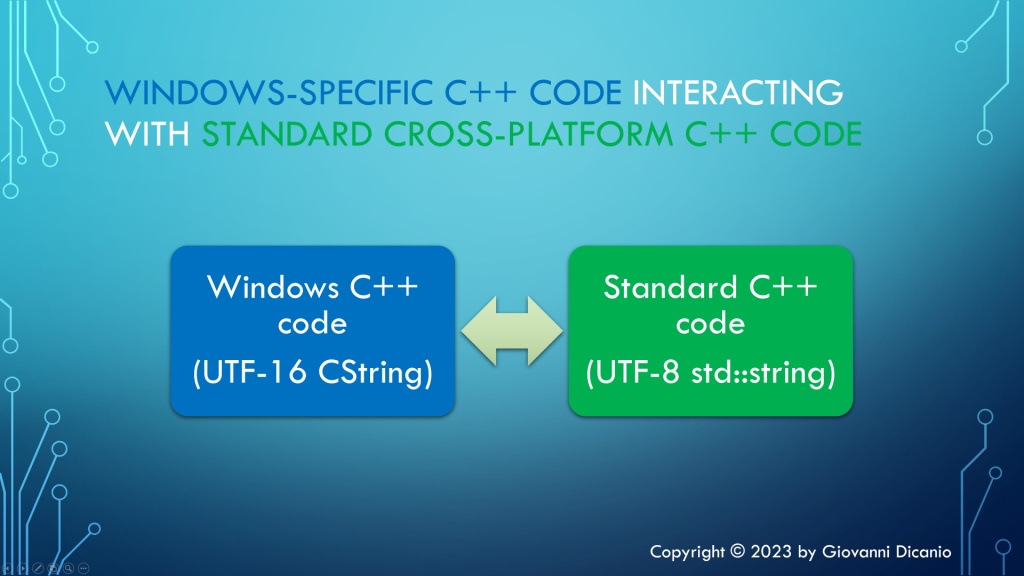
You need a bridge to connect these two “worlds”: the Windows-specific C++ code that uses UTF-16 CString, and the cross-platform C++ code that uses UTF-8 std::string.

Windows-specific C++ code, that uses UTF-16 CString, needs to interact with standard cross-platform C++ code, that uses UTF-8 std::string.
Windows-specific C++ code interacting with portable standard C++ code

Let’s see how to do that.

Basically, you have to do a kind of “code genetic-engineering” between the code that uses ATL classes and the code that uses STL classes.

For example, consider the conversion from UTF-16 CString to UTF-8 std::string.

The function declaration looks like this:

// Convert from UTF-16 CString to UTF-8 std::string
std::string ToUtf8(CString const& utf16)

Inside the function implementation, let’s start with the usual check for the special case of empty strings:

std::string ToUtf8(CString const& utf16)
{
    // Special case of empty input string
    if (utf16.IsEmpty())
    {
        // Empty input --> return empty output string
        return std::string{};
    }

Then you can invoke the WideCharToMultiByte API to figure out the size of the destination UTF-8 std::string:

// Safely fail if an invalid UTF-16 character sequence is encountered
constexpr DWORD kFlags = WC_ERR_INVALID_CHARS;

const int utf16Length = utf16.GetLength();

// Get the length, in chars, of the resulting UTF-8 string
const int utf8Length = ::WideCharToMultiByte(
    CP_UTF8,        // convert to UTF-8
    kFlags,         // conversion flags
    utf16,          // source UTF-16 string
    utf16Length,    // length of source UTF-16 string, in wchar_ts
    nullptr,        // unused - no conversion required in this step
    0,              // request size of destination buffer, in chars
    nullptr,        // unused
    nullptr         // unused
);
if (utf8Length == 0)
{
   // Conversion error: capture error code and throw
   ...
}

Then, as already discussed in previous articles in this series, once you know the size for the destination UTF-8 string, you can create a std::string object capable of storing a string of proper size, using a constructor overload that takes a size parameter (utf8Length) and a fill character (‘ ‘):

// Make room in the destination string for the converted bits
std::string utf8(utf8Length, ' ');

To get write access to the std::string object’s internal buffer, you can invoke the std::string::data method:

char* utf8Buffer = utf8.data();
ATLASSERT(utf8Buffer != nullptr);

Now you can invoke the WideCharToMultiByte API for the second time, to perform the actual conversion, using the destination string of proper size created above, and return the result utf8 string to the caller:

// Do the actual conversion from UTF-16 to UTF-8
int result = ::WideCharToMultiByte(
    CP_UTF8,        // convert to UTF-8
    kFlags,         // conversion flags
    utf16,          // source UTF-16 string
    utf16Length,    // length of source UTF-16 string, in wchar_ts
    utf8Buffer,     // pointer to destination buffer
    utf8Length,     // size of destination buffer, in chars
    nullptr,        // unused
    nullptr         // unused
);
if (result == 0)
{
    // Conversion error: capture error code and throw
    ...
}

return utf8;

I developed an easy-to-use C++ header-only library containing compilable code implementing these Unicode UTF-16/UTF-8 conversions using CString and std::string; you can find it in this GitHub repo of mine.

How Do I Convert Between Japanese Shift JIS and Unicode UTF-8/UTF-16?

When you need a “MultiByteToMultiByte” conversion API, and there is none, you can use a two-step conversion process with UTF-16 coming to the rescue.

Shift JIS is a text encoding for the Japanese language. While these days Unicode is much more widely used, you may still find Japanese text encoded using Shift JIS. So, you may find yourself in a situation where you need to convert text between Shift JIS (SJIS) and Unicode UTF-8 or UTF-16.

If you need to convert from SJIS to UTF-16, you can invoke the MultiByteToWideChar Win32 API, passing the Shift JIS code page identifier, which is 932. Similarly, for the opposite conversion from UTF-16 to SJIS you can invoke the WideCharToMultiByte API, passing the same SJIS code page ID.

You can simply reuse and adapt the C++ code discussed in the previous blog posts on Unicode UTF-16/UTF-8 conversions (using STL strings or ATL CString), which called the aforementioned WideCharToMultiByte and MultiByteToWideChar APIs.

Things become slightly more complicated (and interesting) if you need to convert between Shift JIS and Unicode UTF-8. In fact, in that case there is no “MultiByteToMultiByte” Win32 API available. But, fear not! 🙂 In fact, you can simply perform the conversion in two steps.

For example, to convert from Shift JIS to Unicode UTF-8, you can:

  1. Invoke MultiByteToWideChar to convert from Shift JIS to UTF-16
  2. Invoke WideCharToMultiByte to convert from UTF-16 (returned in the previous step) to UTF-8

In other words, you can use the UTF-16 encoding as a “temporary” helper result in this two-phase conversion process.

Similarly, if you want to convert from Unicode UTF-8 to Shift JIS, you can:

  1. Invoke MultiByteToWideChar to convert from UTF-8 to UTF-16
  2. Invoke WideCharToMultiByte to convert from UTF-16 (returned in the previous step) to Shift JIS.

Converting Between Unicode UTF-16 and UTF-8 Using C++ Standard Library’s Strings and Direct Win32 API Calls

std::string storing UTF-8-encoded text is a good option for C++ cross-platform code. Let’s discuss how to convert between that and UTF-16-encoded wstrings, using direct Win32 API calls.

Last time we saw how to convert between Unicode UTF-16 and UTF-8 using ATL strings and direct Win32 API calls. Now let’s focus on doing the same Unicode UTF-16/UTF-8 conversions but this time using C++ Standard Library’s strings. In particular, you can use std::wstring to represent UTF-16-encoded strings, and std::string for UTF-8-encoded ones.

Using the same coding style of the previous blog post, the conversion function prototypes can look like this:

// Convert from UTF-16 to UTF-8
std::string ToUtf8(std::wstring const& utf16);
 
// Convert from UTF-8 to UTF-16
std::wstring ToUtf16(std::string const& utf8);

As an alternative, you may consider the C++ Standard Library snake_case style, and the various std::to_string and std::to_wstring overloaded functions, and use something like this:

// Convert from UTF-16 to UTF-8
std::string to_uf8_string(std::wstring const& utf16);
 
// Convert from UTF-8 to UTF-16
std::wstring to_utf16_wstring(std::string const& utf8);

Anyway, let’s keep the former coding style already used in the previous blog post.

The conversion code is very similar to what you already saw for the ATL CString case.

In particular, considering the UTF-16-to-UTF-8 conversion, you can start with the special case of an empty input string:

std::string ToUtf8(std::wstring const& utf16)
{
    // Special case of empty input string
    if (utf16.empty())
    {
        // Empty input --> return empty output string
        return std::string{};
    }

Then you can invoke the WideCharToMultiByte API to figure out the size of the destination UTF-8 string:

// Get the length, in chars, of the resulting UTF-8 string
const int utf8Length = ::WideCharToMultiByte(
    CP_UTF8,            // convert to UTF-8
    kFlags,             // conversion flags
    utf16.data(),       // source UTF-16 string
    utf16Length,        // length of source UTF-16 string, in wchar_ts
    nullptr,            // unused - no conversion required in this step
    0,                  // request size of destination buffer, in chars
    nullptr, nullptr    // unused
);
if (utf8Length == 0)
{
   // Conversion error: capture error code and throw
   ...
}

Note that, while in case of CString, you could simply pass CString instances to WideCharToMultiByte parameters expecting a const wchar_t* (thanks to the implicit conversion from CStringW to const wchar_t*), with std::wstring you have explicitly invoke a method to get that read-only wchar_t pointer. I invoked the wstring::data method; another option is to call the wstring::c_str method.

Moreover, you can define a custom C++ exception class to represent a conversion error, and throw instances of this exception on failure. For example, you could derive that exception from std::runtime_error, and add a DWORD data member to represent the error code returned by the GetLastError Win32 API.

Once you know the size for the destination UTF-8 string, you can create a std::string object capable of storing a string of proper size, using a constructor overload that takes a size parameter (utf8Length) and a fill character (‘ ‘):

// Make room in the destination string for the converted bits
std::string utf8(utf8Length, ' ');

To get write access to the std::string object’s internal buffer, you can invoke the std::string::data method:

char* utf8Buffer = utf8.data();

Now you can invoke the WideCharToMultiByte API for the second time, to perform the actual conversion, using a destination string of proper size created above:

// Do the actual conversion from UTF-16 to UTF-8
int result = ::WideCharToMultiByte(
    CP_UTF8,            // convert to UTF-8
    kFlags,             // conversion flags
    utf16.data(),       // source UTF-16 string
    utf16Length,        // length of source UTF-16 string, in wchar_ts
    utf8Buffer,         // pointer to destination buffer
    utf8Length,         // size of destination buffer, in chars
    nullptr, nullptr    // unused
);
if (result == 0)
{
    // Conversion error: capture error code and throw
    ...
}

Finally, you can simply return the result UTF-8 string back to the caller:

    return utf8;

} // End of function ToUtf8 

Note that with C++ Standard Library strings you don’t need the GetBuffer/ReleaseBuffer “dance” required by ATL CStrings.

I developed an easy-to-use C++ header-only library containing compilable code implementing these Unicode UTF-16/UTF-8 conversions using std::wstring/std::string; you can find it in this GitHub repo of mine.

Converting Between Unicode UTF-16 and UTF-8 Using ATL CString and Direct Win32 API Calls

Let’s step up from the previous ATL CW2A/CA2W helpers, and write more efficient (and more customizable) C++ code that directly invokes Win32 APIs for doing Unicode UTF-16/UTF-8 conversions.

Last time we saw how to convert text between Unicode UTF-16 and UTF-8 using a couple of ATL helper classes (CW2A and CA2W). While this can be a good initial approach to “break the ice” with these Unicode conversions, we can do better.

For example, the aforementioned ATL helper classes create their own temporary memory buffer for the conversion work. Then, the result of the conversion must be copied from that temporary buffer into the destination CStringA/W’s internal buffer. On the other hand, if we work with direct Win32 API calls, we will be able to avoid the intermediate CW2A/CA2W’s internal buffer, and we could directly write the converted bytes into the CStringA/W’s internal buffer. That is more efficient.

In addition, directly invoking the Win32 APIs allows us to customize their behavior, for example specifying ad hoc flags that better suit our needs.

Moreover, in this way we will have more freedom on how to signal error conditions: Throwing exceptions? And what kind of exceptions? Throwing a custom-defined exception class? Use return codes? Use something like std::optional? Whatever, you can just pick your favorite error-handling method for the particular problem at hand.

So, let’s start designing our custom Unicode UTF-16/UTF-8 conversion functions. First, we have to pick a couple of classes to store UTF-16-encoded text and UTF-8-encoded text. That’s easy: In the context of ATL (and MFC), we can pick CStringW for UTF-16, and CStringA for UTF-8.

Now, let’s focus on the prototype of the conversion functions. We could pick something like this:

// Convert from UTF-16 to UTF-8
CStringA Utf8FromUtf16(CStringW const& utf16);

// Convert from UTF-8 to UTF-16
CStringW Utf16FromUtf8(CStringA const& utf8);

With this coding style, considering the first function, the “Utf16” part of the function name is located near the corresponding “utf16” parameter, and the “Utf8” part is near the returned UTF-8 string. In other words, in this way we put the return on the left, and the argument on the right:

CStringA resultUtf8 = Utf8FromUtf16(utf16Text);
//                            ^^^^^^^^^^^^^^^  <--- Argument: UTF-16

CStringA resultUtf8 = Utf8FromUtf16(utf16Text);
//       ^^^^^^^^^^^^^^^^^  <--- Return: UTF-8

Another approach is something more similar to the various std::to_string overloads implemented by the C++ Standard Library:

// Convert from UTF-16 to UTF-8
CStringA ToUtf8(CStringW const& utf16);

// Convert from UTF-8 to UTF-16
CStringW ToUtf16(CStringA const& utf8);

Let’s pick up this second style.

Now, let’s focus on the UTF-16-to-UTF-8 conversion, as the inverse conversion is pretty similar.

// Convert from UTF-16 to UTF-8
CStringA ToUtf8(CStringW const& utf16)
{
    // TODO ...
}

The first thing we can do inside the conversion function is to check the special case of an empty input string. In this case, we’ll just return an empty output string:

// Convert from UTF-16 to UTF-8
CStringA ToUtf8(CStringW const& utf16)
{
    // Special case of empty input string
    if (utf16.IsEmpty())
    {
        // Empty input --> return empty output string
        return CStringA();
    }

Now let’s focus on the general case of non-empty input string. First, we need to figure out the size of the result UTF-8 string. Then, we can allocate a buffer of proper size for the result CStringA object. And finally we can invoke a proper Win32 API for doing the conversion.

So, how can you get the size of the destination UTF-8 string? You can invoke the WideCharToMultiByte Win32 API, like this:

// Safely fail if an invalid UTF-16 character sequence is encountered
constexpr DWORD kFlags = WC_ERR_INVALID_CHARS;

const int utf16Length = utf16.GetLength();

// Get the length, in chars, of the resulting UTF-8 string
const int utf8Length = ::WideCharToMultiByte(
    CP_UTF8,            // convert to UTF-8
    kFlags,             // conversion flags
    utf16,              // source UTF-16 string
    utf16Length,        // length of source UTF-16 string, in wchar_ts
    nullptr,            // unused - no conversion required in this step
    0,                  // request size of destination buffer, in chars
    nullptr, nullptr    // unused
);

Note that the interface of that C Win32 API is non-trivial and error prone. Anyway, after reading its documentation and doing some tests, you can figure the parameters out.

If this API fails, it will return 0. So, here you can write some error handling code:

if (utf8Length == 0)
{
    // Conversion error: capture error code and throw
    AtlThrowLastWin32();
}

Here I used the AtlThrowLastWin32 function, which basically invokes the GetLastError Win32 API, converts the returned DWORD error code to HRESULT, and invokes AtlThrow with that HRESULT value. Of course, you are free to define your custom C++ exception class and throw it in case of errors, or use whatever error-reporting method you like.

Now that we know how many chars (i.e. bytes) are required to represent the result UTF-8-encoded string, we can create a CStringA object, and invoke its GetBuffer method to allocate an internal CString buffer of proper size:

// Make room in the destination string for the converted bits
CStringA utf8;
char* utf8Buffer = utf8.GetBuffer(utf8Length);
ATLASSERT(utf8Buffer != nullptr);

Now we can invoke the aforementioned WideCharToMultiByte API again, this time passing the address of the allocated destination buffer and its size. In this way, the API will do the conversion work, and will write the UTF-8-encoded string in the provided destination buffer:

// Do the actual conversion from UTF-16 to UTF-8
int result = ::WideCharToMultiByte(
    CP_UTF8,            // convert to UTF-8
    kFlags,             // conversion flags
    utf16,              // source UTF-16 string
    utf16Length,        // length of source UTF-16 string, in wchar_ts
    utf8Buffer,         // pointer to destination buffer
    utf8Length,         // size of destination buffer, in chars
    nullptr, nullptr    // unused
);
if (result == 0)
{
    // Conversion error
    // ...
}

Before returning the result CStringA object, we need to release the buffer allocated with CString::GetBuffer, invoking the matching ReleaseBuffer method:

// Don't forget to call ReleaseBuffer on the CString object!
utf8.ReleaseBuffer(utf8Length);

Now we can happily return the utf8 CStringA object, containing the converted UTF-8-encoded string:

    return utf8;

} // End of function ToUtf8

A similar approach can be followed for the inverse conversion from UTF-8 to UTF-16. This time, the Win23 API to invoke is MultiByteToWideChar.

Fortunately, you don’t have to write this kind of code from scratch. On my GitHub page, I have uploaded some easy-to-use C++ code that I wrote that implements these two Unicode UTF-16/UTF-8 conversion functions, using ATL CStringW/A and direct Win32 API calls. Enjoy!

Converting Between Unicode UTF-16 and UTF-8 Using ATL Helpers

Do you have some international text (e.g. Japanese) stored as Unicode UTF-16 CString in your C++ application, and want to convert it to UTF-8 for cross-platform/external export? A couple of simple-to-use ATL helpers can come in handy!

Someone had a CString object containing a Japanese string loaded from an MFC application resources, and they wanted to convert that Japanese string to Unicode UTF-8.

// CString loaded from application resources.
// The C++ application is built with Visual Studio in Unicode mode,
// so CString is equivalent to CStringW in this context.
// The CStringW object stores the string using 
// the Unicode UTF-16 encoding.
CString text;  // CStringW, text encoded in UTF-16
text.LoadString(IDS_SOME_JAPANESE_TEXT);

// How to convert that text to UTF-8??

First, the C++/MFC application was built in Unicode mode (which has been the default since VS 2005); so, CString is equivalent to CStringW in that context. The CStringW object stores the string as text encoded in Unicode UTF-16.

How can you convert that to Unicode UTF-8?

One option is to invoke Win32 APIs like WideCharToMultiByte; however, note that this requires writing non-trivial error-prone C++ code.

Another option is to use some conversion helpers from ATL. Note that these ATL string conversion helpers can be used in both MFC/C++ applications, and also in Win32/C++ applications that aren’t built using the MFC framework.

In particular, to solve the problem at hand, you can use the ATL CW2A conversion helper to convert the original UTF-16-encoded CStringW to a CStringA object that stores the same text encoded in UTF-8:

#include <atlconv.h> // for ATL conversion helpers like CW2A


// 'text' is a CStringW object, encoded using UTF-16.
// Convert it to UTF-8, and store it in a CStringA object.
// NOTE the *CP_UTF8* conversion flag specified to CW2A:
CStringA utf8Text = CW2A(text, CP_UTF8);

// Now the CStringA utf8Text object contains the equivalent 
// of the original UTF-16 string, but encoded in UTF-8.
//
// You can use utf8Text where a UTF-8 const char* pointer 
// is needed, even to build a std::string object that contains 
// the UTF-8-encoded string, for example:
// 
//   std::string utf8(utf8Text);
//

CW2A is basically a typedef to a particular CW2AEX template implemented by ATL, which contains C++ code that invokes the aforementioned WideCharToMultiByte Win32 API, in addition to properly manage the memory for the converted string.

But you can ignore the details, and simply use CW2A with the CP_UTF8 flag for the conversion from UTF-16 to UTF-8:

// Some UTF-16 encoded text
CStringW utf16Text = ...;

// Convert it from UTF-16 to UTF-8 using CW2A:
// ** Don't forget the CP_UTF8 flag **
CStringA utf8Text = CW2A(utf16Text, CP_UTF8);

In addition, there is a symmetric conversion helper that you can use to convert from UTF-8 to UTF-16: CA2W. You can use it like this:

// Some UTF-8 encoded text
CStringA utf8Text = ...;

// Convert it from UTF-8 to UTF-16 using CA2W:
// ** Don't forget the CP_UTF8 flag **
CStringW utf16Text = CA2W(utf8Text, CP_UTF8);

Let’s wrap up this post with these (hopefully useful) Unicode UTF-16/UTF-8 conversion tables:

ATL/MFC String ClassUnicode Encoding
CStringWUTF-16
CStringAUTF-8
ATL/MFC CString classes and their associated Unicode encoding

ATL Conversion HelperFromTo
CW2AUTF-16UTF-8
CA2WUTF-8UTF-16
ATL CW2A and CA2W string conversion helpers