Converting Between Unicode UTF-16 and UTF-8 Using ATL Helpers

Do you have some international text (e.g. Japanese) stored as Unicode UTF-16 CString in your C++ application, and want to convert it to UTF-8 for cross-platform/external export? A couple of simple-to-use ATL helpers can come in handy!

Someone had a CString object containing a Japanese string loaded from an MFC application resources, and they wanted to convert that Japanese string to Unicode UTF-8.

// CString loaded from application resources.
// The C++ application is built with Visual Studio in Unicode mode,
// so CString is equivalent to CStringW in this context.
// The CStringW object stores the string using 
// the Unicode UTF-16 encoding.
CString text;  // CStringW, text encoded in UTF-16
text.LoadString(IDS_SOME_JAPANESE_TEXT);

// How to convert that text to UTF-8??

First, the C++/MFC application was built in Unicode mode (which has been the default since VS 2005); so, CString is equivalent to CStringW in that context. The CStringW object stores the string as text encoded in Unicode UTF-16.

How can you convert that to Unicode UTF-8?

One option is to invoke Win32 APIs like WideCharToMultiByte; however, note that this requires writing non-trivial error-prone C++ code.

Another option is to use some conversion helpers from ATL. Note that these ATL string conversion helpers can be used in both MFC/C++ applications, and also in Win32/C++ applications that aren’t built using the MFC framework.

In particular, to solve the problem at hand, you can use the ATL CW2A conversion helper to convert the original UTF-16-encoded CStringW to a CStringA object that stores the same text encoded in UTF-8:

#include <atlconv.h> // for ATL conversion helpers like CW2A


// 'text' is a CStringW object, encoded using UTF-16.
// Convert it to UTF-8, and store it in a CStringA object.
// NOTE the *CP_UTF8* conversion flag specified to CW2A:
CStringA utf8Text = CW2A(text, CP_UTF8);

// Now the CStringA utf8Text object contains the equivalent 
// of the original UTF-16 string, but encoded in UTF-8.
//
// You can use utf8Text where a UTF-8 const char* pointer 
// is needed, even to build a std::string object that contains 
// the UTF-8-encoded string, for example:
// 
//   std::string utf8(utf8Text);
//

CW2A is basically a typedef to a particular CW2AEX template implemented by ATL, which contains C++ code that invokes the aforementioned WideCharToMultiByte Win32 API, in addition to properly manage the memory for the converted string.

But you can ignore the details, and simply use CW2A with the CP_UTF8 flag for the conversion from UTF-16 to UTF-8:

// Some UTF-16 encoded text
CStringW utf16Text = ...;

// Convert it from UTF-16 to UTF-8 using CW2A:
// ** Don't forget the CP_UTF8 flag **
CStringA utf8Text = CW2A(utf16Text, CP_UTF8);

In addition, there is a symmetric conversion helper that you can use to convert from UTF-8 to UTF-16: CA2W. You can use it like this:

// Some UTF-8 encoded text
CStringA utf8Text = ...;

// Convert it from UTF-8 to UTF-16 using CA2W:
// ** Don't forget the CP_UTF8 flag **
CStringW utf16Text = CA2W(utf8Text, CP_UTF8);

Let’s wrap up this post with these (hopefully useful) Unicode UTF-16/UTF-8 conversion tables:

ATL/MFC String ClassUnicode Encoding
CStringWUTF-16
CStringAUTF-8
ATL/MFC CString classes and their associated Unicode encoding

ATL Conversion HelperFromTo
CW2AUTF-16UTF-8
CA2WUTF-8UTF-16
ATL CW2A and CA2W string conversion helpers

How to Print Unicode Text to the Windows Console in C++

How can you print Unicode text to the Windows console in your C++ programs? Let’s discuss both the UTF-16 and UTF-8 encoding cases.

Suppose that you want to print out some Unicode text to the Windows console. From a simple C++ console application created in Visual Studio, you may try this line of code inside main:

std::wcout << L"Japan written in Japanese: \x65e5\x672c (Nihon)\n";

The idea is to print the following text:

Japan written in Japanese: 日本 (Nihon)

The Unicode UTF-16 encoding of the first Japanese kanji is 0x65E5; the second kanji is encoded in UTF-16 as 0x672C. These are embedded in the C++ string literal sent to std::wcout using the escape sequences \x65e5 and \x672c respectively.

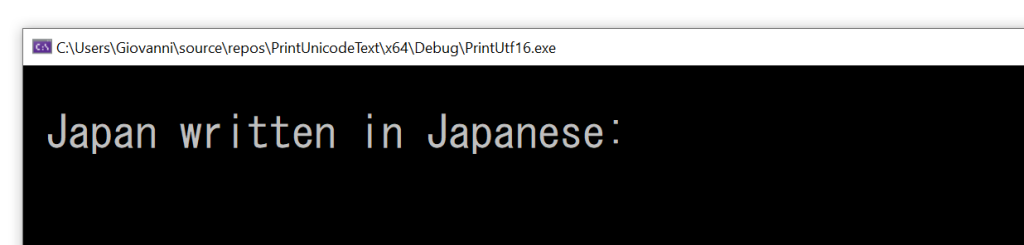
If you try to execute the above code, you get the following output:

The Japanese kanjis are not printed out in the Windows console in this case.
Wrong output: the Japanese kanjis are missing!

As you can see, the Japanese kanjis are not printed. Moreover, even the “standard ASCII” characters following those (i.e.: “(Nihon)”) are missing. There’s clearly a bug in the above code.

How can you fix that?

Well, the missing piece is setting the proper translation mode for stdout to Unicode UTF-16, using _setmode and the _O_U16TEXT mode parameter.

// Change stdout to Unicode UTF-16
_setmode(_fileno(stdout), _O_U16TEXT);

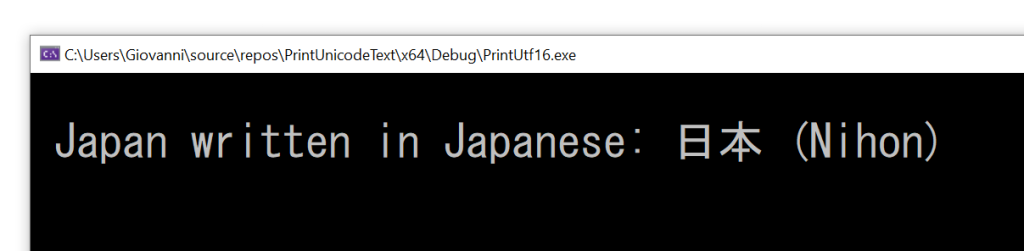
Now the output is what you expect:

The correct output, including the Japanese kanjis.
The correct output of Unicode UTF-16 text.

The complete compilable C++ code follows:

// Printing Unicode UTF-16 text to the Windows console

#include <fcntl.h>      // for _setmode
#include <io.h>         // for _setmode
#include <stdio.h>      // for _fileno

#include <iostream>     // for std::wcout

int main()
{
    // Change stdout to Unicode UTF-16
    _setmode(_fileno(stdout), _O_U16TEXT);

    // Print some Unicode text encoded in UTF-16
    std::wcout << L"Japan written in Japanese: \x65e5\x672c (Nihon)\n";
}

(The above code was compiled with VS 2019 and executed in the Windows 10 command prompt.)

Note that the font you use in the Windows console must support the characters you want to print; in this example, I used the MS Gothic font to show the Japanese kanjis.

The Unicode UTF-8 Case

What about printing text using Unicode UTF-8 instead of UTF-16 (especially with all the suggestions about using “UTF-8 everywhere“)?

Well, you may try to invoke _setmode and this time pass the UTF-8 mode flag _O_U8TEXT (instead of the previous _O_U16TEXT), like this:

// Change stdout to Unicode UTF-8
_setmode(_fileno(stdout), _O_U8TEXT);

And then send the UTF-8 encoded text via std::cout:

// Print some Unicode text encoded in UTF-8
std::cout << "Japan written in Japanese: \xE6\x97\xA5\xE6\x9C\xAC (Nihon)\n";

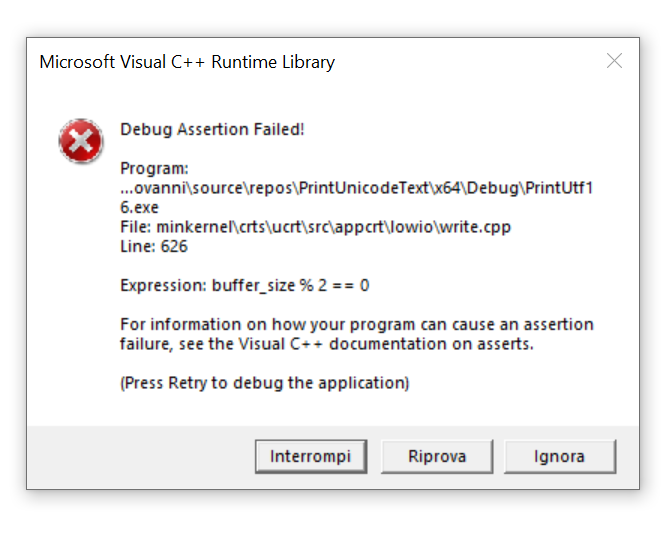
If you build and run that code, you get… an assertion failure!

Visual C++ debug assertion failure when trying to print out Unicode UTF-8 encoded text.
Visual C++ assertion failure when trying to print Unicode UTF-8-encoded text.

So, it seems that this (logical) scenario is not supported, at least with VS2019 and Windows 10.

How can you solve this problem? Well, an option is to take the Unicode UTF-8 encoded text, convert it to UTF-16 (for example using this code), and then use the method discussed above to print out the UTF-16 encoded text.

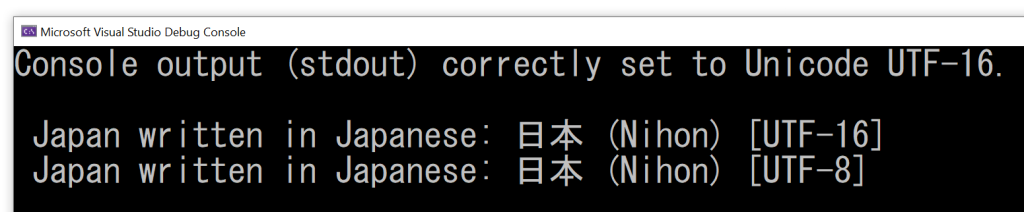
EDIT 2023-11-28: Compilable C++ demo code uploaded to GitHub.

Screenshot showing that both the Unicode UTF-16 and UTF-8 text are correctly printed in the Windows console.
Unicode UTF-16 and UTF-8 correctly printed out in the Windows console.