Pay attention to the target of the address-of (&) operator!
Suppose that you have some data stored in a std::vector, and you need to pass it to a function that takes a pointer to the beginning of the data, and in addition the data size or element count.
Something like this:
// Input data to process
std::vector<int> myData = { 11, 22, 33 };

//
// Do some processing on the above data
//
DoSomething(
    ??? ,         // beginning of data
    myData.size() // element count
);
You may think of using the address-of operator (&) to get a pointer to the beginning of the data, like this:
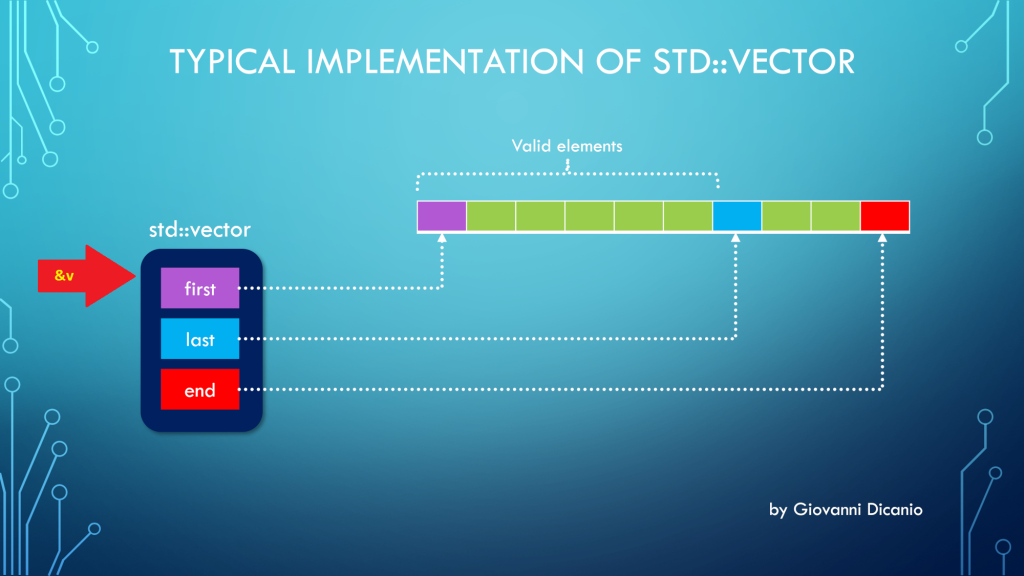
But the above code is wrong. In fact, if you use the address-of operator (&) with a std::vector instance, you get the address of the “control block” of std::vector, that is the block that contains the three pointers first, last, end, according to the model discussed in a previous blog post:
Taking the address of a std::vector (&v) points to its control block
Luckily, if you try the above code, it will fail to compile, with a compiler error message like this one produced by the Visual C++ compiler in VS 2019:
Error C2664: 'void DoSomething(const int *,size_t)':
cannot convert argument 1
from 'std::vector<int,std::allocator<int>> *' to 'const int *'
Types pointed to are unrelated; conversion requires reinterpret_cast, C-style cast or function-style cast
What you really want here is the address of the vector’s elements stored in contiguous memory locations, and pointed to by the vector’s control block.
To get that address, you can invoke the address-of operator on the first element of the vector (which is the element at index 0): &v[0].
// This code works
DoSomething(&myData[0], myData.size());
As an alternative, you can invoke the std::vector::data method:
DoSomething(myData.data(), myData.size());
Now, there’s a note I’d like to point out for the case of empty vectors:
If size() is 0, data() may or may not return a null pointer.
CppReference.com
I would have preferred a well-defined behavior such that, when size is 0 (i.e. the vector is empty), data() must return a null pointer (nullptr). This is the good behavior that is implemented in the C++ Standard Library that comes with VS 2019. I believe the C++ Standard should be fixed to adhere to this intelligent behavior.
An example of writing clear code with good intention, but getting an unexpected C++ compiler error.
Someone asked me for help with their C++ code. The code was something like this:
std::wstring something;
std::optional<bool> result = something.empty() ?
        ReadBoolValueFromRegistry() : {};
The programmer who wrote this code wanted to check whether the ‘something’ string was empty, and if it was, a boolean value had to be read from the Windows registry, and then stored into the std::optionalresult variable.
On the other hand, if the ‘something’ string was not empty, the std::optional result should be default-initialized to an empty optional (i.e. an optional that doesn’t contain any value).
That was the programmer’s intention. Unfortunately, their code failed to compile with Visual Studio 2019 (C++17 mode was enabled).
The offending C++ code with squiggles under the {
There were squiggles under the opening brace {, and the Visual C++ compiler emitted the following error messages:
Error Code
Description
C2059
syntax error: ‘{‘
C2143
syntax error: missing ‘;’ before ‘{‘
I was asked: “What’s the problem here? Are there limitations of using the {} syntax to specify nothing?”
This is a good question. So, clearly, the C++ compiler didn’t interpret the {} syntax as a way to default-initialize the std::optional in case the string was not empty (i.e. the second “branch” in the conditional ternary operator).
A first step to help the C++ compiler figuring out the programmer’s intention could be to be more explicit. So, instead of using {}, you can try and use the std::nullopt constant, which represents an optional that doesn’t store any value.
// Attempt to fix the code: replace {} with std::nullopt
std::optional<bool> result = something.empty() ?
        ReadBoolValueFromRegistry() : std::nullopt;
Unfortunately, this code doesn’t compile either.
Why is that?
Well, to figure that out, let’s take a look at the C++ conditional operator (?:). Consider the conditional operator in its generic form:
// C++ conditional operator ?:
exp1 ? exp2 : exp3
In the above code snippet, “exp2” is represented by the ReadBoolValueFromRegistry call. This function returns a bool. So, in this case the return type of the conditional operator is bool.
// Attempt to fix the code: replace {} with std::nullopt
std::optional<bool> result = something.empty() ?
        ReadBoolValueFromRegistry() : std::nullopt;
//             ^^^--- exp2             ^^^--- exp3
//             Type: bool
On the other hand, if you look at “exp3”, you see std::nullopt, which is a constant of type std::nullopt_t, not a simple bool value!
So, you have this kind of type mismatch, and the C++ compiler complains. This time, the error message is:
Error C2446 ‘:’: no conversion from ‘const std::nullopt_t’ to ‘bool’
So, to fix that code, I suggested to “massage” it a little bit, like this:
// Rewrite the following code:
//
// std::optional<bool> result = something.empty() ?
//        ReadBoolValueFromRegistry() : {};
//
// in a slightly different manner, like this:
//
std::optional<bool> result{};
if (something.empty()) {
    result = ReadBoolValueFromRegistry();
}
Basically, you start with a default-initialized std::optional, which doesn’t contain any value. And then you assign the bool value read from the registry only if the particular condition is met.
The above C++ code compiles successfully, and does what was initially in the mind of the programmer.
P.S. I’m not a C++ “language lawyer”, but it would be great if the C++ language could be extended to allow the original simple code to just work:
std::optional<bool> result = something.empty() ?
        ReadBoolValueFromRegistry() : {};
First, let’s reveal the mystery of the “fixed 24-byte sizeof”; then, let’s see how to properly get the total size, in bytes, of all the elements stored in a std::vector.
Someone was modernizing some legacy C++ code. They had an array defined like this:
int v[100];
and they needed the size, in bytes, of that array, to pass that value to some function. They used sizeof(v) to get the previous array size.
When modernizing their code, they chose to use std::vector instead of the above raw C-style array. And they still used sizeof(v) to retrieve the size of the vector. For example:
The output they got when building their code in release mode with Visual Studio 2019 was 24. They also noted that they always got the same 24 output, independently from the number of elements in the std::vector!
This is clearly a bug. Let’s try to shed some light on it and show the proper way of getting the size of the total number of elements stored in a std::vector.
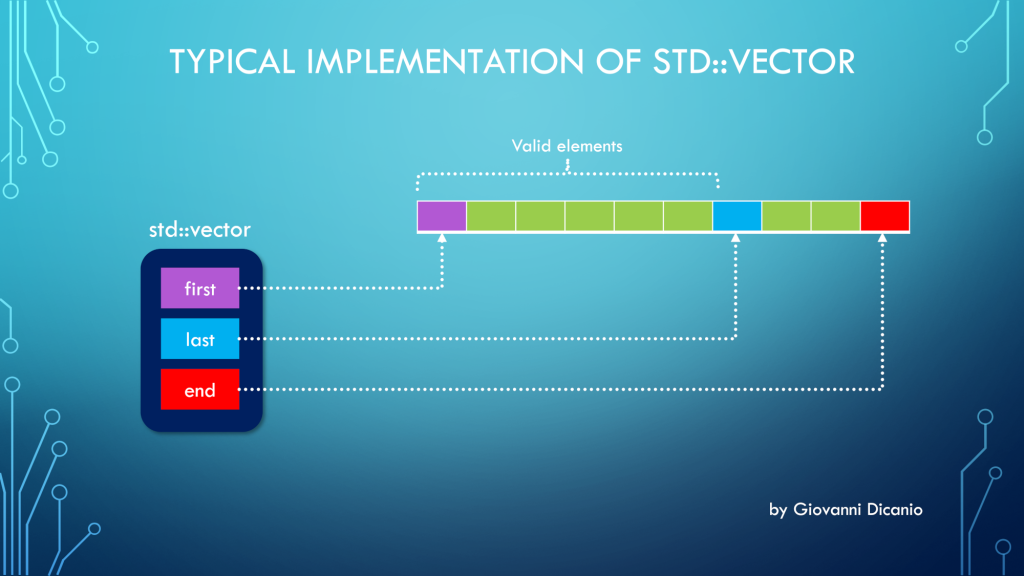
First, to understand this bug, you need to know how a std::vector is implemented. Basically, at least in Microsoft STL implementation (in release builds, and when using the default allocator1), a std::vector is made by three pointers, kind of like this:
Typical implementation of std::vector with three pointers: first, last, end
first: points to the beginning of the contiguous memory block that stores the vector’s elements
last: points one past the last valid element stored in the vector
end: points one past the end of the allocated memory for the vector’s elements
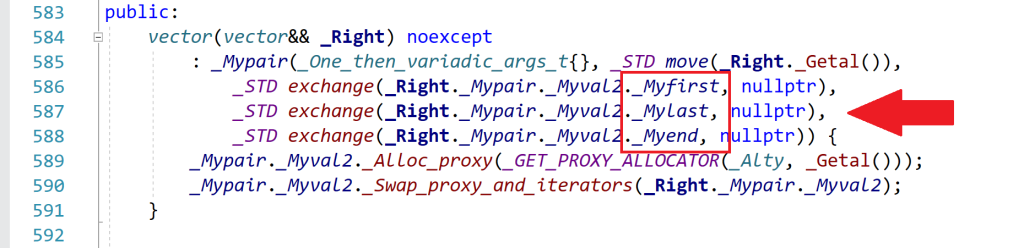
Spelunking inside the Microsoft STL implementation, you’ll see that the “real” names for these pointers are _Myfirst, _Mylast, _Myend, as shown for example in this part of the <vector> header:
An excerpt of the <vector> header that comes with Microsoft Visual Studio 2019
So, when you use sizeof with a std::vector instance, you are actually getting the size of the internal representation of the vector. In this case, you have three pointers. In 64-bit builds, each pointer occupies 8 bytes, so you have a total of 3*8 = 24 bytes, which is the number that sizeof returned in the above example.
As you can see, this number is independent from the actual number of elements stored in the vector. Whether the vector has one, three, ten or 10,000 elements, the size of the vector’s internal representation made by those three pointers is always fixed and given by the above number (at least in the Microsoft’s STL implementation that comes with Visual Studio2).
Now that the bug has been analyzed and the mystery explained, let’s see how to fix it.
Well, to get the “size of a vector”, considered as the number of bytes occupied by the elements stored in the vector, you can get the number of elements stored in the vector (returned by the vector::size method), and multiply that by the (fixed) size of each element, e.g.:
//
// v is a std::vector<int>
//
// v.size()    : number of elements in the vector
// sizeof(int) : size, in bytes, of each element
//
size_t sizeOfAllVectorElementsInBytes = v.size() * sizeof(int);
To write more generic code, assuming the vector is not empty, you can replace sizeof(int) with sizeof(v[0]), which is the sizeof the first element stored in the vector. (If the vector is empty, there is no valid element stored in it, so the index zero in v[0] is out of bounds, and the above code won’t work; it will probably trigger an assertion failure in debug builds.)
In addition, you could use the vector::value_type type name member to get the size of a single element (which would work also in the case of empty vectors). For example:
using IntVector = std::vector<int>;

IntVector v(100);

// Print the number of bytes occupied
// by the (valid) elements stored in the vector:
cout << v.size() * sizeof(IntVector::value_type);
To be even more generic, a helper template function like this could be used:
//
// Return the size, in bytes, of all the valid elements
// stored in the input vector
//
template <typename T, typename Alloc>
inline size_t SizeOfVector(const std::vector<T, Alloc> & v)
{
    return v.size() * sizeof(std::vector<T, Alloc>::value_type);
}


//
// Sample usage:
//
std::vector<int> v(100);
std::cout << SizeOfVector(v) << '\n';
// Prints 400, i.e. 100 * sizeof(int)
Bonus Reading
If you want to learn more about the internal implementation of std::vector (including how they represent the default allocator with an “empty class” using the compressed pair trick), you can read these two interesting blog posts on The Old New Thing blog:
Explaining some of the “magic” behind signed integer overflow weird results.
In this blog post, I showed you some “interesting” (apparently weird) results that you can get when adding signed integer numbers. In that example, you saw that, if you add two positive signed integer numbers and their sum overflows (signed integer overflow is undefined behavior in C++), you can get a negative number.
As another example, I compiled this simple C++ code with Visual Studio C++ compiler:
#include <cstdint>  // for int16_t
#include <iostream> // for std::cout

int main()
{
    using std::cout;

    int16_t a = 3000;
    int16_t b = 32000;
    int16_t c = a + b;  // -30536

    cout << " a = " << a << '\n';
    cout << " b = " << b << '\n';
    cout << " a + b = " << c << '\n';
}
and got this output, with a negative sum of -30536.
Signed integer overflow causing a negative sum when adding positive integers
Now, you may ask: Why is that?
Well, to try to answer this question, consider the binary representations of the integer numbers from the above code:
int16_t a = 3000;  // 0000 1011 1011 1000
int16_t b = 32000; // 0111 1101 0000 0000
int16_t c = a + b; // 1000 1000 1011 1000
If you add a and b bitwise, you’ll get the binary sequence shown above for c.
Now, if you interpret the c sum’s binary sequence as a signed integer number in the Two’s complement representation, you’ll immediately see that you have a negative number! In fact, the most significant bit is set to 1, which in Two’s complement representation means that the number is negative.
int16_t c = a + b;
    //  c: 1000 1000 1011 1000
    //     1xxx xxxx xxxx xxxx
    //     *
    //     ^--- Negative number
    //          Most significant bit = 1
In particular, if you interpret the sum’s binary sequence 1000 1000 1011 1000 in Two’s complement, you’ll get exactly the negative value of -30536 shown in the above screenshot.
Last time, I introduced the convenient and easy-to-use SafeInt C++ library.
You might have experimented with it in a simple C++ console application, and noted that everything is fine.
Now, suppose that you want to use SafeInt in some Windows C++ project that directly or indirectly requires the <Windows.h> header.
Well, if you take your previous C++ code that used SafeInt and successfully compiled, and add an #include <Windows.h>, then try to compile it again, you’ll get lots of error messages!
Typically, you would get lots of errors like this:
Error C2589 ‘(‘: illegal token on right side of ‘::’
Error list in Visual Studio, when trying to compile C++ code that uses SafeInt and includes <Windows.h>
If you try and click on one of these errors, Visual Studio will point to the offending line in the “SafeInt.hpp” header, as shown below.
An example of offending line in SafeInt.hpp
In the above example, the error points to this line of code:
if (t != std::numeric_limits<T>::min() )
So, what’s going on here?
Well, the problem is that the Windows Platform SDK defines a couple of preprocessor macros named min and max. These definitions were imported with the inclusion of <Windows.h>.
So, here the C++ compiler is in “crisis mode”, as the above Windows-specific preprocessor macro definitions conflict with the std::numeric_limits::min and maxmember function calls.
So, how can you fix that?
Well, one option could be to #define the NOMINMAX preprocessor macro before including <Windows.h>:
#define NOMINMAX
#include <Windows.h>
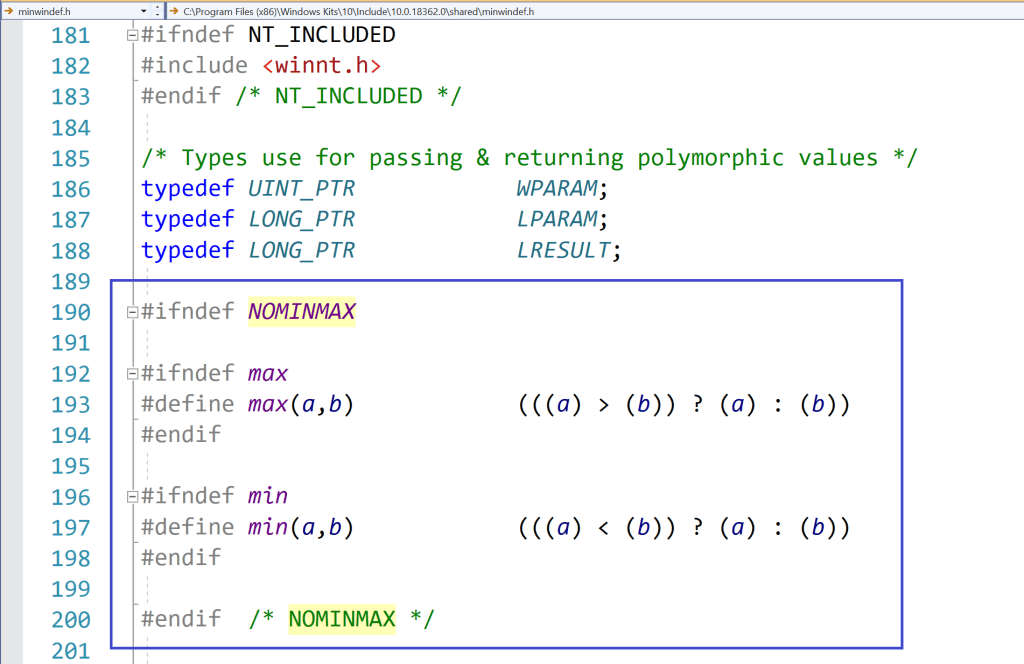
In this way, when <Windows.h> is included, some preprocessor conditional compilation will detect that NOMINMAX is defined, and will skip the definitions of the min and max preprocessor macros. So, the SafeInt code will compile fine.
Preprocessor logic in a Windows SDK header (<minwindef.h>) for the conditional compilation of the min and max macros
So, everything’s fine now, right?
Well, unfortunately not! In fact, if you may happen to include (directly or indirectly) the GDI+ header <gdiplus.h>, you’ll see that you’ll get compilation errors again, this time because some code in GDI+ does require the above Windows definitions of the min and max macros!
So, the previous (pseudo-)fix of #defining NOMINMAX, caused another problem!
Well, if you are working on your own C++ code, you can make your code immune to the above Windows min/max preprocessor macro problem, using an extra pair of parentheses around the std::numeric_limits<T>::min and max member function calls. This additional pair of parentheses will prevent the expansion of the min and max macros.
// Prevent macro expansion with an additional pair of parentheses
// around the std::numeric_limit's min and max member function calls.
(std::numeric_limits<T>::min)()
(std::numeric_limits<T>::max)()
However, that is not the case for the code in SafeInt.hpp. To try to make SafeInt.hpp more compatible with C++ code that requires the Windows Platform SDK, I modified the library’s code with the extra pairs of parentheses (added in many places!), and submitted a pull request. I hope the SafeInt library will be fixed ASAP.
Let’s discuss a cool open-source C++ library that helps you write nice and clear C++ code, but with safety checks *automatically* added under the hood.
Now, consider the apparently innocent simple C++ code that sums the integer values stored in a vector:
// Sum the 16-bit signed integers stored in the values vector
int16_t Sum(const std::vector<int16_t>& values)
{
    int16_t sum = 0;

    for (auto num : values)
    {
        sum += num;
    }

    return sum;
}
As we saw, that code is subject to bogus integer overflow, and may return a negative number even if all positive integer numbers are added together!
To prevent that kind of bugs, we added a safety check before doing the cumulative sum, throwing an exception in case an integer overflow was detected. Better throwing an exception than returning a bogus result!
The checking code was:
//
// Check for integer overflow *before* doing the sum
//
if (num > 0 && sum > std::numeric_limits<int16_t>::max() - num)
{
    throw std::overflow_error("Overflow in Sum function when adding a positive number.");
}
else if (num < 0 && sum < std::numeric_limits<int16_t>::min() - num)
{
    throw std::overflow_error("Overflow in Sum function when adding a negative number.");
}

// The sum is safe
sum += num;
Of course, writing this kind of complicated check code each time there is a sum operation that could potentially overflow would be excruciatingly cumbersome, and bug prone!
It would be certainly better to write a function that performs this kind of checks, and invoke it before adding two integers. That would be certainly a huge step forward versus repeating the above code each time two integers are added.
But, in C++ we can do even better than that!
In fact, C++ offers the ability to overload operators, such as + and +=. So, we could write a kind of SafeInt class, that wraps a “raw” built-in integer type in safe boundaries, and that overloads various operators like +,+=, and so on, and transparently and automatically checks that the operations are safe, and throws an exception in case of integer overflow, instead of returning a bogus result.
This class could be actually a class template, like a SafeInt<T>, where T could be an integer type, like int, int16_t, uint16_t, and so on.
That is a great idea! But developing that code from scratch would certainly require lots of time and energy, and especially we would spend a lot of time debugging and refining it, considering various corner cases and paying attention to the various overflow conditions, and so on.
Fortunately, you don’t have to do all that work! In fact, there is an open source library that does exactly that! This library is called SafeInt. It was initially created in Microsoft Office in 2003, and is now available as open source on GitHub.
To use the SafeInt C++ library in your code, you just have to #include the SafeInt.hpp header file. Basically, the SafeInt class template behaves like a drop-in replacement for built-in integer types; it does however do all the proper integer overflow checks behind the hood of its overloaded operators.
So, considering our previous Sum function, we can make it safe simply replacing the “raw” int16_t type that holds the sum with a SafeInt<int16_t>:
#include "SafeInt.hpp"    // The SafeInt C++ library

// Sum the 16-bit integers stored in the values vector
int16_t Sum(const std::vector<int16_t>& values)
{
    // Use SafeInt to check against integer overflow
    SafeInt<int16_t> sum; // = 0; <-- automatically init to 0

    for (auto num : values)
    {
        sum += num; // <-- *automatically* checked against integer overflow!!
    }

    return sum;
}
Note how the code is basically the sameclear and simple code we initially wrote! But, this time, the cumulative sum operation “sum += num” is automatically checked against integer overflow by the SafeInt’s implementation of the overloaded operator +=. The great thing is that all the checks are done automatically and under the hood by the SafeInt’s overloaded operators! You don’t have to spend time and energy writing potential bug-prone check code. It’s all done automatically and transparently. And the code looks very clear and simple, without additional “pollution” of if-else checks and throwing exceptions. This kind of (necessary) complexity is well embedded and hidden under the SafeInt’s implementation.
SafeInt by default signals errors, like integer overflow, throwing an exception of type SafeIntException, with the m_code data member set to a SafeIntError enum value that indicates the reason for the exception, like SafeIntArithmeticOverflow in case of integer overflow. The following code shows how you can capture the exception thrown by SafeInt in the above Sum function:
Note that also other kinds of errors are checked by SafeInt, like attempts to divide by zero.
Moreover, the default SafeInt exception handler can be customized, for example to throw another exception class, like std::runtime_error, or a custom exception, instead of the default SafeIntException.
So, thanks to SafeInt it’s really easy to protect your C++ code against integer overflow (and divisions by zero) and associated subtle bugs! Just replace “raw” built-in integer types with the corresponding SafeInt<T> wrapper, and you are good to go! The code will still look nice and simple, but safety checks will happen automatically under the hood. Thank you very much SafeInt and C++ operator overloading!
Let’s explore what happens in C++ when you try to add *unsigned* integer numbers and the sum exceeds the maximum value. You’ll also see how to protect your unsigned integer sums against subtle bugs!
Last time, we discussed signedinteger overflow in C++, and some associated subtle bugs, like summing a sequence of positive integer numbers, and getting a negative number as a result.
Now, let’s focus our attention on unsigned integer numbers.
As we did in the previous blog post, let’s start with an apparentlysimple and bug-free function, that takes a vector storing a sequence of numbers, and computes their sum. This time the numbers stored in the vector are unsigned integers of type uint16_t (i.e. 16-bit unsigned int):
#include <cstdint>  // for uint16_t
#include <vector>   // for std::vector

// Sum the 16-bit unsigned integers stored in the values vector
uint16_t Sum(const std::vector<uint16_t>& values)
{
    uint16_t sum = 0;

    for (auto num : values)
    {
        sum += num;
    }

    return sum;
}
Now, try calling the above function on the following test vector, and print out the result:
On my beloved Visual Studio 2019 C++ compiler targeting Windows 64-bit, I get the following result: 9474. Well, this time at least we got a positive number 😉 Seriously, what’s wrong with that result?
Well, if you see the sequence of the input values stored in the vector, you’ll note that the result sum is too small! For example, the vector contains the values 32000 and 40000, which are only by themselves greater than the resulting sum of 9474! I mean: this is (apparently…) nonsense. This is indeed a (subtle) bug!
Now, if you compute the sum of the above input numbers, the correct result is 75010. Unfortunately, this value is larger than the maximum (positive) integer number that can be represented with 16 bits, which is 65535.
Side Note: How can you get the maximum integer number that can be represented with the uint16_t type in C++? Simple: You can just invoke std::numeric_limits<uint16_t>::max():
cout << "Maximum value representable with uint16_t: \n";
cout << std::numeric_limits<uint16_t>::max() << '\n';
End of Side Note
So, here you basically have an integer “overflow” problem. In fact, the sum of the input uint16_t values is too big to be represented with an uint16_t.
Before moving forward, I’d like to point out that, while in C++ signed integer overflow is undefined behavior (so, basically the result you get depends on the particular C++ compiler/toolchain/architecture/even compiler switches, like GCC’s -fwrapv), unsigned integer “overflow” is well defined. Basically, what happens in the case of two unsigned integers being added together and exceeding the maximum value is the so called “wrap around“, according to the modulo operation.
To understand that with a concrete example, think of a clock. For example, if you think of the hour hand of a clock, when the hour hand points to 12, and you add 1 hour, the clock’s hour hand will point to 1; there is no “13”. Similarly, if the hour hand points to 12, and you add 3 hours, you don’t get 15, but 3. And so on. So, what happens for the clock is a wrap around after the maximum value of 12:
12 “+” 1 = 1
12 “+” 2 = 2
12 “+” 3 = 3
…
I enclosed the plus signs above in double quotes, because this is not a sum operation as we normally intend. It’s a “special” sum that wraps the result around the maximum hour value of 12.
You would get a similar “wrap around” behavior with a mechanical-style car odometer: When you reach the maximum value of 999’999 (kilometers or miles), the next kilometer or mile brings the counter back to zero.
Adding unsigned integer values follows the same logic, except that the maximum value is not 12 or 999’999, but 65535 for uint16_t. So, in this case you have:
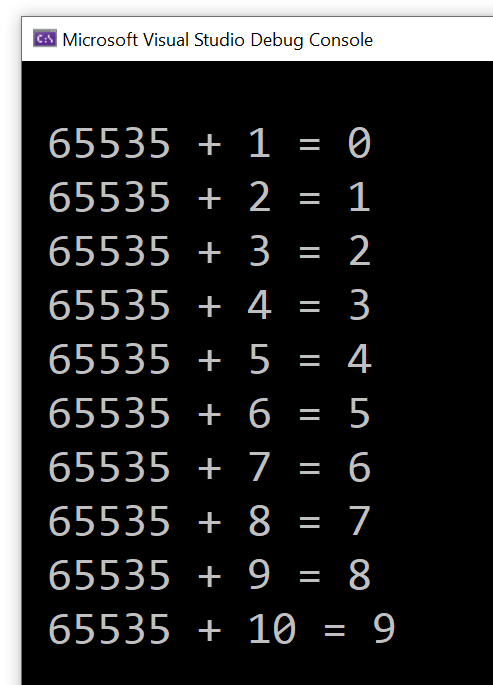
65535 + 1 = 0
65535 + 2 = 1
65535 + 3 = 2
and so on.
You can try this simple C++ loop code to see the above concept in action:
constexpr uint16_t kU16Max = std::numeric_limits<uint16_t>::max(); // 65535
for (uint16_t i = 1; i <= 10; i++)
{
    uint16_t sum = kU16Max + i;
    std::cout << " " << kU16Max << " + " << i << " = " << sum << '\n';
}
I got the following output:
Sample C++ loop showing unsigned integer wrap around
So, unsigned integer overflow in C++ results in wrap around according to modulo operation. Considering the initial example of summing vector elements: 10, 1000, 2000, 32000, 40000, the sum of the first four elements is 35010 and fits well in the uint16_t type. But when you add to that partial sum the last element 40000, you exceed the limit of 65535. At this point, wrap around happens, and you get the final result of 9474.
How of curiosity, you may ask: Where does that “magic number” of 9474 come from?
The modulo operation comes here to the rescue! Modulo basically means dividing two integer numbers and taking the remainder as the result of the operation.
So, if you take the correct sum value of 75010 and divide it by the number of integer values that can be represented with 16 bits, which is 2^16 = 65536, and you get the remainder of that integer division, the result is 9474, which is the result returned by the above Sum function!
Now, some people like to say that in C++ there is no overflow with unsigned integers, as before the overflow happens, the modulo operation is applied with the wrap around. I think this is more like a “word war”, but the concept should be clear at this point. In any case, when the sum of two unsigned integers doesn’t fit in the given unsigned integer type, the modulo operation is applied, with a consequent wrap around of the result. The key point is that, for unsigned integers, this is well defined behavior. Anyway, this is the reason why I enclosed the word “overflow” in double quotes in the blog title, and somewhere in the blog post text as well.
Coming back to the original sum problem, independently from the mechanics of the modulo operation and wrap around of unsigned integers, the key point is that the Sum function above returned a value that is not what a user would normally expect.
So, how can you prevent that from happening?
Well, just as we saw in the previous blog post on signed integer overflow, before doing the actual partial cumulative sum, we can check that the result does not overflow. And, if it does, we can throw an exception to signal the error.
Note that, while in the case of signed integers we have to check both the positive number and negative number cases, the latter check doesn’t apply here to unsigned integers (as there are no negative unsigned integers):
#include <cstdint>    // for uint16_t
#include <limits>     // for std::numeric_limits
#include <stdexcept>  // for std::overflow_error
#include <vector>     // for std::vector

// Sum the 16-bit unsigned integers stored in the values vector.
// Throws a std::overflow_error exception on integer overflow.
uint16_t Sum(const std::vector<uint16_t>& values)
{
    uint16_t sum = 0;

    for (auto num : values)
    {
        //
        // Check for integer overflow *before* doing the sum.
        // This will prevent bogus results due to "wrap around"
        // of unsigned integers.
        //
        if (num > 0 && sum > std::numeric_limits<uint16_t>::max() - num)
        {
            throw std::overflow_error("Overflow in Sum function.");
        }

        // The sum is safe
        sum += num;
    }

    return sum;
}
If you try to invoke the above function with the initial input vector, you will see that you get an exception thrown, instead of a wrong sum returned:
Summing signed integer values on computers, with a *finite* number of bits available for representing integer numbers (16 bits, 32 bits, whatever) is not always possible, and can lead to subtle bugs. Let’s discuss that in the context of C++, and let’s see how to protect our code against those bugs.
Suppose that you are operating on signed integer values, for example: 16-bit signed integers. These may be digital audio samples representing the amplitude of a signal; but, anyway, their nature and origin is not of key importance here.
You want to operate on those 16-bit signed integers, for example: you need to sum them. So, you write a C++ function like this:
#include <cstdint>  // for int16_t
#include <vector>   // for std::vector

// Sum the 16-bit signed integers stored in the values vector
int16_t Sum(const std::vector<int16_t>& values)
{
    int16_t sum = 0;

    for (auto num : values)
    {
        sum += num;
    }

    return sum;
}
The input vector contains the 16-bit signed integer values to sum. This vector is passed using const reference (const &), as we are observing it inside the function, without modifying it.
Then we use the safe and convenient range-for loop to iterate through each number in the vector, and update the cumulative sum.
Finally, when the range-for loop is completed, the sum is returned back to the caller.
Pretty straightforward, right?
Now, try and create a test vector containing some 16-bit signed integer values, and invoke the above Sum() function on that, like this:
I compiled and executed the test code using Microsoft Visual Studio 2019 C++ compiler in 64-bit mode, and the result I got was -30526: a negative number?!
Well, if you try to debug the Sum function, and execute the function’s code step by step, you’ll see that the initial partial sums are correct:
10 + 1000 = 1010
1010 + 2000 = 3010
Then, when you add the partial sum of 3010 with the last value of 32000 stored in the vector, the sum becomes a negative number.
Why is that?
Well, if you think of the 16-bit signed integer type, the maximum (positive) value that can be represented is 32767. You can get this value, for example, invoking std::numeric_limits<int16_t>::max():
cout << "Maximum value representable with int16_t: \n";
cout << std::numeric_limits<int16_t>::max() << '\n';
So, in the above sum example, when 3010 is summed with 32000, the sum exceeds the maximum value of 32767, and you hit an integer overflow.
In C++, signed integer overflow is undefined behavior. In this case of Microsoft Visual C++ 2019 compiler on Windows, we got a negative number as a sum of positive numbers, which, from a “high level” perspective is mathematically meaningless. (Actually, if you consider the binary representation of these numbers, the result kind of makes sense. But, going down to this low binary level is out of the scope of this post; moreover, in any case, from a “high-level” common mathematical perspective, summing positive integer numbers cannot lead to a negative result.)
So, how can we prevent such integer overflows to happen and cause buggy meaningless results?
Well, we could modify the above Sum function code, performing some safety checks before actually calculating the sum.
// Sum the 16-bit signed integers stored in the values vector
int16_t Sum(const std::vector<int16_t>& values)
{
    int16_t sum = 0;

    for (auto num : values)
    {
        //
        // TODO: Add safety checks here to prevent integer overflows
        //
        sum += num;
    }

    return sum;
}
If you think about it, if you are adding two positive integer numbers, what is the condition such that their sum is representable with the same signed integer type (int16_t in this case)?
Well, the following condition must be satisfied:
a + b <= MAX
where MAX is the maximum value that can be represented in the given type: std::numeric_limits<int16_t>::max() or 32767 in our case.
In other words, the above condition expresses in mathematical terms that the sum of the two positive integer numbers a and b cannot exceed the maximum value MAX representable with the given signed integer type.
So, the overflow condition is the negation of the above condition, that is:
a + b > MAX
Of course, as we just saw above, you cannot perform the sum (a+b) on a computer if the sum value overflows! So, it seems like a snake biting its own tail, right? Well, we can fix that problem simply massaging the above condition, moving the ‘a’ quantity on the right-hand side, and changing its sign accordingly, like this:
b > MAX – a
So, the above is the overflow condition when a and b are positive integer numbers. Note that both sides of this condition can be safely evaluated, as (MAX – a) is always representable in the given type (int16_t in this example).
Now, you can do a similar reasoning for the case that both numbers are negative, and you want to protect the sum from becoming less than numeric_limits::min, which is -32768 for int16_t.
The overflow condition for summing two negative numbers is:
a + b < MIN
Which is equivalent to:
b < MIN – a
Now, let’s apply this knowledge to modify our Sum function to prevent integer overflow. We’ll basically check the overflow conditions above before doing the actual sum, and we’ll throw an exception in case of overflow, instead of producing a buggy sum value.
#include <cstdint>    // for int16_t
#include <limits>     // for std::numeric_limits
#include <stdexcept>  // for std::overflow_error
#include <vector>     // for std::vector

// Sum the 16-bit signed integers stored in the values vector.
// Throws a std::overflow_error exception on integer overflow.
int16_t Sum2(const std::vector<int16_t>& values)
{
    int16_t sum = 0;

    for (auto num : values)
    {
        //
        // Check for integer overflow *before* doing the sum
        //
        if (num > 0 && sum > std::numeric_limits<int16_t>::max() - num)
        {
            throw std::overflow_error("Overflow in Sum function when adding a positive number.");
        }
        else if (num < 0 && sum < std::numeric_limits<int16_t>::min() - num)
        {
            throw std::overflow_error("Overflow in Sum function when adding a negative number.");
        }

        // The sum is safe
        sum += num;
    }

    return sum;
}
Note that if you add two signed integer values that have different signs (so, you are basically making a subtraction of their absolute values), you can never overflow. So you might think of doing an additional check on the signs of the variables num and sum above, but I think that would be a useless complication of the above code, without any real performance benefits, so I would leave the code as is.
So, in this blog post we have discussed signed integer overflow. Next time, we’ll see the case of unsigned integers.
An interesting note from Google C++ Style Guide on unsigned integers resonates with the recent blog post on subtle bugs when mixing size_t and int.
I was going through Google C++ Style Guide, and found an interesting note on unsigned integers (from the Integer Types section). This resonated in particular with my recent writing on subtle bugs when mixing unsigned integer types like size_t (coming from the C++ Standard Library way of expressing a string length with an unsigned integer type) and signed integer types like int (required at the Win32 API interface of some functions like MultiByteToWideChar and WideCharToMultiByte).
That note from Google C++ style guide is quoted below, with emphasis mine:
Unsigned integers are good for representing bitfields and modular arithmetic.Because of historical accident, the C++ standard also uses unsigned integers to represent the size of containers – many members of the standards body believe this to be a mistake, but it is effectively impossible to fix at this point. The fact that unsigned arithmetic doesn’t model the behavior of a simple integer, but is instead defined by the standard to model modular arithmetic (wrapping around on overflow/underflow), means that a significant class of bugs cannot be diagnosed by the compiler. In other cases, the defined behavior impedes optimization.
That said, mixing signedness of integer types is responsible for an equally large class of problems. The best advice we can provide: try to use iterators and containers rather than pointers and sizes, try not to mix signedness, and try to avoid unsigned types (except for representing bitfields or modular arithmetic). Do not use an unsigned type merely to assert that a variable is non-negative.
Converting from size_t to int can cause subtle bugs! Let’s take the Win32 Unicode conversion API calls introduced in previous posts as an occasion to discuss some interesting size_t-to-int bugs, and how to write robust C++ code to protect against those.
For example, when you invoke the WideCharToMultiByte API to convert from UTF-16 to UTF-8, the fourth parameter (cchWideChar) represents the number of wchar_ts to process in the input string:
// The WideCharToMultiByte Win32 API declaration from MSDN:
// https://learn.microsoft.com/en-us/windows/win32/api/stringapiset/nf-stringapiset-widechartomultibyte

int WideCharToMultiByte(
  [in]            UINT                               CodePage,
  [in]            DWORD                              dwFlags,
  [in]            _In_NLS_string_(cchWideChar)LPCWCH lpWideCharStr,
  [in]            int                                cchWideChar,
  [out, optional] LPSTR                              lpMultiByteStr,
  [in]            int                                cbMultiByte,
  [in, optional]  LPCCH                              lpDefaultChar,
  [out, optional] LPBOOL                             lpUsedDefaultChar
);
As you can see from the function documentation, this cchWideChar “input string length” parameter is of type int.
On the other hand, the std::wstring::length/size methods return a value of type size_type, which is basically a size_t.
If you build your C++ code with Visual Studio in 64-bit mode, size_t, which is a typedef for unsigned long long, represents a 64-bit unsigned integer.
On the other hand, an int for the MS Visual C++ compiler is a 32-bit integer value, even in 64-bit builds.
So, when you pass the input string length from wstring::length/size to the WideCharToMultiByte API, you have a potential loss of data from 64-bit size_t (unsigned long long) to 32-bit int.
Moreover, even in 32-bit builds, when both size_t and int are 32-bit integers, you have signed/unsigned mismatch! In fact, in this case size_t is an unsigned 32-bit integer, while int is signed.
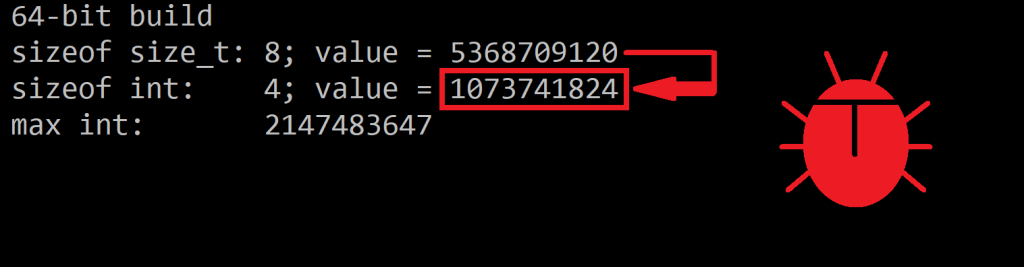
This is not a problem for strings of reasonable length. But, for example, if you happen to have a 3 GB string, in 32-bit builds a conversion from size_t to int will generate a negative number, and a negative length for a string doesn’t make sense. On the other hand, in 64-bit builds, if you a 5 GB string, converting from size_t to int will produce an int value of 1 GB, which is not the original string length.
The following table summarizes these kinds of bugs:
Build mode
size_t Type
int Type
Potential Bug when converting from size_t to int
64-bit
64-bit unsigned integer
32-bit signed integer
A “very big number” (e.g. 5GB) can be converted to an incorrect smaller number (e.g. 5GB -> 1GB)
32-bit
32-bit unsigned integer
32-bit signed integer
A “very big number” (e.g. 3GB) can be converted to a negative number (e.g. 3GB -> -1GB).
Potential bugs with size_t-to-int conversions
Note a few things:
size_t is an unsigned integer in both 32-bit and 64-bit target architectures (or build modes). However, its size does change.
int is always a 32-bit signed integer, in both 32-bit and 64-bit build modes.
This table applies to the Microsoft Visual C++ compiler (tested with VS 2019).
You can have some fun experimenting with these kinds of bugs with this simple C++ code:
// Testing "interesting" bugs with size_t-to-int conversions.
// Compiled with Microsoft Visual C++ in Visual Studio 2019
// by Giovanni Dicanio

#include <iostream>     // std::cout
#include <limits>       // std::numeric_limits

int main()
{
    using std::cout;

#ifdef _M_AMD64
    cout << " 64-bit build\n";
    const size_t s = 5UI64 * 1024 * 1024 * 1024; // 5 GB
#else
    cout << " 32-bit build\n";
    const size_t s = 3U * 1024 * 1024 * 1024; // 3 GB
#endif

    const int n = static_cast<int>(s);

    cout << " sizeof size_t: " << sizeof(s) << "; value = " << s << '\n';
    cout << " sizeof int:    " << sizeof(n) << "; value = " << n << '\n';
    cout << " max int:       " << (std::numeric_limits<int>::max)() << '\n';
}
Sample bogus conversion: a 5 giga size_t value is “silently” converted to a 1 giga int value
(Note: Bug icon designed by me 🙂 Copyright (c) All Rights Reserved)
So, these conversions from size_t to int can be dangerous and bug-prone, in both 32-bit and 64-bit builds.
Note that, if you just try to pass a size_t value to a parameter expecting an int value, without static_cast<int>, the VC++ compiler will correctly emit warning messages. And these should trigger some “red lights” in your head and suggest that your C++ code needs some attention.
Writing Safer Conversion Code
To avoid the above problems and subtle bugs with size_t-to-int conversions, you can check that the input size_t value can be properly and safely converted to int. In such positive case, you can use C++ static_cast<int> to perform the conversion, and correctly suppress C++ compiler warning messages . Else, you can throw an exception to signal the impossibility of a meaningful conversion.
For example:
// utf16.length() is the length of the input UTF-16 std::wstring,
// stored as a size_t value.

// If the size_t length exceeds the maximum value that can be
// stored into an int, throw an exception
constexpr int kIntMax = (std::numeric_limits<int>::max)();
if (utf16.length() > static_cast<size_t>(kIntMax))
{
    throw std::overflow_error(
        "Input string is too long: size_t-length doesn't fit into int.");
}

// The value stored in the size_t can be *safely* converted to int:
// you can use static_cast<int>(utf16.length()) for that purpose.
Note that I used std::numeric_limits from the C++ <limits> header to get the maximum (positive) value that can be stored in an int. This value is returned by std::numeric_limits<int>::max().
Fixing an Ugly Situation of Naming Conflict with max
Unfortunately, since Windows headers already define max as a preprocessor macro, this can create a parsing problem with the maxmethod name of std::numeric_limits from the C++ Standard Library. As a result of that, code invoking std::numeric_limits<int>::max() can fail to compile. To fix this problem, you can enclose the std::numeric_limits::max method call with an additional pair of parentheses, to prevent against the aforementioned macro expansion:
// This could fail to compile due to Windows headers
// already defining "max" as a preprocessor macro:
//
// std::numeric_limits<int>::max()
//
// To fix this problem, enclose the numeric_limits::max method call
// with an additional pair of parentheses:
constexpr int kIntMax = (std::numeric_limits<int>::max)();
//                      ^                             ^
//                      |                             |
//                      *------- additional ( ) ------*
Note: Another option to avoid the parsing problem with “max” could be to #define NOMINMAX before including <Windows.h>, but that may cause additional problems with some Windows Platform SDK headers that do require these Windows-specific preprocessor macros (like <GdiPlus.h>). As an alternative, the INT_MAX constant from <limits.h> could be considered instead of the std::numeric_limits class template.
Widening Your Perspective of size_t-to-int Conversions and Wrapping Up
While I took the current series of blog posts on Unicode conversions as an occasion to discuss these kinds of subtle size_t-to-int bugs, it’s important to note that this topic is much more general. In fact, converting from a size_t value to an int can happen many times when writing C++ code that, for example, uses C++ Standard Library classes and functions that represent lengths or counts of something (e.g. std::[w]string::length, std::vector::size) with size_type/size_t, and interacts with Win32 APIs that use int instead (like the aforementioned WideCharToMultiByte and MultiByteToWideChar APIs). Even ATL/MFC’s CString uses int (not size_t) to represent a string length. And similar problems can happen with third party libraries as well.
A reusable convenient C++ helper function can be written to safely convert from size_t to int, throwing an exception in case of impossible meaningful conversion. For example:
// Safely convert from size_t to int.
// Throws a std::overflow_error exception if the conversion is impossible.
inline int SafeSizeToInt(size_t sizeValue)
{
    constexpr int kIntMax = (std::numeric_limits<int>::max)();
    if (sizeValue > static_cast<size_t>(kIntMax))
    {
        throw std::overflow_error("size_t value is too big to fit into an int.");
    }

    return static_cast<int>(sizeValue);
}
Wrapping up, it’s also worth noting and repeating that, in case of strings of reasonable length (not certainly a 3 GB or 5 GB string), converting a length value from size_t to an int with a simple static_cast<int> doesn’t cause any problems. But if you want to write more robust C++ code that is prepared to handle even gigantic strings (maybe maliciously crafted on purpose?), an additional check and potentially throwing an exception is a good safer option.