Just a heads up to let you know that Axialis is offering special limited-time discounts and a 20% rebate on some of their icon bundles.
For the extra 20% rebate you can use this Coupon Code: AX-ARTI456DU89
You can find the offer page here!

Just a heads up to let you know that Axialis is offering special limited-time discounts and a 20% rebate on some of their icon bundles.
For the extra 20% rebate you can use this Coupon Code: AX-ARTI456DU89
You can find the offer page here!

Win32 APIs like MultiByteToWideChar (or ATL helpers like CA2W) can come in handy, with the knowledge of the EUC-JP code page ID, and maybe an additional intermediate step via UTF-16.
Japanese EUC (Extended Unix Code), or EUC-JP, is a variable-length multi-byte encoding used to represent Japanese characters. For example, I found this encoding used in a Japanese/English dictionary file. How can you convert from it to Unicode?
Well, first “converting to Unicode” requires further refinement; for example: Do you want to convert to Unicode UTF-16, or UTF-8?
If you want to display the Japanese text encoded in EUC-JP in some Windows graphical application, you need to convert to Unicode UTF-16, as this is the “native” Unicode encoding used by Windows Win32 APIs.
So, to convert from EUC-JP to UTF-16 you can invoke the MultiByteToWideChar Win32 API (or use the CA2W ATL conversion helper), as discussed in several posts in the series on Unicode Conversions. The trick here is to identify the correct code page for EUC-JP.
The MSDN page on Code Page Identifiers reports code page EUC-JP as 20932.
I couldn’t find a preprocessor macro in the Windows Platform SDK defining the aforementioned code page ID (unlike, for example, CP_UTF8), but you can simply create a named constant for that purpose, for example:
// Japanese EUC or EUC-JP Code Page ID
constexpr UINT kCodePage_JapaneseEuc = 20932;
Then you can pass this named constant (instead of the “magic number” 20932) as the first parameter to MultiByteToWideChar, or as the second parameter to the proper ATL’s CA2W constructor overload that takes an input string and a code page ID for the conversion.
In this way, you can convert your input text encoded in EUC-JP to Unicode UTF-16, for passing it at the Win32 API boundary.
Now, what about converting from EUC-JP to UTF-8? Well, you cannot directly perform such conversion: You have to do an additional intermediate step, and go through UTF-16, instead. Basically, you can follow these steps:
I already discussed this pattern in the blog post on converting between Japanese Shift JIS and Unicode UTF-8/UTF-16.
P.S. These days, if I have the freedom to pick an encoding for representing a text file, I would use Unicode UTF-8. But you may need to deal with legacy file formats, or very language-specific formats used in some particular contexts, so these kinds of conversions can be necessary.
This is an easy job, but with some gotchas.
In the previous series of articles on Unicode conversions, we saw how to perform various conversions, including ATL/STL mixed ones between Unicode UTF-16 CString and UTF-8 std::string.
Now, let’s assume that you have a Windows C++ code base using MFC or ATL, and the CString class. In Unicode builds (which have been the default in VS since Visual Studio 2005!), CString is a UTF-16 string class. You want to convert between that and the C++ Standard Library’s std::wstring.
How can you do that?
Well, in the Visual C++ implementation of the C++ standard library on Windows, std::wstring stores Unicode UTF-16-encoded text. (Note that, as already discussed in a previous blog post, this behavior is not portable to other platforms. But since we are discussing the case of an ATL or MFC code base here, we are already in the realm of Windows-specific C++ code.)
So, we have a match between CString and wstring here: they use the same Unicode encoding, as they both store Unicode UTF-16 text! Hooray! 🙂
So, the conversion between objects of these two classes is pretty simple. For example, you can use some C++ code like this:
//
// Conversion functions between ATL/MFC CString and std::wstring
// (Note: We assume Unicode build mode here!)
//
#if !defined(UNICODE)
#error This code requires Unicode build mode.
#endif
//
// Convert from std::wstring to ATL CString
//
inline CString ToCString(const std::wstring& ws)
{
if (!ws.empty())
{
ATLASSERT(ws.length() <= INT_MAX);
return CString(ws.c_str(), static_cast<int>(ws.length()));
}
else
{
return CString();
}
}
//
// Convert from ATL CString to std::wstring
//
inline std::wstring ToWString(const CString& cs)
{
if (!cs.IsEmpty())
{
return std::wstring(cs.GetString(), cs.GetLength());
}
else
{
return std::wstring();
}
}
Note that, since std::wstring’s length is expressed as a size_t, while CString’s length is expressed using an int, the conversion from wstring to CString is not always possible, in particular for gigantic strings. For that reason, I used a debug-build ATLASSERT check on the input wstring length in the ToCString function. This aspect was discussed in more details in my previous blog post on unsafe conversions from size_t to int.
An interesting note from Google C++ Style Guide on unsigned integers resonates with the recent blog post on subtle bugs when mixing size_t and int.
I was going through Google C++ Style Guide, and found an interesting note on unsigned integers (from the Integer Types section). This resonated in particular with my recent writing on subtle bugs when mixing unsigned integer types like size_t (coming from the C++ Standard Library way of expressing a string length with an unsigned integer type) and signed integer types like int (required at the Win32 API interface of some functions like MultiByteToWideChar and WideCharToMultiByte).
That note from Google C++ style guide is quoted below, with emphasis mine:
Unsigned integers are good for representing bitfields and modular arithmetic. Because of historical accident, the C++ standard also uses unsigned integers to represent the size of containers – many members of the standards body believe this to be a mistake, but it is effectively impossible to fix at this point. The fact that unsigned arithmetic doesn’t model the behavior of a simple integer, but is instead defined by the standard to model modular arithmetic (wrapping around on overflow/underflow), means that a significant class of bugs cannot be diagnosed by the compiler. In other cases, the defined behavior impedes optimization.
That said, mixing signedness of integer types is responsible for an equally large class of problems. The best advice we can provide: try to use iterators and containers rather than pointers and sizes, try not to mix signedness, and try to avoid unsigned types (except for representing bitfields or modular arithmetic). Do not use an unsigned type merely to assert that a variable is non-negative.
Let’s continue the Unicode conversion series, discussing an interesting case of “mixed” CString/std::string UTF-16/UTF-8 conversions.
In previous blog posts of this series we saw how to convert between Unicode UTF-16 and UTF-8 using ATL/MFC’s CStringW/A classes and C++ Standard Library’s std::wstring/std::string classes.
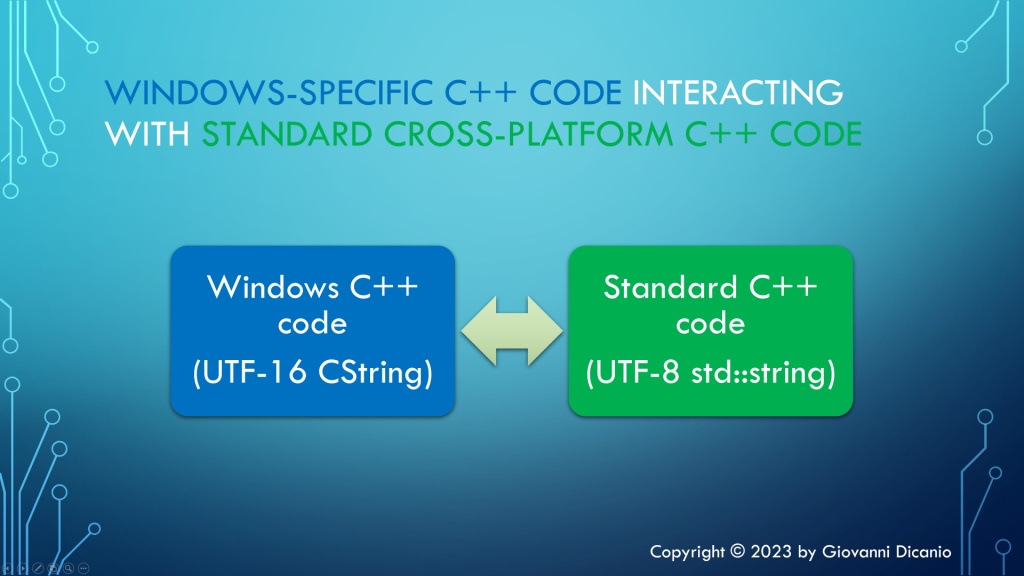
In this post I’ll discuss another interesting scenario: Consider the case that you have a C++ Windows-specific code base, for example using ATL or MFC. In this portion of the code the CString class is used. The code is built in Unicode mode, so CString stores Unicode UTF-16-encoded text (in this case, CString is actually a CStringW class).
On the other hand, you have another portion of C++ code that is standard cross-platform and uses only the standard std::string class, storing Unicode text encoded in UTF-8.
You need a bridge to connect these two “worlds”: the Windows-specific C++ code that uses UTF-16 CString, and the cross-platform C++ code that uses UTF-8 std::string.

Let’s see how to do that.
Basically, you have to do a kind of “code genetic-engineering” between the code that uses ATL classes and the code that uses STL classes.
For example, consider the conversion from UTF-16 CString to UTF-8 std::string.
The function declaration looks like this:
// Convert from UTF-16 CString to UTF-8 std::string
std::string ToUtf8(CString const& utf16)
Inside the function implementation, let’s start with the usual check for the special case of empty strings:
std::string ToUtf8(CString const& utf16)
{
// Special case of empty input string
if (utf16.IsEmpty())
{
// Empty input --> return empty output string
return std::string{};
}
Then you can invoke the WideCharToMultiByte API to figure out the size of the destination UTF-8 std::string:
// Safely fail if an invalid UTF-16 character sequence is encountered
constexpr DWORD kFlags = WC_ERR_INVALID_CHARS;
const int utf16Length = utf16.GetLength();
// Get the length, in chars, of the resulting UTF-8 string
const int utf8Length = ::WideCharToMultiByte(
CP_UTF8, // convert to UTF-8
kFlags, // conversion flags
utf16, // source UTF-16 string
utf16Length, // length of source UTF-16 string, in wchar_ts
nullptr, // unused - no conversion required in this step
0, // request size of destination buffer, in chars
nullptr, // unused
nullptr // unused
);
if (utf8Length == 0)
{
// Conversion error: capture error code and throw
...
}
Then, as already discussed in previous articles in this series, once you know the size for the destination UTF-8 string, you can create a std::string object capable of storing a string of proper size, using a constructor overload that takes a size parameter (utf8Length) and a fill character (‘ ‘):
// Make room in the destination string for the converted bits
std::string utf8(utf8Length, ' ');
To get write access to the std::string object’s internal buffer, you can invoke the std::string::data method:
char* utf8Buffer = utf8.data();
ATLASSERT(utf8Buffer != nullptr);
Now you can invoke the WideCharToMultiByte API for the second time, to perform the actual conversion, using the destination string of proper size created above, and return the result utf8 string to the caller:
// Do the actual conversion from UTF-16 to UTF-8
int result = ::WideCharToMultiByte(
CP_UTF8, // convert to UTF-8
kFlags, // conversion flags
utf16, // source UTF-16 string
utf16Length, // length of source UTF-16 string, in wchar_ts
utf8Buffer, // pointer to destination buffer
utf8Length, // size of destination buffer, in chars
nullptr, // unused
nullptr // unused
);
if (result == 0)
{
// Conversion error: capture error code and throw
...
}
return utf8;
I developed an easy-to-use C++ header-only library containing compilable code implementing these Unicode UTF-16/UTF-8 conversions using CString and std::string; you can find it in this GitHub repo of mine.
Converting from size_t to int can cause subtle bugs! Let’s take the Win32 Unicode conversion API calls introduced in previous posts as an occasion to discuss some interesting size_t-to-int bugs, and how to write robust C++ code to protect against those.
Considering the Unicode conversion code between UTF-16 and UTF-8 using the C++ Standard Library strings and the WideCharToMultiByte and MultiByteToWideChar Win32 APIs, there’s an important aspect regarding the interoperability of the std::string and std::wstring classes at the interface of the aforementioned Win32 APIs.
For example, when you invoke the WideCharToMultiByte API to convert from UTF-16 to UTF-8, the fourth parameter (cchWideChar) represents the number of wchar_ts to process in the input string:
// The WideCharToMultiByte Win32 API declaration from MSDN:
// https://learn.microsoft.com/en-us/windows/win32/api/stringapiset/nf-stringapiset-widechartomultibyte
int WideCharToMultiByte(
[in] UINT CodePage,
[in] DWORD dwFlags,
[in] _In_NLS_string_(cchWideChar)LPCWCH lpWideCharStr,
[in] int cchWideChar,
[out, optional] LPSTR lpMultiByteStr,
[in] int cbMultiByte,
[in, optional] LPCCH lpDefaultChar,
[out, optional] LPBOOL lpUsedDefaultChar
);
As you can see from the function documentation, this cchWideChar “input string length” parameter is of type int.
On the other hand, the std::wstring::length/size methods return a value of type size_type, which is basically a size_t.
If you build your C++ code with Visual Studio in 64-bit mode, size_t, which is a typedef for unsigned long long, represents a 64-bit unsigned integer.
On the other hand, an int for the MS Visual C++ compiler is a 32-bit integer value, even in 64-bit builds.
So, when you pass the input string length from wstring::length/size to the WideCharToMultiByte API, you have a potential loss of data from 64-bit size_t (unsigned long long) to 32-bit int.
Moreover, even in 32-bit builds, when both size_t and int are 32-bit integers, you have signed/unsigned mismatch! In fact, in this case size_t is an unsigned 32-bit integer, while int is signed.
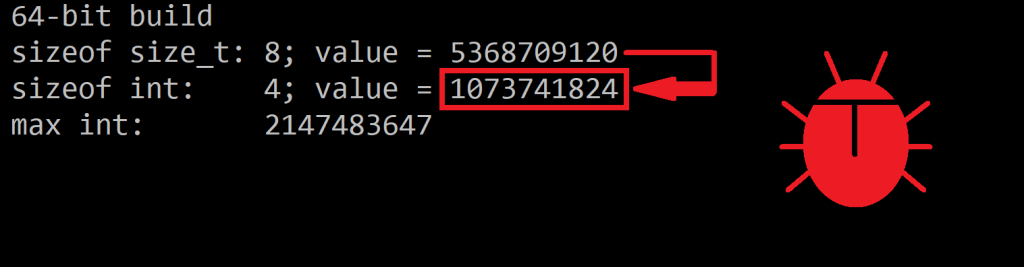
This is not a problem for strings of reasonable length. But, for example, if you happen to have a 3 GB string, in 32-bit builds a conversion from size_t to int will generate a negative number, and a negative length for a string doesn’t make sense. On the other hand, in 64-bit builds, if you a 5 GB string, converting from size_t to int will produce an int value of 1 GB, which is not the original string length.
The following table summarizes these kinds of bugs:
| Build mode | size_t Type | int Type | Potential Bug when converting from size_t to int |
| 64-bit | 64-bit unsigned integer | 32-bit signed integer | A “very big number” (e.g. 5GB) can be converted to an incorrect smaller number (e.g. 5GB -> 1GB) |
| 32-bit | 32-bit unsigned integer | 32-bit signed integer | A “very big number” (e.g. 3GB) can be converted to a negative number (e.g. 3GB -> -1GB). |
Note a few things:
You can have some fun experimenting with these kinds of bugs with this simple C++ code:
// Testing "interesting" bugs with size_t-to-int conversions.
// Compiled with Microsoft Visual C++ in Visual Studio 2019
// by Giovanni Dicanio
#include <iostream> // std::cout
#include <limits> // std::numeric_limits
int main()
{
using std::cout;
#ifdef _M_AMD64
cout << " 64-bit build\n";
const size_t s = 5UI64 * 1024 * 1024 * 1024; // 5 GB
#else
cout << " 32-bit build\n";
const size_t s = 3U * 1024 * 1024 * 1024; // 3 GB
#endif
const int n = static_cast<int>(s);
cout << " sizeof size_t: " << sizeof(s) << "; value = " << s << '\n';
cout << " sizeof int: " << sizeof(n) << "; value = " << n << '\n';
cout << " max int: " << (std::numeric_limits<int>::max)() << '\n';
}

(Note: Bug icon designed by me 🙂 Copyright (c) All Rights Reserved)
So, these conversions from size_t to int can be dangerous and bug-prone, in both 32-bit and 64-bit builds.
Note that, if you just try to pass a size_t value to a parameter expecting an int value, without static_cast<int>, the VC++ compiler will correctly emit warning messages. And these should trigger some “red lights” in your head and suggest that your C++ code needs some attention.
To avoid the above problems and subtle bugs with size_t-to-int conversions, you can check that the input size_t value can be properly and safely converted to int. In such positive case, you can use C++ static_cast<int> to perform the conversion, and correctly suppress C++ compiler warning messages . Else, you can throw an exception to signal the impossibility of a meaningful conversion.
For example:
// utf16.length() is the length of the input UTF-16 std::wstring,
// stored as a size_t value.
// If the size_t length exceeds the maximum value that can be
// stored into an int, throw an exception
constexpr int kIntMax = (std::numeric_limits<int>::max)();
if (utf16.length() > static_cast<size_t>(kIntMax))
{
throw std::overflow_error(
"Input string is too long: size_t-length doesn't fit into int.");
}
// The value stored in the size_t can be *safely* converted to int:
// you can use static_cast<int>(utf16.length()) for that purpose.
Note that I used std::numeric_limits from the C++ <limits> header to get the maximum (positive) value that can be stored in an int. This value is returned by std::numeric_limits<int>::max().
Unfortunately, since Windows headers already define max as a preprocessor macro, this can create a parsing problem with the max method name of std::numeric_limits from the C++ Standard Library. As a result of that, code invoking std::numeric_limits<int>::max() can fail to compile. To fix this problem, you can enclose the std::numeric_limits::max method call with an additional pair of parentheses, to prevent against the aforementioned macro expansion:
// This could fail to compile due to Windows headers
// already defining "max" as a preprocessor macro:
//
// std::numeric_limits<int>::max()
//
// To fix this problem, enclose the numeric_limits::max method call
// with an additional pair of parentheses:
constexpr int kIntMax = (std::numeric_limits<int>::max)();
// ^ ^
// | |
// *------- additional ( ) ------*
Note: Another option to avoid the parsing problem with “max” could be to #define NOMINMAX before including <Windows.h>, but that may cause additional problems with some Windows Platform SDK headers that do require these Windows-specific preprocessor macros (like <GdiPlus.h>). As an alternative, the INT_MAX constant from <limits.h> could be considered instead of the std::numeric_limits class template.
While I took the current series of blog posts on Unicode conversions as an occasion to discuss these kinds of subtle size_t-to-int bugs, it’s important to note that this topic is much more general. In fact, converting from a size_t value to an int can happen many times when writing C++ code that, for example, uses C++ Standard Library classes and functions that represent lengths or counts of something (e.g. std::[w]string::length, std::vector::size) with size_type/size_t, and interacts with Win32 APIs that use int instead (like the aforementioned WideCharToMultiByte and MultiByteToWideChar APIs). Even ATL/MFC’s CString uses int (not size_t) to represent a string length. And similar problems can happen with third party libraries as well.
A reusable convenient C++ helper function can be written to safely convert from size_t to int, throwing an exception in case of impossible meaningful conversion. For example:
// Safely convert from size_t to int.
// Throws a std::overflow_error exception if the conversion is impossible.
inline int SafeSizeToInt(size_t sizeValue)
{
constexpr int kIntMax = (std::numeric_limits<int>::max)();
if (sizeValue > static_cast<size_t>(kIntMax))
{
throw std::overflow_error("size_t value is too big to fit into an int.");
}
return static_cast<int>(sizeValue);
}
Wrapping up, it’s also worth noting and repeating that, in case of strings of reasonable length (not certainly a 3 GB or 5 GB string), converting a length value from size_t to an int with a simple static_cast<int> doesn’t cause any problems. But if you want to write more robust C++ code that is prepared to handle even gigantic strings (maybe maliciously crafted on purpose?), an additional check and potentially throwing an exception is a good safer option.
When you need a “MultiByteToMultiByte” conversion API, and there is none, you can use a two-step conversion process with UTF-16 coming to the rescue.
Shift JIS is a text encoding for the Japanese language. While these days Unicode is much more widely used, you may still find Japanese text encoded using Shift JIS. So, you may find yourself in a situation where you need to convert text between Shift JIS (SJIS) and Unicode UTF-8 or UTF-16.
If you need to convert from SJIS to UTF-16, you can invoke the MultiByteToWideChar Win32 API, passing the Shift JIS code page identifier, which is 932. Similarly, for the opposite conversion from UTF-16 to SJIS you can invoke the WideCharToMultiByte API, passing the same SJIS code page ID.
You can simply reuse and adapt the C++ code discussed in the previous blog posts on Unicode UTF-16/UTF-8 conversions (using STL strings or ATL CString), which called the aforementioned WideCharToMultiByte and MultiByteToWideChar APIs.
Things become slightly more complicated (and interesting) if you need to convert between Shift JIS and Unicode UTF-8. In fact, in that case there is no “MultiByteToMultiByte” Win32 API available. But, fear not! 🙂 In fact, you can simply perform the conversion in two steps.
For example, to convert from Shift JIS to Unicode UTF-8, you can:
In other words, you can use the UTF-16 encoding as a “temporary” helper result in this two-phase conversion process.
Similarly, if you want to convert from Unicode UTF-8 to Shift JIS, you can:
std::string storing UTF-8-encoded text is a good option for C++ cross-platform code. Let’s discuss how to convert between that and UTF-16-encoded wstrings, using direct Win32 API calls.
Last time we saw how to convert between Unicode UTF-16 and UTF-8 using ATL strings and direct Win32 API calls. Now let’s focus on doing the same Unicode UTF-16/UTF-8 conversions but this time using C++ Standard Library’s strings. In particular, you can use std::wstring to represent UTF-16-encoded strings, and std::string for UTF-8-encoded ones.
Using the same coding style of the previous blog post, the conversion function prototypes can look like this:
// Convert from UTF-16 to UTF-8
std::string ToUtf8(std::wstring const& utf16);
// Convert from UTF-8 to UTF-16
std::wstring ToUtf16(std::string const& utf8);
As an alternative, you may consider the C++ Standard Library snake_case style, and the various std::to_string and std::to_wstring overloaded functions, and use something like this:
// Convert from UTF-16 to UTF-8
std::string to_uf8_string(std::wstring const& utf16);
// Convert from UTF-8 to UTF-16
std::wstring to_utf16_wstring(std::string const& utf8);
Anyway, let’s keep the former coding style already used in the previous blog post.
The conversion code is very similar to what you already saw for the ATL CString case.
In particular, considering the UTF-16-to-UTF-8 conversion, you can start with the special case of an empty input string:
std::string ToUtf8(std::wstring const& utf16)
{
// Special case of empty input string
if (utf16.empty())
{
// Empty input --> return empty output string
return std::string{};
}
Then you can invoke the WideCharToMultiByte API to figure out the size of the destination UTF-8 string:
// Get the length, in chars, of the resulting UTF-8 string
const int utf8Length = ::WideCharToMultiByte(
CP_UTF8, // convert to UTF-8
kFlags, // conversion flags
utf16.data(), // source UTF-16 string
utf16Length, // length of source UTF-16 string, in wchar_ts
nullptr, // unused - no conversion required in this step
0, // request size of destination buffer, in chars
nullptr, nullptr // unused
);
if (utf8Length == 0)
{
// Conversion error: capture error code and throw
...
}
Note that, while in case of CString, you could simply pass CString instances to WideCharToMultiByte parameters expecting a const wchar_t* (thanks to the implicit conversion from CStringW to const wchar_t*), with std::wstring you have explicitly invoke a method to get that read-only wchar_t pointer. I invoked the wstring::data method; another option is to call the wstring::c_str method.
Moreover, you can define a custom C++ exception class to represent a conversion error, and throw instances of this exception on failure. For example, you could derive that exception from std::runtime_error, and add a DWORD data member to represent the error code returned by the GetLastError Win32 API.
Once you know the size for the destination UTF-8 string, you can create a std::string object capable of storing a string of proper size, using a constructor overload that takes a size parameter (utf8Length) and a fill character (‘ ‘):
// Make room in the destination string for the converted bits
std::string utf8(utf8Length, ' ');
To get write access to the std::string object’s internal buffer, you can invoke the std::string::data method:
char* utf8Buffer = utf8.data();
Now you can invoke the WideCharToMultiByte API for the second time, to perform the actual conversion, using a destination string of proper size created above:
// Do the actual conversion from UTF-16 to UTF-8
int result = ::WideCharToMultiByte(
CP_UTF8, // convert to UTF-8
kFlags, // conversion flags
utf16.data(), // source UTF-16 string
utf16Length, // length of source UTF-16 string, in wchar_ts
utf8Buffer, // pointer to destination buffer
utf8Length, // size of destination buffer, in chars
nullptr, nullptr // unused
);
if (result == 0)
{
// Conversion error: capture error code and throw
...
}
Finally, you can simply return the result UTF-8 string back to the caller:
return utf8;
} // End of function ToUtf8
Note that with C++ Standard Library strings you don’t need the GetBuffer/ReleaseBuffer “dance” required by ATL CStrings.
I developed an easy-to-use C++ header-only library containing compilable code implementing these Unicode UTF-16/UTF-8 conversions using std::wstring/std::string; you can find it in this GitHub repo of mine.
Let’s step up from the previous ATL CW2A/CA2W helpers, and write more efficient (and more customizable) C++ code that directly invokes Win32 APIs for doing Unicode UTF-16/UTF-8 conversions.
Last time we saw how to convert text between Unicode UTF-16 and UTF-8 using a couple of ATL helper classes (CW2A and CA2W). While this can be a good initial approach to “break the ice” with these Unicode conversions, we can do better.
For example, the aforementioned ATL helper classes create their own temporary memory buffer for the conversion work. Then, the result of the conversion must be copied from that temporary buffer into the destination CStringA/W’s internal buffer. On the other hand, if we work with direct Win32 API calls, we will be able to avoid the intermediate CW2A/CA2W’s internal buffer, and we could directly write the converted bytes into the CStringA/W’s internal buffer. That is more efficient.
In addition, directly invoking the Win32 APIs allows us to customize their behavior, for example specifying ad hoc flags that better suit our needs.
Moreover, in this way we will have more freedom on how to signal error conditions: Throwing exceptions? And what kind of exceptions? Throwing a custom-defined exception class? Use return codes? Use something like std::optional? Whatever, you can just pick your favorite error-handling method for the particular problem at hand.
So, let’s start designing our custom Unicode UTF-16/UTF-8 conversion functions. First, we have to pick a couple of classes to store UTF-16-encoded text and UTF-8-encoded text. That’s easy: In the context of ATL (and MFC), we can pick CStringW for UTF-16, and CStringA for UTF-8.
Now, let’s focus on the prototype of the conversion functions. We could pick something like this:
// Convert from UTF-16 to UTF-8
CStringA Utf8FromUtf16(CStringW const& utf16);
// Convert from UTF-8 to UTF-16
CStringW Utf16FromUtf8(CStringA const& utf8);
With this coding style, considering the first function, the “Utf16” part of the function name is located near the corresponding “utf16” parameter, and the “Utf8” part is near the returned UTF-8 string. In other words, in this way we put the return on the left, and the argument on the right:
CStringA resultUtf8 = Utf8FromUtf16(utf16Text);
// ^^^^^^^^^^^^^^^ <--- Argument: UTF-16
CStringA resultUtf8 = Utf8FromUtf16(utf16Text);
// ^^^^^^^^^^^^^^^^^ <--- Return: UTF-8
Another approach is something more similar to the various std::to_string overloads implemented by the C++ Standard Library:
// Convert from UTF-16 to UTF-8
CStringA ToUtf8(CStringW const& utf16);
// Convert from UTF-8 to UTF-16
CStringW ToUtf16(CStringA const& utf8);
Let’s pick up this second style.
Now, let’s focus on the UTF-16-to-UTF-8 conversion, as the inverse conversion is pretty similar.
// Convert from UTF-16 to UTF-8
CStringA ToUtf8(CStringW const& utf16)
{
// TODO ...
}
The first thing we can do inside the conversion function is to check the special case of an empty input string. In this case, we’ll just return an empty output string:
// Convert from UTF-16 to UTF-8
CStringA ToUtf8(CStringW const& utf16)
{
// Special case of empty input string
if (utf16.IsEmpty())
{
// Empty input --> return empty output string
return CStringA();
}
Now let’s focus on the general case of non-empty input string. First, we need to figure out the size of the result UTF-8 string. Then, we can allocate a buffer of proper size for the result CStringA object. And finally we can invoke a proper Win32 API for doing the conversion.
So, how can you get the size of the destination UTF-8 string? You can invoke the WideCharToMultiByte Win32 API, like this:
// Safely fail if an invalid UTF-16 character sequence is encountered
constexpr DWORD kFlags = WC_ERR_INVALID_CHARS;
const int utf16Length = utf16.GetLength();
// Get the length, in chars, of the resulting UTF-8 string
const int utf8Length = ::WideCharToMultiByte(
CP_UTF8, // convert to UTF-8
kFlags, // conversion flags
utf16, // source UTF-16 string
utf16Length, // length of source UTF-16 string, in wchar_ts
nullptr, // unused - no conversion required in this step
0, // request size of destination buffer, in chars
nullptr, nullptr // unused
);
Note that the interface of that C Win32 API is non-trivial and error prone. Anyway, after reading its documentation and doing some tests, you can figure the parameters out.
If this API fails, it will return 0. So, here you can write some error handling code:
if (utf8Length == 0)
{
// Conversion error: capture error code and throw
AtlThrowLastWin32();
}
Here I used the AtlThrowLastWin32 function, which basically invokes the GetLastError Win32 API, converts the returned DWORD error code to HRESULT, and invokes AtlThrow with that HRESULT value. Of course, you are free to define your custom C++ exception class and throw it in case of errors, or use whatever error-reporting method you like.
Now that we know how many chars (i.e. bytes) are required to represent the result UTF-8-encoded string, we can create a CStringA object, and invoke its GetBuffer method to allocate an internal CString buffer of proper size:
// Make room in the destination string for the converted bits
CStringA utf8;
char* utf8Buffer = utf8.GetBuffer(utf8Length);
ATLASSERT(utf8Buffer != nullptr);
Now we can invoke the aforementioned WideCharToMultiByte API again, this time passing the address of the allocated destination buffer and its size. In this way, the API will do the conversion work, and will write the UTF-8-encoded string in the provided destination buffer:
// Do the actual conversion from UTF-16 to UTF-8
int result = ::WideCharToMultiByte(
CP_UTF8, // convert to UTF-8
kFlags, // conversion flags
utf16, // source UTF-16 string
utf16Length, // length of source UTF-16 string, in wchar_ts
utf8Buffer, // pointer to destination buffer
utf8Length, // size of destination buffer, in chars
nullptr, nullptr // unused
);
if (result == 0)
{
// Conversion error
// ...
}
Before returning the result CStringA object, we need to release the buffer allocated with CString::GetBuffer, invoking the matching ReleaseBuffer method:
// Don't forget to call ReleaseBuffer on the CString object!
utf8.ReleaseBuffer(utf8Length);
Now we can happily return the utf8 CStringA object, containing the converted UTF-8-encoded string:
return utf8;
} // End of function ToUtf8
A similar approach can be followed for the inverse conversion from UTF-8 to UTF-16. This time, the Win23 API to invoke is MultiByteToWideChar.
Fortunately, you don’t have to write this kind of code from scratch. On my GitHub page, I have uploaded some easy-to-use C++ code that I wrote that implements these two Unicode UTF-16/UTF-8 conversion functions, using ATL CStringW/A and direct Win32 API calls. Enjoy!
Do you have some international text (e.g. Japanese) stored as Unicode UTF-16 CString in your C++ application, and want to convert it to UTF-8 for cross-platform/external export? A couple of simple-to-use ATL helpers can come in handy!
Someone had a CString object containing a Japanese string loaded from an MFC application resources, and they wanted to convert that Japanese string to Unicode UTF-8.
// CString loaded from application resources.
// The C++ application is built with Visual Studio in Unicode mode,
// so CString is equivalent to CStringW in this context.
// The CStringW object stores the string using
// the Unicode UTF-16 encoding.
CString text; // CStringW, text encoded in UTF-16
text.LoadString(IDS_SOME_JAPANESE_TEXT);
// How to convert that text to UTF-8??
First, the C++/MFC application was built in Unicode mode (which has been the default since VS 2005); so, CString is equivalent to CStringW in that context. The CStringW object stores the string as text encoded in Unicode UTF-16.
How can you convert that to Unicode UTF-8?
One option is to invoke Win32 APIs like WideCharToMultiByte; however, note that this requires writing non-trivial error-prone C++ code.
Another option is to use some conversion helpers from ATL. Note that these ATL string conversion helpers can be used in both MFC/C++ applications, and also in Win32/C++ applications that aren’t built using the MFC framework.
In particular, to solve the problem at hand, you can use the ATL CW2A conversion helper to convert the original UTF-16-encoded CStringW to a CStringA object that stores the same text encoded in UTF-8:
#include <atlconv.h> // for ATL conversion helpers like CW2A
// 'text' is a CStringW object, encoded using UTF-16.
// Convert it to UTF-8, and store it in a CStringA object.
// NOTE the *CP_UTF8* conversion flag specified to CW2A:
CStringA utf8Text = CW2A(text, CP_UTF8);
// Now the CStringA utf8Text object contains the equivalent
// of the original UTF-16 string, but encoded in UTF-8.
//
// You can use utf8Text where a UTF-8 const char* pointer
// is needed, even to build a std::string object that contains
// the UTF-8-encoded string, for example:
//
// std::string utf8(utf8Text);
//
CW2A is basically a typedef to a particular CW2AEX template implemented by ATL, which contains C++ code that invokes the aforementioned WideCharToMultiByte Win32 API, in addition to properly manage the memory for the converted string.
But you can ignore the details, and simply use CW2A with the CP_UTF8 flag for the conversion from UTF-16 to UTF-8:
// Some UTF-16 encoded text
CStringW utf16Text = ...;
// Convert it from UTF-16 to UTF-8 using CW2A:
// ** Don't forget the CP_UTF8 flag **
CStringA utf8Text = CW2A(utf16Text, CP_UTF8);
In addition, there is a symmetric conversion helper that you can use to convert from UTF-8 to UTF-16: CA2W. You can use it like this:
// Some UTF-8 encoded text
CStringA utf8Text = ...;
// Convert it from UTF-8 to UTF-16 using CA2W:
// ** Don't forget the CP_UTF8 flag **
CStringW utf16Text = CA2W(utf8Text, CP_UTF8);
Let’s wrap up this post with these (hopefully useful) Unicode UTF-16/UTF-8 conversion tables:
| ATL/MFC String Class | Unicode Encoding |
| CStringW | UTF-16 |
| CStringA | UTF-8 |
| ATL Conversion Helper | From | To |
| CW2A | UTF-16 | UTF-8 |
| CA2W | UTF-8 | UTF-16 |