Keeping on Enumerating C++ String Options: The String Views

Did you think the previous C++ string enumeration was complete? No way. Let me briefly introduce string views in this blog post.

My previous enumeration of the various string options available in C++ was by no means meant to be fully exhaustive. For example: Another interesting option available for programmers using C++17 and successive versions of the standard is std::string_view, with all its variations along the lines of what I described in the previous post (e.g. std::wstring_view, std::u8string_view, std::u16string_view, etc.).

I wanted to dedicate a different blog post to string_view’s, as they are kind of different from “ordinary” strings like std::string instances.

You can think of a string_view as a string observer. The string_view instance does not own the string (unlike say std::string): It just observes a sequence of contiguous characters.

Another important difference between std::string objects and std::string_view instances is that, while std::strings are guaranteed to be NUL-terminated, string_views are not!

This is very important, for example, when you pass a string_view invoking its data() method to a function that takes a C-style raw string pointer (const char *), that assumes that the sequence of characters pointed to is NUL-terminated. That’s not guaranteed for string views, and that can be the source of subtle bugs!

Another important feature of string views is that you can create string_view instances using the sv suffix, for example:

auto s = "Connie"sv;
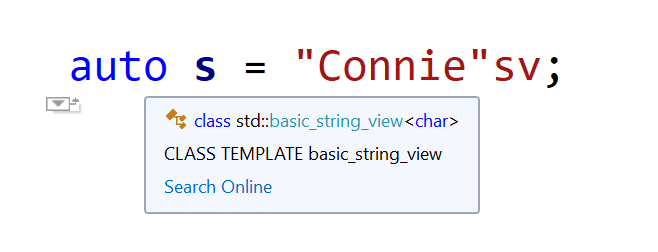
Visual Studio IntelliSense deduces "Connie"sv to be a std::string_view.
Visual Studio IntelliSense deduces s to be of type std::string_view

The above code creates a string view of a raw character array literal.

And what about:

auto s2 = L"Connie"sv;
With the L prefix and the sv suffix, Visual Studio IntelliSense deduces s2 to be of type std::wstring_view

This time s2 is deduced to be of type std::wstring_view (which is a shortcut for std::basic_string_view<wchar_t>), thanks to the L prefix!

And don’t even think you are done! In fact, you can combine that with the other options listed in the previous blog post, for example: u8“Connie”sv, LR”(C:\Path\To\Connie)”sv, and so on.

How Many Strings Does C++ Have?

An amusing enumeration of several string options available in C++.

(…OK, a language lawyer would nitpick suggesting “How many string types…”, but I wanted a catchier title.)

So, if you program in Python and you see something enclosed in double quotes, you have a string:

s = "Connie"

Something similar happens in Java, with string literals like “Connie” implemented as instances of the java.lang.String class:

String s = "Connie";

All right.

Now, let’s enter – drumroll, please – The Realm of C++! And the fun begins 🙂

So, let’s consider this simple line of C++ code:

auto s1 = "Connie";

What is the type of s1?

std::string? A char[7] array? (Hey, “Connie” is six characters, but don’t forget the terminating NUL!)

…Something else?

So, you can use your favorite IDE, and hover over the variable name, and get the deduced type. Visual Studio C++ IntelliSense suggests it’s “const char*”. Wow!

Visual Studio IntelliSense deduces const char pointer.
Visual Studio IntelliSense deduces const char pointer

And what about “Connie”s?

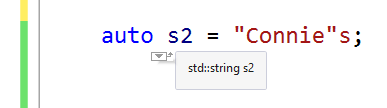
auto s2 = "Connie"s;

No, it’s not the plural of “Connie”. And it’s not a malformed Saxon genitive either. This time s2 is of type std::string! Thank you operator””s introduced in C++14!

Visual Studio IntelliSense deduces std::string

But, are we done? Of course, not! Don’t forget: It’s C++! 🙂

For example, you can have u8“Connie”, which represents a UTF-8 literal. And, of course, we need a thread on StackOverflow to figure out “How are u8-literals supposed to work?”

And don’t forget L“Connie”, u“Connie” and U“Connie”, which represent const wchar_t*, const char16_t* (UTF-16 encoded) and const char32_t* (UTF-32 encoded) respectively.

Now we are done, right? Not yet!

In fact, you can combine the previous prefixes with the standard s-suffix, for example: L“Connie”s is a std::wstring! U“Connie”s is a std::u32string. And so on.

Done, right? Not yet!! In fact, there are raw string literals to consider, too. For example: R”(C:\Path\To\Connie)”, which is a const char* to “C:\Path\To\Connie” (well, this saves you escaping \ with \\).

And don’t forget the combinations of raw string literals with the above prefixes and optionally the standard s-suffix, as well: LR”(C:\Path\To\Connie)”UR”(C:\Path\To\Connie)”LR”(C:\Path\To\Connie)”sUR”(C:\Path\To\Connie)”s, and more!

Oh, and in addition to the standard std::string class, and other standard std::basic_string-based typedefs (e.g. std::wstring, std::u16string, std::u32string, etc.), there are platform/library specific string classes, like ATL/MFC’s CString, CStringA and CStringW. And Qt brings QString to the table. And wxWidgets does the same with its wxString.

Wow! And I would not be surprised if I missed some other string variation out 🙂

The C++ Small String Optimization

How do “Connie” and “meow” differ from “The Commodore 64 is a great computer”? Let’s discover that with an introduction to a cool C++ string optimization: SSO!

How do “Connie” and “meow” differ from “The Commodore 64 is a great computer”?

(Don’t get me wrong: They are all great strings! 🙂 )

In several implementations, including the Visual C++’s one, the STL string classes are empowered by an interesting optimization: The Small String Optimization (SSO).

What does that mean?

Well, it basically means that small strings get a special treatment. In other words, there’s a difference in how strings like “Connie”, “meow” or “The Commodore 64 is a great computer” are allocated and stored by std::string.

In general, a typical string class allocates the storage for the string’s text dynamically from the heap, using new[]. In Visual Studio’s C/C++ run-time implementation on Windows, new[] calls malloc, which calls HeapAlloc (…which may probably call VirtualAlloc). The bottom line is that dynamically-allocating memory with new[] is a non-trivial task, that does have an overhead, and implies a trip down the Windows memory manager.

So, the std::string class says: “OK, for small strings, instead of taking a trip down the new[]-malloc-HeapAlloc-etc. “memory lane” 🙂 , let’s do something much faster and cooler! I, the std::string class, will reserve a small chunk of memory, a “small buffer” embedded inside std::string objects, and when strings are small enough, they will be kept (deep-copied) in that buffer, without triggering dynamic memory allocations.”

That’s a big saving! For example, for something like:

std::string s{"Connie"};

there’s no memory allocated on the heap! “Connie” is just stack-allocated. No new[], no malloc, no HeapAlloc, no trip down the Windows memory manager.

That’s kind of the equivalent of this C-ish code:

char buffer[ /* some short length */ ];
strcpy_s(buffer, "Connie");

No new[], no HeapAlloc, no virtual memory manager overhead! It’s just a simple snappy stack allocation, followed by a string copy.

But there’s more! In fact, having the string’s text embedded inside the std::string object offers great locality, better than chasing pointers to scattered memory blocks allocated on the heap. This is also very good when strings are stored in a std::vector, as small strings are basically stored in contiguous memory locations, and modern CPUs love blasting contiguous data in memory!

SSO: Embedded small string optimized memory layout vs. external string layout

Optimizations similar to the SSO can be applied also to other data structures, for example: to vectors. CppCon 2016 had an interesting session discussing that: “High Performance Code 201: Hybrid Data Structures”.

I’ve prepared some C++ code implementing a simple benchmark to measure the effects of SSO. The results I got for 200,000-small-string vectors clearly show a significant advantage of STL strings for small strings. For example: in 64-bit build on an Intel i7 CPU @3.40GHz: vector::push_back time for ATL (CStringW) is 29 ms, while for STL (wstring) it’s just 14 ms: one half! Moreover, sorting times are 135 ms for ATL vs. 77 ms for the STL: again, a big win for the SSO implemented in the STL!

Pluralsight FREE Week!

This is Pluralsight Free Week: you can watch thousands of expert-led video courses for free for the entire week!

Just a heads up to let you know that Pluralsight is running a FREE Week promo: This means that the Pluralsight’s platform is free for the entire week!

You can watch 7,000+ expert-led video courses for free for the entire week!

For example: Are you interested in an Introduction to Algorithms and Data Structures in C++?

Or in Getting Started with the C Programming Language?

Or would you like to learn more about Object-oriented Programming in Rust?

It’s all free for this entire week!

Enjoy learning!

Hello World!

Welcome to my NEW blog!

My name is Giovanni Dicanio. I had been writing a blog mainly focused on C++ for the past 10+ years, until a recent unexpected shutdown of the MSMVPs (Microsoft MVPs) web site. For the curious ones, my past blog “C++ and More!https://blogs.msmvps.com/gdicanio is archived here.

So, I’m moving on to this new home on the Internet.

I hope this turns out an enjoyable journey! And both you and I can learn a new thing or two.

See you soon!