Converting Between Unicode UTF-16 and UTF-8 Using ATL Helpers

Do you have some international text (e.g. Japanese) stored as Unicode UTF-16 CString in your C++ application, and want to convert it to UTF-8 for cross-platform/external export? A couple of simple-to-use ATL helpers can come in handy!

Someone had a CString object containing a Japanese string loaded from an MFC application resources, and they wanted to convert that Japanese string to Unicode UTF-8.

// CString loaded from application resources.
// The C++ application is built with Visual Studio in Unicode mode,
// so CString is equivalent to CStringW in this context.
// The CStringW object stores the string using 
// the Unicode UTF-16 encoding.
CString text;  // CStringW, text encoded in UTF-16
text.LoadString(IDS_SOME_JAPANESE_TEXT);

// How to convert that text to UTF-8??

First, the C++/MFC application was built in Unicode mode (which has been the default since VS 2005); so, CString is equivalent to CStringW in that context. The CStringW object stores the string as text encoded in Unicode UTF-16.

How can you convert that to Unicode UTF-8?

One option is to invoke Win32 APIs like WideCharToMultiByte; however, note that this requires writing non-trivial error-prone C++ code.

Another option is to use some conversion helpers from ATL. Note that these ATL string conversion helpers can be used in both MFC/C++ applications, and also in Win32/C++ applications that aren’t built using the MFC framework.

In particular, to solve the problem at hand, you can use the ATL CW2A conversion helper to convert the original UTF-16-encoded CStringW to a CStringA object that stores the same text encoded in UTF-8:

#include <atlconv.h> // for ATL conversion helpers like CW2A


// 'text' is a CStringW object, encoded using UTF-16.
// Convert it to UTF-8, and store it in a CStringA object.
// NOTE the *CP_UTF8* conversion flag specified to CW2A:
CStringA utf8Text = CW2A(text, CP_UTF8);

// Now the CStringA utf8Text object contains the equivalent 
// of the original UTF-16 string, but encoded in UTF-8.
//
// You can use utf8Text where a UTF-8 const char* pointer 
// is needed, even to build a std::string object that contains 
// the UTF-8-encoded string, for example:
// 
//   std::string utf8(utf8Text);
//

CW2A is basically a typedef to a particular CW2AEX template implemented by ATL, which contains C++ code that invokes the aforementioned WideCharToMultiByte Win32 API, in addition to properly manage the memory for the converted string.

But you can ignore the details, and simply use CW2A with the CP_UTF8 flag for the conversion from UTF-16 to UTF-8:

// Some UTF-16 encoded text
CStringW utf16Text = ...;

// Convert it from UTF-16 to UTF-8 using CW2A:
// ** Don't forget the CP_UTF8 flag **
CStringA utf8Text = CW2A(utf16Text, CP_UTF8);

In addition, there is a symmetric conversion helper that you can use to convert from UTF-8 to UTF-16: CA2W. You can use it like this:

// Some UTF-8 encoded text
CStringA utf8Text = ...;

// Convert it from UTF-8 to UTF-16 using CA2W:
// ** Don't forget the CP_UTF8 flag **
CStringW utf16Text = CA2W(utf8Text, CP_UTF8);

Let’s wrap up this post with these (hopefully useful) Unicode UTF-16/UTF-8 conversion tables:

ATL/MFC String ClassUnicode Encoding
CStringWUTF-16
CStringAUTF-8
ATL/MFC CString classes and their associated Unicode encoding

ATL Conversion HelperFromTo
CW2AUTF-16UTF-8
CA2WUTF-8UTF-16
ATL CW2A and CA2W string conversion helpers

Pluralsight 60% Off – Limited Time Offer (Until Sep 30th)

Just a heads up to let you know that Pluralsight is offering 60% OFF all Individual Skills subscriptions, for a limited time!

This offers is valid until 11:59 p.m. MT on September 30, 2023.

This a great opportunity to access high-quality content and save money!

Click the banner below ans save now!

Are wchar_t and std::wstring Really Portable in C++?

Some considerations on writing portable C++ code involving Unicode text across Windows and Linux.

Someone was developing some C++ code that was meant to be portable across Windows and Linux. They were using std::wstring to represent Unicode UTF-16-encoded strings in their Windows C++ code, and they thought that they could use the same std::wstring class to represent UTF-16-encoded text on Linux as well.

In other words, they were convinced that wchar_t and std::wstring were portable across Windows and Linux.

First, I asked them: “What do you mean by portable?”

If by “portable” you mean that the symbols are defined on both Windows and Linux platforms, then wchar_t and std::wstring (which is an instantiation of the std::basic_string class template with the wchar_t character type) are “portable”.

But, if by “portable” you mean that those symbols are defined on both platforms and they have the same meaning, then, I’m sorry, but wchar_t and std::wstring are not portable across Windows and Linux.

In fact, if you try to print out the sizeof(wchar_t), you’ll get 2 on C++ code compiled on Windows with the MSVC compiler, and 4 on GCC on Linux. In other words, wchar_t is 2-byte long on Windows, and 4-byte long on Linux!

In fact, you can use wchar_t and std::wstring to represent Unicode UTF-16-encoded text on Windows. And you can use wchar_t and std::wstring to represent Unicode UTF-32-encoded text on Linux.

If you want to write portable C++ code to represent Unicode UTF-16 text, you can use the char16_t character type for code units, and the corresponding std::u16string class for strings. Both char16_t and std::u16string have been introduced in C++11.

Or, you can switch gears and represent your Unicode text in a portable way using the UTF-8 encoding and the std::string class. If your C++ toolchain has some support for C++20 features, you can use the std::u8string class, and the corresponding char8_t character type for code units.

Code Reviewing ChatGPT’s std::map C++ code

ChatGPT does C++ std::map. OK, let’s review the code produced by this AI. Are there any errors? Can it be improved?

Recently someone sent me an interesting email about the answer they got from ChatGPT to the question they asked: “Teach me about C++ std::map“.

ChatGPT provided the following code, with some additional notes.

ChatGPT's demo code showing how to use std::map.
ChatGPT trying to explain how to use std::map

Well, I read that code and noted a few things:

Since the map instance uses std::string as the key type, the associated <string> header should have been #included (although the above code could compile thanks to “indirect” inclusion of <string>; but that’s not a good practice).

Moreover, since C++20, std::map has been given a (long-awaited…) method to check if there is an element with a key equivalent to the input key in the container. So, I would use map::contains instead of invoking the map::count method to check if a key exists.

// ChatGPT suggested:
//   
//   // Checking if a key exists
//   if (ages.count("Bob") > 0) {
//       ...
//
// Starting with C++20 you can use the much clearer
// and simpler map::contains:
//
if (ages.contains("Bob")) {
    ...

In addition, I would also improve the map iteration code provided by ChatGPT.

In fact, starting with C++17, a new feature called structured binding allows writing clearer code for iterating over std::map’s content. For example:

// ChatGPT suggested:
//
//  Iterating over the map
//  for (const auto& pair : ages) {
//      std::cout << pair.first << ": " << pair.second << std::endl;
//  }
//
// Using C++17's structure bindings you can write:
//
for (const auto& [name, age]: ages) {
    std::cout << name << ": " << age << std::endl;
}

Note how using identifiers like name and age produces code that is much more readable than pair.first and pair.second (which are in the code suggested by ChatGPT).

(As a side note of kind of lesser importance, you may want to replace std::endl with ‘\n’ in the above code; although if “output performance” is not particularly important, std::endl would be acceptable.)

What conclusions can we draw from that interesting experience?

Well, I think ChatGPT did a decent job in showing a basic usage of C++ std::map. But, still, its code is not optimal. As discussed in this simple code review, with a better knowledge of the C++ language and standard library features you can produce higher-quality code (e.g. more readable, clearer) than ChatGPT did in this instance.

…But maybe ChatGPT will read this code review, learn a new thing or two, and improve? 😉

Optimizing C++ Code with O(1) Operations

How to get an 80% performance boost by simply replacing a O(N) operation with a fast O(1) operation in C++ code.

Last time we saw that you can invoke the CString::GetString method to get a C-style null-terminated const string pointer, then pass it to functions that take wstring_view input parameters:

// 's' is a CString instance;
// DoSomething takes a std::wstring_view input parameter
DoSomething( s.GetString() );

While this code works fine, it’s possible to optimize it.

As the saying goes: first make things work, then make things fast.

The Big Picture

A typical implementation of wstring_view holds two data members: a pointer to the string characters, and a size (or length). Basically, the pointer indicates where the observed string (view) starts, and the size/length specifies how many consecutive characters belong to the string view (note that string views are not necessarily null-terminated).

The above code invokes a wstring_view constructor overload that takes a null-terminated C-style string pointer. To get the size (or length) of the string view, the implementation code needs to traverse the input string’s characters one by one, until it finds the null terminator. This is a linear time operation, or O(N) operation.

Fortunately, there’s another wstring_view constructor overload, that takes two parameters: a pointer and a length. Since CString objects know their own length, you can invoke the CString::GetLength method to get the value of the length parameter.

// Create a std::wstring_view from a CString,
// using a wstring_view constructor overload that takes
// a pointer (s.GetString()) and a length (s.GetLength())
DoSomething({ s.GetString(), s.GetLength() });  // (*) see below

The great news is that CString objects bookkeep their own string length, so that CString::GetLength doesn’t have to traverse all the string characters until it finds the terminating null. The value of the string length is already available when you invoke the CString::GetLength method.

In other words, creating a string view invoking CString::GetString and CString::GetLength replaces a linear time O(N) operation with a constant time O(1) operation, which is great.

Fixing and Refining the Code

When you try to compile the above code snippet marked with (*), the C++ compiler actually complains with the following message:

Error C2398 Element ‘2’: conversion from ‘int’ to ‘const std::basic_string_view<wchar_t,std::char_traits<wchar_t>>::size_type’ requires a narrowing conversion

The problem here is that CString::GetLength returns an int, which doesn’t match with the size type expected by wstring_view. Well, not a big deal: We can safely cast the int value returned by CString::GetLength to wstring_view::size_type, or just size_t:

// Make the C++ compiler happy with the static_cast:
DoSomething({ s.GetString(), 
              static_cast<size_t>(s.GetLength()) });

As a further refinement, we can wrap the above wstring_view-from-CString creation code in a nice helper function:

// Helper function that *efficiently* creates a wstring_view 
// to a CString
inline [[nodiscard]] std::wstring_view AsView(const CString& s)
{
    return { s.GetString(), static_cast<size_t>(s.GetLength()) };
}

Measuring the Performance Gain

Using the above helper function, you can safely and efficiently create a string view to a CString object.

Now, you may ask, how much speed gain are we talking here?

Good question!

I have developed a simple C++ benchmark, which shows that replacing a O(N) operation with a O(1) operation in this case gives a performance boost of 93 ms vs. 451 ms, which is an 80% performance gain! Wow.

Results of the C++ benchmark comparing O(N) vs. O(1) operations. O(N) takes 451 ms, O(1) takes 93 ms, which is an 80% performance gain.
Results of the string view benchmark comparing O(N) vs. O(1) operations. O(1) offers an 80% performance gain!

If you want to learn more about Big-O notation and other related topics, you can watch my Pluralsight course on Introduction to Data Structures and Algorithms in C++.

Big-O doesn't have to be boring. A slide from my PS course on introduction to data structures and algorithms in C++. This slide shows a graph comparing the big-O of linear vs. binary search.
Big-O doesn’t have to be boring! (A slide from my Pluralsight course on the topic.)

Pluralsight 50% Off Sale – Limited Time Offer (6/6-6/12)

Just a heads up to let you know that Pluralsight is offering 50% off all Individual Skills subscriptions, for a limited time!

This offer is valid from 12 a.m. MT on June 6, 2023, until 11:59 p.m. MT on June 12, 2023.

This a great opportunity to access high-quality content and save money!

Click the banner below ans save now!

Adventures with C++ string_view: Interop with ATL/MFC CString

How to pass ATL/MFC CString objects to functions and methods expecting C++ string views?

Suppose that you have a C++ function or method that takes a string view as input:

void DoSomething(std::wstring_view sv)
{
   // Do stuff ...
}

This function is invoked from some ATL or MFC code that uses the CString class. The code is built with Visual Studio C++ compiler in Unicode mode. So, CString is actually CStringW. And, to make things simpler, the matching std::wstring_view is used by DoSomething.

How can you pass a CString object to that function expecting a string view?

If you try directly passing a CString object like this:

CString s = L"Connie";
DoSomething(s); // *** Doesn't compile ***

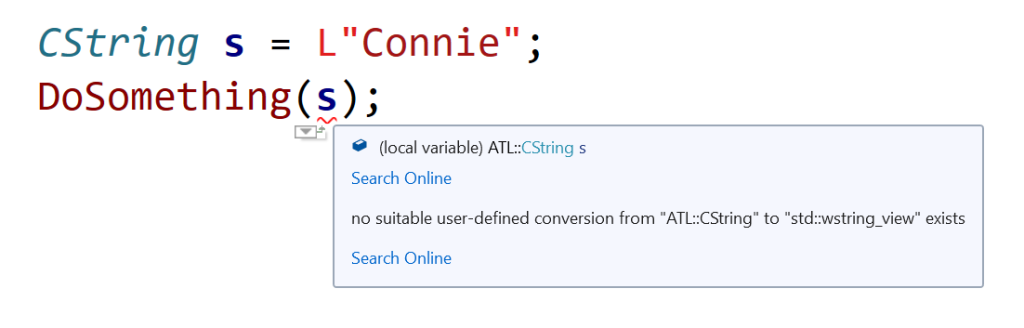
you get a compile-time error. Basically, the C++ compiler complains about no suitable user-defined conversion from ATL::CString to std::wstring_view exists.

Squiggles in Visual Studio IDE, marking code that tries to directly pass a CString object to a function expecting a std::wstring_view.
Visual Studio 2019 IDE squiggles C++ code directly passing CString to a function expecting a wstring_view

So, how can you fix that code?

Well, since there is a wstring_view constructor overload that creates a view from a null-terminated character string pointer, you can invoke the CString::GetString method, and pass the returned pointer to the DoSomething function expecting a string view parameter, like this:

// Pass the CString object 's' to DoSomething 
// as a std::wstring_view
DoSomething(s.GetString());

Now the code compiles correctly!

Important Note About String Views

Note that wstring_view is just a view to a string, so you must pay attention that the pointed-to string is valid for at least all the time you are referencing it via the string view. In other words, pay attention to dangling references and string views that refer to strings that have been deallocated or moved elsewhere in memory.

How to Print Unicode Text to the Windows Console in C++

How can you print Unicode text to the Windows console in your C++ programs? Let’s discuss both the UTF-16 and UTF-8 encoding cases.

Suppose that you want to print out some Unicode text to the Windows console. From a simple C++ console application created in Visual Studio, you may try this line of code inside main:

std::wcout << L"Japan written in Japanese: \x65e5\x672c (Nihon)\n";

The idea is to print the following text:

Japan written in Japanese: 日本 (Nihon)

The Unicode UTF-16 encoding of the first Japanese kanji is 0x65E5; the second kanji is encoded in UTF-16 as 0x672C. These are embedded in the C++ string literal sent to std::wcout using the escape sequences \x65e5 and \x672c respectively.

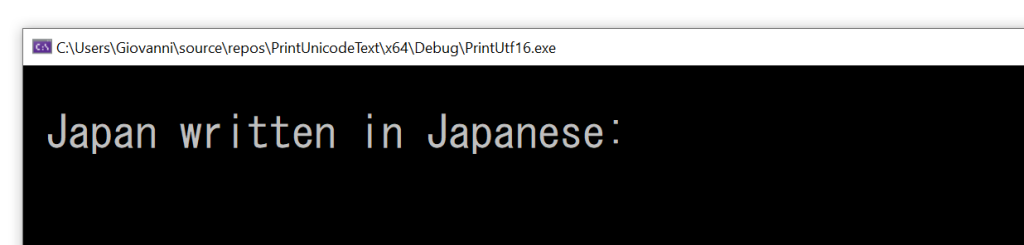
If you try to execute the above code, you get the following output:

The Japanese kanjis are not printed out in the Windows console in this case.
Wrong output: the Japanese kanjis are missing!

As you can see, the Japanese kanjis are not printed. Moreover, even the “standard ASCII” characters following those (i.e.: “(Nihon)”) are missing. There’s clearly a bug in the above code.

How can you fix that?

Well, the missing piece is setting the proper translation mode for stdout to Unicode UTF-16, using _setmode and the _O_U16TEXT mode parameter.

// Change stdout to Unicode UTF-16
_setmode(_fileno(stdout), _O_U16TEXT);

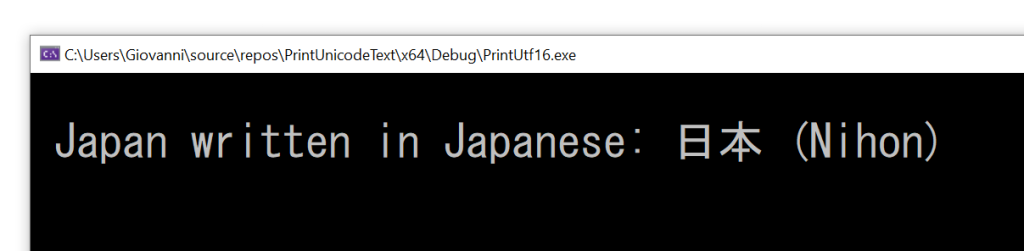
Now the output is what you expect:

The correct output, including the Japanese kanjis.
The correct output of Unicode UTF-16 text.

The complete compilable C++ code follows:

// Printing Unicode UTF-16 text to the Windows console

#include <fcntl.h>      // for _setmode
#include <io.h>         // for _setmode
#include <stdio.h>      // for _fileno

#include <iostream>     // for std::wcout

int main()
{
    // Change stdout to Unicode UTF-16
    _setmode(_fileno(stdout), _O_U16TEXT);

    // Print some Unicode text encoded in UTF-16
    std::wcout << L"Japan written in Japanese: \x65e5\x672c (Nihon)\n";
}

(The above code was compiled with VS 2019 and executed in the Windows 10 command prompt.)

Note that the font you use in the Windows console must support the characters you want to print; in this example, I used the MS Gothic font to show the Japanese kanjis.

The Unicode UTF-8 Case

What about printing text using Unicode UTF-8 instead of UTF-16 (especially with all the suggestions about using “UTF-8 everywhere“)?

Well, you may try to invoke _setmode and this time pass the UTF-8 mode flag _O_U8TEXT (instead of the previous _O_U16TEXT), like this:

// Change stdout to Unicode UTF-8
_setmode(_fileno(stdout), _O_U8TEXT);

And then send the UTF-8 encoded text via std::cout:

// Print some Unicode text encoded in UTF-8
std::cout << "Japan written in Japanese: \xE6\x97\xA5\xE6\x9C\xAC (Nihon)\n";

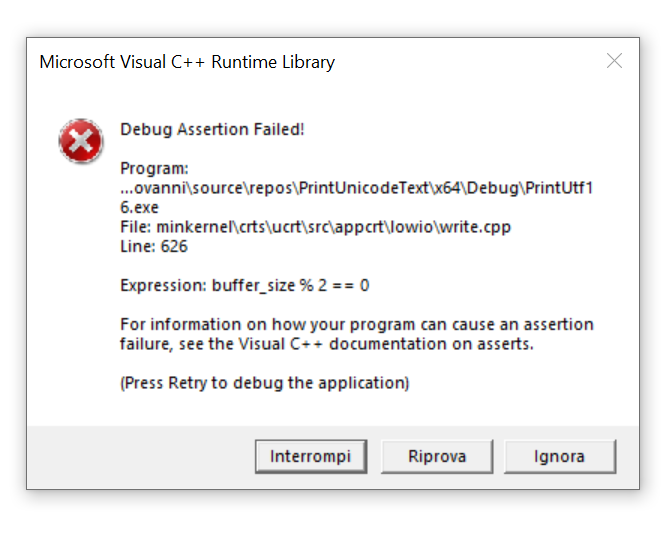
If you build and run that code, you get… an assertion failure!

Visual C++ debug assertion failure when trying to print out Unicode UTF-8 encoded text.
Visual C++ assertion failure when trying to print Unicode UTF-8-encoded text.

So, it seems that this (logical) scenario is not supported, at least with VS2019 and Windows 10.

How can you solve this problem? Well, an option is to take the Unicode UTF-8 encoded text, convert it to UTF-16 (for example using this code), and then use the method discussed above to print out the UTF-16 encoded text.

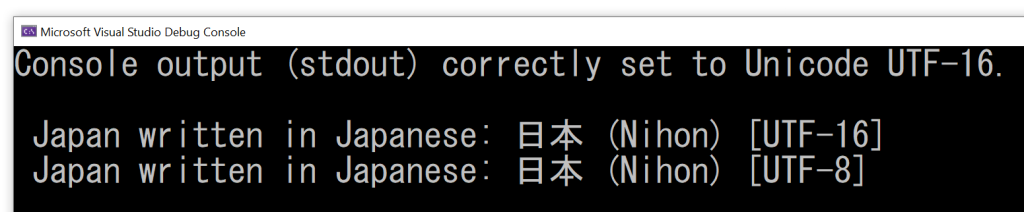
EDIT 2023-11-28: Compilable C++ demo code uploaded to GitHub.

Screenshot showing that both the Unicode UTF-16 and UTF-8 text are correctly printed in the Windows console.
Unicode UTF-16 and UTF-8 correctly printed out in the Windows console.

Introduction to Data Structures and Algorithms in C++

A (hopefully) fun and easy-to-understand introduction to data structures and algorithms in C++.

I authored a course that was published by Pluralsight on Introduction to Data Structures and Algorithms in C++.

In this course, you’ll learn how to implement some fundamental data structures and algorithms in C++ from scratch, with a combination of theoretical introduction using slides, and practical C++ implementation code.

A metaphor used to understand the stack data structure.
Introducing the stack data structure with an interesting metaphor

No prior data structure or algorithm theory knowledge is required. You only need a basic knowledge of C++ language features (please watch the “Prerequisites” clip in the first module for more details about that).

A slide used to explain the linear search algorithm.
Explaining linear search using slides

During this course journey, you’ll also learn some practical C++ coding techniques (ranging from move semantic optimization, to proper safe array copying techniques, insertion operator overloading, etc.) that you’ll be able to use in your own C++ projects, as well.

So, this course is both theory and practice!

A screenshot of a demo showing a subtle bug involving memory leaks.
Spotting a subtle bug!

Here’s just a couple of feedback notes from my reviewers:

The callouts are helpful and keep the demo engaging as you explain the code.

Peer Review

To say that this is an excellent explanation of Big-O notation would be an understatement. The way you illustrate and explain it is far better than the way it was taught to me in college!

Peer Review
A slide illustrating Big-O notation and asymptotic analysis.
Big-O doesn’t have to be boring!

Starting from this course page, you can freely play the course overview, and read a more detailed course description and table of content.

I hope you’ll enjoy watching this course!

The Windows Kernel-mode UNICODE_STRING Structure

A brief introduction to the UNICODE_STRING structure used in Windows kernel mode programming.

Keeping on with the previous enumeration of string options, I’d like to mention here the UNICODE_STRING structure, used in Windows kernel mode programming.

This is a C structure, used to represent Unicode (UTF-16) strings, as its name suggests.

It’s basically a byte-length counted Unicode UTF-16 string made by a contiguous sequence of WCHARs (WCHAR is basically a typedef for wchar_t).

The UNICODE_STRING structure has three fields:

  • Length: This is the length, in bytes, of the contiguous sequence of WCHARs
  • MaximumLength: This is the length, in bytes, of the buffer that stores the contiguous sequence of WCHARs
  • Buffer: This is a pointer to the buffer that stores the contiguous sequence of WCHARs.

Note that the buffer can be physically larger than the string it contains. The exceeding space can be used for example when the string is concatenated with other strings during processing.

If you think of the standard std::string C++ class, or better std::wstring class, the Length field is comparable to wstring::length (except that the UNICODE_STRING’s Length is expressed in bytes, while wstring::length returns a count of wchar_ts). Similarly, UNICODE_STRING’s MaximumLength is comparable to wstring::capacity.

Note that, since UNICODE_STRINGs are byte counted, the WCHAR sequence is not required to be necessarily NUL-terminated. And, even in case of an existing NUL-terminator, the Length field does not include it in the byte count. However, since the MaximumLength field represents the length of the whole buffer, in case of a NUL-terminator, this is counted in the MaximumLength field.

There are various functions to operate on instances of UNICODE_STRING.

For example, you can use the RtlInitUnicodeString function to initialize a UNICODE_STRING. In case of a constant compile-time known Unicode string, a UNICODE_STRING instance can be initialized using the DECLARE_CONST_UNICODE_STRING macro, like this:

DECLARE_CONST_UNICODE_STRING(name, L"Connie");

The following picture shows the memory layout of a UNICODE_STRING defined as above.

Memory layout of a UNICODE_STRING.
Memory layout of a UNICODE_STRING

In this example, L“Connie” is made by 6 WCHARs, followed by a terminating NUL.

So, the Length field of the UNICODE_STRING structure instance, expressed as byte count, and excluding the terminating NUL, is 6 [WCHARs]*2[bytes per WCHAR] = 12 bytes.

On the other hand, the MaximumLength field represents the total length of the buffer, which, in this case, includes the terminating NUL, and it’s 14 bytes.

There are various support functions for UNICODE_STRINGs. For example, you can invoke RtlCompareUnicodeString to compare two UNICODE_STRINGs (note that this API also includes a Boolean flag for case insensitive comparisons).

Even if these are pure C APIs (and UNICODE_STRING is a pure C structure), it may be possible to wrap the UNICODE_STRING structure and its support functions in a nice C++ class, with proper operator overloading. For example, an overloaded operator== could invoke the RtlEqualUnicodeString function to determine whether two UNICODE_STRINGs strings are equal. And so on.