Last time, I introduced the convenient and easy-to-use SafeInt C++ library.
You might have experimented with it in a simple C++ console application, and noted that everything is fine.
Now, suppose that you want to use SafeInt in some Windows C++ project that directly or indirectly requires the <Windows.h> header.
Well, if you take your previous C++ code that used SafeInt and successfully compiled, and add an #include <Windows.h>, then try to compile it again, you’ll get lots of error messages!
Typically, you would get lots of errors like this:
Error C2589 ‘(‘: illegal token on right side of ‘::’
Error list in Visual Studio, when trying to compile C++ code that uses SafeInt and includes <Windows.h>
If you try and click on one of these errors, Visual Studio will point to the offending line in the “SafeInt.hpp” header, as shown below.
An example of offending line in SafeInt.hpp
In the above example, the error points to this line of code:
if (t != std::numeric_limits<T>::min() )
So, what’s going on here?
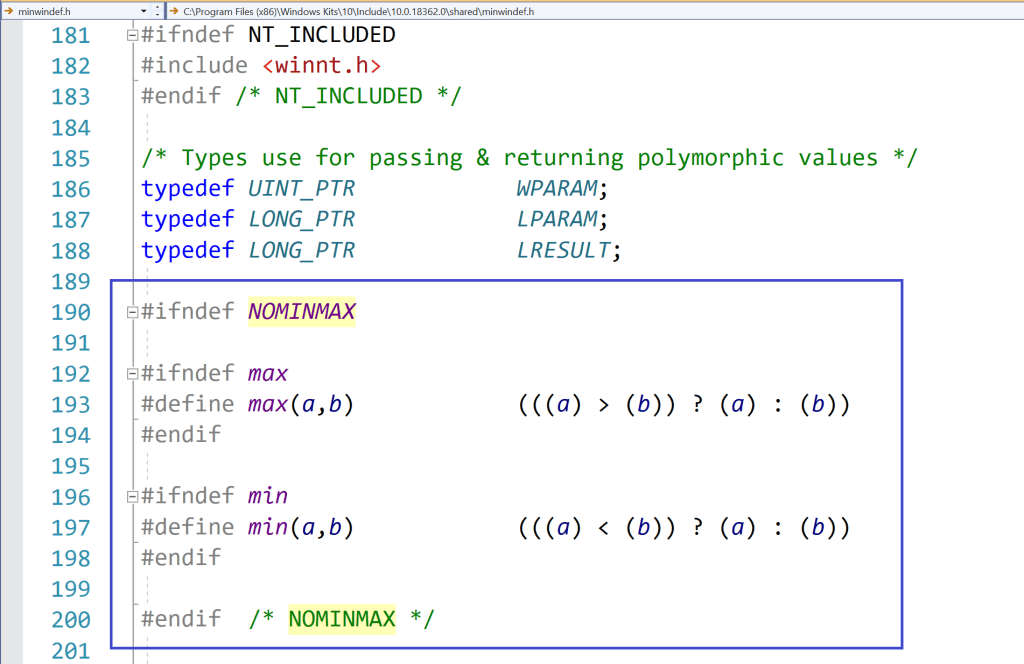
Well, the problem is that the Windows Platform SDK defines a couple of preprocessor macros named min and max. These definitions were imported with the inclusion of <Windows.h>.
So, here the C++ compiler is in “crisis mode”, as the above Windows-specific preprocessor macro definitions conflict with the std::numeric_limits::min and maxmember function calls.
So, how can you fix that?
Well, one option could be to #define the NOMINMAX preprocessor macro before including <Windows.h>:
#define NOMINMAX
#include <Windows.h>
In this way, when <Windows.h> is included, some preprocessor conditional compilation will detect that NOMINMAX is defined, and will skip the definitions of the min and max preprocessor macros. So, the SafeInt code will compile fine.
Preprocessor logic in a Windows SDK header (<minwindef.h>) for the conditional compilation of the min and max macros
So, everything’s fine now, right?
Well, unfortunately not! In fact, if you may happen to include (directly or indirectly) the GDI+ header <gdiplus.h>, you’ll see that you’ll get compilation errors again, this time because some code in GDI+ does require the above Windows definitions of the min and max macros!
So, the previous (pseudo-)fix of #defining NOMINMAX, caused another problem!
Well, if you are working on your own C++ code, you can make your code immune to the above Windows min/max preprocessor macro problem, using an extra pair of parentheses around the std::numeric_limits<T>::min and max member function calls. This additional pair of parentheses will prevent the expansion of the min and max macros.
// Prevent macro expansion with an additional pair of parentheses
// around the std::numeric_limit's min and max member function calls.
(std::numeric_limits<T>::min)()
(std::numeric_limits<T>::max)()
However, that is not the case for the code in SafeInt.hpp. To try to make SafeInt.hpp more compatible with C++ code that requires the Windows Platform SDK, I modified the library’s code with the extra pairs of parentheses (added in many places!), and submitted a pull request. I hope the SafeInt library will be fixed ASAP.
Let’s discuss a cool open-source C++ library that helps you write nice and clear C++ code, but with safety checks *automatically* added under the hood.
Now, consider the apparently innocent simple C++ code that sums the integer values stored in a vector:
// Sum the 16-bit signed integers stored in the values vector
int16_t Sum(const std::vector<int16_t>& values)
{
    int16_t sum = 0;

    for (auto num : values)
    {
        sum += num;
    }

    return sum;
}
As we saw, that code is subject to bogus integer overflow, and may return a negative number even if all positive integer numbers are added together!
To prevent that kind of bugs, we added a safety check before doing the cumulative sum, throwing an exception in case an integer overflow was detected. Better throwing an exception than returning a bogus result!
The checking code was:
//
// Check for integer overflow *before* doing the sum
//
if (num > 0 && sum > std::numeric_limits<int16_t>::max() - num)
{
    throw std::overflow_error("Overflow in Sum function when adding a positive number.");
}
else if (num < 0 && sum < std::numeric_limits<int16_t>::min() - num)
{
    throw std::overflow_error("Overflow in Sum function when adding a negative number.");
}

// The sum is safe
sum += num;
Of course, writing this kind of complicated check code each time there is a sum operation that could potentially overflow would be excruciatingly cumbersome, and bug prone!
It would be certainly better to write a function that performs this kind of checks, and invoke it before adding two integers. That would be certainly a huge step forward versus repeating the above code each time two integers are added.
But, in C++ we can do even better than that!
In fact, C++ offers the ability to overload operators, such as + and +=. So, we could write a kind of SafeInt class, that wraps a “raw” built-in integer type in safe boundaries, and that overloads various operators like +,+=, and so on, and transparently and automatically checks that the operations are safe, and throws an exception in case of integer overflow, instead of returning a bogus result.
This class could be actually a class template, like a SafeInt<T>, where T could be an integer type, like int, int16_t, uint16_t, and so on.
That is a great idea! But developing that code from scratch would certainly require lots of time and energy, and especially we would spend a lot of time debugging and refining it, considering various corner cases and paying attention to the various overflow conditions, and so on.
Fortunately, you don’t have to do all that work! In fact, there is an open source library that does exactly that! This library is called SafeInt. It was initially created in Microsoft Office in 2003, and is now available as open source on GitHub.
To use the SafeInt C++ library in your code, you just have to #include the SafeInt.hpp header file. Basically, the SafeInt class template behaves like a drop-in replacement for built-in integer types; it does however do all the proper integer overflow checks behind the hood of its overloaded operators.
So, considering our previous Sum function, we can make it safe simply replacing the “raw” int16_t type that holds the sum with a SafeInt<int16_t>:
#include "SafeInt.hpp"    // The SafeInt C++ library

// Sum the 16-bit integers stored in the values vector
int16_t Sum(const std::vector<int16_t>& values)
{
    // Use SafeInt to check against integer overflow
    SafeInt<int16_t> sum; // = 0; <-- automatically init to 0

    for (auto num : values)
    {
        sum += num; // <-- *automatically* checked against integer overflow!!
    }

    return sum;
}
Note how the code is basically the sameclear and simple code we initially wrote! But, this time, the cumulative sum operation “sum += num” is automatically checked against integer overflow by the SafeInt’s implementation of the overloaded operator +=. The great thing is that all the checks are done automatically and under the hood by the SafeInt’s overloaded operators! You don’t have to spend time and energy writing potential bug-prone check code. It’s all done automatically and transparently. And the code looks very clear and simple, without additional “pollution” of if-else checks and throwing exceptions. This kind of (necessary) complexity is well embedded and hidden under the SafeInt’s implementation.
SafeInt by default signals errors, like integer overflow, throwing an exception of type SafeIntException, with the m_code data member set to a SafeIntError enum value that indicates the reason for the exception, like SafeIntArithmeticOverflow in case of integer overflow. The following code shows how you can capture the exception thrown by SafeInt in the above Sum function:
Note that also other kinds of errors are checked by SafeInt, like attempts to divide by zero.
Moreover, the default SafeInt exception handler can be customized, for example to throw another exception class, like std::runtime_error, or a custom exception, instead of the default SafeIntException.
So, thanks to SafeInt it’s really easy to protect your C++ code against integer overflow (and divisions by zero) and associated subtle bugs! Just replace “raw” built-in integer types with the corresponding SafeInt<T> wrapper, and you are good to go! The code will still look nice and simple, but safety checks will happen automatically under the hood. Thank you very much SafeInt and C++ operator overloading!
You are welcome to suggest topics and ways to improve this blog!
I already have a list of topics that I would like to discuss in this blog. In addition, if you would like to submit suggestions for topics (mainly related to C++, C, and Windows programming), or other ways to improve this blog, you are welcome to submit them here as comments, or use the contact form.
Let’s explore what happens in C++ when you try to add *unsigned* integer numbers and the sum exceeds the maximum value. You’ll also see how to protect your unsigned integer sums against subtle bugs!
Last time, we discussed signedinteger overflow in C++, and some associated subtle bugs, like summing a sequence of positive integer numbers, and getting a negative number as a result.
Now, let’s focus our attention on unsigned integer numbers.
As we did in the previous blog post, let’s start with an apparentlysimple and bug-free function, that takes a vector storing a sequence of numbers, and computes their sum. This time the numbers stored in the vector are unsigned integers of type uint16_t (i.e. 16-bit unsigned int):
#include <cstdint>  // for uint16_t
#include <vector>   // for std::vector

// Sum the 16-bit unsigned integers stored in the values vector
uint16_t Sum(const std::vector<uint16_t>& values)
{
    uint16_t sum = 0;

    for (auto num : values)
    {
        sum += num;
    }

    return sum;
}
Now, try calling the above function on the following test vector, and print out the result:
On my beloved Visual Studio 2019 C++ compiler targeting Windows 64-bit, I get the following result: 9474. Well, this time at least we got a positive number 😉 Seriously, what’s wrong with that result?
Well, if you see the sequence of the input values stored in the vector, you’ll note that the result sum is too small! For example, the vector contains the values 32000 and 40000, which are only by themselves greater than the resulting sum of 9474! I mean: this is (apparently…) nonsense. This is indeed a (subtle) bug!
Now, if you compute the sum of the above input numbers, the correct result is 75010. Unfortunately, this value is larger than the maximum (positive) integer number that can be represented with 16 bits, which is 65535.
Side Note: How can you get the maximum integer number that can be represented with the uint16_t type in C++? Simple: You can just invoke std::numeric_limits<uint16_t>::max():
cout << "Maximum value representable with uint16_t: \n";
cout << std::numeric_limits<uint16_t>::max() << '\n';
End of Side Note
So, here you basically have an integer “overflow” problem. In fact, the sum of the input uint16_t values is too big to be represented with an uint16_t.
Before moving forward, I’d like to point out that, while in C++ signed integer overflow is undefined behavior (so, basically the result you get depends on the particular C++ compiler/toolchain/architecture/even compiler switches, like GCC’s -fwrapv), unsigned integer “overflow” is well defined. Basically, what happens in the case of two unsigned integers being added together and exceeding the maximum value is the so called “wrap around“, according to the modulo operation.
To understand that with a concrete example, think of a clock. For example, if you think of the hour hand of a clock, when the hour hand points to 12, and you add 1 hour, the clock’s hour hand will point to 1; there is no “13”. Similarly, if the hour hand points to 12, and you add 3 hours, you don’t get 15, but 3. And so on. So, what happens for the clock is a wrap around after the maximum value of 12:
12 “+” 1 = 1
12 “+” 2 = 2
12 “+” 3 = 3
…
I enclosed the plus signs above in double quotes, because this is not a sum operation as we normally intend. It’s a “special” sum that wraps the result around the maximum hour value of 12.
You would get a similar “wrap around” behavior with a mechanical-style car odometer: When you reach the maximum value of 999’999 (kilometers or miles), the next kilometer or mile brings the counter back to zero.
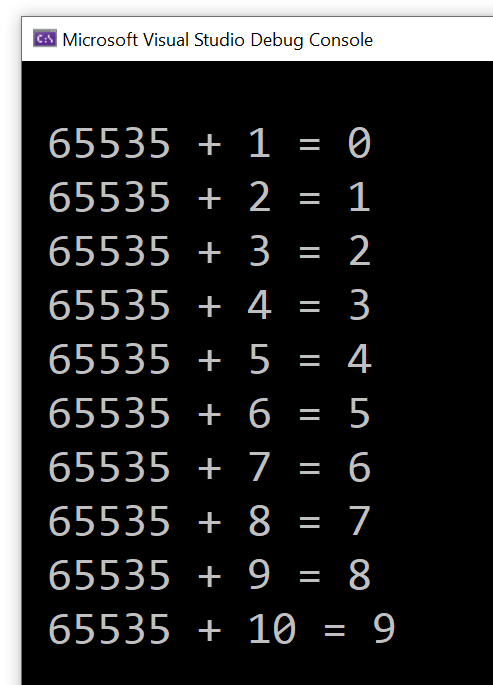
Adding unsigned integer values follows the same logic, except that the maximum value is not 12 or 999’999, but 65535 for uint16_t. So, in this case you have:
65535 + 1 = 0
65535 + 2 = 1
65535 + 3 = 2
and so on.
You can try this simple C++ loop code to see the above concept in action:
constexpr uint16_t kU16Max = std::numeric_limits<uint16_t>::max(); // 65535
for (uint16_t i = 1; i <= 10; i++)
{
    uint16_t sum = kU16Max + i;
    std::cout << " " << kU16Max << " + " << i << " = " << sum << '\n';
}
I got the following output:
Sample C++ loop showing unsigned integer wrap around
So, unsigned integer overflow in C++ results in wrap around according to modulo operation. Considering the initial example of summing vector elements: 10, 1000, 2000, 32000, 40000, the sum of the first four elements is 35010 and fits well in the uint16_t type. But when you add to that partial sum the last element 40000, you exceed the limit of 65535. At this point, wrap around happens, and you get the final result of 9474.
How of curiosity, you may ask: Where does that “magic number” of 9474 come from?
The modulo operation comes here to the rescue! Modulo basically means dividing two integer numbers and taking the remainder as the result of the operation.
So, if you take the correct sum value of 75010 and divide it by the number of integer values that can be represented with 16 bits, which is 2^16 = 65536, and you get the remainder of that integer division, the result is 9474, which is the result returned by the above Sum function!
Now, some people like to say that in C++ there is no overflow with unsigned integers, as before the overflow happens, the modulo operation is applied with the wrap around. I think this is more like a “word war”, but the concept should be clear at this point. In any case, when the sum of two unsigned integers doesn’t fit in the given unsigned integer type, the modulo operation is applied, with a consequent wrap around of the result. The key point is that, for unsigned integers, this is well defined behavior. Anyway, this is the reason why I enclosed the word “overflow” in double quotes in the blog title, and somewhere in the blog post text as well.
Coming back to the original sum problem, independently from the mechanics of the modulo operation and wrap around of unsigned integers, the key point is that the Sum function above returned a value that is not what a user would normally expect.
So, how can you prevent that from happening?
Well, just as we saw in the previous blog post on signed integer overflow, before doing the actual partial cumulative sum, we can check that the result does not overflow. And, if it does, we can throw an exception to signal the error.
Note that, while in the case of signed integers we have to check both the positive number and negative number cases, the latter check doesn’t apply here to unsigned integers (as there are no negative unsigned integers):
#include <cstdint>    // for uint16_t
#include <limits>     // for std::numeric_limits
#include <stdexcept>  // for std::overflow_error
#include <vector>     // for std::vector

// Sum the 16-bit unsigned integers stored in the values vector.
// Throws a std::overflow_error exception on integer overflow.
uint16_t Sum(const std::vector<uint16_t>& values)
{
    uint16_t sum = 0;

    for (auto num : values)
    {
        //
        // Check for integer overflow *before* doing the sum.
        // This will prevent bogus results due to "wrap around"
        // of unsigned integers.
        //
        if (num > 0 && sum > std::numeric_limits<uint16_t>::max() - num)
        {
            throw std::overflow_error("Overflow in Sum function.");
        }

        // The sum is safe
        sum += num;
    }

    return sum;
}
If you try to invoke the above function with the initial input vector, you will see that you get an exception thrown, instead of a wrong sum returned:
Summing signed integer values on computers, with a *finite* number of bits available for representing integer numbers (16 bits, 32 bits, whatever) is not always possible, and can lead to subtle bugs. Let’s discuss that in the context of C++, and let’s see how to protect our code against those bugs.
Suppose that you are operating on signed integer values, for example: 16-bit signed integers. These may be digital audio samples representing the amplitude of a signal; but, anyway, their nature and origin is not of key importance here.
You want to operate on those 16-bit signed integers, for example: you need to sum them. So, you write a C++ function like this:
#include <cstdint>  // for int16_t
#include <vector>   // for std::vector

// Sum the 16-bit signed integers stored in the values vector
int16_t Sum(const std::vector<int16_t>& values)
{
    int16_t sum = 0;

    for (auto num : values)
    {
        sum += num;
    }

    return sum;
}
The input vector contains the 16-bit signed integer values to sum. This vector is passed using const reference (const &), as we are observing it inside the function, without modifying it.
Then we use the safe and convenient range-for loop to iterate through each number in the vector, and update the cumulative sum.
Finally, when the range-for loop is completed, the sum is returned back to the caller.
Pretty straightforward, right?
Now, try and create a test vector containing some 16-bit signed integer values, and invoke the above Sum() function on that, like this:
I compiled and executed the test code using Microsoft Visual Studio 2019 C++ compiler in 64-bit mode, and the result I got was -30526: a negative number?!
Well, if you try to debug the Sum function, and execute the function’s code step by step, you’ll see that the initial partial sums are correct:
10 + 1000 = 1010
1010 + 2000 = 3010
Then, when you add the partial sum of 3010 with the last value of 32000 stored in the vector, the sum becomes a negative number.
Why is that?
Well, if you think of the 16-bit signed integer type, the maximum (positive) value that can be represented is 32767. You can get this value, for example, invoking std::numeric_limits<int16_t>::max():
cout << "Maximum value representable with int16_t: \n";
cout << std::numeric_limits<int16_t>::max() << '\n';
So, in the above sum example, when 3010 is summed with 32000, the sum exceeds the maximum value of 32767, and you hit an integer overflow.
In C++, signed integer overflow is undefined behavior. In this case of Microsoft Visual C++ 2019 compiler on Windows, we got a negative number as a sum of positive numbers, which, from a “high level” perspective is mathematically meaningless. (Actually, if you consider the binary representation of these numbers, the result kind of makes sense. But, going down to this low binary level is out of the scope of this post; moreover, in any case, from a “high-level” common mathematical perspective, summing positive integer numbers cannot lead to a negative result.)
So, how can we prevent such integer overflows to happen and cause buggy meaningless results?
Well, we could modify the above Sum function code, performing some safety checks before actually calculating the sum.
// Sum the 16-bit signed integers stored in the values vector
int16_t Sum(const std::vector<int16_t>& values)
{
    int16_t sum = 0;

    for (auto num : values)
    {
        //
        // TODO: Add safety checks here to prevent integer overflows
        //
        sum += num;
    }

    return sum;
}
If you think about it, if you are adding two positive integer numbers, what is the condition such that their sum is representable with the same signed integer type (int16_t in this case)?
Well, the following condition must be satisfied:
a + b <= MAX
where MAX is the maximum value that can be represented in the given type: std::numeric_limits<int16_t>::max() or 32767 in our case.
In other words, the above condition expresses in mathematical terms that the sum of the two positive integer numbers a and b cannot exceed the maximum value MAX representable with the given signed integer type.
So, the overflow condition is the negation of the above condition, that is:
a + b > MAX
Of course, as we just saw above, you cannot perform the sum (a+b) on a computer if the sum value overflows! So, it seems like a snake biting its own tail, right? Well, we can fix that problem simply massaging the above condition, moving the ‘a’ quantity on the right-hand side, and changing its sign accordingly, like this:
b > MAX – a
So, the above is the overflow condition when a and b are positive integer numbers. Note that both sides of this condition can be safely evaluated, as (MAX – a) is always representable in the given type (int16_t in this example).
Now, you can do a similar reasoning for the case that both numbers are negative, and you want to protect the sum from becoming less than numeric_limits::min, which is -32768 for int16_t.
The overflow condition for summing two negative numbers is:
a + b < MIN
Which is equivalent to:
b < MIN – a
Now, let’s apply this knowledge to modify our Sum function to prevent integer overflow. We’ll basically check the overflow conditions above before doing the actual sum, and we’ll throw an exception in case of overflow, instead of producing a buggy sum value.
#include <cstdint>    // for int16_t
#include <limits>     // for std::numeric_limits
#include <stdexcept>  // for std::overflow_error
#include <vector>     // for std::vector

// Sum the 16-bit signed integers stored in the values vector.
// Throws a std::overflow_error exception on integer overflow.
int16_t Sum2(const std::vector<int16_t>& values)
{
    int16_t sum = 0;

    for (auto num : values)
    {
        //
        // Check for integer overflow *before* doing the sum
        //
        if (num > 0 && sum > std::numeric_limits<int16_t>::max() - num)
        {
            throw std::overflow_error("Overflow in Sum function when adding a positive number.");
        }
        else if (num < 0 && sum < std::numeric_limits<int16_t>::min() - num)
        {
            throw std::overflow_error("Overflow in Sum function when adding a negative number.");
        }

        // The sum is safe
        sum += num;
    }

    return sum;
}
Note that if you add two signed integer values that have different signs (so, you are basically making a subtraction of their absolute values), you can never overflow. So you might think of doing an additional check on the signs of the variables num and sum above, but I think that would be a useless complication of the above code, without any real performance benefits, so I would leave the code as is.
So, in this blog post we have discussed signed integer overflow. Next time, we’ll see the case of unsigned integers.
Let’s briefly introduce a generic helper function from the Guidelines Support Library (GSL), that checks narrowing conversions and throws an exception on errors.
In the previous blog post on conversions from size_t to int and related bugs, we saw some custom code that checked that the conversion from the input size_t value to int was safe, and in case it wasn’t, an exception was thrown. Of course, you can customize that code to throw your own custom exception class, or maybe assert in debug builds and throw an exception in release builds, log the error, etc.
In addition to that, the Microsoft’s implementation of the GSL library offers a utility function called gsl::narrow<T>, that checks if the input argument can be represented in the target type T, and if it cannot, the function throws an exception of type gsl::narrowing_error. The implementation code of that function is more generic than the specific case discussed in the previous blog post, but requires that you use the GSL library (in general not a problem, if your C++ compiler supports it), and that the specific gsl::narrowing_error is thrown. Of course you can pick whatever fits your needs best (maybe using that GSL function fits your needs, or maybe you want a different behavior when an unsafe conversion is encountered, so you need to write your own custom code).
Win32 APIs like MultiByteToWideChar (or ATL helpers like CA2W) can come in handy, with the knowledge of the EUC-JP code page ID, and maybe an additional intermediate step via UTF-16.
Japanese EUC (Extended Unix Code), or EUC-JP, is a variable-length multi-byte encoding used to represent Japanese characters. For example, I found this encoding used in a Japanese/English dictionary file. How can you convert from it to Unicode?
Well, first “converting to Unicode” requires further refinement; for example: Do you want to convert to Unicode UTF-16, or UTF-8?
If you want to display the Japanese text encoded in EUC-JP in some Windows graphical application, you need to convert to Unicode UTF-16, as this is the “native” Unicode encoding used by Windows Win32 APIs.
So, to convert from EUC-JP to UTF-16 you can invoke the MultiByteToWideChar Win32 API (or use the CA2W ATL conversion helper), as discussed in several posts in the series on Unicode Conversions. The trick here is to identify the correct code page for EUC-JP.
I couldn’t find a preprocessor macro in the Windows Platform SDK defining the aforementioned code page ID (unlike, for example, CP_UTF8), but you can simply create a named constant for that purpose, for example:
// Japanese EUC or EUC-JP Code Page ID
constexpr UINT kCodePage_JapaneseEuc = 20932;
Then you can pass this named constant (instead of the “magic number” 20932) as the first parameter to MultiByteToWideChar, or as the second parameter to the proper ATL’s CA2W constructor overload that takes an input string and a code page ID for the conversion.
In this way, you can convert your input text encoded in EUC-JP to Unicode UTF-16, for passing it at the Win32 API boundary.
Now, what about converting from EUC-JP to UTF-8? Well, you cannot directly perform such conversion: You have to do an additional intermediate step, and go through UTF-16, instead. Basically, you can follow these steps:
Convert from EUC-JP to UTF-16 via MultiByteToWideChar (or ATL CA2W) and the EUC-JP code page ID
Convert from UTF-16 to UTF-8 via WideCharToMultiByte (or ATL CW2A) and the CP_UTF8 “code page” ID.
P.S. These days, if I have the freedom to pick an encoding for representing a text file, I would use Unicode UTF-8. But you may need to deal with legacy file formats, or very language-specific formats used in some particular contexts, so these kinds of conversions can be necessary.
Now, let’s assume that you have a Windows C++ code base using MFC or ATL, and the CString class. In Unicode builds (which have been the default in VS since Visual Studio 2005!), CString is a UTF-16 string class. You want to convert between that and the C++ Standard Library’s std::wstring.
How can you do that?
Well, in the Visual C++ implementation of the C++ standard library on Windows, std::wstring stores Unicode UTF-16-encoded text. (Note that, as already discussed in a previous blog post, this behavior is not portable to other platforms. But since we are discussing the case of an ATL or MFC code base here, we are already in the realm of Windows-specific C++ code.)
So, we have a match between CString and wstring here: they use the same Unicode encoding, as they both store Unicode UTF-16 text! Hooray! 🙂
So, the conversion between objects of these two classes is pretty simple. For example, you can use some C++ code like this:
//
// Conversion functions between ATL/MFC CString and std::wstring
// (Note: We assume Unicode build mode here!)
//

#if !defined(UNICODE)
#error This code requires Unicode build mode.
#endif

//
// Convert from std::wstring to ATL CString
//
inline CString ToCString(const std::wstring& ws)
{
    if (!ws.empty())
    {
        ATLASSERT(ws.length() <= INT_MAX);
        return CString(ws.c_str(), static_cast<int>(ws.length()));
    }
    else
    {
        return CString();
    }
}

//
// Convert from ATL CString to std::wstring
//
inline std::wstring ToWString(const CString& cs)
{
    if (!cs.IsEmpty())
    {
        return std::wstring(cs.GetString(), cs.GetLength());
    }
    else
    {
        return std::wstring();
    }
}
Note that, since std::wstring’s length is expressed as a size_t, while CString’s length is expressed using an int, the conversion from wstring to CString is not always possible, in particular for gigantic strings. For that reason, I used a debug-build ATLASSERT check on the input wstring length in the ToCString function. This aspect was discussed in more details in my previous blog post on unsafe conversions from size_t to int.
An interesting note from Google C++ Style Guide on unsigned integers resonates with the recent blog post on subtle bugs when mixing size_t and int.
I was going through Google C++ Style Guide, and found an interesting note on unsigned integers (from the Integer Types section). This resonated in particular with my recent writing on subtle bugs when mixing unsigned integer types like size_t (coming from the C++ Standard Library way of expressing a string length with an unsigned integer type) and signed integer types like int (required at the Win32 API interface of some functions like MultiByteToWideChar and WideCharToMultiByte).
That note from Google C++ style guide is quoted below, with emphasis mine:
Unsigned integers are good for representing bitfields and modular arithmetic.Because of historical accident, the C++ standard also uses unsigned integers to represent the size of containers – many members of the standards body believe this to be a mistake, but it is effectively impossible to fix at this point. The fact that unsigned arithmetic doesn’t model the behavior of a simple integer, but is instead defined by the standard to model modular arithmetic (wrapping around on overflow/underflow), means that a significant class of bugs cannot be diagnosed by the compiler. In other cases, the defined behavior impedes optimization.
That said, mixing signedness of integer types is responsible for an equally large class of problems. The best advice we can provide: try to use iterators and containers rather than pointers and sizes, try not to mix signedness, and try to avoid unsigned types (except for representing bitfields or modular arithmetic). Do not use an unsigned type merely to assert that a variable is non-negative.



 Giovanni Dicanio's Blog