Three Pieces of Advice on Using Modern C++ at Win32 API Boundaries

C is widely used as a programming language at API interfaces. But that doesn’t mean that you must stick to C (or old-style C++) in *your own* code!

The previous article on enumerating modules loaded into a process using Win32 API functions and C++ invites/inspires some reflections and pieces of advice on using modern C++ at the Win32 API boundaries.

#1: Raw C Handles Should Be Wrapped in Safe C++ Classes (a.k.a. Raw C Handles Are Radioactive)

Many Win32 API C-interface functions use raw C handles (e.g. represented by the HANDLE type). For example, we saw in the previous article that the CreateToolhelp32Snapshot function returns a HANDLE that we used with other related API functions to enumerate the loaded modules.

When the handle is not needed anymore, for example after the enumeration process is completed (or even if it’s interrupted by an error), the raw handle must be freed calling the CloseHandle Win32 API function. This is a common pattern for lots of Win32 API functions:

HANDLE hSomething = CreateSomething( /* ...various parameters... */ );
// Check that the handle is valid
// (a typical error value is INVALID_HANDLE_VALUE)

// Do some processing with the above handle
DoSomething(hSomething, /* ...various parameters ... */);

// Close the handle at the end of the elaboration
CloseHandle(hSomething);

// Avoid dangling references to handles already closed
hSomething = INVALID_HANDLE_VALUE;

Well, in modern C++ the idea is to wrap this raw C HANDLE in a safe C++ class, such that, when instances of this class go out of scope, the handle will be automatically closed.

That is made possible by the fact that the C++ class destructor will be automatically called when instances of the class go out of scope, so a proper call to CloseHandle can be made by the destructor itself (or by some cleanup helper method invoked by the destructor).

To be safe, the cleanup code should also take into account the case in which the wrapped handle is invalid (case represented by the INVALID_HANDLE_VALUE for the CreateToolhelp32Snapshot API function discussed above).

So, the initial skeleton code for such a wrapper C++ class could look like this:

//----------------------------------------------------
// C++ class that safely wraps a raw C-style HANDLE,
// and releases it when instances of the class
// go out of scope.
//----------------------------------------------------
class ScopedHandle
{
public:
    // Gain ownership of the input raw handle
    explicit ScopedHandle(HANDLE h) noexcept
        : m_handle{h}
    {}

    // Get access to the wrapped raw handle,
    // for example to pass it as an argument
    // to other Win32 API functions
    HANDLE GetHandle() const noexcept
    {
        return m_handle;
    }

    // Safely releases the wrapped handle
    // (if the handle is valid)
    ~ScopedHandle() noexcept
    {
        if (m_handle != INVALID_HANDLE_VALUE)
        {
            ::CloseHandle(m_handle);
        }
    }

private:
    // Wrapped raw handle
    HANDLE m_handle;
};

As I discussed in more details in my course on Practical C++ 14 and C++17 Features (that can be still applied to newer versions of the C++ standard, as well), you can think of the raw handle as something “radioactive”, that should be safely wrapped in RAII boundaries, provided by a C++ class that behaves as a resource manager, like the one shown above.

Moreover, to avoid subtle bugs, it’s important to prevent copies for a class like the one described above:

class ScopedHandle
{
    //
    // Disable Copy
    //
private:
    ScopedHandle(ScopedHandle const&) = delete;
    ScopedHandle& operator=(ScopedHandle const&) = delete;
...

(If you do want to make the class copyable, it’s important that copy operations are well defined and implemented; for example, you could use some form of reference count applied to the wrapped handle.)

It’s also possible to improve this kind of resource manager class, for example adding move semantics. That would make it possible, for example, to return a wrapped handle by some factory function, or store it in containers like std::vector. In such case the class name should be changed to reflect its improved nature (ScopedHandle wouldn’t work anymore); for example, we could name it SafeHandle, or UniqueHandle (if it’s movable but not copyable), or whatever you like best.

If you want to see some C++ compilable code for a resource manager class like that, you can take a look at the winreg::RegKey class of my WinReg C++ library (you can find the code in the header-only WinReg.hpp file). Note that, in this case, the wrapped raw handle is of type HKEY (i.e. a handle to a registry key).

The code can be generalized, as well. For example, you could write a generic SafeHandle<T> template. This could be the topic of some future articles.

Moreover, if you want to reuse something already available, the Microsoft WIL open-source library provides a wil::unique_handle template for that purpose.

Whatever class or template you choose to use or write, the bottom line is: Do not use raw handles in modern C++ code; wrap them in safe “RAII” boundaries provided by C++ resource manager classes.

#2: Use C++ String Classes Instead of Raw C-style Null-terminated Character Arrays

Win32 API functions usually work with C structures that represent strings using either raw C-style null-terminated character pointers, or null-terminated character arrays.

In modern C++, you can do better than that! In fact, you can use safe and convenient C++ string classes instead of working with those more basic raw C-style constructs.

For example, the MODULEENTRY32 structure used in the previous article on module enumeration, has two fields that are WCHAR C-style raw null-terminated character arrays: szModule and szExePath.

// Structure definition from MSDN:
// https://learn.microsoft.com/en-us/windows/win32/api/tlhelp32/ns-tlhelp32-moduleentry32w

typedef struct tagMODULEENTRY32W {
  DWORD   dwSize;
  ...

  // Null-terminated WCHAR arrays representing Unicode UTF-16
  // strings in C:
  WCHAR   szModule[MAX_MODULE_NAME32 + 1];
  WCHAR   szExePath[MAX_PATH];
} MODULEENTRY32W;

Instead of working with those, you can create instances of C++ string classes, like CString or std::wstring, and operate on those much safer and higher level constructs made available by the C++ language and libraries:

MODULEENTRY32 moduleEntry;
...

// Create a string object storing the module name
std::wstring moduleName(moduleEntry.szModule);

// Can use ATL/MFC CString as well:
CString moduleName(moduleEntry.szModule);

Once you have created string objects from those C raw character arrays, forget about the original C character arrays, and use only the C++ string objects in the rest of your modern C++ code.

C++ string classes have many advantages over pure raw C-style arrays of characters, like being easily and safely copyable. They can also be concatenated with a very simple and highly readable syntax, like using the operator+ overload (as in: s1 + s2). And they are properly freed when they go out of scope, as well.

#3: Use C++ Containers Like std::vector Instead of Raw C Arrays

If you take a look at MSDN examples, that are typically written in C, you’ll see lots of uses of raw C arrays to store a set of elements. Typically the code follows this pattern:

SOME_STRUCTURE elements[MAX_COUNT];

// May have another variable representing 
// the actual number of elements stored in the array.
// This is increased when a new element is added.
int elementCount = 0;

In modern C++, you can do better than that: In fact, you can create a std::vector containing instances of the structures, and you can dynamically grow the vector, for example adding new elements to it invoking its push_back method:

// Start creating an empty vector
std::vector<ModuleInfo> loadedModules;

// When a new module is found during the enumeration, 
// add it to the vector container
loadedModules.push_back( ModuleInfo{ /* ... */ } );

Hope you find these suggestions of some interest!

Slide enumerating the three pieces of advice on using modern C++ at Win32 API boundaries, described in details in the article.

C is a great language for the “boundaries”. But you can happily switch gears to modern C++ on your own side of the boundary.
How to Access std::vector’s Internal Array

Pay attention to the target of the address-of (&) operator!

Suppose that you have some data stored in a std::vector, and you need to pass it to a function that takes a pointer to the beginning of the data, and in addition the data size or element count.

Something like this:

// Input data to process
std::vector<int> myData = { 11, 22, 33 };

//
// Do some processing on the above data
//
DoSomething(
    ??? ,         // beginning of data 
    myData.size() // element count
);

You may think of using the address-of operator (&) to get a pointer to the beginning of the data, like this:

// Note: *** Wrong code ***
DoSomething(&myData, myData.size());

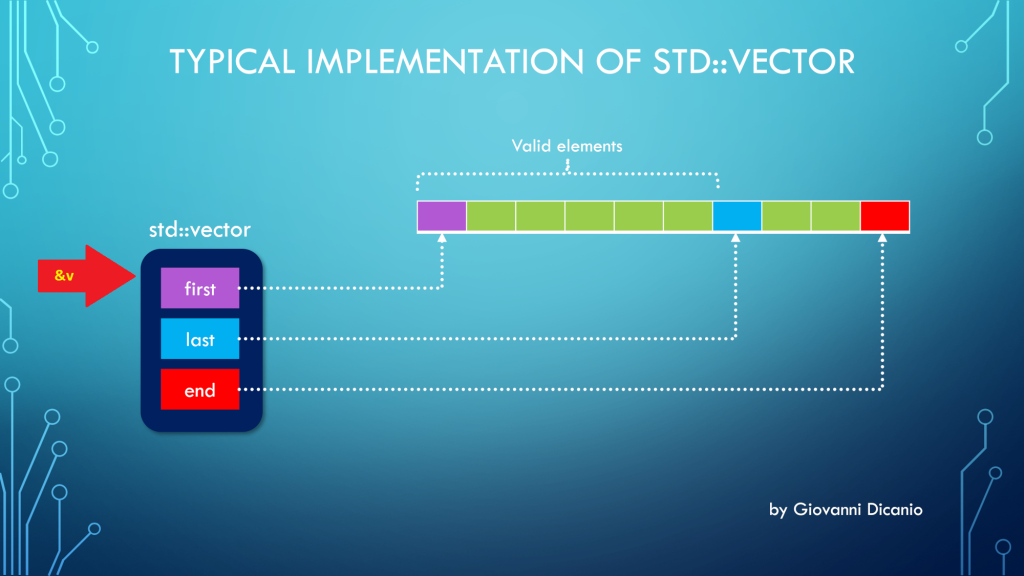
But the above code is wrong. In fact, if you use the address-of operator (&) with a std::vector instance, you get the address of the “control block” of std::vector, that is the block that contains the three pointers first, last, end, according to the model discussed in a previous blog post:

Taking the address of a std::vector returns a pointer to the beginning of its control block
Taking the address of a std::vector (&v) points to its control block

Luckily, if you try the above code, it will fail to compile, with a compiler error message like this one produced by the Visual C++ compiler in VS 2019:

Error C2664: 'void DoSomething(const int *,size_t)': 
cannot convert argument 1 
from 'std::vector<int,std::allocator<int>> *' to 'const int *'
Types pointed to are unrelated; conversion requires reinterpret_cast, C-style cast or function-style cast

What you really want here is the address of the vector’s elements stored in contiguous memory locations, and pointed to by the vector’s control block.

To get that address, you can invoke the address-of operator on the first element of the vector (which is the element at index 0): &v[0].

// This code works
DoSomething(&myData[0], myData.size());

As an alternative, you can invoke the std::vector::data method:

DoSomething(myData.data(), myData.size());

Now, there’s a note I’d like to point out for the case of empty vectors:

According to the documentation on CppReference:

If size() is ​0​, data() may or may not return a null pointer.

CppReference.com

I would have preferred a well-defined behavior such that, when size is 0 (i.e. the vector is empty), data() must return a null pointer (nullptr). This is the good behavior that is implemented in the C++ Standard Library that comes with VS 2019. I believe the C++ Standard should be fixed to adhere to this intelligent behavior.

How to Get the “Size” of a std::vector?

First, let’s reveal the mystery of the “fixed 24-byte sizeof”; then, let’s see how to properly get the total size, in bytes, of all the elements stored in a std::vector.

Someone was modernizing some legacy C++ code. They had an array defined like this:

int v[100];

and they needed the size, in bytes, of that array, to pass that value to some function. They used sizeof(v) to get the previous array size.

When modernizing their code, they chose to use std::vector instead of the above raw C-style array. And they still used sizeof(v) to retrieve the size of the vector. For example:

// Create a vector storing 100 integers
std::vector<int> v(100);

std::cout << sizeof(v);

The output they got when building their code in release mode with Visual Studio 2019 was 24. They also noted that they always got the same 24 output, independently from the number of elements in the std::vector!

This is clearly a bug. Let’s try to shed some light on it and show the proper way of getting the size of the total number of elements stored in a std::vector.

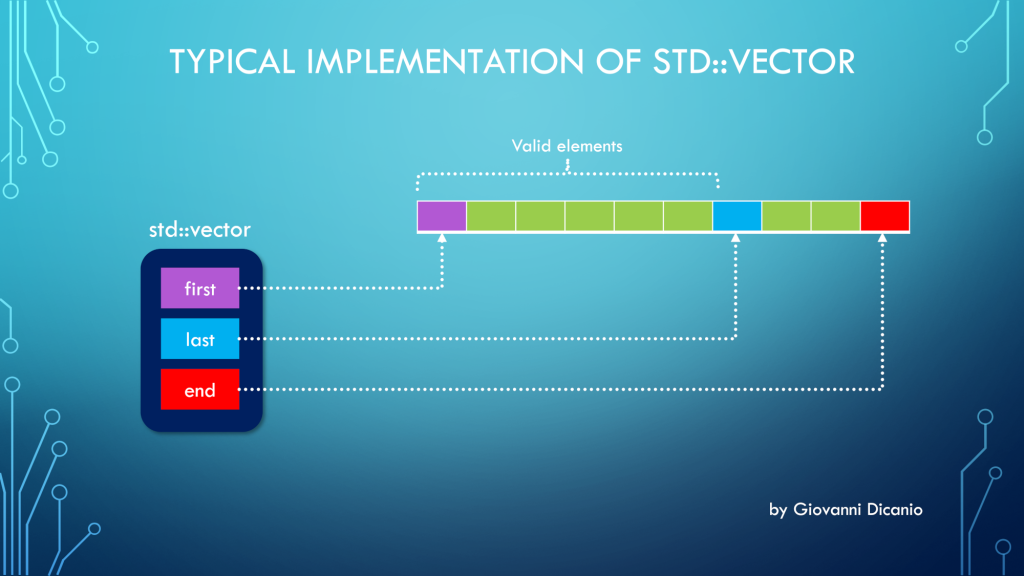
First, to understand this bug, you need to know how a std::vector is implemented. Basically, at least in Microsoft STL implementation (in release builds, and when using the default allocator1), a std::vector is made by three pointers, kind of like this:

template <typename T>
class vector
{
    T* first;
    T* last;
    T* end;

    ...
};
Diagram showing a typical implementation of std::vector, made by three pointers: first, last and end. The valid elements are those pointed between first (inclusive) and last (exclusive).
Typical implementation of std::vector with three pointers: first, last, end
  1. first: points to the beginning of the contiguous memory block that stores the vector’s elements
  2. last: points one past the last valid element stored in the vector
  3. end: points one past the end of the allocated memory for the vector’s elements

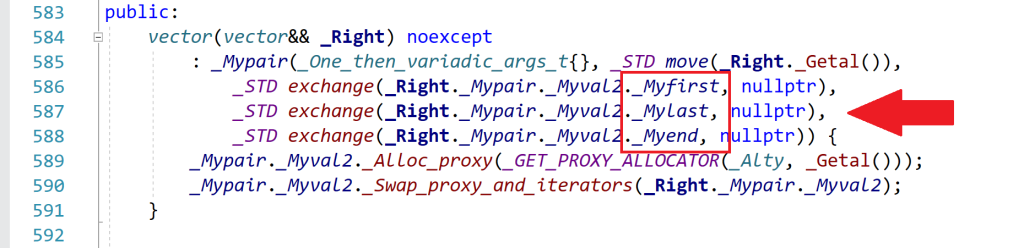
Spelunking inside the Microsoft STL implementation, you’ll see that the “real” names for these pointers are _Myfirst, _Mylast, _Myend, as shown for example in this part of the <vector> header:

Part of the vector header that shows the identifiers that represent the vector's three internal pointers: first, last and end.
An excerpt of the <vector> header that comes with Microsoft Visual Studio 2019

So, when you use sizeof with a std::vector instance, you are actually getting the size of the internal representation of the vector. In this case, you have three pointers. In 64-bit builds, each pointer occupies 8 bytes, so you have a total of 3*8 = 24 bytes, which is the number that sizeof returned in the above example.

As you can see, this number is independent from the actual number of elements stored in the vector. Whether the vector has one, three, ten or 10,000 elements, the size of the vector’s internal representation made by those three pointers is always fixed and given by the above number (at least in the Microsoft’s STL implementation that comes with Visual Studio2).

Now that the bug has been analyzed and the mystery explained, let’s see how to fix it.

Well, to get the “size of a vector”, considered as the number of bytes occupied by the elements stored in the vector, you can get the number of elements stored in the vector (returned by the vector::size method), and multiply that by the (fixed) size of each element, e.g.:

//
// v is a std::vector<int>
//
// v.size()    : number of elements in the vector
// sizeof(int) : size, in bytes, of each element
//
size_t sizeOfAllVectorElementsInBytes = v.size() * sizeof(int);

To write more generic code, assuming the vector is not empty, you can replace sizeof(int) with sizeof(v[0]), which is the sizeof the first element stored in the vector. (If the vector is empty, there is no valid element stored in it, so the index zero in v[0] is out of bounds, and the above code won’t work; it will probably trigger an assertion failure in debug builds.)

In addition, you could use the vector::value_type type name member to get the size of a single element (which would work also in the case of empty vectors). For example:

using IntVector = std::vector<int>;

IntVector v(100);

// Print the number of bytes occupied 
// by the (valid) elements stored in the vector:
cout << v.size() * sizeof(IntVector::value_type);

To be even more generic, a helper template function like this could be used:

//
// Return the size, in bytes, of all the valid elements
// stored in the input vector
//
template <typename T, typename Alloc>
inline size_t SizeOfVector(const std::vector<T, Alloc> & v)
{
    return v.size() * sizeof(std::vector<T, Alloc>::value_type);
}


//
// Sample usage:
//
std::vector<int> v(100);
std::cout << SizeOfVector(v) << '\n'; 
// Prints 400, i.e. 100 * sizeof(int)

Bonus Reading

If you want to learn more about the internal implementation of std::vector (including how they represent the default allocator with an “empty class” using the compressed pair trick), you can read these two interesting blog posts on The Old New Thing blog:

  1. Inside the STL: The pair and the compressed pair
  2. Inside the STL: The vector

  1. In debug builds, or when using a custom allocator, there can be more stuff added to the above simple std::vector representation. ↩︎
  2. Of course, that number can change in debug builds, or when using custom allocators, as per the previous note. ↩︎