Converting Between Unicode UTF-16 and UTF-8 in Windows C++ Code

A detailed discussion on how to convert C++ strings between Unicode UTF-16 and UTF-8 in C++ code using Windows APIs like WideCharToMultiByte, and STL strings and string views.

Unicode UTF-16 is the “native” Unicode encoding used in Windows. In particular, the UTF-16LE (Little-Endian) format is used (which specifies the byte order, i.e. the bytes within a two-byte code unit are stored in the little-endian format, with the least significant byte stored at lower memory address).

Often the need arises to convert between UTF-16 and UTF-8 in Windows C++ code. For example, you may invoke a Windows API that returns a string in UTF-16 format, like FormatMessageW to get a descriptive error message from a system error code, and then you want to convert that string to UTF-8 to return it via a std::exception::what overriding, or write the text in UTF-8 encoding in a log file.

I usually like working with “native” UTF-16-encoded strings in Windows C++ code, and then convert to UTF-8 for external storage or transmission outside of application boundaries, or for cross-platform C++ code.

So, how can you convert some text from UTF-16 to UTF-8? The Windows API makes it available a C-interface function named WideCharToMultiByte. Note that there is also the symmetric MultiByteToWideChar that can be used for the opposite conversion from UTF-8 to UTF-16.

Let’s focus our attention on the aforementioned WideCharToMultiByte. You pass to it a UTF-16-encoded string, and on success this API will return the corresponding UTF-8-encoded string.

As you can see from Microsoft official documentation, this API takes several parameters:

int WideCharToMultiByte(
  [in]            UINT   CodePage,
  [in]            DWORD  dwFlags,
  [in]            LPCWCH lpWideCharStr,
  [in]            int    cchWideChar,
  [out, optional] LPSTR  lpMultiByteStr,
  [in]            int    cbMultiByte,
  [in, optional]  LPCCH  lpDefaultChar,
  [out, optional] LPBOOL lpUsedDefaultChar
);

So, instead of explicitly invoking it every time you need in your code, it’s much better to wrap it in a convenient higher-level C++ function.

Choosing a Name for the Conversion Function

How can we name that function? One option could be ConvertUtf16ToUtf8, or maybe just Utf16ToUtf8. In this way, the flow or direction of the conversion seems pretty clear from the function’s name.

However, let’s see some potential C++ code that invokes this helper function:

std::string utf8 = Utf16ToUtf8(utf16);

The kind of ugly thing here is that we see the utf8 result on the same side of the Utf16 part of the function name; and the Utf8 part of the function name is near the utf16 input argument:

std::string utf8 = Utf16ToUtf8(utf16);
//          ^^^^   =====   
//
// The utf8 return value is near the Utf16 part of the function name,
// and the Utf8 part of the function name is near the utf16 argument.

This may look somewhat intricate. Would it be nicer to have the UTF-8 return and UTF-16 argument parts on the same side, putting the return on the left and the argument on the right? Something like that:

std::string utf8 = Utf8FromUtf16(utf16);
//          ^^^^^^^^^^^    ===========
// The UTF-8 and UTF-16 parts are on the same side
//
// result = [Result]From[Argument](argument);
//

Anyway, pick the coding style that you prefer.

Let’s assume Utf8FromUtf16 from now on.

Defining the Public Interface of the Conversion Function

We can store the UTF-8 result string using std::string as the return type. For the UTF-16 input argument, we could use a std::wstring, passing it to the function as a const reference (const &), since this is an input read-only parameter, and we want to avoid potentially expensive deep copies:

std::string Utf8FromUtf16(const std::wstring& utf16);

If you are using at least C++17, another option to pass the input UTF-16 string is using a string view, in particular std::wstring_view:

std::string Utf8FromUtf16(std::wstring_view utf16);

Note that string views are cheap to copy, so they can be simply passed by value.

Note that when you invoke the WideCharToMultiByte API you have two options for passing the input string. In both cases you pass a pointer to the input UTF-16 string in the lpWideCharStr parameter. Then in the cchWideChar parameter you can either specify the count of wchar_ts in the input string, or pass -1 if the string is null-terminated and you want to process the whole string (letting the API figure out the length).

Note that passing the explicit wchar_t count allows you to process only a sub-string of a given string, which works nicely with the std::wstring_view C++ class.

In addition, you can mark this helper C++ function with [[nodiscard]], as discarding the return value would likely be a programming error, so it’s better to at least have the C++ compiler emit a warning about that:

[[nodiscard]] std::string Utf8FromUtf16(std::wstring_view utf16);

Now that we have defined the public interface of our helper conversion function, let’s focus on the implementation code.

Implementing the Conversion Code

The first thing we can do is to check the special case of an empty input string, and, in such case, just return an empty string back to the caller:

// Special case of empty input string
if (utf16.empty())
{
    // Empty input --> return empty output string
    return std::string{};
}

Now that we got this special case out of our way, let’s focus on the general case of non-empty UTF-16 input strings. We can proceed in three logical steps, as follows:

  1. Invoke the WideCharToMultiByte API a first time, to get the size of the result UTF-8 string.
  2. Create a std::string object with large enough internal array, that can store a UTF-8 string of that size.
  3. Invoke the WideCharToMultiByte API a second time, to do the actual conversion from UTF-16 to UTF-8, passing the address of the internal buffer of the UTF-8 string created in the previous step.

Let’s write some C++ code to put these steps into action.

First, the WideCharToMultiByte API can take several flags. In our case, we’ll use the WC_ERR_INVALID_CHARS flag, which tells the API to fail if an invalid input character is encountered. Since we’ll invoke the API a couple times, it makes sense to store this flag in a constant, and reuse it in both API calls:

// Safely fail if an invalid UTF-16 character sequence is encountered
constexpr DWORD kFlags = WC_ERR_INVALID_CHARS;

We also need the length of the input string, in wchar_t count. We can invoke the length (or size) method of std::wstring_view for that. However, note that wstring_view::length returns a value of type equivalent to size_t, while the WideCharToMultiByte API’s cchWideChar parameter is of type int. So we have a type mismatch here. We could simply use a static_cast<int> here, but that would be more like putting a “patch” on the issue. A better approach is to first check that the input string length can be safely stored inside an int, which is always the case for strings of reasonable lengths, but not for gigantic strings, like for strings of length greater than 2^31-1, that is more than two billion wchar_ts in size! In such cases, the conversion from an unsigned integer (size_t) to a signed integer (int) can generate a negative number, and negative lengths don’t make sense.

For a safe conversion, we could write this C++ code:

if (utf16.length() > static_cast<size_t>((std::numeric_limits<int>::max)()))
{
    throw std::overflow_error(
        "Input string is too long; size_t-length doesn't fit into an int."
    );
}

// Safely cast from size_t to int
const int utf16Length = static_cast<int>(utf16.length());

Now we can invoke the WideCharToMultiByte API to get the length of the result UTF-8 string, as described in the first step above:

// Get the length, in chars, of the resulting UTF-8 string
const int utf8Length = ::WideCharToMultiByte(
    CP_UTF8,          // convert to UTF-8
    kFlags,           // conversion flags
    utf16.data(),     // source UTF-16 string
    utf16Length,      // length of source UTF-16 string, in wchar_ts
    nullptr,          // unused - no conversion required in this step
    0,                // request size of destination buffer, in chars
    nullptr, nullptr  // unused
);
if (utf8Length == 0)
{
    // Conversion error: capture error code and throw
    const DWORD errorCode = ::GetLastError();
        
    // You can throw an exception here...
}

Now we can create a std::string object of the desired length, to store the result UTF-8 string (this is the second step):

// Make room in the destination string for the converted bits
std::string utf8(utf8Length, '\0');
char* utf8Buffer = utf8.data();

Now that we have a string object with proper size, we can invoke the WideCharToMultiByte API a second time, to do the actual conversion (this is the third step):

// Do the actual conversion from UTF-16 to UTF-8
int result = ::WideCharToMultiByte(
    CP_UTF8,          // convert to UTF-8
    kFlags,           // conversion flags
    utf16.data(),     // source UTF-16 string
    utf16Length,      // length of source UTF-16 string, in wchar_ts
    utf8Buffer,       // pointer to destination buffer
    utf8Length,       // size of destination buffer, in chars
    nullptr, nullptr  // unused
);
if (result == 0)
{
    // Conversion error: capture error code and throw
    const DWORD errorCode = ::GetLastError();

    // Throw some exception here...
}

And now we can finally return the result UTF-8 string back to the caller!

return utf8;

You can find reusable C++ code that follows these steps in this GitHub repo of mine. This repo contains code for converting in both directions: from UTF-16 to UTF-8 (as described here), and vice versa. The opposite conversion (from UTF-8 to UTF-16) is done invoking the MultiByteToWideChar API; the logical steps are the same.


P.S. You can also find an article of mine about this topic in an old issue of MSDN Magazine (September 2016): Unicode Encoding Conversions with STL Strings and Win32 APIs. This article contains a nice introduction to the Unicode UTF-16 and UTF-8 encodings. But please keep in mind that this article predates C++17, so there was no discussion of using string views for the input string parameters. Moreover, the (non const) pointer to the string’s internal array was retrieved with the &s[0] syntax, instead of invoking the convenient non-const [w]string::data overload introduced in C++17.

How to Safely Pass a C++ String View as Input to a C-interface API

Use STL string objects like std::string/std::wstring as a safe bridge.

Last time, we saw that passing a C++ std::[w]string_view to a C-interface API (like Win32 APIs) expecting a C-style null-terminated string pointer can cause subtle bugs, as there is a requirement impedance mismatch. In fact:

  • The C-interface API (e.g. Win32 SetWindowText) expects a null-terminated string pointer
  • The STL string views do not guarantee null-termination

So, supposing that you have a C++17 (or newer) code base that heavily uses string views, when you need to interface those with Win32 API function calls, or whatever C-interface API, expecting C-style null-terminated strings, how can you safely pass instances of string views as input parameter?

Invoking the string_view/wstring_view’s data method would be dangerous and source of subtle bugs, as the data returned pointer is not guaranteed to point to a null-terminated string.

Instead, you can use a std::string/wstring object as a bridge between the string views and the C-interface API. In fact, the std::string/wstring’s c_str method does guarantee that the returned pointer points to a null-terminated string. So it’s safe to pass the pointer returned by std::[w]string::c_str to a C-interface API function that expects a null-terminated C-style string pointer (like PCWSTR/LPCWSTR parameters in the Win32 realm).

For example:

// sv is a std::wstring_view

// C++ STL strings can be easily initialized from string views
std::wstring str{ sv };

// Pass the intermediate wstring object to a Win32 API,
// or whatever C-interface API expecting 
// a C-style *null-terminated* string pointer.
DoSomething( 
    // PCWSTR/LPCWSTR/const wchar_t* parameter
    str.c_str(), // wstring::c_str

    // Other parameters ...    
);

// Or use a temporary string object to wrap the string view 
// at the call site:
DoSomething(
    // PCWSTR/LPCWSTR/const wchar_t* parameter
    std::wstring{ sv }.c_str(),

    // Other parameters ...
);

Passing C++ STL Strings vs. String Views as Input Parameters at the Windows C API Boundary

Passing STL std::[w]string objects at Win32 API boundaries is common for C++ code that calls into Win32 C-interface APIs. When is it safe to pass *string views* instead?

A common question I have been asked many times goes along these lines: “I need to pass a C++ string as input parameter to a Windows Win32 C API function. In modern C++ code, should I pass an STL string or a string view?”

Let’s start with some refinements and clarifications.

First, assuming the Windows C++ code is built in Unicode UTF-16 mode (which has been the default since Visual Studio 2005), the STL string class would be std::wstring, and the corresponding “string view” would be std::wstring_view.

Moreover, since wstring objects are, in general, not cheap to copy, I would consider passing them via const&. Use reference (&) to avoid potentially expensive copies, and use const, since these string parameters are input parameters, and they will not be modified by the called function.

So, the two competing options are typically:

// Use std::wstring passed by const&
SomeReturnType DoSomething( 
    /* [in] */ const std::wstring& s, 
    /* other parameters */
)
{
    // Call some Win32 API passing s
    ...
}

// Use std::wstring_view (passing by value is just fine)
SomeReturnType DoSomething(
    /* [in] */ std::wstring_view sv,
    /* other parameters */
)
{
    // Call some Win32 API passing sv
    ...
}

So, which form should you pick?

Well, that’s a good question!

In general, I would say that if the Win32 API you are wrapping/calling takes a pointer to a null-terminated C-style string (i.e. a const wchar_t*/PCWSTR/LPCWSTR parameter), then you should pick std::wstring.

An example of that is the SetWindowText Windows API. Its prototype is like this:

// In Unicode builds, SetWindowText expands to SetWindowTextW

BOOL SetWindowTextW(
  HWND    hWnd,
  LPCWSTR lpString
);

When you write some code like this:

SetWindowText(hWndName, L"Connie");  // Unicode build

the SetWindowText(W) API is expecting a null-terminated C-style string. If you pass a std::wstring object, like this:

std::wstring name = L"Connie";
SetWindowText(hWndName, name.c_str()); // Works fine!

the code will work fine. In fact, the wstring::c_str() method is guaranteed to return a null-terminated C-style string pointer.

On the other hand, if you pass a string view like std::wstring_view in that context, you’ll likely get some subtle bugs!

To learn more about that, you may want to read my article: The Case of string_view and the Magic String.

Try experimenting with the above API and something like “Connie is learning C++” and string views!

Passing STL string objects vs. string views

On the other hand, there are Win32 APIs that accept also a pointer to some string characters and a length. An example of that is the LCMapStringEx API:

int LCMapStringEx(
    LPCWSTR lpLocaleName,
    DWORD   dwMapFlags,
    LPCWSTR lpSrcStr,  // <-- pointer
    int     cchSrc,    // <-- length (optional)

    /* ... other parameters */
);

As it can be read from the official Microsoft documentation about the 4th parameter cchSrc, this represents (emphasis mine):

“(the) Size, in characters, of the source string indicated by lpSrcStr. The size of the source string can include the terminating null character, but does not have to.

(…) The application can set this parameter to any negative value to specify that the source string is null-terminated.”

In other words, the aforementioned LCMapStringEx API has two “input” working modes with regard to this aspect of the input string:

  1. Explicitly pass a pointer and a (positive) size.
  2. Pass a pointer to a null-terminated string and a negative value for the size.

If you use the API in working mode #1, explicitly passing a size value for the input string, the input string is not required to be null-terminated!

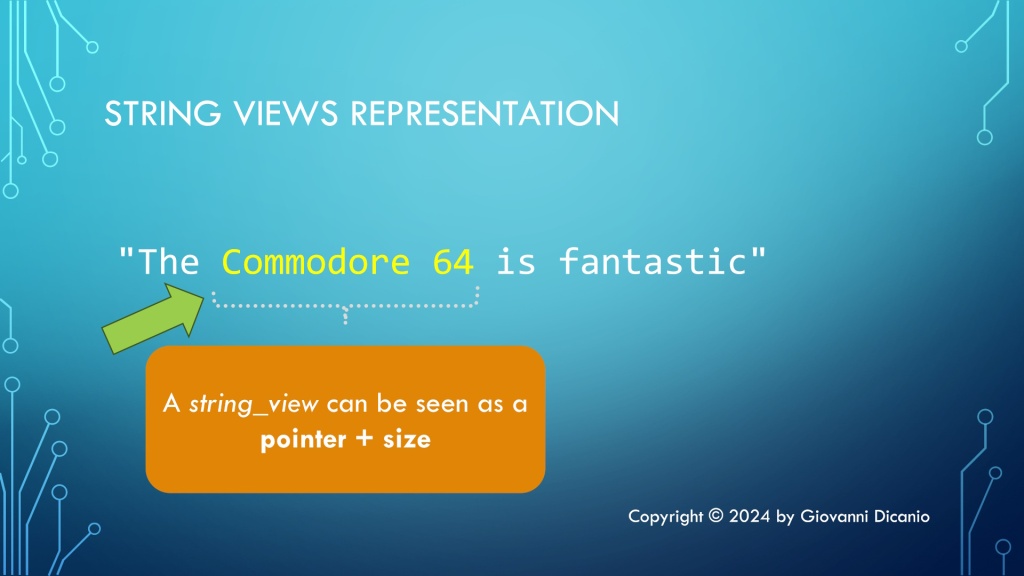
In this case, you can simply use a std::wstring_view, as there is no requirement for null-termination for the input string. And a std::[w]string_view is basically a pointer (to string characters) + a size.

Of course, you can still use the “classic” C++ option of passing std::wstring by const& in this case, as well. But, you also have the other option to safely use wstring_view.

Comparing Different Methods for Accessing Raw Character Buffers in Strings vs. String Views

Let’s try to make clarity on some different available options.

In a previous blog post, I discussed the reasons why I passed std::wstring objects by const&, instead of using std::wstring_view. The key point was that those strings were passed as input parameters to C-interface API functions, that expected null-terminated C-style strings.

In particular, the standard string classes like std::string and std::wstring offer the c_str method, which returns a pointer to a read-only string buffer that is guaranteed to be null-terminated. This method is only available in the const version; there is no non-const overload of c_str that returns a character buffer with read/write access. If you need read-write access to the internal string character buffer, you need to invoke the data method, which is available in both const and non-const overloaded forms. The string‘s data method guarantees that the returned buffer is null-terminated.

On the other hand, the string view‘s data method does not offer this null-termination guarantee. In addition, there is no c_str method available for string views (which makes sense if you think that c_str implies a null-terminated C-style string pointer, and [w]string_views are not guaranteed to be null-terminated).

The properties discussed in the above paragraph can be summarized in the following comparison table:

Method[w]string[w]string_view
c_str (const)Returns null-terminated read-only string bufferN/A
c_str (non-const)N/AN/A
data (const)Returns null-terminated read-only string bufferNo guarantee for null-termination
data (non-const)Returns null-terminated read/write string bufferNo guarantee for null-termination
Accessing raw character buffer in C++ standard strings vs. string views

Suggestion for the C++ Standard Library: Null-terminated String Views?

As a side note, it probably wouldn’t be bad if null-terminated string views were added to the C++ standard library. That would make it possible to pass instances of those null-terminated string views instead of const& to string objects as input strings to C-interface APIs.

Why Don’t You Use String Views (as std::wstring_view) Instead of Passing std::wstring by const&?

Thank you for the suggestion. But *in that context* that would cause nasty bugs in my code, and in code that relies on it.

…Because (in the given context) that would be wrong 🙂

This “suggestion” comes up with some frequency…

The context is this: I have some Win32 C++ code that takes input string parameters as const std::wstring&, and someone suggests me to substitute those wstring const reference parameters with string views like std::wstring_view. This is usually because they have learned from someone in some course/video course/YouTube video/whatever that in “modern” C++ code you should use string views instead of passing string objects via const&. [Sarcastic mode on]Are you passing a string via const&? Your code is not modern C++! You are such an ignorant C++98 old-style C++ programmer![Sarcastic mode off] 😉

(There are also other “gurus” who say that in modern C++ you should always use exceptions to communicate error conditions. Yeah… Well, that’s a story for another time…)

So, Thank you for the suggestion, but using std::wstring_view instead of const std::wstring& in that context would introduce nasty bugs in my C++ code (and in other people’s code that relies on my own code)! So, I won’t do that!

In fact, my C++ code in question (like WinReg) talks to some Win32 C-style APIs. These expect PCWSTR as input parameters representing Unicode UTF-16 strings. A PCWSTR is basically a typedef for a _Null_terminated_ const wchar_t*. The key here is the null termination part.

If you have:

// Input string passed via const&.
//
// Someone suggests me to replace 'const wstring &' 
// with wstring_view:
//
//     void DoSomething(std::wstring_view s, ...)
//
void DoSomething(const std::wstring& s, ...)
{
    // This API expects input string as PCWSTR,
    // i.e. _null-terminated_ const wchar_t*.
    SomeWin32Api(s.data(), ...); // <-- See the P.S. later
}

std::wstring guarantees that the pointer returned by the wstring::data() method points to a null-terminated string.

On the other hand, invoking std::wstring_view::data() does not guarantee that the returned pointer points to a null-terminated string. It may, or may not. But there is no guarantee!

So, since [w]string_views are not guaranteed to be null-terminated, using them with Win32 APIs that expect null-terminated strings is totally wrong and a source of nasty bugs.

So, if your target are Win32 API calls that expect null-terminated C-style strings, just keep passing good old std::wstring by const&.

Bonus Reading: The Case of string_view and the Magic String


P.S. Invoking data() vs. c_str() – To make things clearer (and more bug-resistant), when you need a null-terminated C-style string pointer as input parameter, it’s better to invoke the c_str() method on [w]string (instead of the data() method), as there is no corresponding c_str() method available with [w]string_view.

In this way, if someone wants to “modernize” the existing C++ code and tries to change the input string parameter from [w]string const& to [w]string_view, they get a compiler error when the c_str() method is invoked in the modified code (as there is no c_str() method available for string views). It’s much better to get a compile-time error than a subtle run-time bug!

On the other hand, the data() method is available for both strings and string views, but its guarantees about null-termination are different for strings vs. string views.

So, invoking the string’s c_str() method (instead of the data() method) is what I suggest when passing STL strings to Win32 API calls that expect C-style null-terminated string pointers as input (read-only) parameters. I consider this a best practice.

(Of course, if the C-interface API function needs to write to the provided string buffer, the data() method must be invoked, as it’s overloaded for both the const and non-const cases.)

Unicode Conversions with String Views as Input Parameters

Replacing input STL string parameters with string views: Is it always possible?

In a previous blog post, I showed how to convert between Unicode UTF-8 and UTF-16 using STL string classes like std::string and std::wstring. The std::string class can be used to store UTF-8-encoded text, and the std::wstring class can be used for UTF-16. The C++ Unicode conversion code is available on GitHub as open source project.

The above code passes input string parameters using const references (const &) to STL string objects:

// Convert from UTF-16 to UTF-8
std::string ToUtf8(std::wstring const& utf16)
    
// Convert from UTF-8 to UTF-16
std::wstring ToUtf16(std::string const& utf8)

Since C++17, it’s also possible to use string views for input string parameters. Since string views are cheap to copy, they can just be passed by value (instead of const&). For example:

// Convert from UTF-16 to UTF-8
std::string ToUtf8(std::wstring_view utf16)
    
// Convert from UTF-8 to UTF-16
std::wstring ToUtf16(std::string_view utf8)

As you can see, I replaced the input std::wstring const& parameter above with a simpler std::wstring_view passed by value. Similarly, std::string const& was replaced with std::string_view.

Important Gotcha on String Views and Null Termination

There is an important note to make here. The WideCharToMultiByte and MultiByteToWideChar Windows C-interface APIs that are used in the conversion code can accept input strings in two forms:

  1. A null-terminated C-style string pointer
  2. A counted (in bytes or wchar_ts) string pointer

In my code, I used the second option, i.e. the counted behavior of those APIs. So, using string views instead of STL string classes works just fine in this case, as string views can be seen as a pointer and a “size”, or count of characters.

A representation of string views: they can be seen as a pointer and a size.
A representation of string views: pointer + size

But string views are not necessarily null-terminated, which implies that you cannot safely use string view parameters when passing strings to APIs that expect null-terminated C-style strings. In fact, if the API is expecting a terminating null, it may well run over the valid string view characters. This is a very important point to keep in mind, to avoid subtle and dangerous bugs when using input string view parameters.

The modified code that uses input string view parameters instead of STL string classes passed by const& can be found in this branch of the main Unicode string conversion project on GitHub.

Optimizing C++ Code with O(1) Operations

How to get an 80% performance boost by simply replacing a O(N) operation with a fast O(1) operation in C++ code.

Last time we saw that you can invoke the CString::GetString method to get a C-style null-terminated const string pointer, then pass it to functions that take wstring_view input parameters:

// 's' is a CString instance;
// DoSomething takes a std::wstring_view input parameter
DoSomething( s.GetString() );

While this code works fine, it’s possible to optimize it.

As the saying goes: first make things work, then make things fast.

The Big Picture

A typical implementation of wstring_view holds two data members: a pointer to the string characters, and a size (or length). Basically, the pointer indicates where the observed string (view) starts, and the size/length specifies how many consecutive characters belong to the string view (note that string views are not necessarily null-terminated).

The above code invokes a wstring_view constructor overload that takes a null-terminated C-style string pointer. To get the size (or length) of the string view, the implementation code needs to traverse the input string’s characters one by one, until it finds the null terminator. This is a linear time operation, or O(N) operation.

Fortunately, there’s another wstring_view constructor overload, that takes two parameters: a pointer and a length. Since CString objects know their own length, you can invoke the CString::GetLength method to get the value of the length parameter.

// Create a std::wstring_view from a CString,
// using a wstring_view constructor overload that takes
// a pointer (s.GetString()) and a length (s.GetLength())
DoSomething({ s.GetString(), s.GetLength() });  // (*) see below

The great news is that CString objects bookkeep their own string length, so that CString::GetLength doesn’t have to traverse all the string characters until it finds the terminating null. The value of the string length is already available when you invoke the CString::GetLength method.

In other words, creating a string view invoking CString::GetString and CString::GetLength replaces a linear time O(N) operation with a constant time O(1) operation, which is great.

Fixing and Refining the Code

When you try to compile the above code snippet marked with (*), the C++ compiler actually complains with the following message:

Error C2398 Element ‘2’: conversion from ‘int’ to ‘const std::basic_string_view<wchar_t,std::char_traits<wchar_t>>::size_type’ requires a narrowing conversion

The problem here is that CString::GetLength returns an int, which doesn’t match with the size type expected by wstring_view. Well, not a big deal: We can safely cast the int value returned by CString::GetLength to wstring_view::size_type, or just size_t:

// Make the C++ compiler happy with the static_cast:
DoSomething({ s.GetString(), 
              static_cast<size_t>(s.GetLength()) });

As a further refinement, we can wrap the above wstring_view-from-CString creation code in a nice helper function:

// Helper function that *efficiently* creates a wstring_view 
// to a CString
inline [[nodiscard]] std::wstring_view AsView(const CString& s)
{
    return { s.GetString(), static_cast<size_t>(s.GetLength()) };
}

Measuring the Performance Gain

Using the above helper function, you can safely and efficiently create a string view to a CString object.

Now, you may ask, how much speed gain are we talking here?

Good question!

I have developed a simple C++ benchmark, which shows that replacing a O(N) operation with a O(1) operation in this case gives a performance boost of 93 ms vs. 451 ms, which is an 80% performance gain! Wow.

Results of the C++ benchmark comparing O(N) vs. O(1) operations. O(N) takes 451 ms, O(1) takes 93 ms, which is an 80% performance gain.
Results of the string view benchmark comparing O(N) vs. O(1) operations. O(1) offers an 80% performance gain!

If you want to learn more about Big-O notation and other related topics, you can watch my Pluralsight course on Introduction to Data Structures and Algorithms in C++.

Big-O doesn't have to be boring. A slide from my PS course on introduction to data structures and algorithms in C++. This slide shows a graph comparing the big-O of linear vs. binary search.
Big-O doesn’t have to be boring! (A slide from my Pluralsight course on the topic.)

Adventures with C++ string_view: Interop with ATL/MFC CString

How to pass ATL/MFC CString objects to functions and methods expecting C++ string views?

Suppose that you have a C++ function or method that takes a string view as input:

void DoSomething(std::wstring_view sv)
{
   // Do stuff ...
}

This function is invoked from some ATL or MFC code that uses the CString class. The code is built with Visual Studio C++ compiler in Unicode mode. So, CString is actually CStringW. And, to make things simpler, the matching std::wstring_view is used by DoSomething.

How can you pass a CString object to that function expecting a string view?

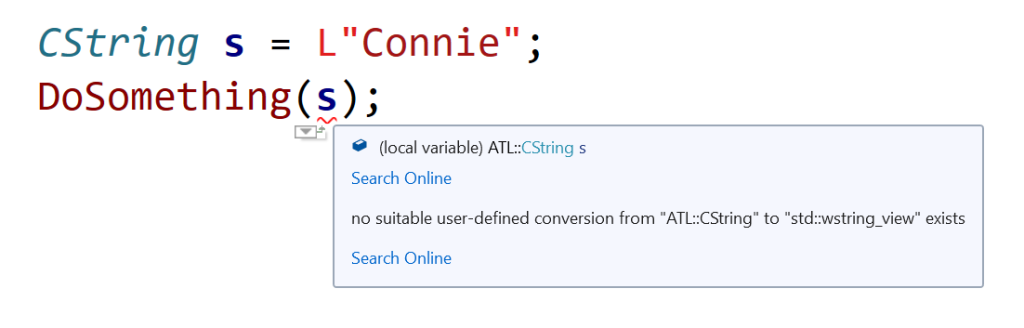
If you try directly passing a CString object like this:

CString s = L"Connie";
DoSomething(s); // *** Doesn't compile ***

you get a compile-time error. Basically, the C++ compiler complains about no suitable user-defined conversion from ATL::CString to std::wstring_view exists.

Squiggles in Visual Studio IDE, marking code that tries to directly pass a CString object to a function expecting a std::wstring_view.
Visual Studio 2019 IDE squiggles C++ code directly passing CString to a function expecting a wstring_view

So, how can you fix that code?

Well, since there is a wstring_view constructor overload that creates a view from a null-terminated character string pointer, you can invoke the CString::GetString method, and pass the returned pointer to the DoSomething function expecting a string view parameter, like this:

// Pass the CString object 's' to DoSomething 
// as a std::wstring_view
DoSomething(s.GetString());

Now the code compiles correctly!

Important Note About String Views

Note that wstring_view is just a view to a string, so you must pay attention that the pointed-to string is valid for at least all the time you are referencing it via the string view. In other words, pay attention to dangling references and string views that refer to strings that have been deallocated or moved elsewhere in memory.

The Case of string_view and the Magic String

An interesting bug involving the use of string_view instead of std::string const&.

Suppose that in your C++ code base you have a legacy C-interface function:

// Takes a C-style NUL-terminated string pointer as input
void DoSomethingLegacy(const char* s)
{
    // Do something ...

    printf("DoSomethingLegacy: %s\n", s);
}

The above function is called from a C++ function/method, for example:

void DoSomethingCpp(std::string const& s)
{
    // Invoke the legacy C function
    DoSomethingLegacy(s.data());
}

The calling code looks like this:

std::string s = "Connie is learning C++";

// Extract the "Connie" substring
std::string s1{ s.c_str(), 6 };

DoSomethingCpp(s1);

The string that is printed out is “Connie”, as expected.

Then, someone who knew about the new std::string_view feature introduced in C++17, modifies the above code to “modernize” it, replacing the use of std::string with std::string_view:

// Pass std::string_view instead of std::string const&
void DoSomethingCpp(std::string_view sv)
{
    DoSomethingLegacy(sv.data());
}

The calling code is modified as well:

std::string s = "Connie is learning C++";


// Use string_view instead of string:
//
//     std::string s1{ s.c_str(), 6 };
//
std::string_view sv{ s.c_str(), 6 };

DoSomethingCpp(sv);

The code is recompiled and executed. But, unfortunately, now the output has changed! Instead of the expected “Connie” substring, now the entire string is printed out:

Connie is learning C++

What’s going on here? Where does that “magic string” come from?

Analysis of the Bug

Well, the key to figure out this bug is understanding that std::string_view’s are not necessarily NUL-terminated. On the other hand, the legacy C-interface function does expect as input a C-style NUL-terminated string (passed via const char*).

In the initial code, a std::string object was created to store the “Connie” substring:

// Extract the "Connie" substring
std::string s1{ s.c_str(), 6 };

This string object was then passed via const& to the DoSomethingCpp function, which in turn invoked the string::data method, and passed the returned C-style string pointer to the DoSomethingLegacy C-interface function.

Since strings managed via std::string objects are guaranteed to be NUL-terminated, the string::data method pointed to a NUL-terminated contiguous sequence of characters, which was what the DoSomethingLegacy function expected. Everyone’s happy.

On the other hand, when std::string is replaced with std::string_view in the calling code:

// Use string_view instead of string:
//
//     std::string s1{ s.c_str(), 6 };
//
std::string_view sv{ s.c_str(), 6 };

DoSomethingCpp(sv);

you lose the guarantee that the sub-string is NUL-terminated!

In fact, this time when sv.data is invoked inside DoSomethingCpp, the returned pointer points to a sequence of contiguous characters that is the original string s, which is the whole string “Connie is learning C++”. There is no NUL-terminator after “Connie” in that string, so the legacy C function that takes the string pointer just goes on and prints the whole string, not just the “Connie” substring, until it finds a NUL-terminator, which follows the last character of “Connie is learning C++”.

Figuring out the std::string_view related bug: The string_view points to a sub-string that does *not* include a NUL-terminator.
Figuring out the bug involving the (mis)use of string_view

So, be careful when replacing std::string const& parameters with string_views! Don’t forget that string_views are not guaranteed to be NUL-terminated! That is very important when writing or maintaining C++ code that interoperates with legacy C or C-style code.

Keeping on Enumerating C++ String Options: The String Views

Did you think the previous C++ string enumeration was complete? No way. Let me briefly introduce string views in this blog post.

My previous enumeration of the various string options available in C++ was by no means meant to be fully exhaustive. For example: Another interesting option available for programmers using C++17 and successive versions of the standard is std::string_view, with all its variations along the lines of what I described in the previous post (e.g. std::wstring_view, std::u8string_view, std::u16string_view, etc.).

I wanted to dedicate a different blog post to string_view’s, as they are kind of different from “ordinary” strings like std::string instances.

You can think of a string_view as a string observer. The string_view instance does not own the string (unlike say std::string): It just observes a sequence of contiguous characters.

Another important difference between std::string objects and std::string_view instances is that, while std::strings are guaranteed to be NUL-terminated, string_views are not!

This is very important, for example, when you pass a string_view invoking its data() method to a function that takes a C-style raw string pointer (const char *), that assumes that the sequence of characters pointed to is NUL-terminated. That’s not guaranteed for string views, and that can be the source of subtle bugs!

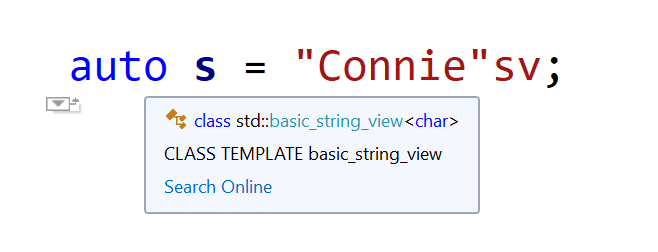
Another important feature of string views is that you can create string_view instances using the sv suffix, for example:

auto s = "Connie"sv;
Visual Studio IntelliSense deduces "Connie"sv to be a std::string_view.
Visual Studio IntelliSense deduces s to be of type std::string_view

The above code creates a string view of a raw character array literal.

And what about:

auto s2 = L"Connie"sv;
With the L prefix and the sv suffix, Visual Studio IntelliSense deduces s2 to be of type std::wstring_view

This time s2 is deduced to be of type std::wstring_view (which is a shortcut for std::basic_string_view<wchar_t>), thanks to the L prefix!

And don’t even think you are done! In fact, you can combine that with the other options listed in the previous blog post, for example: u8“Connie”sv, LR”(C:\Path\To\Connie)”sv, and so on.