Code Reviewing ChatGPT’s std::map C++ code

ChatGPT does C++ std::map. OK, let’s review the code produced by this AI. Are there any errors? Can it be improved?

Recently someone sent me an interesting email about the answer they got from ChatGPT to the question they asked: “Teach me about C++ std::map“.

ChatGPT provided the following code, with some additional notes.

ChatGPT's demo code showing how to use std::map.
ChatGPT trying to explain how to use std::map

Well, I read that code and noted a few things:

Since the map instance uses std::string as the key type, the associated <string> header should have been #included (although the above code could compile thanks to “indirect” inclusion of <string>; but that’s not a good practice).

Moreover, since C++20, std::map has been given a (long-awaited…) method to check if there is an element with a key equivalent to the input key in the container. So, I would use map::contains instead of invoking the map::count method to check if a key exists.

// ChatGPT suggested:
//   
//   // Checking if a key exists
//   if (ages.count("Bob") > 0) {
//       ...
//
// Starting with C++20 you can use the much clearer
// and simpler map::contains:
//
if (ages.contains("Bob")) {
    ...

In addition, I would also improve the map iteration code provided by ChatGPT.

In fact, starting with C++17, a new feature called structured binding allows writing clearer code for iterating over std::map’s content. For example:

// ChatGPT suggested:
//
//  Iterating over the map
//  for (const auto& pair : ages) {
//      std::cout << pair.first << ": " << pair.second << std::endl;
//  }
//
// Using C++17's structure bindings you can write:
//
for (const auto& [name, age]: ages) {
    std::cout << name << ": " << age << std::endl;
}

Note how using identifiers like name and age produces code that is much more readable than pair.first and pair.second (which are in the code suggested by ChatGPT).

(As a side note of kind of lesser importance, you may want to replace std::endl with ‘\n’ in the above code; although if “output performance” is not particularly important, std::endl would be acceptable.)

What conclusions can we draw from that interesting experience?

Well, I think ChatGPT did a decent job in showing a basic usage of C++ std::map. But, still, its code is not optimal. As discussed in this simple code review, with a better knowledge of the C++ language and standard library features you can produce higher-quality code (e.g. more readable, clearer) than ChatGPT did in this instance.

…But maybe ChatGPT will read this code review, learn a new thing or two, and improve? 😉

Optimizing C++ Code with O(1) Operations

How to get an 80% performance boost by simply replacing a O(N) operation with a fast O(1) operation in C++ code.

Last time we saw that you can invoke the CString::GetString method to get a C-style null-terminated const string pointer, then pass it to functions that take wstring_view input parameters:

// 's' is a CString instance;
// DoSomething takes a std::wstring_view input parameter
DoSomething( s.GetString() );

While this code works fine, it’s possible to optimize it.

As the saying goes: first make things work, then make things fast.

The Big Picture

A typical implementation of wstring_view holds two data members: a pointer to the string characters, and a size (or length). Basically, the pointer indicates where the observed string (view) starts, and the size/length specifies how many consecutive characters belong to the string view (note that string views are not necessarily null-terminated).

The above code invokes a wstring_view constructor overload that takes a null-terminated C-style string pointer. To get the size (or length) of the string view, the implementation code needs to traverse the input string’s characters one by one, until it finds the null terminator. This is a linear time operation, or O(N) operation.

Fortunately, there’s another wstring_view constructor overload, that takes two parameters: a pointer and a length. Since CString objects know their own length, you can invoke the CString::GetLength method to get the value of the length parameter.

// Create a std::wstring_view from a CString,
// using a wstring_view constructor overload that takes
// a pointer (s.GetString()) and a length (s.GetLength())
DoSomething({ s.GetString(), s.GetLength() });  // (*) see below

The great news is that CString objects bookkeep their own string length, so that CString::GetLength doesn’t have to traverse all the string characters until it finds the terminating null. The value of the string length is already available when you invoke the CString::GetLength method.

In other words, creating a string view invoking CString::GetString and CString::GetLength replaces a linear time O(N) operation with a constant time O(1) operation, which is great.

Fixing and Refining the Code

When you try to compile the above code snippet marked with (*), the C++ compiler actually complains with the following message:

Error C2398 Element ‘2’: conversion from ‘int’ to ‘const std::basic_string_view<wchar_t,std::char_traits<wchar_t>>::size_type’ requires a narrowing conversion

The problem here is that CString::GetLength returns an int, which doesn’t match with the size type expected by wstring_view. Well, not a big deal: We can safely cast the int value returned by CString::GetLength to wstring_view::size_type, or just size_t:

// Make the C++ compiler happy with the static_cast:
DoSomething({ s.GetString(), 
              static_cast<size_t>(s.GetLength()) });

As a further refinement, we can wrap the above wstring_view-from-CString creation code in a nice helper function:

// Helper function that *efficiently* creates a wstring_view 
// to a CString
inline [[nodiscard]] std::wstring_view AsView(const CString& s)
{
    return { s.GetString(), static_cast<size_t>(s.GetLength()) };
}

Measuring the Performance Gain

Using the above helper function, you can safely and efficiently create a string view to a CString object.

Now, you may ask, how much speed gain are we talking here?

Good question!

I have developed a simple C++ benchmark, which shows that replacing a O(N) operation with a O(1) operation in this case gives a performance boost of 93 ms vs. 451 ms, which is an 80% performance gain! Wow.

Results of the C++ benchmark comparing O(N) vs. O(1) operations. O(N) takes 451 ms, O(1) takes 93 ms, which is an 80% performance gain.
Results of the string view benchmark comparing O(N) vs. O(1) operations. O(1) offers an 80% performance gain!

If you want to learn more about Big-O notation and other related topics, you can watch my Pluralsight course on Introduction to Data Structures and Algorithms in C++.

Big-O doesn't have to be boring. A slide from my PS course on introduction to data structures and algorithms in C++. This slide shows a graph comparing the big-O of linear vs. binary search.
Big-O doesn’t have to be boring! (A slide from my Pluralsight course on the topic.)

Adventures with C++ string_view: Interop with ATL/MFC CString

How to pass ATL/MFC CString objects to functions and methods expecting C++ string views?

Suppose that you have a C++ function or method that takes a string view as input:

void DoSomething(std::wstring_view sv)
{
   // Do stuff ...
}

This function is invoked from some ATL or MFC code that uses the CString class. The code is built with Visual Studio C++ compiler in Unicode mode. So, CString is actually CStringW. And, to make things simpler, the matching std::wstring_view is used by DoSomething.

How can you pass a CString object to that function expecting a string view?

If you try directly passing a CString object like this:

CString s = L"Connie";
DoSomething(s); // *** Doesn't compile ***

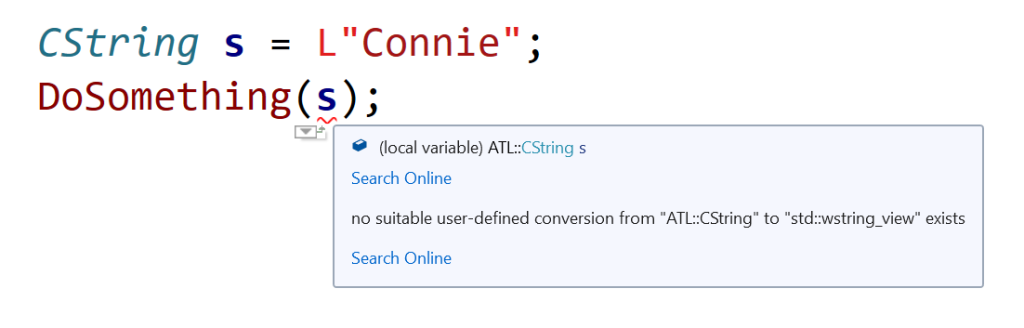
you get a compile-time error. Basically, the C++ compiler complains about no suitable user-defined conversion from ATL::CString to std::wstring_view exists.

Squiggles in Visual Studio IDE, marking code that tries to directly pass a CString object to a function expecting a std::wstring_view.
Visual Studio 2019 IDE squiggles C++ code directly passing CString to a function expecting a wstring_view

So, how can you fix that code?

Well, since there is a wstring_view constructor overload that creates a view from a null-terminated character string pointer, you can invoke the CString::GetString method, and pass the returned pointer to the DoSomething function expecting a string view parameter, like this:

// Pass the CString object 's' to DoSomething 
// as a std::wstring_view
DoSomething(s.GetString());

Now the code compiles correctly!

Important Note About String Views

Note that wstring_view is just a view to a string, so you must pay attention that the pointed-to string is valid for at least all the time you are referencing it via the string view. In other words, pay attention to dangling references and string views that refer to strings that have been deallocated or moved elsewhere in memory.

Properly Passing a C++ Standard String as an Input BSTR String Parameter

How to fix the 2 billion characters long BSTR string bug, plus a practical introduction to CComBSTR.

Last time we analyzed an interesting and subtle bug, caused by a standard std::wstring wrongly passed as an input BSTR string parameter (even though the code did compile).

So, how can you fix that bug?

Well, the key is to first create a BSTR from the initial std::wstring, and then pass the created BSTR to the function or class method that expects a BSTR input string.

The BSTR can be created invoking the SysAllocString API. Note that, once the BSTR is no longer needed, it must be freed calling the SysFreeString API.

The following C++ code snippet shows these concepts in action:

// The initial standard string
std::wstring ws = L"Connie is learning C++";

// Allocate a BSTR and initialize it
// with the content of the std::wstring
BSTR bstr = SysAllocString(ws.c_str());

// Invoke the function expecting the BSTR input parameter
DoSomething(bstr);

// Release the BSTR
SysFreeString(bstr);

// Avoid dangling pointers
bstr = nullptr;

The above code can be simplified, following the C++ RAII pattern and enjoying the power of C++ destructors. In fact, you can use a C++ class like ATL’s CComBSTR to wrap the raw BSTR string. In this way, the raw BSTR will be automatically deallocated when the CComBSTR object goes out of scope. That’s because the CComBSTR destructor will automatically and safely invoke SysFreeString for you.

The new simplified and safer (as incapable of leaking!) code looks like this:

// Create a BSTR safely wrapped in a CComBSTR
// from the initial std::wstring
CComBSTR myBstr(ws.c_str());

// The CComBSTR is automatically converted to a BSTR
// and passed to the function
DoSomething(myBstr);

// No need to invoke SysFreeString!
// CComBSTR destructor will *automatically* release the BSTR.
// THANK YOU C++ RAII and DESTRUCTORS!
The correct output is shown when converting from a std::wstring to a BSTR using the ATL's CComBSTR C++ class.
The correct output when using CComBSTR

The Case of string_view and the Magic String

An interesting bug involving the use of string_view instead of std::string const&.

Suppose that in your C++ code base you have a legacy C-interface function:

// Takes a C-style NUL-terminated string pointer as input
void DoSomethingLegacy(const char* s)
{
    // Do something ...

    printf("DoSomethingLegacy: %s\n", s);
}

The above function is called from a C++ function/method, for example:

void DoSomethingCpp(std::string const& s)
{
    // Invoke the legacy C function
    DoSomethingLegacy(s.data());
}

The calling code looks like this:

std::string s = "Connie is learning C++";

// Extract the "Connie" substring
std::string s1{ s.c_str(), 6 };

DoSomethingCpp(s1);

The string that is printed out is “Connie”, as expected.

Then, someone who knew about the new std::string_view feature introduced in C++17, modifies the above code to “modernize” it, replacing the use of std::string with std::string_view:

// Pass std::string_view instead of std::string const&
void DoSomethingCpp(std::string_view sv)
{
    DoSomethingLegacy(sv.data());
}

The calling code is modified as well:

std::string s = "Connie is learning C++";


// Use string_view instead of string:
//
//     std::string s1{ s.c_str(), 6 };
//
std::string_view sv{ s.c_str(), 6 };

DoSomethingCpp(sv);

The code is recompiled and executed. But, unfortunately, now the output has changed! Instead of the expected “Connie” substring, now the entire string is printed out:

Connie is learning C++

What’s going on here? Where does that “magic string” come from?

Analysis of the Bug

Well, the key to figure out this bug is understanding that std::string_view’s are not necessarily NUL-terminated. On the other hand, the legacy C-interface function does expect as input a C-style NUL-terminated string (passed via const char*).

In the initial code, a std::string object was created to store the “Connie” substring:

// Extract the "Connie" substring
std::string s1{ s.c_str(), 6 };

This string object was then passed via const& to the DoSomethingCpp function, which in turn invoked the string::data method, and passed the returned C-style string pointer to the DoSomethingLegacy C-interface function.

Since strings managed via std::string objects are guaranteed to be NUL-terminated, the string::data method pointed to a NUL-terminated contiguous sequence of characters, which was what the DoSomethingLegacy function expected. Everyone’s happy.

On the other hand, when std::string is replaced with std::string_view in the calling code:

// Use string_view instead of string:
//
//     std::string s1{ s.c_str(), 6 };
//
std::string_view sv{ s.c_str(), 6 };

DoSomethingCpp(sv);

you lose the guarantee that the sub-string is NUL-terminated!

In fact, this time when sv.data is invoked inside DoSomethingCpp, the returned pointer points to a sequence of contiguous characters that is the original string s, which is the whole string “Connie is learning C++”. There is no NUL-terminator after “Connie” in that string, so the legacy C function that takes the string pointer just goes on and prints the whole string, not just the “Connie” substring, until it finds a NUL-terminator, which follows the last character of “Connie is learning C++”.

Figuring out the std::string_view related bug: The string_view points to a sub-string that does *not* include a NUL-terminator.
Figuring out the bug involving the (mis)use of string_view

So, be careful when replacing std::string const& parameters with string_views! Don’t forget that string_views are not guaranteed to be NUL-terminated! That is very important when writing or maintaining C++ code that interoperates with legacy C or C-style code.

Keeping on Enumerating C++ String Options: The String Views

Did you think the previous C++ string enumeration was complete? No way. Let me briefly introduce string views in this blog post.

My previous enumeration of the various string options available in C++ was by no means meant to be fully exhaustive. For example: Another interesting option available for programmers using C++17 and successive versions of the standard is std::string_view, with all its variations along the lines of what I described in the previous post (e.g. std::wstring_view, std::u8string_view, std::u16string_view, etc.).

I wanted to dedicate a different blog post to string_view’s, as they are kind of different from “ordinary” strings like std::string instances.

You can think of a string_view as a string observer. The string_view instance does not own the string (unlike say std::string): It just observes a sequence of contiguous characters.

Another important difference between std::string objects and std::string_view instances is that, while std::strings are guaranteed to be NUL-terminated, string_views are not!

This is very important, for example, when you pass a string_view invoking its data() method to a function that takes a C-style raw string pointer (const char *), that assumes that the sequence of characters pointed to is NUL-terminated. That’s not guaranteed for string views, and that can be the source of subtle bugs!

Another important feature of string views is that you can create string_view instances using the sv suffix, for example:

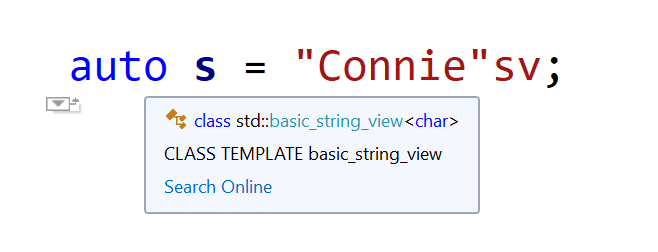
auto s = "Connie"sv;
Visual Studio IntelliSense deduces "Connie"sv to be a std::string_view.
Visual Studio IntelliSense deduces s to be of type std::string_view

The above code creates a string view of a raw character array literal.

And what about:

auto s2 = L"Connie"sv;
With the L prefix and the sv suffix, Visual Studio IntelliSense deduces s2 to be of type std::wstring_view

This time s2 is deduced to be of type std::wstring_view (which is a shortcut for std::basic_string_view<wchar_t>), thanks to the L prefix!

And don’t even think you are done! In fact, you can combine that with the other options listed in the previous blog post, for example: u8“Connie”sv, LR”(C:\Path\To\Connie)”sv, and so on.

The C++ Small String Optimization

How do “Connie” and “meow” differ from “The Commodore 64 is a great computer”? Let’s discover that with an introduction to a cool C++ string optimization: SSO!

How do “Connie” and “meow” differ from “The Commodore 64 is a great computer”?

(Don’t get me wrong: They are all great strings! 🙂 )

In several implementations, including the Visual C++’s one, the STL string classes are empowered by an interesting optimization: The Small String Optimization (SSO).

What does that mean?

Well, it basically means that small strings get a special treatment. In other words, there’s a difference in how strings like “Connie”, “meow” or “The Commodore 64 is a great computer” are allocated and stored by std::string.

In general, a typical string class allocates the storage for the string’s text dynamically from the heap, using new[]. In Visual Studio’s C/C++ run-time implementation on Windows, new[] calls malloc, which calls HeapAlloc (…which may probably call VirtualAlloc). The bottom line is that dynamically-allocating memory with new[] is a non-trivial task, that does have an overhead, and implies a trip down the Windows memory manager.

So, the std::string class says: “OK, for small strings, instead of taking a trip down the new[]-malloc-HeapAlloc-etc. “memory lane” 🙂 , let’s do something much faster and cooler! I, the std::string class, will reserve a small chunk of memory, a “small buffer” embedded inside std::string objects, and when strings are small enough, they will be kept (deep-copied) in that buffer, without triggering dynamic memory allocations.”

That’s a big saving! For example, for something like:

std::string s{"Connie"};

there’s no memory allocated on the heap! “Connie” is just stack-allocated. No new[], no malloc, no HeapAlloc, no trip down the Windows memory manager.

That’s kind of the equivalent of this C-ish code:

char buffer[ /* some short length */ ];
strcpy_s(buffer, "Connie");

No new[], no HeapAlloc, no virtual memory manager overhead! It’s just a simple snappy stack allocation, followed by a string copy.

But there’s more! In fact, having the string’s text embedded inside the std::string object offers great locality, better than chasing pointers to scattered memory blocks allocated on the heap. This is also very good when strings are stored in a std::vector, as small strings are basically stored in contiguous memory locations, and modern CPUs love blasting contiguous data in memory!

SSO: Embedded small string optimized memory layout vs. external string layout

Optimizations similar to the SSO can be applied also to other data structures, for example: to vectors. CppCon 2016 had an interesting session discussing that: “High Performance Code 201: Hybrid Data Structures”.

I’ve prepared some C++ code implementing a simple benchmark to measure the effects of SSO. The results I got for 200,000-small-string vectors clearly show a significant advantage of STL strings for small strings. For example: in 64-bit build on an Intel i7 CPU @3.40GHz: vector::push_back time for ATL (CStringW) is 29 ms, while for STL (wstring) it’s just 14 ms: one half! Moreover, sorting times are 135 ms for ATL vs. 77 ms for the STL: again, a big win for the SSO implemented in the STL!