Comparing STL vs. ATL/MFC String Usage at the Windows API Boundaries

A comparison between the worlds of STL vs. ATL/MFC string usage at the Windows API boundaries. Plus a small suggestion to improve C++ standard library strings.

In previous articles we saw some options for using STL strings and ATL/MFC CString at the Windows API boundaries. Let’s do a quick refresher and comparison between these two “worlds”.

For the sake of simplicity, let’s assume Unicode builds (which have been the default since VS 2005) and consider std::wstring for the STL side of the comparison.

The Input String Case

When passing strings as input parameters to Windows API C-interface functions, you can invoke the c_str method for STL std::wstring instances; on the other side, you can just pass CString instances, as CString implements an implicit C-style string pointer conversion operator, that will be automatically invoked by the compiler. At first sight, it seems that the CString approach is simpler (i.e. just pass the CString object), although in modern C++ there is a propensity to avoid implicit conversions, so the explicit call to c_str required by STL strings sounds safer. (Anyway, if you prefer explicit method invocations, CString offers a GetString method, as well.)

The Output String Case

Using an External Temporary Buffer – Both STL strings and ATL/MFC CString have constructor overloads that take an input pointer to a raw character buffer that is assumed to be null-terminated, and can build string objects from the content of that raw C-style null-terminated character buffer. This means that you can create an external temporary character buffer, pass a pointer to it as output string parameter to the C-interface Windows API you want to invoke, and then build the result string object (both STL wstring and ATL/MFC CString) using a pointer to that external intermediate buffer. In addition, an explicit buffer length can be passed together with the pointer to the beginning of the buffer, in case you want or need to explicitly pass the string length, and not relying on the null terminator.

Working In-Place – For both STL strings and ATL/MFC CString it’s possible to work with an internal buffer. This can be allocated using the resize method for STL strings, and then can be accessed via the non-const pointer returned by the data method invoked for the same string. If the returned string is shorter than the allocated buffer length, you have to find the position of the null-terminator scribbled in by the invoked Windows API, and call the STL string’s resize method once again to set the proper size (“length”) of the result string object.

On the other hand, with CString you can use the GetBuffer/ReleaseBuffer method pair: You can allocate the internal CString buffer specifying a proper (minimum) size invoking GetBuffer, then pass the pointer it returns on success to Windows C-interface APIs, and finally invoke CString::ReleaseBuffer to let the CString object update its internal state to properly store the null-terminated string written by the called function into the provided buffer.

Summary Table of the Various Cases

The following table summarizes the various cases discussed so far in a compact form:

STL vs. ATL/MFC string usage at the Windows API boundaries – Summary table

I think that for the “working in-place” output sub-case, CString is more convenient than STL strings, as:

  1. You don’t have to specify any initial value for filling the buffer allocated with GetBuffer; on the other hand, with STL strings you must specify some initial value to fill the string buffer when you invoke the string’s resize method (or equivalently the string constructor that takes a count of characters to repeat). So the CString::GetBuffer method is also likely more efficient, as it doesn’t need to fill the allocated buffer (at least in release builds).
  2. It’s possible to allocate a larger-than-needed buffer with GetBuffer (all in all you pass the safe minimum required buffer length to this method), then have the Windows API function write a shorter null-terminated string in that buffer. The ReleaseBuffer method will automatically scan the buffer content for the string’s null-terminator, and will properly update the CString object internal state (e.g. the string length) in accordance to that. This nice feature (scan until the null-terminator and properly set the string size) is not available with STL strings, as there is no such thing as a resize_until_null method.

A Small Suggestion for Improving STL Strings Interoperability with C-Interface Functions (Including Windows APIs)

So, here’s as a small suggestion for improving the C++ standard library strings: It would be nice to have something like get_buffer and release_buffer methods available for STL strings, following the same semantics of CString’s GetBuffer and ReleaseBuffer methods, with:

1. No need to specify an initial character to fill the STL string object when the internal buffer is allocated.

2. Automatically set the size of the final string object based on the null-terminator written into the internal buffer.
How to Use ATL/MFC CString at the Windows API Boundaries

Let’s discuss how CString C++ objects can be used at the boundaries of C-interface Windows APIs, considering both the input and output string cases.

We have two cases to consider: Let’s start with the input read-only string case (which is the easiest one).

The Input String Case

If you have a CString instance and you want to pass it to a Windows API function that expects an input read-only string, you can simply pass the CString instance itself! It’s as simple as this:

//
// *** Input string case ***
// 

// Some string to pass as input parameter
CString myString = TEXT("Connie"); 

// Just pass the CString object to the Windows API function
// that expects an input string, like e.g. SetWindowText
DoSomething(myString);

If you compile your C++ code in Unicode (UTF-16) build mode (which has been the default since Visual Studio 2005): CString is a wchar_t-based string, and the input string parameter of the Windows API function that follows the TCHAR model is typically a PCWSTR, which is basically a null-terminated const wchar_t* C-style string pointer. In this case CString offers an implicit conversion operator to PCWSTR, so you can simply pass the CString object, and the C++ compiler will automatically invoke the PCWSTR conversion operator to pass the given string as read-only string input parameter.

The Output String Case

Now let’s consider the output case, i.e. you are invoking a Windows API function that expects an output string parameter. Usually, in C-interface Windows API functions this is represented by a non-const pointer to a raw C-style character array, in particular a wchar_t* (or PWSTR) in the Unicode UTF-16 form.

You (i.e. the caller) pass a non-const pointer to a writable wchar_t buffer, and the Windows API function will fill this caller-provided buffer with proper characters, including a terminating NUL. This is all C stuff, but at the end of the process what you really want is the result string to be stored in a C++ CString object. So, how can you bridge these two worlds of C-style null-terminated string pointers and C++ CString class instances?

Option 1: Using an Intermediate Buffer

Well, one option would be to allocate an intermediary character buffer, then let the Windows API function fill it with its own result text, and finally create a CString object initialized with the content of that external intermediary buffer. For example:

//
// The Output String Case -- Using a Temporary Buffer
//

// 1. Allocate a temporary buffer to pass to the Windows API function
auto buffer = std::make_unique< wchar_t[] >(bufferLength);

// 2. Call the Windows API function, passing the address of the temporary buffer.
// The Windows API function will write its string into that buffer,
// including a NUL terminator, as per usual C string convention.
GetSomeText(
    buffer.get(), // <-- starting address of the output buffer
    bufferLength, // <-- size of the buffer (e.g. in wchar_t's)
    /* ... other parameters ... */
);

// 3. Create a CString object initialized with the NUL-terminated
// string stored in the temporary buffer previously allocated
CString result(buffer.get());

// NOTE: Since the temporary buffer was created with make_unique,
// it will be *automatically* released.
// Thank you C++ destructors!

Option 2: Working In-place with the CString’s Own Buffer

In addition to that, instead of creating an external temporary buffer, passing its address to the Windows API function to let it write the output string, and then copying the result string into a CString object, CString offers another option.

In fact, you can request CString objects to allocate some internal memory, and get write access to that. In this way, you can directly pass the address of that CString’s own internal memory to the desired Windows API function, and let it write the result string directly inside the CString’s internal buffer, without the need of creating an external intermediary buffer, and making an additional string copy (from the temporary buffer to the CString object).

The method that CString offers to allocate an internal character buffer is GetBuffer. You can specify to it the minimum required buffer length. On success, this method returns a non-const pointer to the beginning of the buffer memory, which you can pass to the Windows API function expecting an output string parameter.

Then, after the called function has written its result string into the provided buffer (including the NUL-terminator), you can invoke the CString::ReleaseBuffer method to let the CString object update its internal state to properly store the NUL-terminated string previously written in its own buffer.

In C++ code, this process looks like that:

//
// The Output String Case -- Using CString's Internal Buffer
//

// This CString object will store the output result string
CString result;

// Allocate a CString buffer of proper size, 
// and return a _non-const_ pointer to it
wchar_t* pBuffer = result.GetBuffer(bufferLength);

// Pass the pointer to the internal CString buffer
// and the buffer length to the Windows API function
// expecting an output string parameter
GetSomeText(
    pBuffer,      // <-- starting address of the buffer
    bufferLength, // <-- size of the buffer (e.g. in wchar_t's)
    /* ... other parameters ... */
);

// We assume that the Windows API function has written
// a properly NUL-terminated string into the provided buffer.
// So we can invoke CString::ReleaseBuffer to update
// the CString object's internal state, 
// and release control of the buffer.
result.ReleaseBuffer();

// It's good practice to clear the buffer pointer to avoid subtle bugs
// caused by referencing it after the ReleaseBuffer call
pBuffer = nullptr;

// Now you can happily use the CString result object in your code!

As you can note, in this second case, working in-place with the CString’s internal buffer, the output string characters are written only once inside the CString object, instead of being first written to an external intermediate buffer, and then being copied inside the result CString object.

How to Load CString from Resources

Very easy! It’s just a matter of invoking a constructor with a type cast.

Last time we saw how to load a string resource into a wstring. As already explained, ATL/MFC’s CString does offer very convenient methods for Win32 C++ programming. So, how can you load a string resource into a CString instance?

Well, it’s very simple! Just pass the string ID to a CString constructor overload with a proper type cast:

// Load string with ID IDS_MY_STRING from resources 
// into a CString instance
CString myString( (PCTSTR) IDS_MY_STRING );

You can even #define a simple preprocessor macro that takes the string resource ID and and creates a CString object storing the string resource:

#define _S(stringResId) (CString((PCTSTR) (stringResId)))

When you need to pass a (localized) string loaded from resources to a Win32 API or ATL/MFC class member function that expects a string pointer (typically in the form of LPCTSTR/PCTSTR, i.e. const TCHAR*), then you can simply use the convenient macro defined above:

// Show a message-box to the user, 
// displaying strings loaded from resources
MessageBox(nullptr,
           _S(IDS_SOME_MESSAGE_FOR_THE_USER),
           _S(IDS_SOME_TITLE),
           MB_OK);

How does that work?

Well, first the _S macro defined above creates a (temporary) CString object and loads the string resource into it. Then, the implicit LPCTSTR conversion operator provided by CString is invoked by the C++ compiler, so the (read-only) string pointer is passed to the proper parameter of the MessageBox API.

See how simple is that compared to using std::wstring, where we needed to create an ad hoc non-trivial function to load wstring from resources!

CString or std::string? That Is The Question (2023 Revisited)

Revisiting one of my first blog posts from 2010. Should you pick CString or std::string? Based on what context (ATL, MFC, cross-platform code)? And why?

…with (more) apologies to Shakespeare 🙂

I discussed that in 2010 at the beginning of my blog journey (on the now defunct MSMVPs blog web site – Thank You Very Much Internet Archive!).

It’s interesting to revisit that post today toward the end of 2023, more than 10 years later.

So, should we use CString or std::string class to store and manage strings in our C++ code?

Well, if there is a need of writing portable C++ code, the choice should be std::string, which is part of the C++ standard library.

(Me, on January 4th, 2010)

Still true today. Let’s also add that we can use std::string with Unicode UTF-8-encoded text to represent international text.

But, in the context of C++ Win32 programming (using ATL or MFC), I find CString class much more convenient than std::string.

These are some reasons:

Again, I think that is still true today. Now let’s see the reasons why:

1) CString allows loading strings from resources, which is good also for internationalization.

Still valid today. (You have to write additional code to do that with STL strings.)

2) CString offers a convenient FormatMessage method (which is good for internationalization, too; see for example the interesting problem of “Yoda speak” […])

Again, still true today. Although in C++20 (20+ years later than MFC!1) they added std::format. There’s also something from Boost (the Boost.Format library).

3) CString integrates well with Windows APIs (the implicit LPCTSTR operator comes in handy when passing instances of CString to Windows APIs, like e.g. SetWindowText).

Still valid today.

4) CString is reference counted, so moving instances of CString around is cheap.

Well, as discussed in a previous blog post, the Microsoft Visual C++ compiler and C++ Standard Library implementation have been improved a lot since VS 2008, and now the performance of STL’s strings is better than CString, at least for adding many strings to a vector and sorting the string vector.

5) CString offers convenient methods to e.g. tokenize strings, to trim them, etc.

This is still a valid reason today. 20+ years later, with C++20 they finally added some convenient methods to std::string, like starts_with and ends_with, but this is very little and honestly very late (but, yes, better late than ever).

So, CString is still a great string option for Windows C++ code that uses ATL and/or MFC. It’s also worth noting that you can still use CString at the ATL/MFC/Win32 boundary, and then convert to std::wstring or std::string for some more complex data structures (for example, something that would benefit from move semantics), or for better integration with STL algorithms or Boost libraries, or for cross-platform portions of C++ code.

  1. I used and loved Visual C++ 6 (which was released in 1998), and its MFC implementation already offered a great CString class with many convenient methods including those discussed here. So, the time difference between that and C++20 is more than 20 years! ↩︎

Converting Between Unicode UTF-16 CString and UTF-8 std::string

Let’s continue the Unicode conversion series, discussing an interesting case of “mixed” CString/std::string UTF-16/UTF-8 conversions.

In previous blog posts of this series we saw how to convert between Unicode UTF-16 and UTF-8 using ATL/MFC’s CStringW/A classes and C++ Standard Library’s std::wstring/std::string classes.

In this post I’ll discuss another interesting scenario: Consider the case that you have a C++ Windows-specific code base, for example using ATL or MFC. In this portion of the code the CString class is used. The code is built in Unicode mode, so CString stores Unicode UTF-16-encoded text (in this case, CString is actually a CStringW class).

On the other hand, you have another portion of C++ code that is standard cross-platform and uses only the standard std::string class, storing Unicode text encoded in UTF-8.

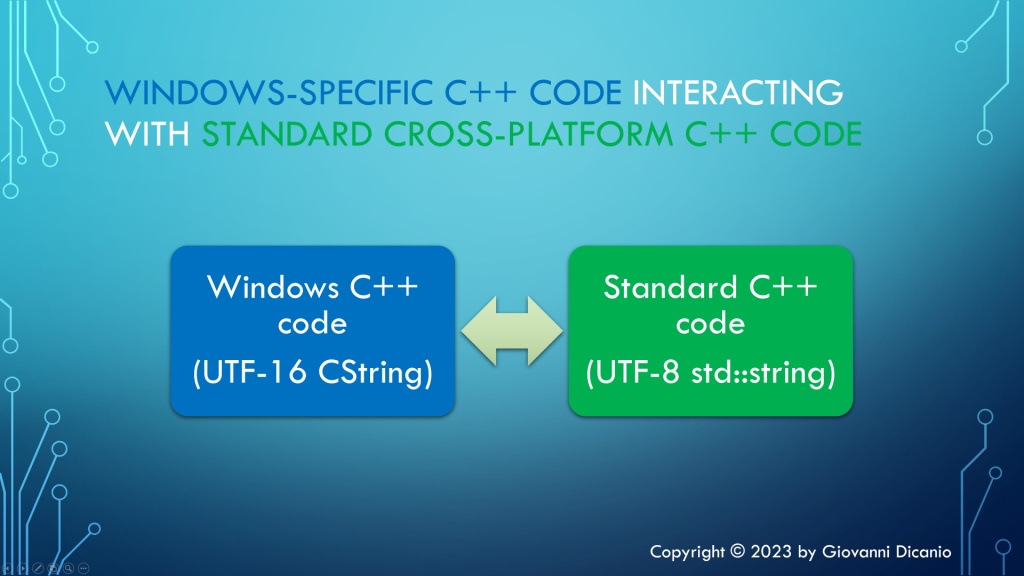
You need a bridge to connect these two “worlds”: the Windows-specific C++ code that uses UTF-16 CString, and the cross-platform C++ code that uses UTF-8 std::string.

Windows-specific C++ code, that uses UTF-16 CString, needs to interact with standard cross-platform C++ code, that uses UTF-8 std::string.
Windows-specific C++ code interacting with portable standard C++ code

Let’s see how to do that.

Basically, you have to do a kind of “code genetic-engineering” between the code that uses ATL classes and the code that uses STL classes.

For example, consider the conversion from UTF-16 CString to UTF-8 std::string.

The function declaration looks like this:

// Convert from UTF-16 CString to UTF-8 std::string
std::string ToUtf8(CString const& utf16)

Inside the function implementation, let’s start with the usual check for the special case of empty strings:

std::string ToUtf8(CString const& utf16)
{
    // Special case of empty input string
    if (utf16.IsEmpty())
    {
        // Empty input --> return empty output string
        return std::string{};
    }

Then you can invoke the WideCharToMultiByte API to figure out the size of the destination UTF-8 std::string:

// Safely fail if an invalid UTF-16 character sequence is encountered
constexpr DWORD kFlags = WC_ERR_INVALID_CHARS;

const int utf16Length = utf16.GetLength();

// Get the length, in chars, of the resulting UTF-8 string
const int utf8Length = ::WideCharToMultiByte(
    CP_UTF8,        // convert to UTF-8
    kFlags,         // conversion flags
    utf16,          // source UTF-16 string
    utf16Length,    // length of source UTF-16 string, in wchar_ts
    nullptr,        // unused - no conversion required in this step
    0,              // request size of destination buffer, in chars
    nullptr,        // unused
    nullptr         // unused
);
if (utf8Length == 0)
{
   // Conversion error: capture error code and throw
   ...
}

Then, as already discussed in previous articles in this series, once you know the size for the destination UTF-8 string, you can create a std::string object capable of storing a string of proper size, using a constructor overload that takes a size parameter (utf8Length) and a fill character (‘ ‘):

// Make room in the destination string for the converted bits
std::string utf8(utf8Length, ' ');

To get write access to the std::string object’s internal buffer, you can invoke the std::string::data method:

char* utf8Buffer = utf8.data();
ATLASSERT(utf8Buffer != nullptr);

Now you can invoke the WideCharToMultiByte API for the second time, to perform the actual conversion, using the destination string of proper size created above, and return the result utf8 string to the caller:

// Do the actual conversion from UTF-16 to UTF-8
int result = ::WideCharToMultiByte(
    CP_UTF8,        // convert to UTF-8
    kFlags,         // conversion flags
    utf16,          // source UTF-16 string
    utf16Length,    // length of source UTF-16 string, in wchar_ts
    utf8Buffer,     // pointer to destination buffer
    utf8Length,     // size of destination buffer, in chars
    nullptr,        // unused
    nullptr         // unused
);
if (result == 0)
{
    // Conversion error: capture error code and throw
    ...
}

return utf8;

I developed an easy-to-use C++ header-only library containing compilable code implementing these Unicode UTF-16/UTF-8 conversions using CString and std::string; you can find it in this GitHub repo of mine.

Optimizing C++ Code with O(1) Operations

How to get an 80% performance boost by simply replacing a O(N) operation with a fast O(1) operation in C++ code.

Last time we saw that you can invoke the CString::GetString method to get a C-style null-terminated const string pointer, then pass it to functions that take wstring_view input parameters:

// 's' is a CString instance;
// DoSomething takes a std::wstring_view input parameter
DoSomething( s.GetString() );

While this code works fine, it’s possible to optimize it.

As the saying goes: first make things work, then make things fast.

The Big Picture

A typical implementation of wstring_view holds two data members: a pointer to the string characters, and a size (or length). Basically, the pointer indicates where the observed string (view) starts, and the size/length specifies how many consecutive characters belong to the string view (note that string views are not necessarily null-terminated).

The above code invokes a wstring_view constructor overload that takes a null-terminated C-style string pointer. To get the size (or length) of the string view, the implementation code needs to traverse the input string’s characters one by one, until it finds the null terminator. This is a linear time operation, or O(N) operation.

Fortunately, there’s another wstring_view constructor overload, that takes two parameters: a pointer and a length. Since CString objects know their own length, you can invoke the CString::GetLength method to get the value of the length parameter.

// Create a std::wstring_view from a CString,
// using a wstring_view constructor overload that takes
// a pointer (s.GetString()) and a length (s.GetLength())
DoSomething({ s.GetString(), s.GetLength() });  // (*) see below

The great news is that CString objects bookkeep their own string length, so that CString::GetLength doesn’t have to traverse all the string characters until it finds the terminating null. The value of the string length is already available when you invoke the CString::GetLength method.

In other words, creating a string view invoking CString::GetString and CString::GetLength replaces a linear time O(N) operation with a constant time O(1) operation, which is great.

Fixing and Refining the Code

When you try to compile the above code snippet marked with (*), the C++ compiler actually complains with the following message:

Error C2398 Element ‘2’: conversion from ‘int’ to ‘const std::basic_string_view<wchar_t,std::char_traits<wchar_t>>::size_type’ requires a narrowing conversion

The problem here is that CString::GetLength returns an int, which doesn’t match with the size type expected by wstring_view. Well, not a big deal: We can safely cast the int value returned by CString::GetLength to wstring_view::size_type, or just size_t:

// Make the C++ compiler happy with the static_cast:
DoSomething({ s.GetString(), 
              static_cast<size_t>(s.GetLength()) });

As a further refinement, we can wrap the above wstring_view-from-CString creation code in a nice helper function:

// Helper function that *efficiently* creates a wstring_view 
// to a CString
inline [[nodiscard]] std::wstring_view AsView(const CString& s)
{
    return { s.GetString(), static_cast<size_t>(s.GetLength()) };
}

Measuring the Performance Gain

Using the above helper function, you can safely and efficiently create a string view to a CString object.

Now, you may ask, how much speed gain are we talking here?

Good question!

I have developed a simple C++ benchmark, which shows that replacing a O(N) operation with a O(1) operation in this case gives a performance boost of 93 ms vs. 451 ms, which is an 80% performance gain! Wow.

Results of the C++ benchmark comparing O(N) vs. O(1) operations. O(N) takes 451 ms, O(1) takes 93 ms, which is an 80% performance gain.
Results of the string view benchmark comparing O(N) vs. O(1) operations. O(1) offers an 80% performance gain!

If you want to learn more about Big-O notation and other related topics, you can watch my Pluralsight course on Introduction to Data Structures and Algorithms in C++.

Big-O doesn't have to be boring. A slide from my PS course on introduction to data structures and algorithms in C++. This slide shows a graph comparing the big-O of linear vs. binary search.
Big-O doesn’t have to be boring! (A slide from my Pluralsight course on the topic.)

Adventures with C++ string_view: Interop with ATL/MFC CString

How to pass ATL/MFC CString objects to functions and methods expecting C++ string views?

Suppose that you have a C++ function or method that takes a string view as input:

void DoSomething(std::wstring_view sv)
{
   // Do stuff ...
}

This function is invoked from some ATL or MFC code that uses the CString class. The code is built with Visual Studio C++ compiler in Unicode mode. So, CString is actually CStringW. And, to make things simpler, the matching std::wstring_view is used by DoSomething.

How can you pass a CString object to that function expecting a string view?

If you try directly passing a CString object like this:

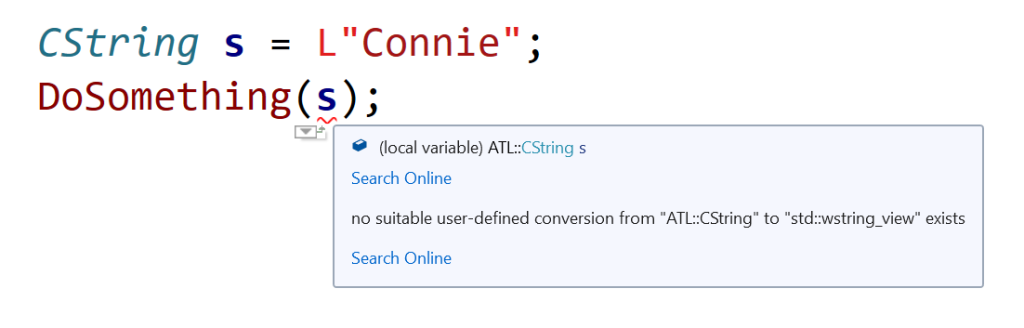
CString s = L"Connie";
DoSomething(s); // *** Doesn't compile ***

you get a compile-time error. Basically, the C++ compiler complains about no suitable user-defined conversion from ATL::CString to std::wstring_view exists.

Squiggles in Visual Studio IDE, marking code that tries to directly pass a CString object to a function expecting a std::wstring_view.
Visual Studio 2019 IDE squiggles C++ code directly passing CString to a function expecting a wstring_view

So, how can you fix that code?

Well, since there is a wstring_view constructor overload that creates a view from a null-terminated character string pointer, you can invoke the CString::GetString method, and pass the returned pointer to the DoSomething function expecting a string view parameter, like this:

// Pass the CString object 's' to DoSomething 
// as a std::wstring_view
DoSomething(s.GetString());

Now the code compiles correctly!

Important Note About String Views

Note that wstring_view is just a view to a string, so you must pay attention that the pointed-to string is valid for at least all the time you are referencing it via the string view. In other words, pay attention to dangling references and string views that refer to strings that have been deallocated or moved elsewhere in memory.