Well, the key is to firstcreate a BSTR from the initial std::wstring, and then pass the created BSTR to the function or class method that expects a BSTR input string.
The BSTR can be created invoking the SysAllocString API. Note that, once the BSTR is no longer needed, it must be freed calling the SysFreeString API.
The following C++ code snippet shows these concepts in action:
// The initial standard string
std::wstring ws = L"Connie is learning C++";

// Allocate a BSTR and initialize it
// with the content of the std::wstring
BSTR bstr = SysAllocString(ws.c_str());

// Invoke the function expecting the BSTR input parameter
DoSomething(bstr);

// Release the BSTR
SysFreeString(bstr);

// Avoid dangling pointers
bstr = nullptr;
The above code can be simplified, following the C++ RAII pattern and enjoying the power of C++ destructors. In fact, you can use a C++ class like ATL’s CComBSTR to wrap the raw BSTR string. In this way, the raw BSTR will be automatically deallocated when the CComBSTR object goes out of scope. That’s because the CComBSTR destructor will automatically and safely invoke SysFreeString for you.
The new simplified and safer (as incapable of leaking!) code looks like this:
// Create a BSTR safely wrapped in a CComBSTR
// from the initial std::wstring
CComBSTR myBstr(ws.c_str());

// The CComBSTR is automatically converted to a BSTR
// and passed to the function
DoSomething(myBstr);

// No need to invoke SysFreeString!
// CComBSTR destructor will *automatically* release the BSTR.
// THANK YOU C++ RAII and DESTRUCTORS!
Weird things can happen when you misinterpret a BSTR string pointer. With a sprinkle of assembly language.
Somebody has to pass a string from standard cross-platform C++ code to Windows-specific C++ code, in particular to a function that takes a BSTR string as input. For the sake of simplicity, assume that the Windows-specific function has a prototype like this:
void DoSomething(BSTR bstr)
(In real-world code, that could be a COM interface method, as well.)
The string to pass to DoSomething is stored in a std::wstring instance. The caller might have converted the original string that was encoded in Unicode UTF-8 to a Unicode UTF-16 string, and stored it in a std::wstring.
They pass the wstring to DoSomething, invoking the wstring::data method, like this:
std::wstring ws{ L"Connie is learning C++" };
DoSomething(ws.data());
The code compiles successfully. But when the DoSomething function processes the input string, a weird bug happens. To try to debug this code and figure out what’s going on, the programmer builds this code in debug mode with Visual Studio. Basically, what they observe is that the text stored in the string is output correctly, but when the string length is queried, the returned value is abnormally big.
The reported string length is 2,130,640,638. That is more than 2 billion! Of course, this string length value is completely out of scale for a string like “Connie is learning C++”.
This is a small repro code for the DoSomething function:
void DoSomething(BSTR bstr)
{
    // Printing a BSTR with std::wcout?
    // ...See the note at the end of the article.
    std::wcout << L" String: [" << bstr << L"]\n";

    // *** Get the length of the input BSTR string ***
    auto len = SysStringLen(bstr);
    std::wcout << L" String length: " << len << '\n';
}
And this is the output:
The input BSTR is printed out correctly, but the string length is reported as 2+ billion characters!
What is going on here? What is the origin of this bug? Why is the input string printed out correctly, but the same string is reported as being more than 2 billion characters long?
Well, the key to figure out this bug is understanding that a BSTR is not just a raw C-style wchar_t* string pointer, but it’s a pointer to a more complex and well-defined data structure.
In particular, a BSTR has a length prefix.
To get the input string length, the DoSomething function invokes the SysStringLen API. This is correct, as the input string passed to DoSomething is a BSTR. And to get the length of a BSTR string, you don’t call CRT functions like strlen or its derivatives like wcslen; instead, you call proper BSTR API functions, like SysStringLen.
The length of a BSTR is a value written as a header, before the contiguous sequence of characters pointed to by the BSTR. So, what SysStringLen likely does, is adjusting the input BSTR pointer to read the length-prefix header, and return that value back to the caller. Basically, getting the string length of a BSTR is fast O(1) constant-time operation (much faster than a O(N) operation performed by strlen/wcslen).
So, why is this 2,130,640,638 (2B+) magic number returned as length?
A Bit of Assembly Language Comes to the Rescue
I started programming at direct hardware level on the Commodore 64 and Amiga, and I love assembly!
These days I think modern C and C++ compilers do a great job in producing high-quality assembly code. However, I think that being able to read some assembly can come in handy even in these modern days!
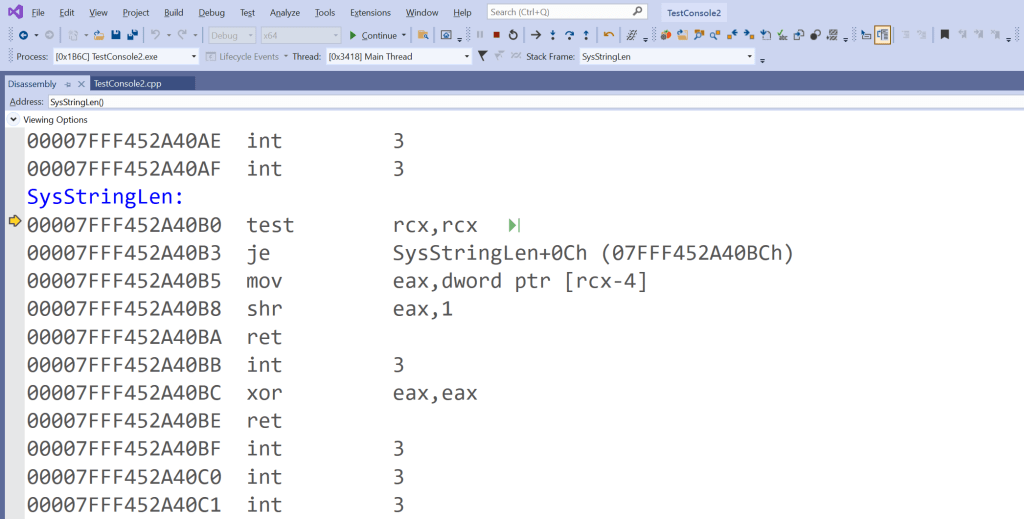
So, let’s take a look at some assembly code associated with the SysStringLen function:
SysStringLen’s assembly code shown in Visual Studio
The first assembly instruction in SysStringLen is:
test rcx, rcx
Followed by a JE conditional jump:
je SysStringLen+0Ch
This assembly code is basically checking if the RCX register is zero.
In fact, the x86/AMD64 assembly TEST instruction performs a bitwise AND on two operands. In this case, the two operands are both the value stored in the RCX register. If RCX contains the value zero (i.e. all its bits are 0), the AND operation results in zero, too. In this case, the ZF (Zero Flag) is set. As a consequence of that, the following JE instruction jumps to the instruction located at SysStringLen+0Ch, that is:
xor eax, eax
This assembly instruction performs a XOR on the content of EAX with itself. The result of that is zeroing out the EAX register.
Then, the function returns with a RET instruction.
So, what is going on here?
Well, the RCX register contains the input BSTR pointer. So, this initial assembly code is basically checking for a NULL BSTR, and, if that’s the case, it returns 0 back to the caller. This is because a NULL BSTR is considered an empty string, whose length is zero.
So, the above assembly code is basically equivalent to the following C/C++ code:
if (bstr == NULL) {
    return 0;
}
But this is not the case for the input BSTR string we are considering!
So, if you execute step by step the above code, the JE jump is not taken, and the next assembly instruction that gets executed is:
mov eax, dword ptr [rcx-4]
This assembly code is basically taking the value stored in RCX, which is the input BSTR pointer. Then it adjusts the pointer to point 4 bytes backward. In this way, the pointer is pointing to the length-prefix header! So, the BSTR length value, stored in this header, is written into the EAX register.
This is basically equivalent to the following C/C++ code:
UINT len = *((UINT*)(((BYTE*)bstr) - 4));
The following instruction to be executed is:
shr eax, 1
This is a right shift of the EAX register by one bit. The result of that operation is dividing the value of EAX by two. This is basically equivalent to:
len /= 2;
Why does SysStringLen do that?
Well, the reason for that is because the string length is expressed in byte count in the header. But the returned length is expressed as count of wchar_ts. Since each wchar_t occupies two bytes in memory, you have to divide by two to convert from count in bytes to count in wchar_ts.
Finally, the RET instruction returns back to the calling code. So, when SysStringLen returns, the caller will find the BSTR string length, expressed as count of wchar_ts, in the EAX register.
Memory Analysis and the “No Man’s Land” Byte Sequence
Now you know what the assembly code of the SysStringLen does. But you may still ask: “Why that 2+ billion string length??”.
Well, the final piece of this puzzle is taking a look at the memory content when the SysStringLen function is invoked.
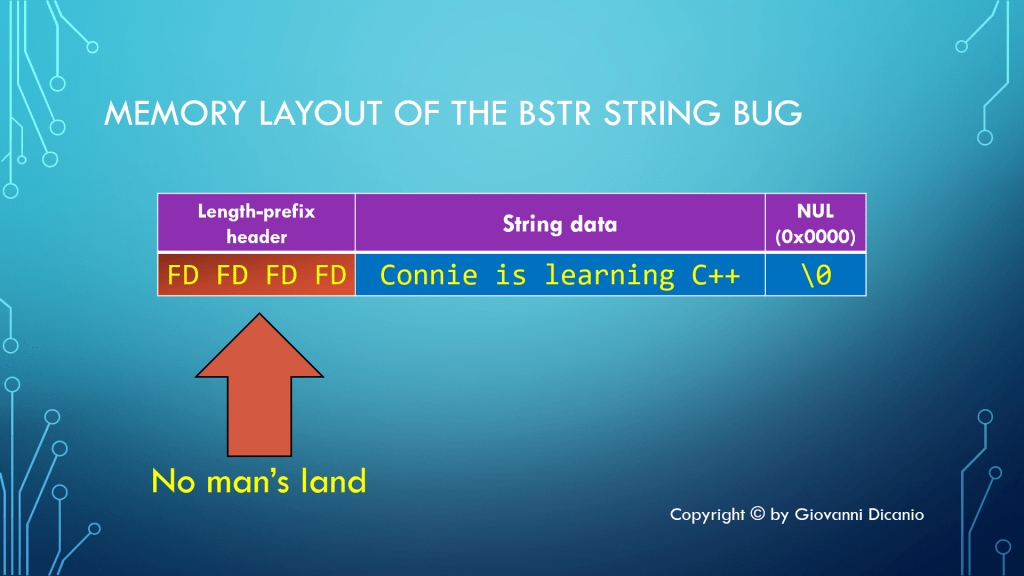
Remember that the DoSomething function expected a BSTR. The caller passed the content of a std::wstring, invoking wstring::data instead. If you take a look at the computer memory, the situation is something like what is shown below:
The memory layout of the BSTR string bug: expecting a length prefix that wasn’t there.
Before the wstring sequence of characters, there are some bytes filled with the 0xFD pattern. In particular, the 0xfdfdfdfd sequence is used to mark the area of memory before a debug heap allocated block. This is a kind of “guard” byte sequence, that delimits debug heap allocated memory blocks. This is sometimes referred to as “no man’s land”.
Of course, SysStringLen assumes that the passed string pointer represents a BSTR, and the bytes immediately before the pointed memory represent a valid length-prefix header. But in this case the pointer is a simple raw C-style string pointer (that is owned by the std::wstring object), not a full-fledged BSTR with a length prefix.
So, SysStringLen reads the 0xfdfdfdfd byte sequence, and interprets it as a BSTR length prefix.
Note that 0xfdfdfdfd expressed in base ten corresponds to the integer value 4,261,281,277. That’s something around 4 billion, not the circa-2 billion value we get here. So, why we do get 2 billion and not 4 billion?
Well, don’t forget the SHR (shift to the right) instruction towards the end of the SysStringLen assembly code! In fact, as already discussed, SysStringLen uses SHR to divide the initial length value by two, as the length is stored in the BSTR header as a count of bytes, but the value returned by SysStringLen is expressed as a count of wchar_ts.
So, start from the “no man’s land” byte sequence 0xfdfdfdfd. Right-shift it by one bit, making it 0x7efefefe. Convert that value back to decimal, and you get 2,130,640,638, which is the initial “magic value” returned as the string length! So: Mystery Solved! 😊
Side Note: Why Was the BSTR Printed Out Correctly with wcout?
That is a very good question! Well, when you pass the BSTR pointer to wcout, it is interpreted as a raw C-style string pointer to a NUL-terminated string (wchar_t*). Since the BSTR contains a NUL terminator at its end, things work correctly: wcout prints the various string characters, and stops at the terminating NUL.
However, note that we were kind of lucky. In fact, if the BSTR contained embedded NULs (which is possible, as a BSTR is length-prefixed), wcout would have stopped at the first NUL in the sequence; so, in that case, only the first part of the BSTR string would have been printed out.
Let’s continue the discussion on string types available for C++ programmers, this time introducing a Windows-specific string type: the BSTR.
Continuing the previous enumeration of some available C++ string options, let’s focus this time on a Windows platform-specific type of string: BSTR. BSTR is a string type that is used in Windows programming by COM, OLE Automation, and even interop functions to pass strings between C++ native code and .NET managed code.
The acronym stands for Basic String, which is tied to its historical origins related to Visual Basic and OLE Automation.
So, what does this BSTR string type look like?
Well, it’s defined in the Windows SDK <wtypes.h> header like this (comments and annotations stripped out):
typedef OLECHAR *BSTR;
So, it’s a raw pointer to an OLECHAR. And, what is an OLECHAR? If you use Visual Studio, you can right click on the unknown OLECHAR symbol, and select “Go To Definition” in the context menu, or just press F12. This leads to:
typedef WCHAR OLECHAR;
So, OLECHAR is basically a typedef for a WCHAR. And, recursively, what is a WCHAR?
Well, same F12 trick, and you land on the following line in <winnt.h>:
typedef wchar_t WCHAR; // wc, 16-bit UNICODE character
So, “unwinding” the above search stack, BSTR is basically a typedef to a wchar_t* raw pointer.
So, does it mean that you can happily use both BSTR and wchar_t* C-style strings interchangeably in your C++ code?
No way! Unless you want to introduce nasty bugs in your code.
In fact, in addition to its raw typedef definition, a BSTR has a well-defined memory layout, and allocation and deallocation requirements.
Allocating and Freeing Memory for BSTRs
In particular, a BSTR must be allocated using COM specific memory allocation functions, like SysAllocString (and similar functions like SysAllocStringLen, etc.).
BSTR myBstr = SysAllocString(L"Connie");
And, symmetrically, it must be freed using SysFreeString:
In other words, you can’t just invoke new[] and delete[] or malloc and free to allocate and release memory for your BSTR strings. Again, that would cause nasty bugs in your code!
As a side note: These BSTR functions (SysAllocString, SysFreeString, etc.) are declared in the <OleAuto.h> header, which reminds us of the historical connection between BSTR and OLE Automation.
The BSTR Memory Layout
Note also that, despite its simple type-system definition of wchar_t*, a BSTR has a well specified structure in computer memory.
In particular, considering the above “Connie” example, such a BSTR looks like this in memory:
Memory layout of a BSTR string
There is a 4-byte (32-bit) header, before the wchar_t pointed by the BSTR pointer, that is a 32-bit integer that stores the number of bytes in the following string data.
There is a contiguous sequence of wchar_t’s, that represents the string encoded in Unicode UTF-16.
There is a wchar_t NUL-terminator, i.e., a sequence of two bytes (16 bits) cleared to zero: 0x0000.
As you can see, this is a concrete well-defined data structure associated to the BSTR pointer, with a length-prefix header, followed by the sequence of wchar_t’s, and a 2-byte NUL terminator. This is very different from a simple C-style string, like:
const wchar_t* str = L"Connie";
Note that the string length in the BSTR header is expressed in bytes. Let’s do some simple math: “Connie” has six characters; each character is a wchar_t, which occupies two bytes; so, 6 [wchar_t] * 2 [byte/wchar_t] = 12 bytes. So, 12 is the number of bytes occupied by the string data; this length value is stored in the BSTR header.
Note also that the terminating NUL is not counted in the length prefix.
Another important feature of BSTR is that a NULL (or nullptr) BSTR is equivalent to an empty string. In other words, an empty string ”” and a NULL BSTR must have the same semantics.
Note also that the sequence of contiguous wchar_ts following the BSTR header can contain embedded NULs, as the BSTR is length-prefixed.
In addition, getting the length (expressed as count of wchar_ts) for a BSTR is a fast O(1) operation, as the string stores its length in the header. You can get the length of a BSTR invoking the SysStringLen API.
Side Note: Using a BSTR as a Binary Array
As an interesting side note, sometimes the BSTR structure is used as a generic byte-array data structure instead of a proper string. In other words, since it’s length-prefixed and can potentially contain embedded zeros, a generic sequence of bytes can be stuffed in the string data part of the BSTR structure. However, I have to say that I’d prefer using a proper data structure to store a binary byte sequence, for example, in the realm of OLE Automation: a SAFEARRAY storing 8-bit unsigned integers, instead of kind of “semantically stretching” a BSTR.
An interesting bug involving the use of string_view instead of std::string const&.
Suppose that in your C++ code base you have a legacy C-interface function:
// Takes a C-style NUL-terminated string pointer as input
void DoSomethingLegacy(const char* s)
{
    // Do something ...

    printf("DoSomethingLegacy: %s\n", s);
}
The above function is called from a C++ function/method, for example:
void DoSomethingCpp(std::string const& s)
{
    // Invoke the legacy C function
    DoSomethingLegacy(s.data());
}
The calling code looks like this:
std::string s = "Connie is learning C++";

// Extract the "Connie" substring
std::string s1{ s.c_str(), 6 };

DoSomethingCpp(s1);
The string that is printed out is “Connie”, as expected.
Then, someone who knew about the new std::string_view feature introduced in C++17, modifies the above code to “modernize” it, replacing the use of std::string with std::string_view:
std::string s = "Connie is learning C++";


// Use string_view instead of string:
//
//     std::string s1{ s.c_str(), 6 };
//
std::string_view sv{ s.c_str(), 6 };

DoSomethingCpp(sv);
The code is recompiled and executed. But, unfortunately, now the output has changed! Instead of the expected “Connie” substring, now the entire string is printed out:
Connie is learning C++
What’s going on here? Where does that “magic string” come from?
Analysis of the Bug
Well, the key to figure out this bug is understanding that std::string_view’s are not necessarily NUL-terminated. On the other hand, the legacy C-interface function does expect as input a C-style NUL-terminated string (passed via const char*).
In the initial code, a std::string object was created to store the “Connie” substring:
// Extract the "Connie" substring
std::string s1{ s.c_str(), 6 };
This string object was then passed via const& to the DoSomethingCpp function, which in turn invoked the string::data method, and passed the returned C-style string pointer to the DoSomethingLegacy C-interface function.
Since strings managed via std::string objects are guaranteed to be NUL-terminated, the string::data method pointed to a NUL-terminated contiguous sequence of characters, which was what the DoSomethingLegacy function expected. Everyone’s happy.
On the other hand, when std::string is replaced with std::string_view in the calling code:
// Use string_view instead of string:
//
//     std::string s1{ s.c_str(), 6 };
//
std::string_view sv{ s.c_str(), 6 };

DoSomethingCpp(sv);
you lose the guarantee that the sub-string is NUL-terminated!
In fact, this time when sv.data is invoked inside DoSomethingCpp, the returned pointer points to a sequence of contiguous characters that is the original string s, which is the whole string “Connie is learning C++”. There is no NUL-terminator after “Connie” in that string, so the legacy C function that takes the string pointer just goes on and prints the whole string, not just the “Connie” substring, until it finds a NUL-terminator, which follows the last character of “Connie is learning C++”.
Figuring out the bug involving the (mis)use of string_view
So, be careful when replacing std::string const& parameters with string_views! Don’t forget that string_views are not guaranteed to be NUL-terminated! That is very important when writing or maintaining C++ code that interoperates with legacy C or C-style code.
Did you think the previous C++ string enumeration was complete? No way. Let me briefly introduce string views in this blog post.
My previous enumeration of the various string options available in C++ was by no means meant to be fully exhaustive. For example: Another interesting option available for programmers using C++17 and successive versions of the standard is std::string_view, with all its variations along the lines of what I described in the previous post (e.g. std::wstring_view, std::u8string_view, std::u16string_view, etc.).
I wanted to dedicate a different blog post to string_view’s, as they are kind of different from “ordinary” strings like std::string instances.
You can think of a string_view as a string observer. The string_view instance does not own the string (unlike say std::string): It just observes a sequence of contiguous characters.
Another important difference between std::string objects and std::string_view instances is that, while std::strings are guaranteed to be NUL-terminated, string_views are not!
This is very important, for example, when you pass a string_view invoking its data() method to a function that takes a C-style raw string pointer (const char *), that assumes that the sequence of characters pointed to is NUL-terminated. That’s not guaranteed for string views, and that can be the source of subtle bugs!
Another important feature of string views is that you can create string_view instances using the sv suffix, for example:
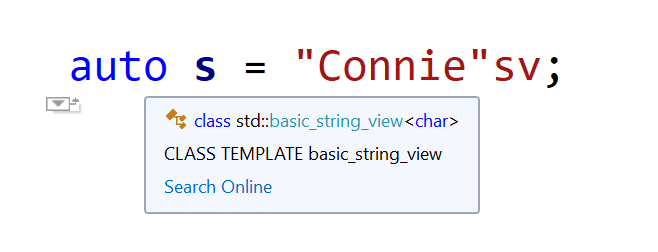
auto s = "Connie"sv;
Visual Studio IntelliSense deduces s to be of type std::string_view
The above code creates a string view of a raw character array literal.
And what about:
auto s2 = L"Connie"sv;
With the L prefix and the sv suffix, Visual Studio IntelliSense deduces s2 to be of type std::wstring_view
This time s2 is deduced to be of type std::wstring_view (which is a shortcut for std::basic_string_view<wchar_t>), thanks to the L prefix!
And don’t even think you are done! In fact, you can combine that with the other options listed in the previous blog post, for example: u8“Connie”sv, LR”(C:\Path\To\Connie)”sv, and so on.
An amusing enumeration of several string options available in C++.
(…OK, a language lawyer would nitpick suggesting “How many string types…”, but I wanted a catchier title.)
So, if you program in Python and you see something enclosed in double quotes, you have a string:
s = "Connie"
Something similar happens in Java, with string literals like “Connie” implemented as instances of the java.lang.String class:
String s = "Connie";
All right.
Now, let’s enter – drumroll, please – The Realm of C++! And the fun begins 🙂
So, let’s consider this simple line of C++ code:
auto s1 = "Connie";
What is the type of s1?
std::string? A char[7] array? (Hey, “Connie” is six characters, but don’t forget the terminating NUL!)
…Something else?
So, you can use your favorite IDE, and hover over the variable name, and get the deduced type. Visual Studio C++ IntelliSense suggests it’s “const char*”. Wow!
Visual Studio IntelliSense deduces const char pointer
And what about “Connie”s?
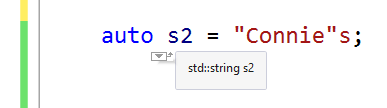
auto s2 = "Connie"s;
No, it’s not the plural of “Connie”. And it’s not a malformed Saxon genitive either. This time s2 is of type std::string! Thank you operator””s introduced in C++14!
Visual Studio IntelliSense deduces std::string
But, are we done? Of course, not! Don’t forget: It’s C++! 🙂
For example, you can have u8“Connie”, which represents a UTF-8 literal. And, of course, we need a thread on StackOverflow to figure out “How are u8-literals supposed to work?”
And don’t forget L“Connie”, u“Connie” and U“Connie”, which represent const wchar_t*, const char16_t* (UTF-16 encoded) and const char32_t* (UTF-32 encoded) respectively.
Now we are done, right? Not yet!
In fact, you can combine the previous prefixes with the standard s-suffix, for example: L“Connie”s is a std::wstring! U“Connie”s is a std::u32string. And so on.
Done, right? Not yet!! In fact, there are raw string literals to consider, too. For example: R”(C:\Path\To\Connie)”, which is a const char* to “C:\Path\To\Connie” (well, this saves you escaping \ with \\).
And don’t forget the combinations of raw string literals with the above prefixes and optionally the standard s-suffix, as well: LR”(C:\Path\To\Connie)”, UR”(C:\Path\To\Connie)”, LR”(C:\Path\To\Connie)”s, UR”(C:\Path\To\Connie)”s, and more!
Oh, and in addition to the standard std::string class, and other standard std::basic_string-based typedefs (e.g. std::wstring, std::u16string, std::u32string, etc.), there are platform/library specific string classes, like ATL/MFC’s CString, CStringA and CStringW. And Qt brings QString to the table. And wxWidgets does the same with its wxString.
Wow! And I would not be surprised if I missed some other string variation out 🙂
How do “Connie” and “meow” differ from “The Commodore 64 is a great computer”? Let’s discover that with an introduction to a cool C++ string optimization: SSO!
How do “Connie” and “meow” differ from “The Commodore 64 is a great computer”?
(Don’t get me wrong: They are all great strings! 🙂 )
In several implementations, including the Visual C++’s one, the STL string classes are empowered by an interesting optimization: The Small String Optimization (SSO).
What does that mean?
Well, it basically means that small strings get a special treatment. In other words, there’s a difference in how strings like “Connie”, “meow” or “The Commodore 64 is a great computer” are allocated and stored by std::string.
In general, a typical string class allocates the storage for the string’s text dynamically from the heap, using new[]. In Visual Studio’s C/C++ run-time implementation on Windows, new[] calls malloc, which calls HeapAlloc (…which may probably call VirtualAlloc). The bottom line is that dynamically-allocating memory with new[] is a non-trivial task, that does have an overhead, and implies a trip down the Windows memory manager.
So, the std::string class says: “OK, for small strings, instead of taking a trip down the new[]-malloc-HeapAlloc-etc. “memory lane” 🙂 , let’s do something muchfaster and cooler! I, the std::string class, will reserve a small chunk of memory, a “small buffer”embedded inside std::string objects, and when strings are small enough, they will be kept (deep-copied) in that buffer, without triggering dynamic memory allocations.”
That’s a big saving! For example, for something like:
std::string s{"Connie"};
there’s no memory allocated on the heap! “Connie” is just stack-allocated. No new[], no malloc, no HeapAlloc, no trip down the Windows memory manager.
That’s kind of the equivalent of this C-ish code:
char buffer[ /* some short length */ ];
strcpy_s(buffer, "Connie");
No new[], no HeapAlloc, no virtual memory manager overhead! It’s just a simple snappy stack allocation, followed by a string copy.
But there’s more! In fact, having the string’s text embedded inside the std::string object offers greatlocality, better than chasing pointers to scattered memory blocks allocated on the heap. This is also very good when strings are stored in a std::vector, as small strings are basically stored in contiguous memory locations, and modern CPUs love blasting contiguous data in memory!
SSO: Embedded small string optimized memory layout vs. external string layout
Optimizations similar to the SSO can be applied also to other data structures, for example: to vectors. CppCon 2016 had an interesting session discussing that: “High Performance Code 201: Hybrid Data Structures”.
I’ve prepared some C++ code implementing a simple benchmark to measure the effects of SSO. The results I got for 200,000-small-string vectors clearly show a significant advantage of STL strings for small strings. For example: in 64-bit build on an Intel i7 CPU @3.40GHz: vector::push_back time for ATL (CStringW) is 29 ms, while for STL (wstring) it’s just 14 ms: one half! Moreover, sorting times are 135 ms for ATL vs. 77 ms for the STL: again, a big win for the SSO implemented in the STL!