How Can You Pass STL Strings as PCWSTR Parameters at the Windows API Boundaries?

The STL wstring’s c_str method comes to the rescue.

We saw that a PCWSTR parameter is basically an input C-style null-terminated string pointer. If you have an STL string, how can you pass it when a PCWSTR is expected?

Well, it depends from the type of the STL string. If it’s a std::wstring, you can simply invoke its c_str method:

// DoSomethingApi(PCWSTR pszText, ... other stuff ...)

std::wstring someText = L"Connie";

// Invoke the wstring::c_str() method to pass the wstring
// as PCWSTR parameter to a Windows API:
DoSomethingApi(someText.c_str(), /* other parameters */);

The wstring::c_str method returns a pointer to a read-only C-style null-terminated “wide” (i.e. UTF-16 on Windows) string, which is exactly what a PCWSTR parameter expects.

If it’s a std::string, then you have to consider the encoding used by it. For example, if it’s a UTF-8-encoded string, you can first convert from UTF-8 to UTF-16, and then pass the UTF-16 equivalent std::wstring object to the Windows API invoking the c_str method as shown above.

If the std::string stores text encoded in a different way, you could still use the MultiByteToWideChar API to convert from that encoding to UTF-16, and pass the result std::wstring to the PCWSTR parameter invoking the wstring::c_str method, as well.

Decoding Windows SDK Types: PWSTR

Meet the non-const sibling of the previously discussed PCWSTR.

Last time we discussed a common Windows SDK type: PCWSTR. You can follow the same approach of the previous post to decode another common Win32 type: PWSTR.

PWSTR is very similar to PCWSTR: the only difference is the missing “C” after the initial “P”.

So, splitting PWSTR up into pieces like we did last time, you get:

  1. The initial P, which stands for pointer. So, this is a pointer to something.
  2. [There is no C in this case, so the “thing” pointed to is not const]
  3. The remaining WSTR part, which stands for WCHAR STRing, and represents the target of the pointer.

So, a PWSTR is a pointer (P) to a (non-const) Unicode UTF-16 NUL-terminated C-style string (WSTR). In other words, PWSTR is the non-const version of the previous PCWSTR.

Considering its const type qualifier, PCWSTR is used to represent read-only input string parameters; on the other hand, the non-const version PWSTR can be used for output or input-output string parameters.

As already seen for PCWSTR, there is the perfectly equivalent variant with the initial “LP” prefix instead of “P”: LPWSTR.

The PWSTR and LPWSTR definitions from <WinNT.h> are like that:

typedef _Null_terminated_ WCHAR *LPWSTR, *PWSTR;

Note the _Null_terminated_ annotation, used to specify that the WCHAR array must be null-terminated.

Decoding Windows SDK Types: PCWSTR

Exploring what’s under the hood of a common Windows SDK C/C++ typedef, including an interesting code annotation.

If you have done some Windows native programming in C or C++, you would have almost certainly found some apparently weird types, like PCWSTR.

So, what does PCWSTR mean?

Well, to understand its meaning, let’s split it up into smaller pieces:

  1. The initial P stands for pointer. So, this is a pointer to something.
  2. The following C stands for const. So, this is a pointer to something that cannot be modified.
  3. The remaining WSTR part stands for WCHAR STRing, and represents the target of the pointer.

So, a PCWSTR is a pointer to a constant (i.e. read-only) WCHAR string.

The WSTR or “WCHAR string” part needs some elaboration. Basically, WCHAR is a typedef for wchar_t. So, a WSTR or WCHAR string basically means a C-style NUL-terminated string made by an array of wchar_ts. In other words, this is a Unicode UTF-16 C-style NUL-terminated string.

Putting all these pieces of information together, a PCWSTR is basically a pointer (P) to a constant (C) NUL-terminated C-style wchar_t Unicode UTF-16 string (WSTR).

Shows the various pieces of the PCWSTR acronym.
Decoding the PCWSTR typedef

This PCWSTR definition can be translated in the following C/C++ typedef:

typedef const WCHAR* PCWSTR;

// NOTE:
// WCHAR is a typedef for wchar_t

Some C++ coding guidelines, like Google’s, suggest avoiding those Windows SDK typedefs like PCWSTR in your own C++ code, and instead “keeping as close as you can to the underlying C++ types”:

Windows defines many of its own synonyms for primitive types, such as DWORDHANDLE, etc. It is perfectly acceptable, and encouraged, that you use these types when calling Windows API functions. Even so, keep as close as you can to the underlying C++ types. For example, use const TCHAR * instead of LPCTSTR.

Google C++ Style Guide – Windows Code Section

In other words, following those guidelines, you should use the explicit and more verbose “const WCHAR*” or “const wchar_t*”, instead of the PCWSTR typedef.

Don’t Miss the Code Annotation

However, if you take a look at the actual typedef in the Windows SDK headers, you’ll see that the definition of PCWSTR is something like this:

// PCWSTR definition in the <winnt.h> Windows SDK header

typedef _Null_terminated_ CONST WCHAR *LPCWSTR, *PCWSTR;

The important thing to note here is the _Null_terminated_ part, which is a C/C++ code annotation that specifies that the WCHAR array pointed to must be null-terminated. This is something useful when you run Code Analysis on your C/C++ Windows native code, as it can help spotting subtle bugs, like pointing to non-null-terminated character arrays by mistake.

So, in this case, if you follow C++ coding styles like Google’s, and keep as close as possible to the underlying C++ types, you miss the important code annotation part.

An Equivalent Type with Historical Roots: LPCWSTR

As a side note, as you can see from the above typedef from the <winnt.h> Windows SDK header, there is a totally equivalent type to PCWSTR: it’s LPCWSTR, the difference being in the additional initial “L“. This “L” probably means “long“, and should be thought of as attached to the “P”as in “LP”. So, basically, this should probably mean something like “long pointer”. I’m not entirely sure, but I think this is something from the 16-bit Windows era, when the memory was somehow segmented and there were “near” pointers and “far” or “long” pointers. But, as I said, I’m not entirely sure, as I started programming in C++ for Windows 95, enjoying the 32-bit era.

Visual Studio 2019 and [[nodiscard]] in its Default C++14 Mode

“Back-porting” and enabling [[nodiscard]] in C++14 code bases is a feature that can come in handy.

[[nodiscard]] is a feature that was added in C++17. However, it’s interesting to note that the Visual C++ compiler that comes with Visual Studio 2019 accepts [[nodiscard]] also when you compile C++ code in the default C++14 mode.

C++ project property page in VS 2019, showing the default C++14 mode selected.
Visual Studio 2019 C++ Project Properties

If, for some reason, you can’t compile your C++ code base with C++17 mode enabled, I would still suggest to use [[nodiscard]] in your C++ code, at least in places where it can help spotting subtle bugs (like in the cases suggested here).

C4834 warning message emitted by VC++ 2019 in its default C++14 mode, when the return value of a [[nodiscard]] function is discarded.
C4834 [[nodiscard]]-related warning message emitted by VC++ in default C++14 mode

You could even use some conditional compilation with preprocessor macros to enable [[nodiscard]] when compiling your C++ code with compilers like VC++ 2019 that support this feature, and expand that preprocessor macro to nothing in C++ compilers that don’t support it.

Where to Apply [[nodiscard]]?

A couple of suggestions for applying the [[nodiscard]] attribute in C++ code.

In the previous blog post, I shared some thoughts on [[nodiscard]]. As I wrote there, it would be better to have a good default of always assuming [[nodiscard]], and opt out from that good default only in some specific cases. But, unfortunately, the current state of the C++ language standard is different, and actually the opposite of the above.

So, where would I strongly recommend to apply [[nodiscard]]?

The Case of Bad Confusing Naming Choices

A common case that comes to my mind is the example of std::vector::empty. I have always found that vector’s method name confusing. I mean: Is “empty” a method to empty the vector, that is to remove its content? No. std::vector::empty is a bool-returning method to check if the vector has no element.

So, in this case, applying [[nodiscard]] to the vector::empty method will make the C++ compiler generate a warning when you write this kind of C++ code:

// myVector is a std::vector

// Empty the vector content [NOTE: Wrong code]
myVector.empty();

As can be read from the comment above, the intention of the programmer was to empty the vector. But the vector::empty method simply returned a bool to check if the vector had no elements. And, in the above case, that returned value was discarded.

So, the use of the [[nodiscard]] attribute with the vector::empty method will generate a warning in the above bogus case. It’s like the C++ compiler telling the programmer: “Hey, programmer! You discarded the return value of vector::empty!” So the programmer thinks: “Hey, what return value? Wait a minute… I just wanted to empty the vector! Ahhh…Ok. I got it: This vector::empty method returns a bool and is used to check if the vector is empty. So, the method I should call is another one!” And then, after some search, the vector::clear method is invoked and the above code fixed.

// Correct code to empty the vector:
myVector.clear();

Note: The so maltreated MFC, with its CArray class, did choose a much better naming for its “empty” method, calling it IsEmpty. With such a good name, you won’t certainly make the mistake of invoking IsEmpty when you actually meant to make the vector empty. The designers of the STL made a confusing choice for the vector::empty method: calling it is_empty would have been much better and clear.

So, this is actually a case in which [[nodiscard]] comes to the rescue for a bad confusing choice for naming methods.

The Case of Returning Raw Owning Resource Handles

Another important case where I strongly suggest to apply the [[nodiscard]] attribute is when you return to the caller some raw owning handle or pointer (which you can think of as an “handle” to memory resources).

For example, in my WinReg C++ library, I wrap a raw Windows Registry HKEY handle in the safe boundaries of the RegKey C++ class.

However, for flexibility of design, I chose to have a RegKey::Detach method that transfers the ownership of that HKEY raw handle to the caller:

// Transfer ownership of current HKEY to the caller.
// Note that the caller is responsible for closing the key handle!
[[nodiscard]] HKEY Detach() noexcept;

After invoking that method, the caller becomes the new owner of the returned HKEY. As such, the caller will be responsible for properly tracking and releasing the raw handle when not needed anymore.

In such cases, discarding (by mistake) the returned value of the RegKey::Detach method would cause a resource leak. So, having the C++ compiler speak up in such cases would definitely help in preventing such leaks. So, if you have to be selective of where you apply the [[nodiscard]] attribute, this is certainly a great place for it!

To [[nodiscard]] or Not [[nodiscard]] by Default?

Some reflections on the use (or abuse?) of the [[nodiscard]] attribute introduced in C++17.

An interesting addition made in C++17 has been the [[nodiscard]] attribute. The basic idea is to apply it such that the C++ compiler will emit a warning when the return values of functions or methods are discarded.

Someone said that, even in previous versions of the C++ standard, if your C++ compiler didn’t emit a warning when you discard the return value of functions or methods, you should discard that C++ compiler.

Really?

Well, consider this simple piece of C++ code:

int GetSomething()
{
    return 10;
}

int main()
{
    GetSomething();
}

I tried compiling that code with VS 2019 at warning level 4 (which is a good warning level for VC++), and the code compiles successfully, with no warnings emitted by the VC++ compiler.

Of course, I won’t discard VC++, as I consider it the best C++ compiler for Windows (and Visual Studio is my favorite IDE for Windows).

On the other hand, if I add the [[nodiscard]] attribute to the GetSomething function:

[[nodiscard]] int GetSomething()
{
    ...

then the VC++ compiler does emit a warning message:

warning C4834: discarding return value of function with ‘nodiscard’ attribute

So, should C++ compilers emit warnings on discarded return values by default?

Well, if you think about it, printf returns an int, which I think a lot of programmers discard 🙂

So, if C++ compilers would emit such warnings by default, compiling lots of code that uses printf to print some text to the standard output would result in very noisy compilations.

Well, you may argue that printf comes from C. But I could reply that it’s used a lot in C++ (at least until the recent std::print and related formatting functions added in C++20/23).

Moreover, even focusing on more C++-specific features, even something like operator= overloads return a reference that is many times discarded:

T& operator=(const T& other)
{
    ...
    return *this;
}

Should an innocent assignment like:

a = b;

trigger a warning??

So, assuming a default [[nodiscard]] policy, that would indeed generate lots of noisy compilation sessions!

On the other hand, adding [[nodiscard]] to many functions and methods can result in very noisy and kind of cluttered code, too.

So, we need to find a balance here.

A good alternative could be adding [[nodiscard]] to structs or classes or enumerations that represent an error information or something that shouldn’t be discarded, so the C++ compiler will automatically apply the [[nodiscard]] behavior to functions and methods that return those [[nodiscard]] classes or enumerations. Note that this behavior is already implemented in C++17, and available in C++ compilers like Visual C++ 2019.

Another option I was thinking about is this: Assume [[nodiscard]] behavior as the default, and opt out using another attribute, like [[maybe_discarded]], in cases like the operator= overloads, in which discarding the returned value or reference is perfectly sensible. This would adhere to the philosophy of good defaults. In other words, if you don’t specify anything, you’ll get [[nodiscard]] behavior by default, and warning messages. And in those specific cases when discarding the returned value can make sense, only there you specify an explicit attribute like [[maybe_discarded]].

How to Set VC++ Warning Level 4 in Visual Studio

A few small extra steps at the beginning, that will save you lots of time and headaches during C++ project development!

One of the very first things I do after creating a new C++ project in Visual Studio is setting the Visual C++ compiler warning level 4. I consider this a best practice when writing C++ code compiled with the Microsoft Visual C++ compiler. In fact, I prefer having the VC++ compiler speak out more frequently, as it helps finding bugs (and fixing them) earlier in the development cycle.

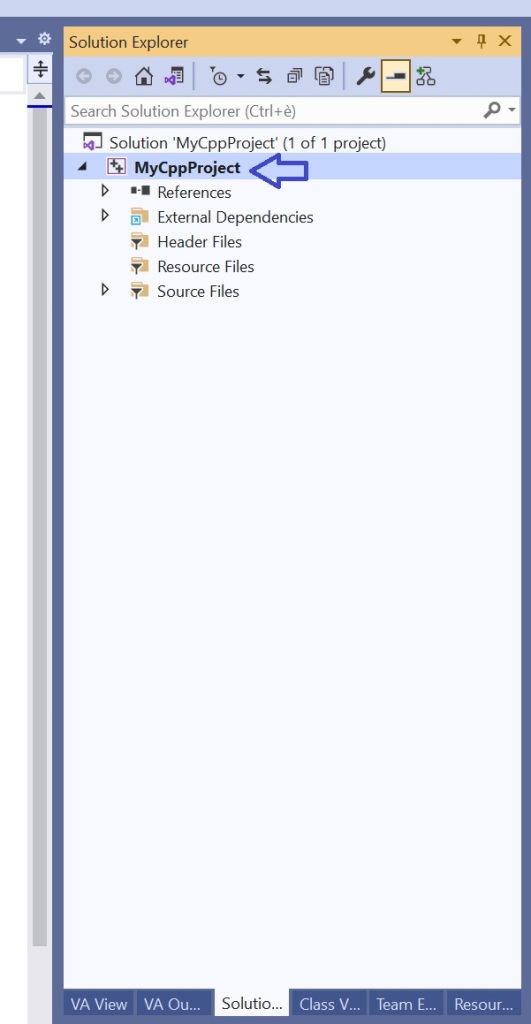
To do so, in the Solution Explorer view in Visual Studio, right click on your C++ project name, and select Properties from the menu.

Project name in Solution Explorer inside Visual Studio.
Right-click on the project name in Solution Explorer in Visual Studio…

Select the Properties menu item to show the project's properties dialog box.
…then select the project Properties menu item.

The dialog box showing the project’s properties will appear.

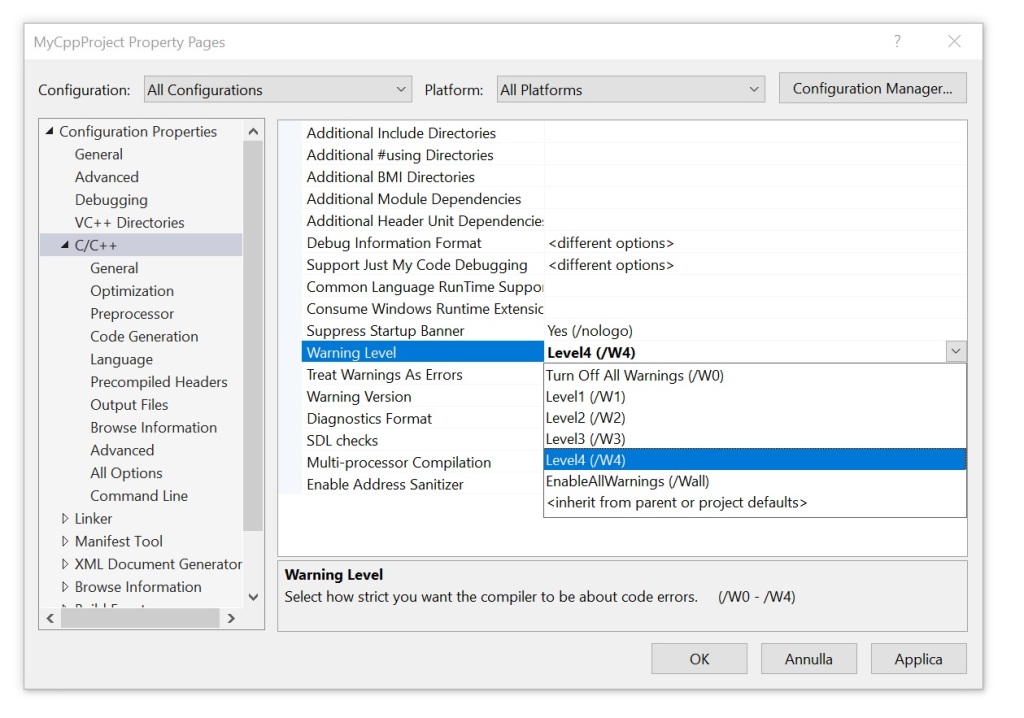
In Configuration Properties on the left, select C/C++. Then change the Warning Level property from the default Level3 (/W3) to Level4 (/w4). Confirm clicking the OK button.

Setting the Warning Level property in the project properties dialog box in Visual Studio to Level4 (/W4).
Setting the Warning Level property to Level4 (/W4).

Enjoy your C++ project development!

I wish the warning level 4 was the default setting in Visual Studio for C++ projects! For me, this would adhere to the philosophy of having good defaults.

How to Access std::vector’s Internal Array

Pay attention to the target of the address-of (&) operator!

Suppose that you have some data stored in a std::vector, and you need to pass it to a function that takes a pointer to the beginning of the data, and in addition the data size or element count.

Something like this:

// Input data to process
std::vector<int> myData = { 11, 22, 33 };

//
// Do some processing on the above data
//
DoSomething(
    ??? ,         // beginning of data 
    myData.size() // element count
);

You may think of using the address-of operator (&) to get a pointer to the beginning of the data, like this:

// Note: *** Wrong code ***
DoSomething(&myData, myData.size());

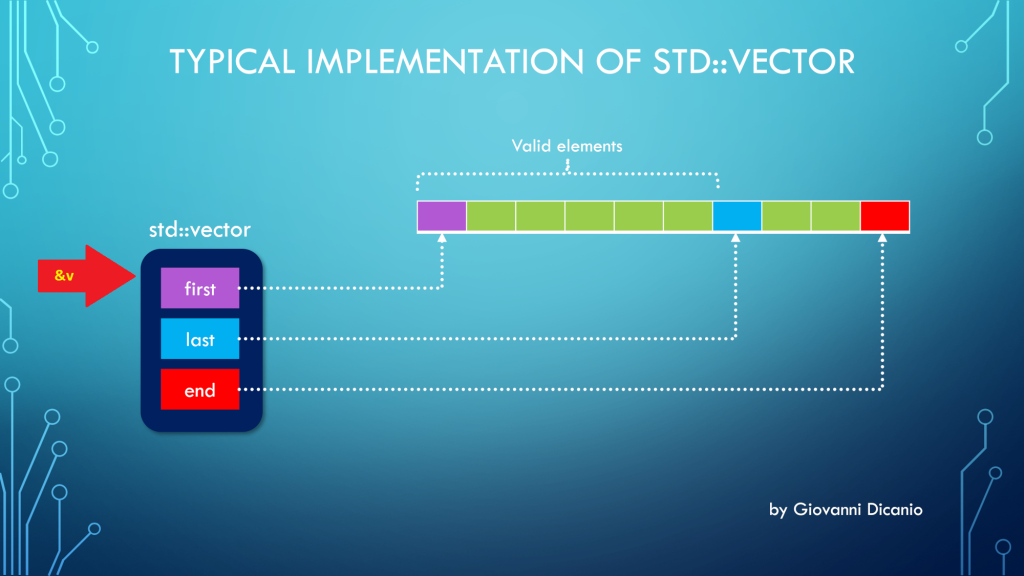
But the above code is wrong. In fact, if you use the address-of operator (&) with a std::vector instance, you get the address of the “control block” of std::vector, that is the block that contains the three pointers first, last, end, according to the model discussed in a previous blog post:

Taking the address of a std::vector returns a pointer to the beginning of its control block
Taking the address of a std::vector (&v) points to its control block

Luckily, if you try the above code, it will fail to compile, with a compiler error message like this one produced by the Visual C++ compiler in VS 2019:

Error C2664: 'void DoSomething(const int *,size_t)': 
cannot convert argument 1 
from 'std::vector<int,std::allocator<int>> *' to 'const int *'
Types pointed to are unrelated; conversion requires reinterpret_cast, C-style cast or function-style cast

What you really want here is the address of the vector’s elements stored in contiguous memory locations, and pointed to by the vector’s control block.

To get that address, you can invoke the address-of operator on the first element of the vector (which is the element at index 0): &v[0].

// This code works
DoSomething(&myData[0], myData.size());

As an alternative, you can invoke the std::vector::data method:

DoSomething(myData.data(), myData.size());

Now, there’s a note I’d like to point out for the case of empty vectors:

According to the documentation on CppReference:

If size() is ​0​, data() may or may not return a null pointer.

CppReference.com

I would have preferred a well-defined behavior such that, when size is 0 (i.e. the vector is empty), data() must return a null pointer (nullptr). This is the good behavior that is implemented in the C++ Standard Library that comes with VS 2019. I believe the C++ Standard should be fixed to adhere to this intelligent behavior.