Well, it depends from the type of the STL string. If it’s a std::wstring, you can simply invoke its c_str method:
// DoSomethingApi(PCWSTR pszText, ... other stuff ...)

std::wstring someText = L"Connie";

// Invoke the wstring::c_str() method to pass the wstring
// as PCWSTR parameter to a Windows API:
DoSomethingApi(someText.c_str(), /* other parameters */);
The wstring::c_str method returns a pointer to a read-onlyC-style null-terminated “wide” (i.e. UTF-16 on Windows) string, which is exactly what a PCWSTR parameter expects.
If it’s a std::string, then you have to consider the encoding used by it. For example, if it’s a UTF-8-encoded string, you can first convert from UTF-8 to UTF-16, and then pass the UTF-16 equivalent std::wstring object to the Windows API invoking the c_str method as shown above.
If the std::string stores text encoded in a different way, you could still use the MultiByteToWideChar API to convert from that encoding to UTF-16, and pass the result std::wstring to the PCWSTR parameter invoking the wstring::c_str method, as well.
Meet the non-const sibling of the previously discussed PCWSTR.
Last time we discussed a common Windows SDK type: PCWSTR. You can follow the same approach of the previous post to decode another common Win32 type: PWSTR.
PWSTR is very similar to PCWSTR: the only difference is the missing “C” after the initial “P”.
So, splitting PWSTR up into pieces like we did last time, you get:
The initial P, which stands for pointer. So, this is a pointer to something.
[There is no C in this case, so the “thing” pointed to is not const]
The remaining WSTR part, which stands for WCHAR STRing, and represents the target of the pointer.
So, a PWSTR is a pointer (P) to a (non-const) Unicode UTF-16 NUL-terminated C-style string (WSTR). In other words, PWSTR is the non-const version of the previous PCWSTR.
Considering its const type qualifier, PCWSTR is used to represent read-only input string parameters; on the other hand, the non-const version PWSTR can be used for output or input-output string parameters.
As already seen for PCWSTR, there is the perfectly equivalent variant with the initial “LP” prefix instead of “P”: LPWSTR.
The PWSTR and LPWSTR definitions from <WinNT.h> are like that:
typedef _Null_terminated_ WCHAR *LPWSTR, *PWSTR;
Note the _Null_terminated_ annotation, used to specify that the WCHAR array must be null-terminated.
Exploring what’s under the hood of a common Windows SDK C/C++ typedef, including an interesting code annotation.
If you have done some Windows native programming in C or C++, you would have almost certainly found some apparently weird types, like PCWSTR.
So, what does PCWSTR mean?
Well, to understand its meaning, let’s split it up into smaller pieces:
The initial P stands for pointer. So, this is a pointer to something.
The following C stands for const. So, this is a pointer to something that cannot be modified.
The remaining WSTR part stands for WCHAR STRing, and represents the target of the pointer.
So, a PCWSTR is a pointer to a constant (i.e. read-only) WCHAR string.
The WSTR or “WCHAR string” part needs some elaboration. Basically, WCHAR is a typedef for wchar_t. So, a WSTR or WCHAR string basically means a C-style NUL-terminated string made by an array of wchar_ts. In other words, this is a Unicode UTF-16 C-style NUL-terminated string.
Putting all these pieces of information together, a PCWSTR is basically a pointer (P) to a constant (C) NUL-terminated C-style wchar_t Unicode UTF-16 string (WSTR).
Decoding the PCWSTR typedef
This PCWSTR definition can be translated in the following C/C++ typedef:
typedef const WCHAR* PCWSTR;

// NOTE:
// WCHAR is a typedef for wchar_t
Some C++ coding guidelines, like Google’s, suggest avoiding those Windows SDK typedefs like PCWSTR in your own C++ code, and instead “keeping as close as you can to the underlying C++ types”:
Windows defines many of its own synonyms for primitive types, such as DWORD, HANDLE, etc. It is perfectly acceptable, and encouraged, that you use these types when calling Windows API functions. Even so, keep as close as you can to the underlying C++ types. For example, use const TCHAR * instead of LPCTSTR.
Google C++ Style Guide – Windows Code Section
In other words, following those guidelines, you should use the explicit and more verbose “const WCHAR*” or “const wchar_t*”, instead of the PCWSTR typedef.
Don’t Miss the Code Annotation
However, if you take a look at the actual typedef in the Windows SDK headers, you’ll see that the definition of PCWSTR is something like this:
// PCWSTR definition in the <winnt.h> Windows SDK header

typedef _Null_terminated_ CONST WCHAR *LPCWSTR, *PCWSTR;
The important thing to note here is the _Null_terminated_ part, which is a C/C++ code annotation that specifies that the WCHAR array pointed to must be null-terminated. This is something useful when you run Code Analysis on your C/C++ Windows native code, as it can help spotting subtle bugs, like pointing to non-null-terminated character arrays by mistake.
So, in this case, if you follow C++ coding styles like Google’s, and keep as close as possible to the underlying C++ types, you miss the important code annotation part.
An Equivalent Type with Historical Roots: LPCWSTR
As a side note, as you can see from the above typedef from the <winnt.h> Windows SDK header, there is a totally equivalent type to PCWSTR: it’s LPCWSTR, the difference being in the additional initial “L“. This “L” probably means “long“, and should be thought of as attached to the “P”as in “LP”. So, basically, this should probably mean something like “long pointer”. I’m not entirely sure, but I think this is something from the 16-bit Windows era, when the memory was somehow segmented and there were “near” pointers and “far” or “long” pointers. But, as I said, I’m not entirely sure, as I started programming in C++ for Windows 95, enjoying the 32-bit era.
A few small extra steps at the beginning, that will save you lots of time and headaches during C++ project development!
One of the very first things I do after creating a new C++ project in Visual Studio is setting the Visual C++ compiler warning level 4. I consider this a best practice when writing C++ code compiled with the Microsoft Visual C++ compiler. In fact, I prefer having the VC++ compiler speak out more frequently, as it helps finding bugs (and fixing them) earlier in the development cycle.
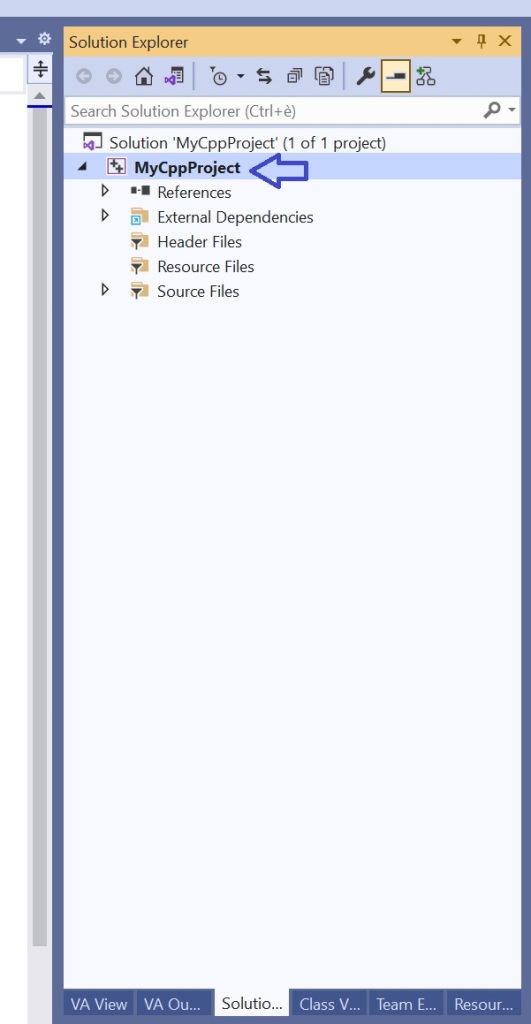
To do so, in the Solution Explorer view in Visual Studio, right click on your C++ project name, and select Properties from the menu.
Right-click on the project name in Solution Explorer in Visual Studio……then select the project Properties menu item.
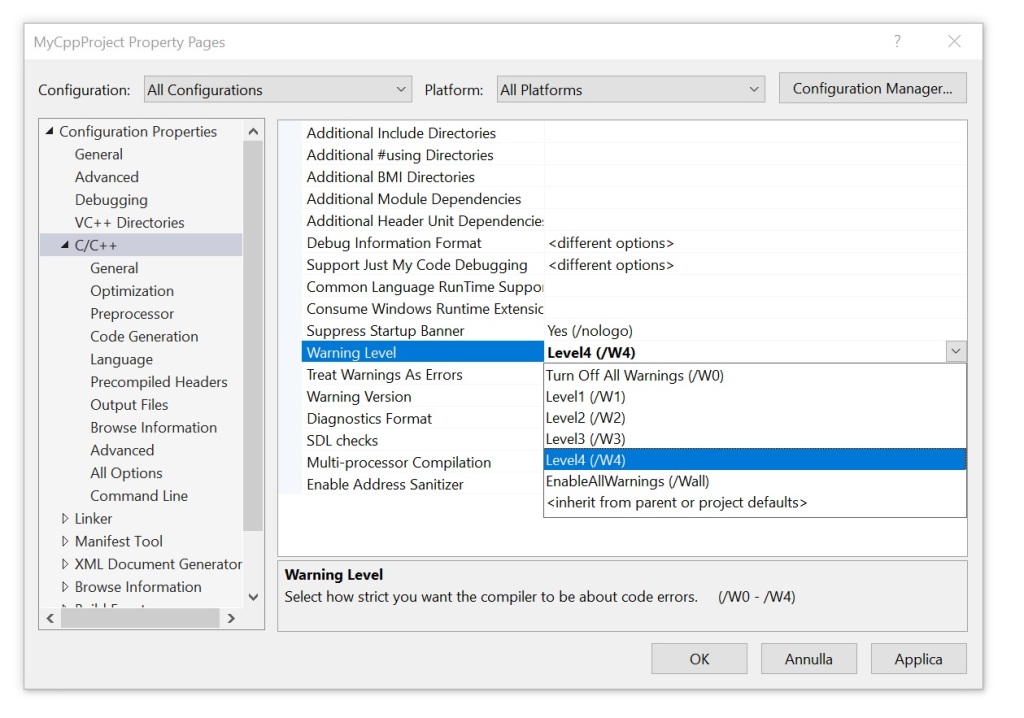
The dialog box showing the project’s properties will appear.
In Configuration Properties on the left, select C/C++. Then change the Warning Level property from the default Level3 (/W3) to Level4 (/w4). Confirm clicking the OK button.
Setting the Warning Level property to Level4 (/W4).
Enjoy your C++ project development!
I wish the warning level 4 was the default setting in Visual Studio for C++ projects! For me, this would adhere to the philosophy of having good defaults.
Very easy! It’s just a matter of invoking a constructor with a type cast.
Last time we saw how to load a string resource into a wstring. As already explained, ATL/MFC’s CString does offer very convenient methods for Win32 C++ programming. So, how can you load a string resource into a CString instance?
Well, it’s very simple! Just pass the string ID to a CString constructor overload with a proper type cast:
// Load string with ID IDS_MY_STRING from resources
// into a CString instance
CString myString( (PCTSTR) IDS_MY_STRING );
You can even #define a simple preprocessor macro that takes the string resource ID and and creates a CString object storing the string resource:
When you need to pass a (localized) string loaded from resources to a Win32 API or ATL/MFC class member function that expects a string pointer (typically in the form of LPCTSTR/PCTSTR, i.e. const TCHAR*), then you can simply use the convenient macro defined above:
// Show a message-box to the user,
// displaying strings loaded from resources
MessageBox(nullptr,
           _S(IDS_SOME_MESSAGE_FOR_THE_USER),
           _S(IDS_SOME_TITLE),
           MB_OK);
How does that work?
Well, first the _S macro defined above creates a (temporary) CString object and loads the string resource into it. Then, the implicit LPCTSTR conversion operator provided by CString is invoked by the C++ compiler, so the (read-only) string pointer is passed to the proper parameter of the MessageBox API.
See how simple is that compared to using std::wstring, where we needed to create an ad hoc non-trivial function to load wstring from resources!
CString easily allows loading strings from resources “out of the box”. Let’s try to implement this feature for std::wstring.
As discussed in the previous blog post, CString offers convenient methods for Windows C++ programming, including those to load strings from resources.
What Is a String Resource and Why Should You Care?
Basically, in a Windows Win32 C++ application you can store your strings (like messages for the user) as resources, and then reference them in your C++ code via their IDs. If you want to localize your application for a different language, a translator can take the string resources and translate them into the destination language. The C++ source code remains the same, as it references strings not by their language-specific literal form (e.g. “Cannot access the Registry key XYZ”), but using language-neutral resource IDs (e.g. IDS_CANNOT_ACCESS_REGISTRY_KEY_XYZ).
Accessing String Resources via the LoadString(W) API
To access a Unicode (UTF-16) string resource, you can use the LoadStringW Win32 API.
Loads a string resource from the executable file associated with a specified module and either copies the string into a buffer with a terminating null character or returns a read-only pointer to the string resource itself.
From that paragraph, we get that there are two different behaviors available for this API:
Copy the string resource into a user-provided buffer.
Return a read-only pointer to the string resource itself.
Behavior #1: Copying the String Resource into a User-provided Buffer
The first behavior is shown several times in Microsoft documentation. For example, the doc page about LoadStringW refers to the following sample code:
Example code for LoadString referenced by the official Microsoft documentation
Basically, the idea here is to create a TCHAR buffer, and invoke LoadString to load the string resource into that buffer:
In Unicode builds, TCHAR becomes WCHAR (i.e. wchar_t), and LoadString becomes LoadStringW.
One of the problem of this kind of code is that the buffer is pre-allocated with a given fixed size. Then, what happens if the string read from resources is larger than the pre-allocated buffer? The string is silently truncated, as per the official MS documentation about the cchBufferMax parameter:
The string is truncated and null-terminated if it is longer than the number of characters specified.
This could make the UI ugly if it is just a user message string that gets truncated; or it can become a much more serious bug if the truncated string is something like the format specifier for some printf-like function.
Moreover, in that code there is no check on the return value of LoadString. So, if the function fails, the buffer could contain garbage, and that could cause other bugs. (Although, I understand that often MS documentation doesn’t include error checking; but it’s important to point that out, as often people copy-paste code from MS doc samples, and silent bugs are introduced in their own code.)
In addition, it’s important to remember to properly scale the “sizeof” the destination buffer, dividing it by sizeof(TCHAR), which is sizeof(WCHAR) == 2 (bytes) in Unicode builds. Failing to do so would cause additional buffer overflow problems.
You can use a std::wstring of proper size, and pass a pointer to the internal string characters instead of using a raw wchar_t array, but the aforementioned problems still remain.
Behavior #2: Getting a Read-only Pointer to the String Resource
To me the behavior #2 (which is: get a read-only pointer to the string resource itself) is what leads to better and easier code (despite some type cast). However, it’s not very clear from the current MS documentation how to operate the LoadStringW API in this “behavior #2” mode.
So, let’s explain that here. Let’s start with the function declaration:
int LoadStringW(
  [in, optional] HINSTANCE hInstance,
  [in]           UINT      uID,
  [out]          LPWSTR    lpBuffer,
  [in]           int       cchBufferMax
);
To enable behavior #2 (i.e. return a read-only pointer to the string resource itself), you need to pass 0 (zero) for the last parameter cchBufferMax.
If you pass zero for cchBufferMax, the LoadStringW API says: “Hey, the caller wants me to just return a read-only pointer to the string resource itself, with no deep-copies in a user-provided buffer. Ok, let’s do that!”
Where does the API get the information about the destination string pointer? In other words: Where can the LoadStringW API write the string resource’s address? Well, it uses the third parameter for that: lpBuffer.
However, there’s a gotcha here (that I think is not well documented in the official MS web page). Basically, you need to create a const wchar_t pointer that will store the address of the resource string (which is read-only, hence the const):
// Pointer to the start of the string resource
const wchar_t* pchStringBegin = nullptr;
Then you need to pass the address of this pointer as the lpBuffer parameter to LoadStringW: &pchStringBegin. Note that, in this way, you are using a double-indirection, i.e. a pointer-to-a-pointer. Since the lpBuffer parameter is declared as LPWSTR (i.e. wchar_t*), you have a type mismatch for this parameter. In fact, LoadStringW expects a simple wchar_t* pointer; but you are passing a pointer-to-a-wchar_t-pointer (double indirection). However, this type mismatch is needed and expected by the behavior #2, so in this case you can safely use reinterpret_cast to make the C++ compiler happy about that type mismatch.
So, the LoadStringW call can look like this:
// Invoke LoadStringW, requesting a pointer
// to the beginning of the string resource
int cchStringLength = ::LoadStringW(
        hInstance,
        resourceId,
        reinterpret_cast<PWSTR>(&pchStringBegin),
        0);
Note that the string resource is not necessarily NUL-terminated! But, thankfully, on success, the LoadStringW API returns the number of characters (as count of wchar_ts) in the string resource.
So, you can use these two pieces of information to build a std::wstring instance to safely store the string resource:
The pointer to the start of the string resource
The number of wchar_ts in the string resource
In code, this becomes:
if (cchStringLength > 0) // LoadStringW succeeded
{
    // Create a std::wstring storing the string loaded from resources
    return std::wstring(pchStringBegin, cchStringLength);
}
On failure, LoadStringW returns zero. Then you can choose if you want to throw an exception, log an error message, return an empty string to the user, return a std::optional<std::wstring>, or whatever.
Wrapping Up: An Easy-to-Use and Hard-to-Misuse Helper Function for Loading String Resources into std::wstring
To wrap up this blog post, this is a nice LoadStringFromResources reusable C++ function that you can invoke to load string resources into std::wstring:
//
// Load a string resource into a std::wstring
//
[[nodiscard]] std::wstring LoadStringFromResources(
    _In_opt_ HINSTANCE hInstance,
    _In_     UINT resourceId
)
{
	// Pointer to the first character of the string.
	// NOTE: *Not* necessarily null-terminated!!
	const wchar_t* pchStringBegin = nullptr;

	// Invoke LoadStringW, requesting a pointer
    // to the beginning of the string resource itself
	const int cchStringLength = ::LoadStringW(
            hInstance,
            resourceId,
            reinterpret_cast<PWSTR>(&pchStringBegin),
            0);

	ATLASSERT(cchStringLength >= 0);
	if (cchStringLength > 0)
	{
        // Success
		return std::wstring(pchStringBegin, cchStringLength);
	}
	else
	{
        // Failure: Throw an exception
		// const DWORD error = ::GetLastError();
		AtlThrowLastWin32();
	}
}
Revisiting one of my first blog posts from 2010. Should you pick CString or std::string? Based on what context (ATL, MFC, cross-platform code)? And why?
It’s interesting to revisit that post today toward the end of 2023, more than 10 years later.
So, should we use CString or std::string class to store and manage strings in our C++ code?
Well, if there is a need of writing portable C++ code, the choice should be std::string, which is part of the C++ standard library.
(Me, on January 4th, 2010)
Still true today. Let’s also add that we can use std::string with Unicode UTF-8-encoded text to represent international text.
But, in the context of C++ Win32 programming (using ATL or MFC), I find CString class much more convenient than std::string.
These are some reasons:
Again, I think that is still true today. Now let’s see the reasons why:
1) CString allows loading strings from resources, which is good also for internationalization.
Still valid today. (You have to write additional code to do that with STL strings.)
2) CString offers a convenient FormatMessage method (which is good for internationalization, too; see for example the interesting problem of “Yoda speak” […])
Again, still true today. Although in C++20 (20+ years later than MFC!1) they added std::format. There’s also something from Boost (the Boost.Format library).
3) CString integrates well with Windows APIs (the implicit LPCTSTR operator comes in handy when passing instances of CString to Windows APIs, like e.g. SetWindowText).
Still valid today.
4) CString is reference counted, so moving instances of CString around is cheap.
Well, as discussed in a previous blog post, the Microsoft Visual C++ compiler and C++ Standard Library implementation have been improved a lot since VS 2008, and now the performance of STL’s strings is better than CString, at least for adding many strings to a vector and sorting the string vector.
5) CString offers convenient methods to e.g. tokenize strings, to trim them, etc.
This is still a valid reason today. 20+ years later, with C++20 they finally added some convenient methods to std::string, like starts_with and ends_with, but this is very little and honestly very late (but, yes, better late than ever).
So, CString is still a great string option for Windows C++ code that uses ATL and/or MFC. It’s also worth noting that you can still use CString at the ATL/MFC/Win32 boundary, and then convert to std::wstring or std::string for some more complex data structures (for example, something that would benefit from move semantics), or for better integration with STL algorithms or Boost libraries, or for cross-platform portions of C++ code.
I used and loved Visual C++ 6 (which was released in 1998), and its MFC implementation already offered a great CString class with many convenient methods including those discussed here. So, the time difference between that and C++20 is more than 20 years! ↩︎
Let’s see how STL strings, ATL CString and strings coming from a custom pool allocator perform in a couple of interesting contexts (string vector creation and sorting).
Basically, the pool allocator maintains a singly-linked list of chunks, and string memory is carved from each chunk just increasing a string pointer. When there isn’t enough memory available in the current chunk to serve the requested allocation, a new chunk is allocated. The new chunk is safely linked to the previous chunk list maintained by the allocator object, and the memory for the requested string is carved from this new chunk. At destruction time, the linked list of chunks is traversed to properly release all the allocated memory blocks.
I measured the execution times to create and fill string vectors, and the execution times to sort the same vectors.
TL;DR: The STL string performance is great! However, you can improve creation times with a custom pool allocator.
The execution times are measured for vectors storing each kind of strings: STL’s wstring, ATL’s CString (i.e. CStringW in Unicode builds), and the strings created using the custom string pool allocator.
This is a sample run (executed on a Windows 10 64-bit Intel i7 PC, with code compiled with Visual Studio 2019 in 64-bit release build):
String benchmark: STL vs. ATL’s CString vs. custom string pool allocator
As you can note, the best creation times are obtained with the custom string pool allocator (see the POL1, POL2 and POL3 times in the “Creation” section).
For example:
String type
Run time (ms)
ATL CStringW
954
STL std::wstring
866
Pool-allocated strings
506
Sample execution times for creating and filling string vectors
In the above sample run, the pool-allocated strings are about 47% faster than ATL’s CString, and about 42% faster than STL’s wstring.
This was expected, as the allocation strategy of carving string memory from pre-allocated blocks is very efficient.
Regarding the sorting times, STL and the custom pool strings perform very similarly.
On the other hand, ATL’s CString shows the worst execution times for both creation and sorting. Probably this is caused by CString implementation lacking optimizations like move semantics, and using _InterlockedIncrement/_InterlockedDecrement to atomically update the reference count used in their CoW (Copy on Write) implementation. Moreover, managing the shared control block for CString instances could cause an additional overhead, too.
Historical Note: I recall that I performed a similar benchmark some years ago with Visual Studio 2008, and in that case the performance of ATL’s CString was much better than std::wstring. I think move semantics introduced with C++11 and initially implemented in VS2010 and then refined in the following versions of the C++ compiler, and more “programming love” given to the MSVC’s STL implementation, have shown their results here in the much improved STL string performance.
Benchmark Variation: Tiny Strings (and SSO)
It’s also possible to run the benchmark with short strings, triggering the SSO (to enable this, compile the benchmark code #define’ing TEST_TINY_STRINGS).
Here’s a sample run:
String benchmark with tiny strings: STL vs. ATL vs. custom string pool allocator
As you can see in this case, thanks to the SSO, STL strings win by an important margin in both creation and sorting times.
Last time, I introduced the convenient and easy-to-use SafeInt C++ library.
You might have experimented with it in a simple C++ console application, and noted that everything is fine.
Now, suppose that you want to use SafeInt in some Windows C++ project that directly or indirectly requires the <Windows.h> header.
Well, if you take your previous C++ code that used SafeInt and successfully compiled, and add an #include <Windows.h>, then try to compile it again, you’ll get lots of error messages!
Typically, you would get lots of errors like this:
Error C2589 ‘(‘: illegal token on right side of ‘::’
Error list in Visual Studio, when trying to compile C++ code that uses SafeInt and includes <Windows.h>
If you try and click on one of these errors, Visual Studio will point to the offending line in the “SafeInt.hpp” header, as shown below.
An example of offending line in SafeInt.hpp
In the above example, the error points to this line of code:
if (t != std::numeric_limits<T>::min() )
So, what’s going on here?
Well, the problem is that the Windows Platform SDK defines a couple of preprocessor macros named min and max. These definitions were imported with the inclusion of <Windows.h>.
So, here the C++ compiler is in “crisis mode”, as the above Windows-specific preprocessor macro definitions conflict with the std::numeric_limits::min and maxmember function calls.
So, how can you fix that?
Well, one option could be to #define the NOMINMAX preprocessor macro before including <Windows.h>:
#define NOMINMAX
#include <Windows.h>
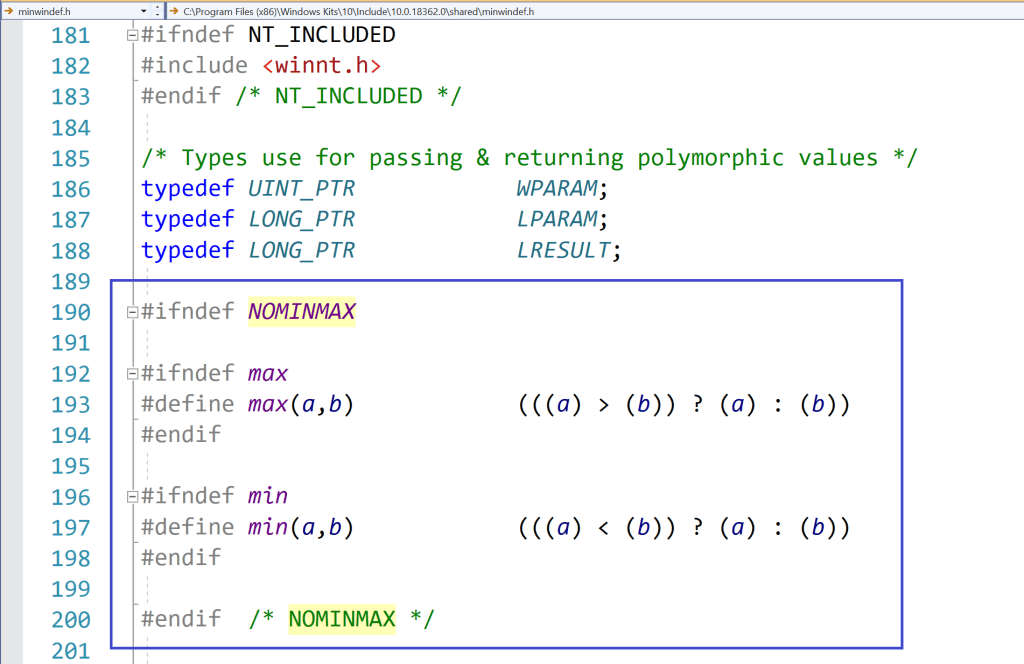
In this way, when <Windows.h> is included, some preprocessor conditional compilation will detect that NOMINMAX is defined, and will skip the definitions of the min and max preprocessor macros. So, the SafeInt code will compile fine.
Preprocessor logic in a Windows SDK header (<minwindef.h>) for the conditional compilation of the min and max macros
So, everything’s fine now, right?
Well, unfortunately not! In fact, if you may happen to include (directly or indirectly) the GDI+ header <gdiplus.h>, you’ll see that you’ll get compilation errors again, this time because some code in GDI+ does require the above Windows definitions of the min and max macros!
So, the previous (pseudo-)fix of #defining NOMINMAX, caused another problem!
Well, if you are working on your own C++ code, you can make your code immune to the above Windows min/max preprocessor macro problem, using an extra pair of parentheses around the std::numeric_limits<T>::min and max member function calls. This additional pair of parentheses will prevent the expansion of the min and max macros.
// Prevent macro expansion with an additional pair of parentheses
// around the std::numeric_limit's min and max member function calls.
(std::numeric_limits<T>::min)()
(std::numeric_limits<T>::max)()
However, that is not the case for the code in SafeInt.hpp. To try to make SafeInt.hpp more compatible with C++ code that requires the Windows Platform SDK, I modified the library’s code with the extra pairs of parentheses (added in many places!), and submitted a pull request. I hope the SafeInt library will be fixed ASAP.
Win32 APIs like MultiByteToWideChar (or ATL helpers like CA2W) can come in handy, with the knowledge of the EUC-JP code page ID, and maybe an additional intermediate step via UTF-16.
Japanese EUC (Extended Unix Code), or EUC-JP, is a variable-length multi-byte encoding used to represent Japanese characters. For example, I found this encoding used in a Japanese/English dictionary file. How can you convert from it to Unicode?
Well, first “converting to Unicode” requires further refinement; for example: Do you want to convert to Unicode UTF-16, or UTF-8?
If you want to display the Japanese text encoded in EUC-JP in some Windows graphical application, you need to convert to Unicode UTF-16, as this is the “native” Unicode encoding used by Windows Win32 APIs.
So, to convert from EUC-JP to UTF-16 you can invoke the MultiByteToWideChar Win32 API (or use the CA2W ATL conversion helper), as discussed in several posts in the series on Unicode Conversions. The trick here is to identify the correct code page for EUC-JP.
I couldn’t find a preprocessor macro in the Windows Platform SDK defining the aforementioned code page ID (unlike, for example, CP_UTF8), but you can simply create a named constant for that purpose, for example:
// Japanese EUC or EUC-JP Code Page ID
constexpr UINT kCodePage_JapaneseEuc = 20932;
Then you can pass this named constant (instead of the “magic number” 20932) as the first parameter to MultiByteToWideChar, or as the second parameter to the proper ATL’s CA2W constructor overload that takes an input string and a code page ID for the conversion.
In this way, you can convert your input text encoded in EUC-JP to Unicode UTF-16, for passing it at the Win32 API boundary.
Now, what about converting from EUC-JP to UTF-8? Well, you cannot directly perform such conversion: You have to do an additional intermediate step, and go through UTF-16, instead. Basically, you can follow these steps:
Convert from EUC-JP to UTF-16 via MultiByteToWideChar (or ATL CA2W) and the EUC-JP code page ID
Convert from UTF-16 to UTF-8 via WideCharToMultiByte (or ATL CW2A) and the CP_UTF8 “code page” ID.
P.S. These days, if I have the freedom to pick an encoding for representing a text file, I would use Unicode UTF-8. But you may need to deal with legacy file formats, or very language-specific formats used in some particular contexts, so these kinds of conversions can be necessary.




 Giovanni Dicanio's Blog