An example of writing clear code with good intention, but getting an unexpected C++ compiler error.
Someone asked me for help with their C++ code. The code was something like this:
std::wstring something;
std::optional<bool> result = something.empty() ?
        ReadBoolValueFromRegistry() : {};
The programmer who wrote this code wanted to check whether the ‘something’ string was empty, and if it was, a boolean value had to be read from the Windows registry, and then stored into the std::optionalresult variable.
On the other hand, if the ‘something’ string was not empty, the std::optional result should be default-initialized to an empty optional (i.e. an optional that doesn’t contain any value).
That was the programmer’s intention. Unfortunately, their code failed to compile with Visual Studio 2019 (C++17 mode was enabled).
The offending C++ code with squiggles under the {
There were squiggles under the opening brace {, and the Visual C++ compiler emitted the following error messages:
Error Code
Description
C2059
syntax error: ‘{‘
C2143
syntax error: missing ‘;’ before ‘{‘
I was asked: “What’s the problem here? Are there limitations of using the {} syntax to specify nothing?”
This is a good question. So, clearly, the C++ compiler didn’t interpret the {} syntax as a way to default-initialize the std::optional in case the string was not empty (i.e. the second “branch” in the conditional ternary operator).
A first step to help the C++ compiler figuring out the programmer’s intention could be to be more explicit. So, instead of using {}, you can try and use the std::nullopt constant, which represents an optional that doesn’t store any value.
// Attempt to fix the code: replace {} with std::nullopt
std::optional<bool> result = something.empty() ?
        ReadBoolValueFromRegistry() : std::nullopt;
Unfortunately, this code doesn’t compile either.
Why is that?
Well, to figure that out, let’s take a look at the C++ conditional operator (?:). Consider the conditional operator in its generic form:
// C++ conditional operator ?:
exp1 ? exp2 : exp3
In the above code snippet, “exp2” is represented by the ReadBoolValueFromRegistry call. This function returns a bool. So, in this case the return type of the conditional operator is bool.
// Attempt to fix the code: replace {} with std::nullopt
std::optional<bool> result = something.empty() ?
        ReadBoolValueFromRegistry() : std::nullopt;
//             ^^^--- exp2             ^^^--- exp3
//             Type: bool
On the other hand, if you look at “exp3”, you see std::nullopt, which is a constant of type std::nullopt_t, not a simple bool value!
So, you have this kind of type mismatch, and the C++ compiler complains. This time, the error message is:
Error C2446 ‘:’: no conversion from ‘const std::nullopt_t’ to ‘bool’
So, to fix that code, I suggested to “massage” it a little bit, like this:
// Rewrite the following code:
//
// std::optional<bool> result = something.empty() ?
//        ReadBoolValueFromRegistry() : {};
//
// in a slightly different manner, like this:
//
std::optional<bool> result{};
if (something.empty()) {
    result = ReadBoolValueFromRegistry();
}
Basically, you start with a default-initialized std::optional, which doesn’t contain any value. And then you assign the bool value read from the registry only if the particular condition is met.
The above C++ code compiles successfully, and does what was initially in the mind of the programmer.
P.S. I’m not a C++ “language lawyer”, but it would be great if the C++ language could be extended to allow the original simple code to just work:
std::optional<bool> result = something.empty() ?
        ReadBoolValueFromRegistry() : {};
Just a heads up to let you all know that Pluralsight is running a promotion of 50% off individual gift plans.
You can give the gift of Pluralsight Skills, and save 50% on 1 month, 3 months, or 1 year of individual standard, or 1 year of Individual Premium subscription.
Click the banner below and save 50% on your PS gift!
First, let’s reveal the mystery of the “fixed 24-byte sizeof”; then, let’s see how to properly get the total size, in bytes, of all the elements stored in a std::vector.
Someone was modernizing some legacy C++ code. They had an array defined like this:
int v[100];
and they needed the size, in bytes, of that array, to pass that value to some function. They used sizeof(v) to get the previous array size.
When modernizing their code, they chose to use std::vector instead of the above raw C-style array. And they still used sizeof(v) to retrieve the size of the vector. For example:
The output they got when building their code in release mode with Visual Studio 2019 was 24. They also noted that they always got the same 24 output, independently from the number of elements in the std::vector!
This is clearly a bug. Let’s try to shed some light on it and show the proper way of getting the size of the total number of elements stored in a std::vector.
First, to understand this bug, you need to know how a std::vector is implemented. Basically, at least in Microsoft STL implementation (in release builds, and when using the default allocator1), a std::vector is made by three pointers, kind of like this:
Typical implementation of std::vector with three pointers: first, last, end
first: points to the beginning of the contiguous memory block that stores the vector’s elements
last: points one past the last valid element stored in the vector
end: points one past the end of the allocated memory for the vector’s elements
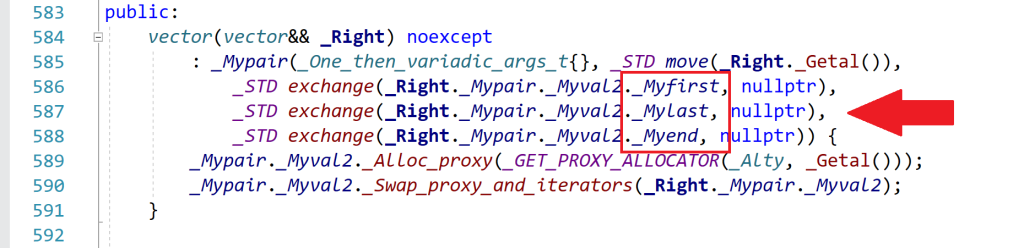
Spelunking inside the Microsoft STL implementation, you’ll see that the “real” names for these pointers are _Myfirst, _Mylast, _Myend, as shown for example in this part of the <vector> header:
An excerpt of the <vector> header that comes with Microsoft Visual Studio 2019
So, when you use sizeof with a std::vector instance, you are actually getting the size of the internal representation of the vector. In this case, you have three pointers. In 64-bit builds, each pointer occupies 8 bytes, so you have a total of 3*8 = 24 bytes, which is the number that sizeof returned in the above example.
As you can see, this number is independent from the actual number of elements stored in the vector. Whether the vector has one, three, ten or 10,000 elements, the size of the vector’s internal representation made by those three pointers is always fixed and given by the above number (at least in the Microsoft’s STL implementation that comes with Visual Studio2).
Now that the bug has been analyzed and the mystery explained, let’s see how to fix it.
Well, to get the “size of a vector”, considered as the number of bytes occupied by the elements stored in the vector, you can get the number of elements stored in the vector (returned by the vector::size method), and multiply that by the (fixed) size of each element, e.g.:
//
// v is a std::vector<int>
//
// v.size()    : number of elements in the vector
// sizeof(int) : size, in bytes, of each element
//
size_t sizeOfAllVectorElementsInBytes = v.size() * sizeof(int);
To write more generic code, assuming the vector is not empty, you can replace sizeof(int) with sizeof(v[0]), which is the sizeof the first element stored in the vector. (If the vector is empty, there is no valid element stored in it, so the index zero in v[0] is out of bounds, and the above code won’t work; it will probably trigger an assertion failure in debug builds.)
In addition, you could use the vector::value_type type name member to get the size of a single element (which would work also in the case of empty vectors). For example:
using IntVector = std::vector<int>;

IntVector v(100);

// Print the number of bytes occupied
// by the (valid) elements stored in the vector:
cout << v.size() * sizeof(IntVector::value_type);
To be even more generic, a helper template function like this could be used:
//
// Return the size, in bytes, of all the valid elements
// stored in the input vector
//
template <typename T, typename Alloc>
inline size_t SizeOfVector(const std::vector<T, Alloc> & v)
{
    return v.size() * sizeof(std::vector<T, Alloc>::value_type);
}


//
// Sample usage:
//
std::vector<int> v(100);
std::cout << SizeOfVector(v) << '\n';
// Prints 400, i.e. 100 * sizeof(int)
Bonus Reading
If you want to learn more about the internal implementation of std::vector (including how they represent the default allocator with an “empty class” using the compressed pair trick), you can read these two interesting blog posts on The Old New Thing blog:
Very easy! It’s just a matter of invoking a constructor with a type cast.
Last time we saw how to load a string resource into a wstring. As already explained, ATL/MFC’s CString does offer very convenient methods for Win32 C++ programming. So, how can you load a string resource into a CString instance?
Well, it’s very simple! Just pass the string ID to a CString constructor overload with a proper type cast:
// Load string with ID IDS_MY_STRING from resources
// into a CString instance
CString myString( (PCTSTR) IDS_MY_STRING );
You can even #define a simple preprocessor macro that takes the string resource ID and and creates a CString object storing the string resource:
When you need to pass a (localized) string loaded from resources to a Win32 API or ATL/MFC class member function that expects a string pointer (typically in the form of LPCTSTR/PCTSTR, i.e. const TCHAR*), then you can simply use the convenient macro defined above:
// Show a message-box to the user,
// displaying strings loaded from resources
MessageBox(nullptr,
           _S(IDS_SOME_MESSAGE_FOR_THE_USER),
           _S(IDS_SOME_TITLE),
           MB_OK);
How does that work?
Well, first the _S macro defined above creates a (temporary) CString object and loads the string resource into it. Then, the implicit LPCTSTR conversion operator provided by CString is invoked by the C++ compiler, so the (read-only) string pointer is passed to the proper parameter of the MessageBox API.
See how simple is that compared to using std::wstring, where we needed to create an ad hoc non-trivial function to load wstring from resources!
CString easily allows loading strings from resources “out of the box”. Let’s try to implement this feature for std::wstring.
As discussed in the previous blog post, CString offers convenient methods for Windows C++ programming, including those to load strings from resources.
What Is a String Resource and Why Should You Care?
Basically, in a Windows Win32 C++ application you can store your strings (like messages for the user) as resources, and then reference them in your C++ code via their IDs. If you want to localize your application for a different language, a translator can take the string resources and translate them into the destination language. The C++ source code remains the same, as it references strings not by their language-specific literal form (e.g. “Cannot access the Registry key XYZ”), but using language-neutral resource IDs (e.g. IDS_CANNOT_ACCESS_REGISTRY_KEY_XYZ).
Accessing String Resources via the LoadString(W) API
To access a Unicode (UTF-16) string resource, you can use the LoadStringW Win32 API.
Loads a string resource from the executable file associated with a specified module and either copies the string into a buffer with a terminating null character or returns a read-only pointer to the string resource itself.
From that paragraph, we get that there are two different behaviors available for this API:
Copy the string resource into a user-provided buffer.
Return a read-only pointer to the string resource itself.
Behavior #1: Copying the String Resource into a User-provided Buffer
The first behavior is shown several times in Microsoft documentation. For example, the doc page about LoadStringW refers to the following sample code:
Example code for LoadString referenced by the official Microsoft documentation
Basically, the idea here is to create a TCHAR buffer, and invoke LoadString to load the string resource into that buffer:
In Unicode builds, TCHAR becomes WCHAR (i.e. wchar_t), and LoadString becomes LoadStringW.
One of the problem of this kind of code is that the buffer is pre-allocated with a given fixed size. Then, what happens if the string read from resources is larger than the pre-allocated buffer? The string is silently truncated, as per the official MS documentation about the cchBufferMax parameter:
The string is truncated and null-terminated if it is longer than the number of characters specified.
This could make the UI ugly if it is just a user message string that gets truncated; or it can become a much more serious bug if the truncated string is something like the format specifier for some printf-like function.
Moreover, in that code there is no check on the return value of LoadString. So, if the function fails, the buffer could contain garbage, and that could cause other bugs. (Although, I understand that often MS documentation doesn’t include error checking; but it’s important to point that out, as often people copy-paste code from MS doc samples, and silent bugs are introduced in their own code.)
In addition, it’s important to remember to properly scale the “sizeof” the destination buffer, dividing it by sizeof(TCHAR), which is sizeof(WCHAR) == 2 (bytes) in Unicode builds. Failing to do so would cause additional buffer overflow problems.
You can use a std::wstring of proper size, and pass a pointer to the internal string characters instead of using a raw wchar_t array, but the aforementioned problems still remain.
Behavior #2: Getting a Read-only Pointer to the String Resource
To me the behavior #2 (which is: get a read-only pointer to the string resource itself) is what leads to better and easier code (despite some type cast). However, it’s not very clear from the current MS documentation how to operate the LoadStringW API in this “behavior #2” mode.
So, let’s explain that here. Let’s start with the function declaration:
int LoadStringW(
  [in, optional] HINSTANCE hInstance,
  [in]           UINT      uID,
  [out]          LPWSTR    lpBuffer,
  [in]           int       cchBufferMax
);
To enable behavior #2 (i.e. return a read-only pointer to the string resource itself), you need to pass 0 (zero) for the last parameter cchBufferMax.
If you pass zero for cchBufferMax, the LoadStringW API says: “Hey, the caller wants me to just return a read-only pointer to the string resource itself, with no deep-copies in a user-provided buffer. Ok, let’s do that!”
Where does the API get the information about the destination string pointer? In other words: Where can the LoadStringW API write the string resource’s address? Well, it uses the third parameter for that: lpBuffer.
However, there’s a gotcha here (that I think is not well documented in the official MS web page). Basically, you need to create a const wchar_t pointer that will store the address of the resource string (which is read-only, hence the const):
// Pointer to the start of the string resource
const wchar_t* pchStringBegin = nullptr;
Then you need to pass the address of this pointer as the lpBuffer parameter to LoadStringW: &pchStringBegin. Note that, in this way, you are using a double-indirection, i.e. a pointer-to-a-pointer. Since the lpBuffer parameter is declared as LPWSTR (i.e. wchar_t*), you have a type mismatch for this parameter. In fact, LoadStringW expects a simple wchar_t* pointer; but you are passing a pointer-to-a-wchar_t-pointer (double indirection). However, this type mismatch is needed and expected by the behavior #2, so in this case you can safely use reinterpret_cast to make the C++ compiler happy about that type mismatch.
So, the LoadStringW call can look like this:
// Invoke LoadStringW, requesting a pointer
// to the beginning of the string resource
int cchStringLength = ::LoadStringW(
        hInstance,
        resourceId,
        reinterpret_cast<PWSTR>(&pchStringBegin),
        0);
Note that the string resource is not necessarily NUL-terminated! But, thankfully, on success, the LoadStringW API returns the number of characters (as count of wchar_ts) in the string resource.
So, you can use these two pieces of information to build a std::wstring instance to safely store the string resource:
The pointer to the start of the string resource
The number of wchar_ts in the string resource
In code, this becomes:
if (cchStringLength > 0) // LoadStringW succeeded
{
    // Create a std::wstring storing the string loaded from resources
    return std::wstring(pchStringBegin, cchStringLength);
}
On failure, LoadStringW returns zero. Then you can choose if you want to throw an exception, log an error message, return an empty string to the user, return a std::optional<std::wstring>, or whatever.
Wrapping Up: An Easy-to-Use and Hard-to-Misuse Helper Function for Loading String Resources into std::wstring
To wrap up this blog post, this is a nice LoadStringFromResources reusable C++ function that you can invoke to load string resources into std::wstring:
//
// Load a string resource into a std::wstring
//
[[nodiscard]] std::wstring LoadStringFromResources(
    _In_opt_ HINSTANCE hInstance,
    _In_     UINT resourceId
)
{
	// Pointer to the first character of the string.
	// NOTE: *Not* necessarily null-terminated!!
	const wchar_t* pchStringBegin = nullptr;

	// Invoke LoadStringW, requesting a pointer
    // to the beginning of the string resource itself
	const int cchStringLength = ::LoadStringW(
            hInstance,
            resourceId,
            reinterpret_cast<PWSTR>(&pchStringBegin),
            0);

	ATLASSERT(cchStringLength >= 0);
	if (cchStringLength > 0)
	{
        // Success
		return std::wstring(pchStringBegin, cchStringLength);
	}
	else
	{
        // Failure: Throw an exception
		// const DWORD error = ::GetLastError();
		AtlThrowLastWin32();
	}
}
Revisiting one of my first blog posts from 2010. Should you pick CString or std::string? Based on what context (ATL, MFC, cross-platform code)? And why?
It’s interesting to revisit that post today toward the end of 2023, more than 10 years later.
So, should we use CString or std::string class to store and manage strings in our C++ code?
Well, if there is a need of writing portable C++ code, the choice should be std::string, which is part of the C++ standard library.
(Me, on January 4th, 2010)
Still true today. Let’s also add that we can use std::string with Unicode UTF-8-encoded text to represent international text.
But, in the context of C++ Win32 programming (using ATL or MFC), I find CString class much more convenient than std::string.
These are some reasons:
Again, I think that is still true today. Now let’s see the reasons why:
1) CString allows loading strings from resources, which is good also for internationalization.
Still valid today. (You have to write additional code to do that with STL strings.)
2) CString offers a convenient FormatMessage method (which is good for internationalization, too; see for example the interesting problem of “Yoda speak” […])
Again, still true today. Although in C++20 (20+ years later than MFC!1) they added std::format. There’s also something from Boost (the Boost.Format library).
3) CString integrates well with Windows APIs (the implicit LPCTSTR operator comes in handy when passing instances of CString to Windows APIs, like e.g. SetWindowText).
Still valid today.
4) CString is reference counted, so moving instances of CString around is cheap.
Well, as discussed in a previous blog post, the Microsoft Visual C++ compiler and C++ Standard Library implementation have been improved a lot since VS 2008, and now the performance of STL’s strings is better than CString, at least for adding many strings to a vector and sorting the string vector.
5) CString offers convenient methods to e.g. tokenize strings, to trim them, etc.
This is still a valid reason today. 20+ years later, with C++20 they finally added some convenient methods to std::string, like starts_with and ends_with, but this is very little and honestly very late (but, yes, better late than ever).
So, CString is still a great string option for Windows C++ code that uses ATL and/or MFC. It’s also worth noting that you can still use CString at the ATL/MFC/Win32 boundary, and then convert to std::wstring or std::string for some more complex data structures (for example, something that would benefit from move semantics), or for better integration with STL algorithms or Boost libraries, or for cross-platform portions of C++ code.
I used and loved Visual C++ 6 (which was released in 1998), and its MFC implementation already offered a great CString class with many convenient methods including those discussed here. So, the time difference between that and C++20 is more than 20 years! ↩︎
Let’s see how STL strings, ATL CString and strings coming from a custom pool allocator perform in a couple of interesting contexts (string vector creation and sorting).
Basically, the pool allocator maintains a singly-linked list of chunks, and string memory is carved from each chunk just increasing a string pointer. When there isn’t enough memory available in the current chunk to serve the requested allocation, a new chunk is allocated. The new chunk is safely linked to the previous chunk list maintained by the allocator object, and the memory for the requested string is carved from this new chunk. At destruction time, the linked list of chunks is traversed to properly release all the allocated memory blocks.
I measured the execution times to create and fill string vectors, and the execution times to sort the same vectors.
TL;DR: The STL string performance is great! However, you can improve creation times with a custom pool allocator.
The execution times are measured for vectors storing each kind of strings: STL’s wstring, ATL’s CString (i.e. CStringW in Unicode builds), and the strings created using the custom string pool allocator.
This is a sample run (executed on a Windows 10 64-bit Intel i7 PC, with code compiled with Visual Studio 2019 in 64-bit release build):
String benchmark: STL vs. ATL’s CString vs. custom string pool allocator
As you can note, the best creation times are obtained with the custom string pool allocator (see the POL1, POL2 and POL3 times in the “Creation” section).
For example:
String type
Run time (ms)
ATL CStringW
954
STL std::wstring
866
Pool-allocated strings
506
Sample execution times for creating and filling string vectors
In the above sample run, the pool-allocated strings are about 47% faster than ATL’s CString, and about 42% faster than STL’s wstring.
This was expected, as the allocation strategy of carving string memory from pre-allocated blocks is very efficient.
Regarding the sorting times, STL and the custom pool strings perform very similarly.
On the other hand, ATL’s CString shows the worst execution times for both creation and sorting. Probably this is caused by CString implementation lacking optimizations like move semantics, and using _InterlockedIncrement/_InterlockedDecrement to atomically update the reference count used in their CoW (Copy on Write) implementation. Moreover, managing the shared control block for CString instances could cause an additional overhead, too.
Historical Note: I recall that I performed a similar benchmark some years ago with Visual Studio 2008, and in that case the performance of ATL’s CString was much better than std::wstring. I think move semantics introduced with C++11 and initially implemented in VS2010 and then refined in the following versions of the C++ compiler, and more “programming love” given to the MSVC’s STL implementation, have shown their results here in the much improved STL string performance.
Benchmark Variation: Tiny Strings (and SSO)
It’s also possible to run the benchmark with short strings, triggering the SSO (to enable this, compile the benchmark code #define’ing TEST_TINY_STRINGS).
Here’s a sample run:
String benchmark with tiny strings: STL vs. ATL vs. custom string pool allocator
As you can see in this case, thanks to the SSO, STL strings win by an important margin in both creation and sorting times.
// Sum the 16-bit signed integers stored in the values vector
int16_t Sum(const std::vector<int16_t>& values)
{
    int16_t sum = 0;

    for (auto num : values)
    {
        sum += num;
    }

    return sum;
}
How can you fix the integer overflow problem and associated weird negative results discussed in the above blog post?
Well, one option would be to simply “step up” the integer type. In other words, instead of storing the sum into an int16_t variable, you could use a larger integer type, like int32_t or even int64_t. I mean, the maximum positive integer value that can be represented with a 64-bit (signed) integer is (2^63)-1 = 9,223,372,036,854,775,807: sounds pretty reasonable to represent the sum of some 16-bit samples, doesn’t it?
The updated code using int64_t for the cumulative sum can look like this:
// Sum the 16-bit signed integers stored in the values vector.
// The cumulative sum is stored in a 64-bit integer
// to prevent integer overflow.
int64_t Sum(const std::vector<int16_t>& values)
{
    int64_t sum = 0;

    for (auto num : values)
    {
        sum += num;
    }

    return sum;
}
this time with the int64_t fix you get the correct result of 35,010. Of course, also a simple shorter int32_t would have worked fine in this example. And, if you want to be super-safe, you can still wrap it in a convenient SafeInt<>.
Explaining some of the “magic” behind signed integer overflow weird results.
In this blog post, I showed you some “interesting” (apparently weird) results that you can get when adding signed integer numbers. In that example, you saw that, if you add two positive signed integer numbers and their sum overflows (signed integer overflow is undefined behavior in C++), you can get a negative number.
As another example, I compiled this simple C++ code with Visual Studio C++ compiler:
#include <cstdint>  // for int16_t
#include <iostream> // for std::cout

int main()
{
    using std::cout;

    int16_t a = 3000;
    int16_t b = 32000;
    int16_t c = a + b;  // -30536

    cout << " a = " << a << '\n';
    cout << " b = " << b << '\n';
    cout << " a + b = " << c << '\n';
}
and got this output, with a negative sum of -30536.
Signed integer overflow causing a negative sum when adding positive integers
Now, you may ask: Why is that?
Well, to try to answer this question, consider the binary representations of the integer numbers from the above code:
int16_t a = 3000;  // 0000 1011 1011 1000
int16_t b = 32000; // 0111 1101 0000 0000
int16_t c = a + b; // 1000 1000 1011 1000
If you add a and b bitwise, you’ll get the binary sequence shown above for c.
Now, if you interpret the c sum’s binary sequence as a signed integer number in the Two’s complement representation, you’ll immediately see that you have a negative number! In fact, the most significant bit is set to 1, which in Two’s complement representation means that the number is negative.
int16_t c = a + b;
    //  c: 1000 1000 1011 1000
    //     1xxx xxxx xxxx xxxx
    //     *
    //     ^--- Negative number
    //          Most significant bit = 1
In particular, if you interpret the sum’s binary sequence 1000 1000 1011 1000 in Two’s complement, you’ll get exactly the negative value of -30536 shown in the above screenshot.




 Giovanni Dicanio's Blog