How To Fix an Unhandled System.DllNotFoundException in Mixed C++/C# Projects

Let’s see how to fix a common problem when building mixed C++/C# projects in Visual Studio.

Someone had a Visual Studio 2019 solution containing a C# application project and a native C++ DLL project. The C# application was supposed to call some C-interface functions exported by the native C++ DLL.

Both projects built successfully in Visual Studio. But, after the C# application was launched, a System.DllNotFoundException was thrown when the C# code tried to invoke the DLL-exported functions:

Visual Studio shows an error message complaining about an unhandled exception of type System.DllNotFoundException when trying to invoke native C++ DLL functions from C# code.
Visual Studio complains about an unhandled System.DllNotFoundException when debugging the C# application.

So, it looks like the C# application is unable to find the native C++ DLL.

First Attempt: A Manual Fix

In a first attempt to solve this problem, I tried manually copying the native C++ DLL from the folder where it was built into the same folder where the C# application was built (for example: from MySolution\Debug to MySolution\CSharpApp\bin\Debug). Then, I relaunched the C# application, and everything worked fine as expected this time! Wow 🙂 The problem was kind of easy to fix.

However, I was not 100% happy, as this was kind of a manual fix, that required manually copying-and-pasting the DLL from its own folder to the C# application folder. I would love to have Visual Studio doing that automatically!

A Better Solution: Making the Copy Automatic in Post-build

Well, it turns out that we can do better than that! In fact, it’s possible to automate that process and basically instruct Visual Studio’s build system to perform the aforementioned copy for us. To do so, we basically need to specify a custom command line that VS automatically executes as a post-build event.

In Solution Explorer, right-click on the C# application project, and select Properties from the menu.

Select the Build Events tab, and enter the desired copy instruction in the Post-build event command line box. For example, the following command can be used:

xcopy "$(SolutionDir)$(Configuration)\MyCppDll.dll" "$(TargetDir)" /Y

Then type Ctrl+S or click the Save button (= diskette icon) in the toolbar to save these changes.

Setting a post-build event command line inside Visual Studio IDE to copy the DLL into the same folder of the C# application.
Setting the post-build event command line to copy the DLL into the C# application folder

Basically, with the above settings we are telling Visual Studio: “Dear VS, after successfully building the C# application, please copy the C++ DLL from its original folder into the same folder where you have just built the C# application. Thank you very much!”

After relaunching the C# application, this time everything went well, and the C# EXE was able to find the C++ DLL and call its exported C-interface functions.

Addendum: Demystifying the $(Thingy)

If you take a look at the custom copy command added in post-build event, you’ll notice some apparently weird syntax like $(SolutionDir) or $(TargetDir). These $(something) are basically MSBuild macros, that expand to meaningful stuff like the path of the Visual Studio solution, or the directory of the primary output file for the build (e.g. the directory where the C# application .exe file is created).

You can read more about those MSBuild macros in this MSDN page: Common macros for MSBuild commands and properties.

Note that the macros representing paths can include the trailing backslash \; for example, this is the case of $(SolutionDir). So, take that into account when combining these macros to refer to actual sub-directories and paths in your solution.

Considering the command used above:

xcopy "$(SolutionDir)$(Configuration)\MyCppDll.dll" "$(TargetDir)" /Y

$(SolutionDir) represents the full path of the Visual Studio solution, e.g. C:\Users\Gio\source\repos\MySolution\.

$(TargetDir) is the directory of the primary output file for the build, for example the directory where the C# console app .exe is created. This could be something like C:\Users\Gio\source\repos\MySolution\CSharpApp\bin\Debug\.

$(Configuration) is the name of the current project configuration, for example: Debug when doing a debug build.

So, for example: $(SolutionDir)$(Configuration) would expand to something like C:\Users\Gio\source\repos\MySolution\Debug in debug builds.

In addition, you can also see how these MSBuild macros are actually expanded in a given context. To do so in Visual Studio, once you are in the Build Events tab, click the Edit Post-build button. Then click the Macros > > button to view the actual expansions of those macros.

A sample expansion of some MSBuild macros.
Sample expansion of some MSBuild macros

C++ Myth-Buster: UTF-8 Is a Simple Drop-in Replacement for ASCII char-based Strings in Existing Code

Let’s bust a myth that is a source of many subtle bugs. Are you sure that you can simply drop UTF-8-encoded text in char-based strings that expect ASCII text, and your C++ code will still work fine?

Several (many?) C++ programmers think that we should use UTF-8 everywhere as the Unicode encoding in our C++ code, stating that UTF-8 is a simple easy drop-in replacement for existing code that uses ASCII char-based strings, like const char* or std::string variables and parameters.

Of course, that UTF-8-simple-drop-in-replacement-for-ASCII thing is wrong and just a myth!

In fact, suppose that you wrote a C++ function whose purpose is to convert a std::string to lower case. For example:

// Code proposed by CppReference:
// https://en.cppreference.com/w/cpp/string/byte/tolower
//
// This code is basically the same found on StackOverflow here:
// https://stackoverflow.com/q/313970
// https://stackoverflow.com/a/313990 (<-- most voted answer)

std::string str_tolower(std::string s)
{
    std::transform(s.begin(), s.end(), s.begin(),
        // wrong code ...
        // <omitted>
 
        [](unsigned char c){ return std::tolower(c); } // correct
    );
    return s;
}

Well, that function works correctly for pure ASCII characters. But as soon as you try to pass it a UTF-8-encoded string, that code will not work correctly anymore! That was already discussed in my previous blog post, and also in this post on The Old New Thing blog.

I’ll give you another simple example. Consider the following C++ function, PrintUnderlined(), that receives a std::string (passed by const&) as input, and prints it with an underline below:

// Print the input text string, with an underline below
void PrintUnderlined(const std::string& text)
{
    std::cout << text << '\n';
    std::cout << std::string(text.length(), '-') << '\n';
}

For example, invoking PrintUnderlined(“Hello C++ World!”), you’ll get the following output:

Hello C++ World!
----------------

Well, as you can see, this function works fine with ASCII text. But, what happens if you pass UTF-8-encoded text to it?

Well, it may work as expected in some cases, but not in others. For example, what happens if the input string contains non-pure-ASCII characters, like the LATIN SMALL LETTER E WITH GRAVE è (U+00E8)? Well, in this case the UTF-8 encoding for “è” is represented by two bytes: 0xC3 0xA8. So, from the viewpoint of the std::string::length() method, that “single character è” counts as two chars. So, you’ll get two underscore characters for the single è, instead of the expected one underscore character. And that will produce a bogus output with the PrintUnderlined function! And note that this same function works correctly for ASCII char-based strings.

So, if you have some existing C++ code that works with const char* or std::string, or similar char-based string types, and assumes ASCII encoding for text, don’t expect to pass a UTF-8-encoded strings and have it just automagically working fine! The existing code may still compile fine, but there is a good chance that you could have introduced subtle runtime bugs and logic errors!

Some kanji characters

Spend some time thinking about the exact type of encoding of the const char* and std::string variables and parameters in your C++ code base: Are they pure ASCII strings? Are these char-based strings encoded in some particular ANSI/Windows code pages? Which code page? Maybe it’s an “ANSI” Windows code page like Latin 1 / Western European Windows-1252 code page? Or some other code page?

You can pack many different kinds of stuff in char-based strings (ASCII text, text encoded in various code pages, etc.), and there is no guarantee that code that used to work fine with that particular encoding would automatically continue to work correctly when you pass UTF-8-encoded text.

If we could start everything from scratch today, using UTF-8 for everything would certainly be an option. But, there is a thing called legacy code. And you cannot simply assume that you can just drop UTF-8-encoded strings in the existing char-based strings in existing legacy C++ code bases, and that everything will magically work fine. It may compile fine, but running fine as expected is another completely different thing.

How to Safely Pass a C++ String View as Input to a C-interface API

Use STL string objects like std::string/std::wstring as a safe bridge.

Last time, we saw that passing a C++ std::[w]string_view to a C-interface API (like Win32 APIs) expecting a C-style null-terminated string pointer can cause subtle bugs, as there is a requirement impedance mismatch. In fact:

  • The C-interface API (e.g. Win32 SetWindowText) expects a null-terminated string pointer
  • The STL string views do not guarantee null-termination

So, supposing that you have a C++17 (or newer) code base that heavily uses string views, when you need to interface those with Win32 API function calls, or whatever C-interface API, expecting C-style null-terminated strings, how can you safely pass instances of string views as input parameter?

Invoking the string_view/wstring_view’s data method would be dangerous and source of subtle bugs, as the data returned pointer is not guaranteed to point to a null-terminated string.

Instead, you can use a std::string/wstring object as a bridge between the string views and the C-interface API. In fact, the std::string/wstring’s c_str method does guarantee that the returned pointer points to a null-terminated string. So it’s safe to pass the pointer returned by std::[w]string::c_str to a C-interface API function that expects a null-terminated C-style string pointer (like PCWSTR/LPCWSTR parameters in the Win32 realm).

For example:

// sv is a std::wstring_view

// C++ STL strings can be easily initialized from string views
std::wstring str{ sv };

// Pass the intermediate wstring object to a Win32 API,
// or whatever C-interface API expecting 
// a C-style *null-terminated* string pointer.
DoSomething( 
    // PCWSTR/LPCWSTR/const wchar_t* parameter
    str.c_str(), // wstring::c_str

    // Other parameters ...    
);

// Or use a temporary string object to wrap the string view 
// at the call site:
DoSomething(
    // PCWSTR/LPCWSTR/const wchar_t* parameter
    std::wstring{ sv }.c_str(),

    // Other parameters ...
);

Passing C++ STL Strings vs. String Views as Input Parameters at the Windows C API Boundary

Passing STL std::[w]string objects at Win32 API boundaries is common for C++ code that calls into Win32 C-interface APIs. When is it safe to pass *string views* instead?

A common question I have been asked many times goes along these lines: “I need to pass a C++ string as input parameter to a Windows Win32 C API function. In modern C++ code, should I pass an STL string or a string view?”

Let’s start with some refinements and clarifications.

First, assuming the Windows C++ code is built in Unicode UTF-16 mode (which has been the default since Visual Studio 2005), the STL string class would be std::wstring, and the corresponding “string view” would be std::wstring_view.

Moreover, since wstring objects are, in general, not cheap to copy, I would consider passing them via const&. Use reference (&) to avoid potentially expensive copies, and use const, since these string parameters are input parameters, and they will not be modified by the called function.

So, the two competing options are typically:

// Use std::wstring passed by const&
SomeReturnType DoSomething( 
    /* [in] */ const std::wstring& s, 
    /* other parameters */
)
{
    // Call some Win32 API passing s
    ...
}

// Use std::wstring_view (passing by value is just fine)
SomeReturnType DoSomething(
    /* [in] */ std::wstring_view sv,
    /* other parameters */
)
{
    // Call some Win32 API passing sv
    ...
}

So, which form should you pick?

Well, that’s a good question!

In general, I would say that if the Win32 API you are wrapping/calling takes a pointer to a null-terminated C-style string (i.e. a const wchar_t*/PCWSTR/LPCWSTR parameter), then you should pick std::wstring.

An example of that is the SetWindowText Windows API. Its prototype is like this:

// In Unicode builds, SetWindowText expands to SetWindowTextW

BOOL SetWindowTextW(
  HWND    hWnd,
  LPCWSTR lpString
);

When you write some code like this:

SetWindowText(hWndName, L"Connie");  // Unicode build

the SetWindowText(W) API is expecting a null-terminated C-style string. If you pass a std::wstring object, like this:

std::wstring name = L"Connie";
SetWindowText(hWndName, name.c_str()); // Works fine!

the code will work fine. In fact, the wstring::c_str() method is guaranteed to return a null-terminated C-style string pointer.

On the other hand, if you pass a string view like std::wstring_view in that context, you’ll likely get some subtle bugs!

To learn more about that, you may want to read my article: The Case of string_view and the Magic String.

Try experimenting with the above API and something like “Connie is learning C++” and string views!

Passing STL string objects vs. string views

On the other hand, there are Win32 APIs that accept also a pointer to some string characters and a length. An example of that is the LCMapStringEx API:

int LCMapStringEx(
    LPCWSTR lpLocaleName,
    DWORD   dwMapFlags,
    LPCWSTR lpSrcStr,  // <-- pointer
    int     cchSrc,    // <-- length (optional)

    /* ... other parameters */
);

As it can be read from the official Microsoft documentation about the 4th parameter cchSrc, this represents (emphasis mine):

“(the) Size, in characters, of the source string indicated by lpSrcStr. The size of the source string can include the terminating null character, but does not have to.

(…) The application can set this parameter to any negative value to specify that the source string is null-terminated.”

In other words, the aforementioned LCMapStringEx API has two “input” working modes with regard to this aspect of the input string:

  1. Explicitly pass a pointer and a (positive) size.
  2. Pass a pointer to a null-terminated string and a negative value for the size.

If you use the API in working mode #1, explicitly passing a size value for the input string, the input string is not required to be null-terminated!

In this case, you can simply use a std::wstring_view, as there is no requirement for null-termination for the input string. And a std::[w]string_view is basically a pointer (to string characters) + a size.

Of course, you can still use the “classic” C++ option of passing std::wstring by const& in this case, as well. But, you also have the other option to safely use wstring_view.

How To Convert Unicode Strings to Lower Case and Upper Case in C++

How to *properly* convert Unicode strings to lower and upper cases in C++? Unfortunately, the simple common char-by-char conversion loop with tolower/toupper calls is wrong. Let’s see how to fix that!

Back in November 2017, on my previous MS MVPs blog, I wrote a post criticizing what was a common but wrong way of converting Unicode strings to lower and upper cases.

Basically, it seems that people started with code available on StackOverflow or CppReference, and wrote some kind of conversion code like this, invoking std::tolower for each char/wchar_t in the input string:

// BEWARE: *** WRONG CODE AHEAD ***

// From StackOverflow - Most voted answer (!)
// https://stackoverflow.com/a/313990

#include <algorithm>
#include <cctype>
#include <string>

std::string data = "Abc";
std::transform(data.begin(), data.end(), data.begin(),
    [](unsigned char c){ return std::tolower(c); });

// BEWARE: *** WRONG CODE AHEAD ***

// From CppReference:
// https://en.cppreference.com/w/cpp/string/byte/tolower
std::string str_tolower(std::string s)
{
    std::transform(s.begin(), s.end(), s.begin(),
        // wrong code ...
        // <omitted>

        [](unsigned char c){ return std::tolower(c); } // correct
    );
    return s;
}

That kind of code would be safe and correct for pure ASCII strings. But even if you consider Unicode UTF-8-encoded strings, that code would be totally wrong.

Very recently (October 7th, 2024), a blog post appeared on The Old New Thing blog, discussing how that kind of conversion code is wrong:

std::wstring name;

std::transform(name.begin(), name.end(), name.begin(),
    [](auto c) { return std::tolower(c); });

Besides the copy-and-pasto of using std::tolower instead of std::towlower for wchar_ts, there are deeper problems in that kind of approach. In particular:

  • You cannot convert in a context-free manner like that wchar_t-by-wchar_t, as context involving adjacent wchar_ts can indeed be important for the conversion.
  • You cannot assume that the result string has the same size (“length” in wchar_ts) as the input source strings, as that is in general not true: In fact, there are cases where to-lower/to-upper strings can be of different lengths than the original strings.

As I wrote in my old 2017 article (and stated also in the recent Old New Thing blog post), a possible solution to properly convert Unicode strings to lower and upper cases in Windows C++ code is to use the LCMapStringEx Windows API. This is a low-level C interface API.

I wrapped it in higher-level convenient reusable C++ code, available here on GitHub. I organized that code as a header-only library: you can simply include the library header, and invoke the ToStringLower and ToStringUpper helper functions. For example:

#include "StringCaseConv.hpp"  // the library header


std::wstring name;

// Simply convert to lower case:
std::wstring lowerCaseName = ToStringLower(name);

The ToStringLower and ToStringUpper functions take std::wstring_view as input parameters, representing views to the source strings. Both functions return std::wstring instances on success. On error, C++ exceptions are thrown.

There are also overloaded forms of these functions that accept a locale name for the conversion.

The code compiles cleanly with VS 2019 in C++17 mode with warning level 4 (/W4) in both 64-bit and 32-bit builds.

Note that the std::wstring and std::wstring_view instances represent Unicode UTF-16 strings. If you need strings represented in another encoding, like UTF-8, you can use conversion helpers to convert between UTF-16 and UTF-8.

P.S. If you need a portable solution, as already written in my 2017 article, an option would be using the ICU library with its icu::UnicodeString class and its toLower and toUpper methods.

C++ WinReg Library Updated with Contains Methods

I added a few convenient methods to my C++ WinReg library to test if a key contains specific values and sub-keys.

I just wanted to let you know that I updated my C++ WinReg library adding a few methods to test if a registry key contains a given value or a sub-key.

For example, now you can easily check if a key contains a value with some simple C++ code like this:

// 'key' is an instance of the winreg::RegKey class.
// Check if the given key contains a value named "Connie":
if (key.ContainsValue(L"Connie"))
{
    // The value is in the key...
}

From an implementation point of view, the RegKey::ContainsValue method invokes the RegGetValueW Win32 API, and checks its return code.

If the return code is ERROR_SUCCESS (0), the value was found in the key, and the method returns true.

If the return code is ERROR_FILE_NOT_FOUND (2), it means that there is no value with that given name in the key, so the method returns false.

In all other cases, an exception is thrown.

There is a similar method to check for sub-keys, named ContainsSubKey. And there are also the non-exception forms TryContainsValue and TryContainsSubKey.

Three Pieces of Advice on Using Modern C++ at Win32 API Boundaries

C is widely used as a programming language at API interfaces. But that doesn’t mean that you must stick to C (or old-style C++) in *your own* code!

The previous article on enumerating modules loaded into a process using Win32 API functions and C++ invites/inspires some reflections and pieces of advice on using modern C++ at the Win32 API boundaries.

#1: Raw C Handles Should Be Wrapped in Safe C++ Classes (a.k.a. Raw C Handles Are Radioactive)

Many Win32 API C-interface functions use raw C handles (e.g. represented by the HANDLE type). For example, we saw in the previous article that the CreateToolhelp32Snapshot function returns a HANDLE that we used with other related API functions to enumerate the loaded modules.

When the handle is not needed anymore, for example after the enumeration process is completed (or even if it’s interrupted by an error), the raw handle must be freed calling the CloseHandle Win32 API function. This is a common pattern for lots of Win32 API functions:

HANDLE hSomething = CreateSomething( /* ...various parameters... */ );
// Check that the handle is valid
// (a typical error value is INVALID_HANDLE_VALUE)

// Do some processing with the above handle
DoSomething(hSomething, /* ...various parameters ... */);

// Close the handle at the end of the elaboration
CloseHandle(hSomething);

// Avoid dangling references to handles already closed
hSomething = INVALID_HANDLE_VALUE;

Well, in modern C++ the idea is to wrap this raw C HANDLE in a safe C++ class, such that, when instances of this class go out of scope, the handle will be automatically closed.

That is made possible by the fact that the C++ class destructor will be automatically called when instances of the class go out of scope, so a proper call to CloseHandle can be made by the destructor itself (or by some cleanup helper method invoked by the destructor).

To be safe, the cleanup code should also take into account the case in which the wrapped handle is invalid (case represented by the INVALID_HANDLE_VALUE for the CreateToolhelp32Snapshot API function discussed above).

So, the initial skeleton code for such a wrapper C++ class could look like this:

//----------------------------------------------------
// C++ class that safely wraps a raw C-style HANDLE,
// and releases it when instances of the class
// go out of scope.
//----------------------------------------------------
class ScopedHandle
{
public:
    // Gain ownership of the input raw handle
    explicit ScopedHandle(HANDLE h) noexcept
        : m_handle{h}
    {}

    // Get access to the wrapped raw handle,
    // for example to pass it as an argument
    // to other Win32 API functions
    HANDLE GetHandle() const noexcept
    {
        return m_handle;
    }

    // Safely releases the wrapped handle
    // (if the handle is valid)
    ~ScopedHandle() noexcept
    {
        if (m_handle != INVALID_HANDLE_VALUE)
        {
            ::CloseHandle(m_handle);
        }
    }

private:
    // Wrapped raw handle
    HANDLE m_handle;
};

As I discussed in more details in my course on Practical C++ 14 and C++17 Features (that can be still applied to newer versions of the C++ standard, as well), you can think of the raw handle as something “radioactive”, that should be safely wrapped in RAII boundaries, provided by a C++ class that behaves as a resource manager, like the one shown above.

Moreover, to avoid subtle bugs, it’s important to prevent copies for a class like the one described above:

class ScopedHandle
{
    //
    // Disable Copy
    //
private:
    ScopedHandle(ScopedHandle const&) = delete;
    ScopedHandle& operator=(ScopedHandle const&) = delete;
...

(If you do want to make the class copyable, it’s important that copy operations are well defined and implemented; for example, you could use some form of reference count applied to the wrapped handle.)

It’s also possible to improve this kind of resource manager class, for example adding move semantics. That would make it possible, for example, to return a wrapped handle by some factory function, or store it in containers like std::vector. In such case the class name should be changed to reflect its improved nature (ScopedHandle wouldn’t work anymore); for example, we could name it SafeHandle, or UniqueHandle (if it’s movable but not copyable), or whatever you like best.

If you want to see some C++ compilable code for a resource manager class like that, you can take a look at the winreg::RegKey class of my WinReg C++ library (you can find the code in the header-only WinReg.hpp file). Note that, in this case, the wrapped raw handle is of type HKEY (i.e. a handle to a registry key).

The code can be generalized, as well. For example, you could write a generic SafeHandle<T> template. This could be the topic of some future articles.

Moreover, if you want to reuse something already available, the Microsoft WIL open-source library provides a wil::unique_handle template for that purpose.

Whatever class or template you choose to use or write, the bottom line is: Do not use raw handles in modern C++ code; wrap them in safe “RAII” boundaries provided by C++ resource manager classes.

#2: Use C++ String Classes Instead of Raw C-style Null-terminated Character Arrays

Win32 API functions usually work with C structures that represent strings using either raw C-style null-terminated character pointers, or null-terminated character arrays.

In modern C++, you can do better than that! In fact, you can use safe and convenient C++ string classes instead of working with those more basic raw C-style constructs.

For example, the MODULEENTRY32 structure used in the previous article on module enumeration, has two fields that are WCHAR C-style raw null-terminated character arrays: szModule and szExePath.

// Structure definition from MSDN:
// https://learn.microsoft.com/en-us/windows/win32/api/tlhelp32/ns-tlhelp32-moduleentry32w

typedef struct tagMODULEENTRY32W {
  DWORD   dwSize;
  ...

  // Null-terminated WCHAR arrays representing Unicode UTF-16
  // strings in C:
  WCHAR   szModule[MAX_MODULE_NAME32 + 1];
  WCHAR   szExePath[MAX_PATH];
} MODULEENTRY32W;

Instead of working with those, you can create instances of C++ string classes, like CString or std::wstring, and operate on those much safer and higher level constructs made available by the C++ language and libraries:

MODULEENTRY32 moduleEntry;
...

// Create a string object storing the module name
std::wstring moduleName(moduleEntry.szModule);

// Can use ATL/MFC CString as well:
CString moduleName(moduleEntry.szModule);

Once you have created string objects from those C raw character arrays, forget about the original C character arrays, and use only the C++ string objects in the rest of your modern C++ code.

C++ string classes have many advantages over pure raw C-style arrays of characters, like being easily and safely copyable. They can also be concatenated with a very simple and highly readable syntax, like using the operator+ overload (as in: s1 + s2). And they are properly freed when they go out of scope, as well.

#3: Use C++ Containers Like std::vector Instead of Raw C Arrays

If you take a look at MSDN examples, that are typically written in C, you’ll see lots of uses of raw C arrays to store a set of elements. Typically the code follows this pattern:

SOME_STRUCTURE elements[MAX_COUNT];

// May have another variable representing 
// the actual number of elements stored in the array.
// This is increased when a new element is added.
int elementCount = 0;

In modern C++, you can do better than that: In fact, you can create a std::vector containing instances of the structures, and you can dynamically grow the vector, for example adding new elements to it invoking its push_back method:

// Start creating an empty vector
std::vector<ModuleInfo> loadedModules;

// When a new module is found during the enumeration, 
// add it to the vector container
loadedModules.push_back( ModuleInfo{ /* ... */ } );

Hope you find these suggestions of some interest!

Slide enumerating the three pieces of advice on using modern C++ at Win32 API boundaries, described in details in the article.

C is a great language for the “boundaries”. But you can happily switch gears to modern C++ on your own side of the boundary.

How to Enumerate the Modules Loaded in a Process

Let’s see how to use a convenient Windows API C-interface library from C++ code to enumerate the modules loaded in a given process.

Suppose that you want to enumerate all the modules in a given process in Windows, for example because you want to discover the DLLs loaded into a given process.

You can use the so called Tool Help Library for that (the associated Windows SDK header file is <tlhelp32.h>)

In particular, you can start taking the snapshot of the process’s module list, invoking the CreateToolhelp32Snapshot Windows API function. On success, this function will return a HANDLE that will be used with the following module enumeration functions.

// Create module snapshot for the enumeration.
//
// The first parameter passed to CreateToolhelp32Snapshot
// tells the API what kind of elements are included in the snapshot:
// In this case we are interested in the list of *modules*
// loaded in the process of given ID.
HANDLE hEnum = ::CreateToolhelp32Snapshot(TH32CS_SNAPMODULE,
                                          processID);
if (hEnum == INVALID_HANDLE_VALUE)
{
    // Signal error...
}

// On success, store the raw handle in some safe RAII wrapper,
// so it will be *automatically* closed via CloseHandle, 
// even in case of exceptions.
//
// E.g.: ScopedHandle enumHandle{ hEnum };

Then you can initialize the enumeration loop calling the Module32First API function, which will return information about the first module in the list. The module information is stored as fields of the MODULEENTRTY32 structure. You can retrieve the particular pieces of information that you want (e.g. the module name, or its size, etc.) from this structure’s fields.

Next, you can repeatedly invoke the Module32Next API to get information for the subsequent modules in the list.

In C++ code, the enumeration logic can look like this:

// Initialize this structure with its size field (dwSize).
// Other fields of the structure containing module info 
// will be written by the Module32First and Module32Next APIs.
MODULEENTRY32 moduleEntry = { sizeof(moduleEntry) };

// Start the enumeration loop invoking Module32First
BOOL continueEnumeration = ::Module32First(enumHandle.Get(),
                                           &moduleEntry);
while (continueEnumeration)
{
    // Extract the pieces of information we need 
    // from the MODULEENTRY32 structure
    moduleList.push_back(
        // Here we retrieve the module name (szModule) 
        // and the module size (modBaseSize),
        // pack them in a C++ struct, and push it into
        // a vector<ModuleInfo> that will contain the list
        // of all modules in the given process
        ModuleInfo{ moduleEntry.szModule, 
                    moduleEntry.modBaseSize }
    );

    // Move to the next module (if any)
    continueEnumeration = ::Module32Next(enumHandle.Get(),
                                         &moduleEntry);
}

When there are no more modules to enumerate in the snapshot, Module32Next will return FALSE, and a subsequent call to GetLastError will return ERROR_NO_MORE_FILES.

You can see that in action in some compilable C++ code in this repo of mine on GitHub.

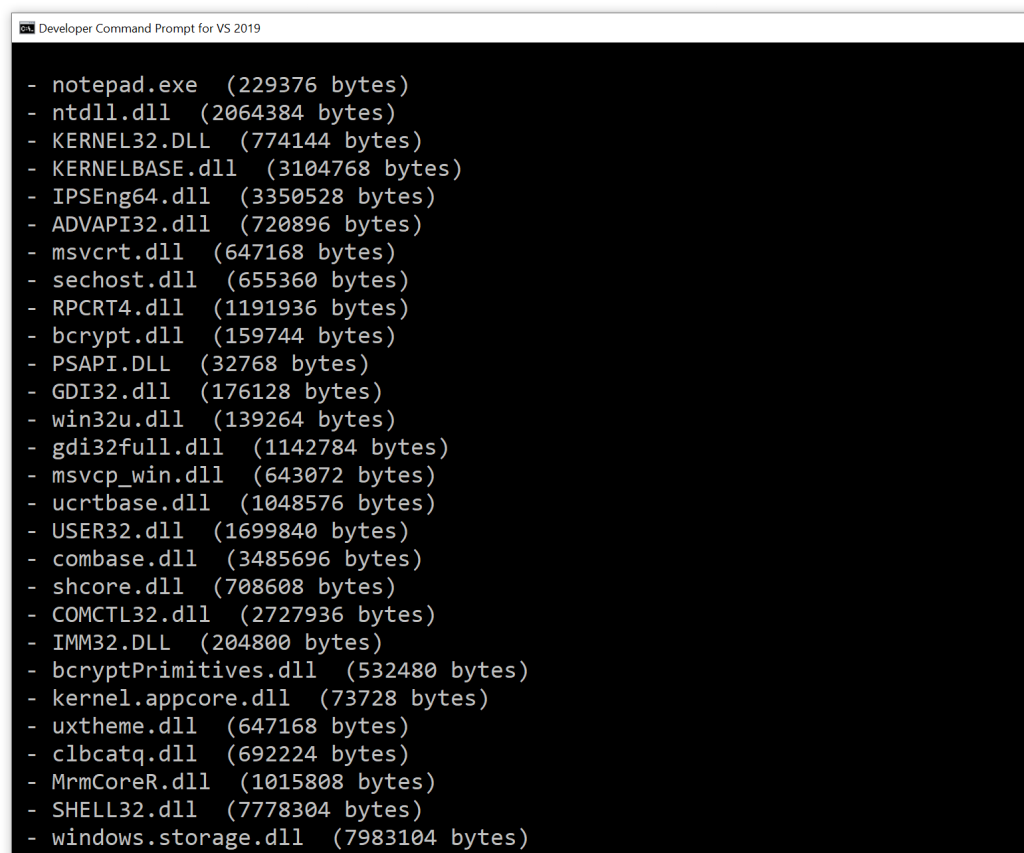
For example, suppose that you want to see a list of DLLs loaded in the Notepad process. You can use your favorite tool to get the process ID (PID) associated to your running instance of Notepad, then pass this PID as the only parameter to the command line tool cited above, and it will print out a list of the loaded modules (DLLs) inside the Notepad process, as shown below.

List of modules in the Notepad process.

Comparing STL vs. ATL/MFC String Usage at the Windows API Boundaries

A comparison between the worlds of STL vs. ATL/MFC string usage at the Windows API boundaries. Plus a small suggestion to improve C++ standard library strings.

In previous articles we saw some options for using STL strings and ATL/MFC CString at the Windows API boundaries. Let’s do a quick refresher and comparison between these two “worlds”.

For the sake of simplicity, let’s assume Unicode builds (which have been the default since VS 2005) and consider std::wstring for the STL side of the comparison.

The Input String Case

When passing strings as input parameters to Windows API C-interface functions, you can invoke the c_str method for STL std::wstring instances; on the other side, you can just pass CString instances, as CString implements an implicit C-style string pointer conversion operator, that will be automatically invoked by the compiler. At first sight, it seems that the CString approach is simpler (i.e. just pass the CString object), although in modern C++ there is a propensity to avoid implicit conversions, so the explicit call to c_str required by STL strings sounds safer. (Anyway, if you prefer explicit method invocations, CString offers a GetString method, as well.)

The Output String Case

Using an External Temporary Buffer – Both STL strings and ATL/MFC CString have constructor overloads that take an input pointer to a raw character buffer that is assumed to be null-terminated, and can build string objects from the content of that raw C-style null-terminated character buffer. This means that you can create an external temporary character buffer, pass a pointer to it as output string parameter to the C-interface Windows API you want to invoke, and then build the result string object (both STL wstring and ATL/MFC CString) using a pointer to that external intermediate buffer. In addition, an explicit buffer length can be passed together with the pointer to the beginning of the buffer, in case you want or need to explicitly pass the string length, and not relying on the null terminator.

Working In-Place – For both STL strings and ATL/MFC CString it’s possible to work with an internal buffer. This can be allocated using the resize method for STL strings, and then can be accessed via the non-const pointer returned by the data method invoked for the same string. If the returned string is shorter than the allocated buffer length, you have to find the position of the null-terminator scribbled in by the invoked Windows API, and call the STL string’s resize method once again to set the proper size (“length”) of the result string object.

On the other hand, with CString you can use the GetBuffer/ReleaseBuffer method pair: You can allocate the internal CString buffer specifying a proper (minimum) size invoking GetBuffer, then pass the pointer it returns on success to Windows C-interface APIs, and finally invoke CString::ReleaseBuffer to let the CString object update its internal state to properly store the null-terminated string written by the called function into the provided buffer.

Summary Table of the Various Cases

The following table summarizes the various cases discussed so far in a compact form:

STL vs. ATL/MFC string usage at the Windows API boundaries – Summary table

I think that for the “working in-place” output sub-case, CString is more convenient than STL strings, as:

  1. You don’t have to specify any initial value for filling the buffer allocated with GetBuffer; on the other hand, with STL strings you must specify some initial value to fill the string buffer when you invoke the string’s resize method (or equivalently the string constructor that takes a count of characters to repeat). So the CString::GetBuffer method is also likely more efficient, as it doesn’t need to fill the allocated buffer (at least in release builds).
  2. It’s possible to allocate a larger-than-needed buffer with GetBuffer (all in all you pass the safe minimum required buffer length to this method), then have the Windows API function write a shorter null-terminated string in that buffer. The ReleaseBuffer method will automatically scan the buffer content for the string’s null-terminator, and will properly update the CString object internal state (e.g. the string length) in accordance to that. This nice feature (scan until the null-terminator and properly set the string size) is not available with STL strings, as there is no such thing as a resize_until_null method.

A Small Suggestion for Improving STL Strings Interoperability with C-Interface Functions (Including Windows APIs)

So, here’s as a small suggestion for improving the C++ standard library strings: It would be nice to have something like get_buffer and release_buffer methods available for STL strings, following the same semantics of CString’s GetBuffer and ReleaseBuffer methods, with:

1. No need to specify an initial character to fill the STL string object when the internal buffer is allocated.

2. Automatically set the size of the final string object based on the null-terminator written into the internal buffer.